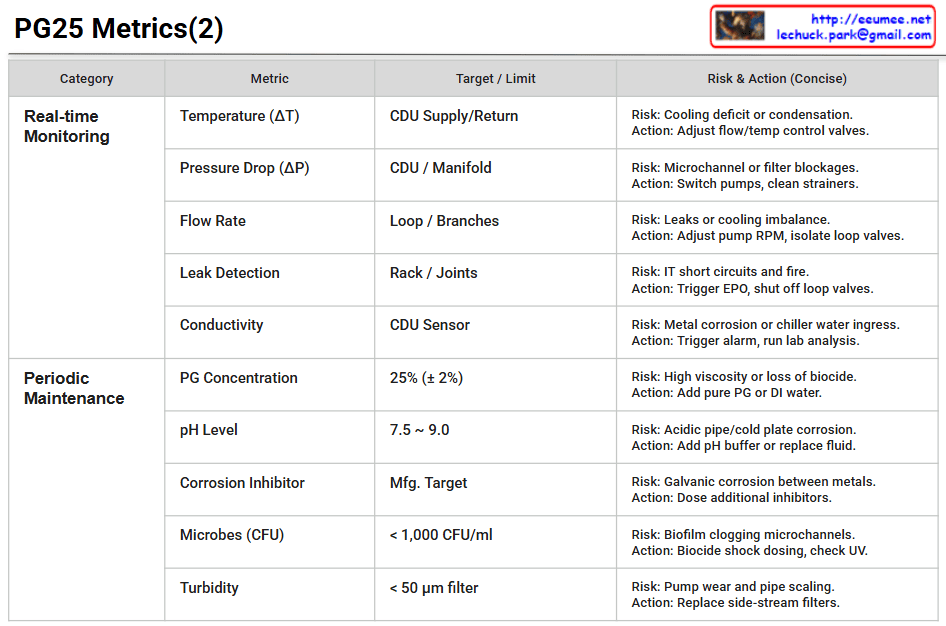
The table categorizes the key metrics required to safely manage a Coolant Distribution Unit (CDU) and its secondary cooling loop using a 25% Propylene Glycol (PG25) mixture into two main sections:
Real-time Monitoring: This section focuses on physical states that require immediate attention. It includes Temperature (ΔT), Pressure Drop (ΔP), Flow Rate, Leak Detection, and Conductivity.
Example: It highlights that a leak at the rack or joints poses a risk of IT short circuits and fire, dictating immediate actions such as triggering the Emergency Power Off (EPO) and shutting off the loop valves.
Periodic Maintenance: This section covers the chemical and biological fluid quality checks that must be performed regularly. It sets targets for PG Concentration (25% ± 2%), pH Level (7.5 ~ 9.0), Corrosion Inhibitor, Microbes (< 1,000 CFU/ml), and Turbidity/Filtration (< 50 μm).
Example: To mitigate the risk of biofilms clogging the tightly packed microchannels, it advises taking actions like biocide shock dosing or checking the UV sterilization system.
📌 Summary
This document is a practical, structured matrix designed for data center operators. It explicitly outlines the essential operational telemetry, potential hardware and fluid risks, and precise mitigation actions needed to maintain a reliable and highly efficient liquid cooling infrastructure.
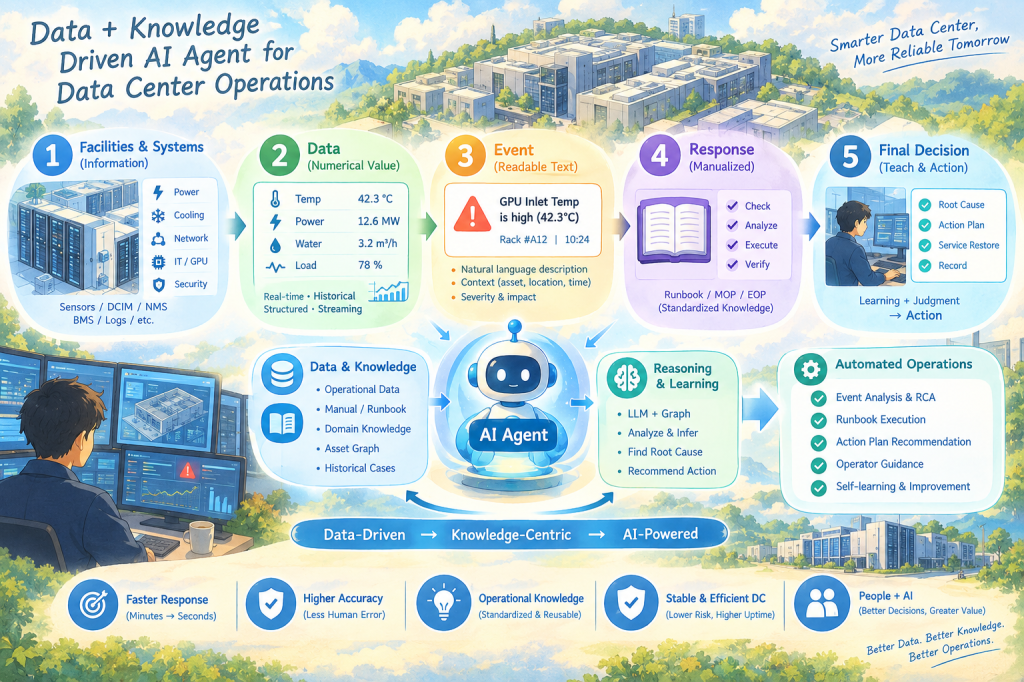
Data & Knowledge Driven AI Agent for Data Center Operations
This illustration describes how data center operations can evolve from facility data → operational knowledge → AI Agent → automated operations.
The key message is not simply that AI controls data center equipment.
Rather, it shows how AI Agents can connect operational data with accumulated human knowledge, understand operational situations, reason about incidents, and support or automate operational actions.
1. Facilities & Systems
The process starts with the physical infrastructure and operational systems of the data center.
The illustration represents:
Power
Cooling
Network
IT / GPU
Security
Environment
Sensors and systems continuously generate operational information.
Systems such as DCIM, NMS, BMS, and log platforms collect this information.
In simple terms:
Facilities generate information, and systems collect it.
2. Data — From Information to Metrics
Facility information is transformed into measurable operational data.
For example:
Temperature → 42.3°C
Power Load → 12.6 MW
Water Flow → 3.2 m³/h
Utilization → 78%
The important point is that the AI Agent uses both:
Real-time Data + Historical Data
Real-time data tells the Agent what is happening now, while historical data provides the operational context and previous experience.
3. Event — Turning Numbers into Meaning
Raw numbers are not always meaningful to operators.
Therefore, data is transformed into understandable events.
For example:
GPU Inlet Temperature is high (42.3°C)
Now the numerical value has become a meaningful operational event.
The event also contains context such as:
What happened + Where + When + Severity + Impact
This is important because the AI Agent does not need to operate only on raw numbers. It can reason about meaningful operational situations.
4. Response — Operational Knowledge
When an event occurs, traditional operations rely on manuals and experienced operators.
The illustration represents this knowledge through:
Runbook
MOP
EOP
SOP
Best Practices
A typical response process can be:
Check → Analyze → Execute → Verify
This represents the transformation of human experience into reusable operational knowledge.
Human Experience → Documentation → Operational Knowledge
This knowledge becomes one of the most important assets for the AI Agent.
5. Final Decision — Judgment & Action
The final stage goes beyond detecting an event.
The operational process becomes:
Root Cause → Action Plan → Service Restore → Record
Traditionally, experienced operators perform much of this reasoning manually.
With an AI Agent, operational data and knowledge can be combined to support:
Root-cause analysis
Action recommendations
Runbook execution
Operator guidance
Controlled automation
In a real data center, however, autonomous action should be governed by policies, safety controls, and human approval where required.
The Center of the Illustration — AI Agent
The AI Agent sits at the center because it connects Data and Knowledge.
Data
Operational Data
Facility & Asset Data
Event & Incident Data
Historical Cases
Asset / Relationship Data
Knowledge
Manuals
Runbooks
SOP / MOP / EOP
Domain Knowledge
Best Practices
Past Cases & Lessons
The Agent combines these two layers to perform:
Learn → Reason → Act
A simple way to express the concept is:
Data tells the Agent what is happening. Knowledge tells the Agent what it means and what to do.
The Core Message
The most important point of the illustration is that the AI Agent itself is not the foundation.
The real foundation is:
Data → Knowledge → AI Agent → Operations
Without accurate data, the Agent cannot reliably understand the current state.
Without structured operational knowledge, the Agent cannot reliably determine what the situation means or what response is appropriate.
Therefore, the real objective of AI-enabled data center operations is not simply:
“Deploy AI.”
It is:
“Make operational data and knowledge usable by AI.”
The Transformation of Data Center Operations
The bottom of the illustration shows:
Data-Driven → Knowledge-Centric → AI-Powered
This represents the evolution of operational models.
Traditional Operations
Human → Data → Manual Analysis → Manual Action
AI Agent-Based Operations
Data + Knowledge → AI Agent → Reasoning → Recommended / Controlled Action
The role of people does not disappear.
Instead, it changes.
AI handles repetitive monitoring, analysis, and operational assistance, while people focus more on judgment, decision-making, exception handling, and continuous improvement.
This is why the final concept is:
People + AI
rather than simply AI replaces People.
One-Sentence Summary
By connecting data generated from data center facilities with operational knowledge, an AI Agent can understand, reason, and support or automate operational actions—transforming human-centered operations into data- and knowledge-driven intelligent operations.
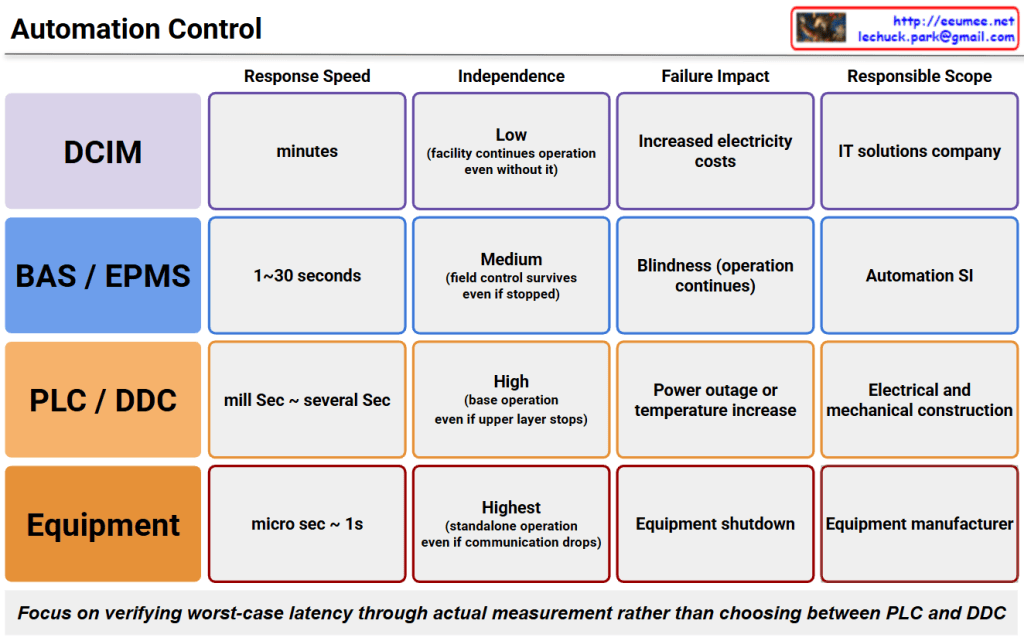
Response Speed: Ranges from microseconds to 1 second, offering the most immediate reaction.
Independence: Highest (Enables standalone operation even if communication drops entirely).
Failure Impact: Results in an immediate shutdown of the specific equipment.
Responsible Scope: Handled by the equipment manufacturer.
PLC / DDC
Response Speed: Milliseconds to several seconds.
Independence: High (Base operations continue even if the upper layer stops).
Failure Impact: Can cause power outages or temperature increases.
Responsible Scope: Handled by electrical and mechanical contractors.
BAS / EPMS
Response Speed: Takes 1 to 30 seconds.
Independence: Medium (Field-level control survives even if the upper system stops).
Failure Impact: Causes “blindness” (loss of monitoring visibility), though physical operation continues.
Responsible Scope: Managed by automation system integrators (SIs).
DCIM
Response Speed: Operates on a time scale of minutes.
Independence: Low (The facility can continue operating even without it).
Failure Impact: Leads to management inefficiencies such as increased electricity costs rather than immediate outages.
Responsible Scope: Handled by IT solution companies.
Core Message
The note at the bottom highlights a critical paradigm shift: rather than debating whether to choose PLC or DDC based on theory, engineering teams must focus on empirically verifying worst-case latency through actual measurements.
Summary
Automation control architectures are strictly layered by response speed and independence, requiring engineers to prioritize measured worst-case latency verification over conventional component selection debates.
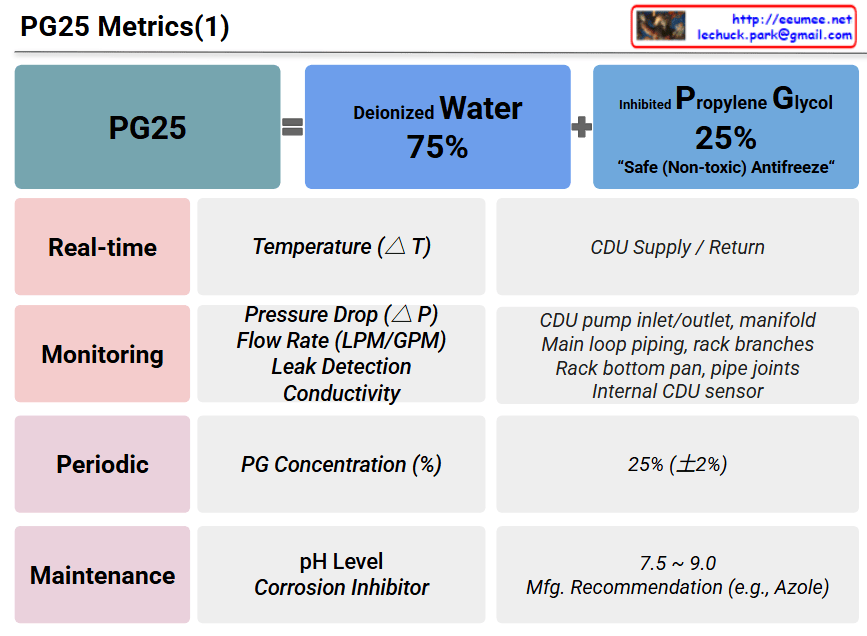
This image file (image_a2495a.png) is a presentation slide titled “PG25 Metrics(1).” It explains the chemical composition of PG25, a cooling fluid often used in liquid cooling systems, and details the key metrics required to manage it effectively.
1. Composition of PG25 (Top Section)
PG25 is defined as a mixture of two primary components.
Deionized Water: 75%
Inhibited Propylene Glycol: 25%
This specific formula is described as a “Safe (Non-toxic) Antifreeze.”
2. Management Metrics (Bottom Table)
The table below categorizes the management metrics into four distinct phases based on frequency and purpose:
Real-time:
Metrics: Temperature change ($\Delta T$)
Location/Reference: CDU (Coolant Distribution Unit) Supply / Return lines
Monitoring:
Metrics: Pressure Drop ($\Delta P$), Flow Rate (LPM/GPM), Leak Detection, and Conductivity
Location/Reference: CDU pump inlet/outlet and manifold, Main loop piping and rack branches, Rack bottom pan and pipe joints, Internal CDU sensor
Periodic:
Metrics: PG (Propylene Glycol) Concentration (%)
Location/Reference: Maintained at 25% ($\pm 2\%$)
Maintenance:
Metrics: pH Level, Corrosion Inhibitor
Location/Reference: pH level kept between 7.5 and 9.0; Corrosion inhibitors managed per Manufacturer’s Recommendation (e.g., Azole)
📝 Summary
This slide provides a systematic guide for maintaining the optimal condition of PG25 cooling fluid (75% Deionized Water + 25% Propylene Glycol) used in liquid cooling applications. It breaks down the fluid management process into Real-time, Monitoring, Periodic, and Maintenance phases, clearly outlining the essential metrics (temperature, pressure, flow rate, concentration, pH) and target values for each stage.
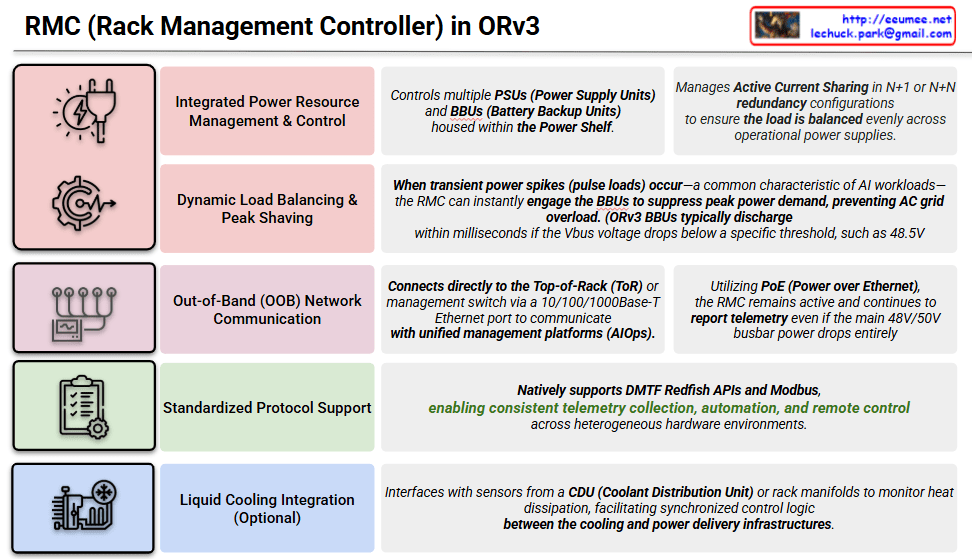
This image is an infographic that intuitively explains the five key functions of the RMC (Rack Management Controller) defined in the Open Compute Project (OCP) Open Rack v3 (ORv3) specification. Each function is categorized into a color-coded row, featuring a representative icon and title on the left, paired with a detailed description on the right.
1. Integrated Power Resource Management & Control
Icon: A gear with a power plug and a lightning bolt.
Detailed Description: This function controls multiple PSUs (Power Supply Units) and BBUs (Battery Backup Units) housed within the Power Shelf. It manages Active Current Sharing in N+1 or N+N redundancy configurations to ensure the load is balanced evenly across operational power supplies. This optimizes power efficiency and reliability.
2. Dynamic Load Balancing & Peak Shaving
Icon: A gear with a wave graph.
Detailed Description: When transient power spikes (pulse loads) occur—a common characteristic of AI workloads—the RMC can instantly engage the BBUs to suppress peak power demand, preventing AC grid overload. Note that ORv3 BBUs typically discharge within milliseconds if the Vbus voltage drops below a specific threshold, such as 48.5V.
3. Out-of-Band (OOB) Network Communication
Icon: A metering device with multiple cable connections.
Detailed Description: It connects directly to the Top-of-Rack (ToR) or management switch via a 10/100/1000Base-T Ethernet port to communicate with unified management platforms (AIOps). Utilizing PoE (Power over Ethernet), the RMC remains active and continues to report telemetry even if the main 48V/50V busbar power drops entirely, ensuring high availability of management functions.
4. Standardized Protocol Support
Icon: A clipboard with a checklist and a gear.
Detailed Description: The RMC natively supports DMTF Redfish APIs and Modbus. This enables consistent telemetry collection, automation, and remote control across heterogeneous hardware environments, facilitating interoperability in multi-vendor data centers.
5. Liquid Cooling Integration (Optional)
Icon: A gear shaped like a cooling system with piping and a fan.
Detailed Description: This optional feature interfaces with sensors from a CDU (Coolant Distribution Unit) or rack manifolds to monitor heat dissipation. This facilitates synchronized control logic between the cooling and power delivery infrastructures for holistic rack management.
Summary
This image illustrates the five core values of the RMC, a critical component of the OCP ORv3 standard rack. The RMC provides essential capabilities for advanced data center infrastructure management, including maximizing power efficiency, handling sudden power spikes typical of AI workloads, and maintaining management operations via PoE even during main power failures. Additionally, it addresses the complex demands of modern data centers through standardized protocol support and optional integration with liquid cooling systems.
The image is a structured chart titled “Data Center Protocols (2, Application Layer)”. It categorizes various communication protocols used within a data center into three main operational paradigms based on their purpose and characteristics. The chart outlines the protocol name, communication method, data format/security, and typical use cases for each category.
Key Categories and Descriptions
1. Device-Centric This section covers traditional, hardware-specific protocols used for direct communication with physical infrastructure equipment. The primary communication paradigm here is ‘Polling’ (master/slave or with events).
Modbus RTU/TCP: Used for UPS, PDU, and power meters. It uses raw registers with no typing and lacks built-in security.
BACnet IP-MS-TP-SC: An object-oriented protocol used for Chillers, CRAH, cooling towers, and BMS (Building Management Systems).
SNMP v2c/v3: Utilized for Smart PDUs, environmental sensors, and network gear, relying on a MIB (OID tree) structure.
Redfish (replaces IPMI): Designed for Server BMC, power, and thermal management using REST polling and JSON schemas.
DNP3 / IEC 61850: Used for switchgear, HV substations, and gensets, featuring time-stamped event reporting.
2. Data-Centric This area focuses on protocols designed to collect, route, and distribute large volumes of sensor and telemetry data. These protocols primarily utilize the ‘Publish/Subscribe (Pub/Sub)’ mechanism.
MQTT (+Sparkplug B): Ideal for high-volume telemetry and monitoring liquid-cooling flow & temperature, featuring free payloads (with models added by Sparkplug).
OPC UA: Used for heterogeneous normalization and gateway-to-DCIM communication, offering a semantic info model and built-in security.
Kafka (optional): Acts as a central ingestion bus for stream logs, providing partitioning, retention, and SASL-TLS security.
3. Integration-Centric This tier deals with protocols meant for linking high-level application systems, web services, and user interfaces.
REST API (JSON): The standard request/response method used for DCIM integration and generating tenant power reports over HTTPs.
gRPC: Based on HTTP/2 and Protobuf, it enforces schemas and is used for internal Microservices Architecture (MSA), AI, and RAG pipelines.
WebSocket / Webhook: Provides persistent duplex communication and event callbacks, perfect for live dashboards and real-time fault alerting.
💡 Summary
The chart illustrates that modern data center communication is strategically divided into three architectural layers: hardware control (Device-Centric), massive data ingestion and routing (Data-Centric), and high-level system connectivity (Integration-Centric). Each layer employs specifically optimized protocols to meet its distinct requirements for speed, payload structure, and security.The chart illustrates that modern data center communication is strategically divided into three architectural layers: hardware control (Device-Centric), massive data ingestion and routing (Data-Centric), and high-level system connectivity (Integration-Centric). Each layer employs specifically optimized protocols to meet its distinct requirements for speed, payload structure, and security.

 Lechuck Park