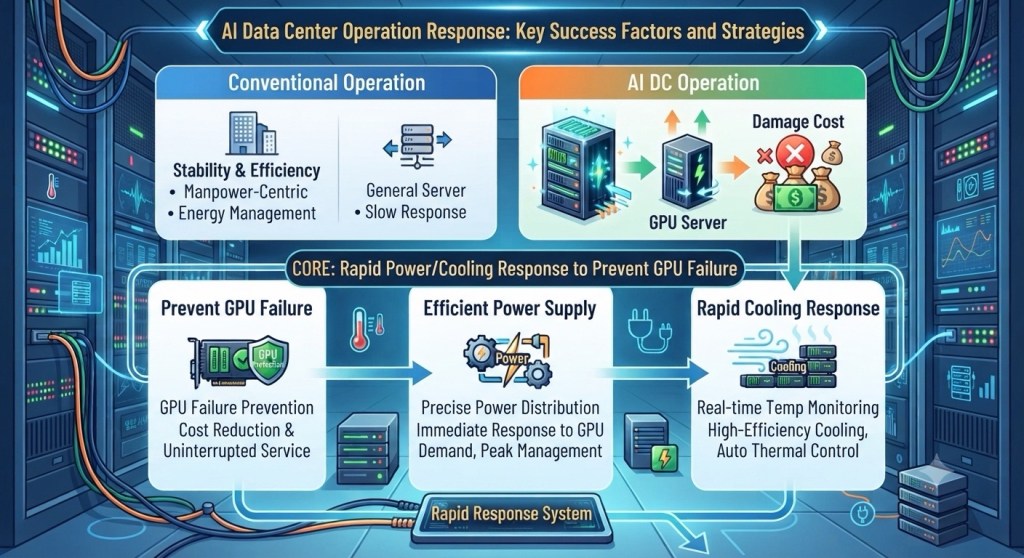
This image is a detailed infographic illustrating the “Key Success Factors and Strategies for AI Data Center Operation Response.” Set against a modern, cybernetic server room background, it outlines the paradigm shift in data center management.
Image Detailed Description:
- Top Section (Comparison of Operations): The graphic contrasts “Conventional Operation” with “AI DC Operation.” Conventional operations focus on manpower-centric stability and energy management for general servers, which typically have a slow response time. In contrast, AI Data Centers utilize high-performance GPU servers. The illustration of money bags with a red ‘X’ visually emphasizes that any system failure in an AI DC leads to massive financial “Damage Cost.”
- Middle & Bottom Sections (Core Strategy): The central message is highlighted as the “CORE: Rapid Power/Cooling Response to Prevent GPU Failure.” This is broken down into three main pillars:
- Prevent GPU Failure: The primary goal is to prevent hardware breakdowns to ensure cost reduction and uninterrupted service.
- Efficient Power Supply: Depicted with gear and lightning icons, this involves precise power distribution, immediate response to fluctuating GPU power demands, and effective peak management.
- Rapid Cooling Response: Illustrated with wind and thermometer symbols, this highlights the necessity of real-time temperature monitoring, high-efficiency cooling, and automated thermal control to manage the intense heat generated by GPUs.
- Bottom Center: The “Rapid Response System” is shown at the base, acting as the foundational control hub that seamlessly connects and manages all these critical infrastructure components.
📌 Summary
Unlike conventional facilities, AI data centers operate GPU servers that consume massive amounts of power and generate extreme heat. Because downtime results in severe financial losses, the key to successful operation is implementing an integrated, automated system capable of delivering real-time power adjustments and rapid cooling responses.
#AIDataCenter #DataCenterOperations #GPUServers #PowerManagement #CoolingSystem #ITInfrastructure #ServerStability