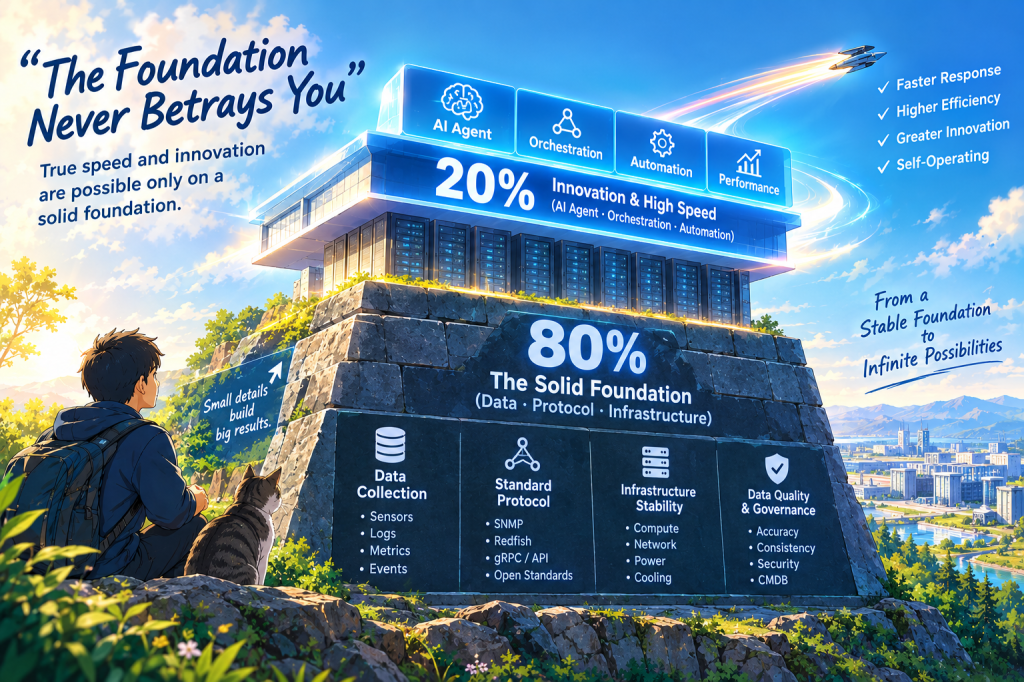
The central theme of the image is captured by the prominent text in the sky: “The Foundation Never Betrays You.” Just below it, a supporting phrase states, “True speed and innovation are possible only on a solid foundation.”
The Bottom Section: The Solid Foundation (80%) The lower portion of the structure resembles an ancient, massive stone base. This represents the essential framework (Data, Protocol, Infrastructure) that accounts for 80% of the entire system. This foundation consists of four key pillars:
Data Collection: Sensors, Logs, Metrics, Events.
Standard Protocol: SNMP, Redfish, gRPC/API, Open Standards.
Data Quality & Governance: Accuracy, Consistency, Security, CMDB.
The Top Section: Innovation & High Speed (20%) Atop the stone foundation sits a transparent, modern data center building. This represents the innovation layer, making up the remaining 20%, which symbolizes AI Agent, Orchestration, Automation, and Performance.
The sky on the right lists the resulting benefits: Faster Response, Higher Efficiency, Greater Innovation, and Self-Operating.
Surrounding Background & Details
Bottom Left: A boy with a backpack and a cat sit on a grassy hill, looking up at the massive structure. A nearby signpost reads, “Small details build big results.”
Right Background: Along with the phrase “From a Stable Foundation to Infinite Possibilities,” a spacecraft (or jet) is depicted flying rapidly over a futuristic city, hinting at technological advancement and the future.
📝 Summary
This conceptual illustration visually emphasizes that in order for cutting-edge technologies (such as AI and automation) to operate successfully and achieve true innovation, they must be supported by a rock-solid, unseen foundation (80%) comprising underlying infrastructure, data collection, and standard protocols.
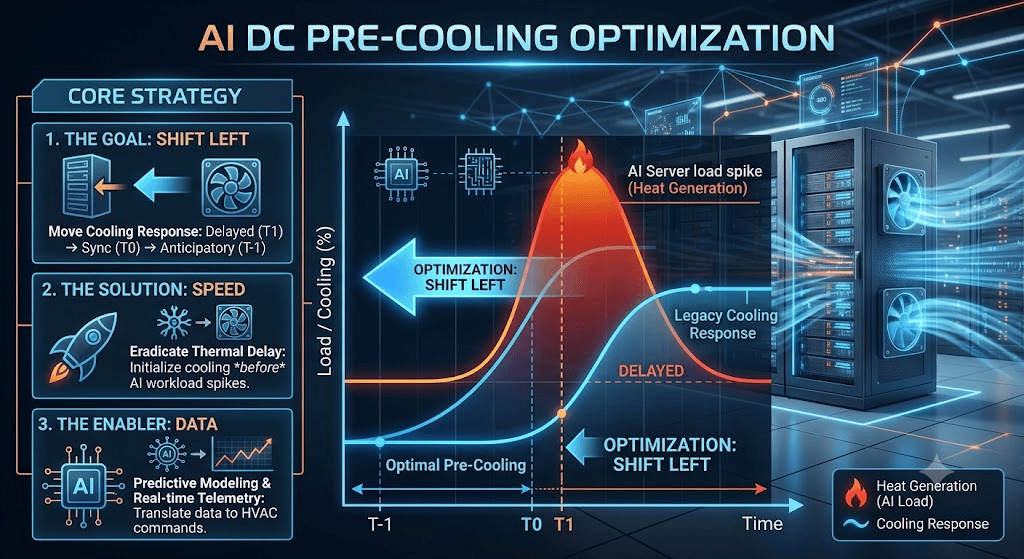
This image is an infographic that visually explains “AI DC PRE-COOLING OPTIMIZATION.”
Main Graph (Right Side): This section plots Load/Cooling capacity (Y-axis) against Time (X-axis).
Red Curve: Represents a massive spike in “Heat Generation” caused by surging AI server workloads.
Dark Blue Line (Legacy Cooling): Shows how traditional cooling systems react with a significant delay (starting around T1), allowing heat to build up before responding.
Light Blue Line (Optimal Pre-Cooling): This is the core message. Highlighted by large glowing arrows, the graph illustrates the “Shift Left” optimization. It shows the cooling response initiating proactively at (T-1)—well before the heat spike occurs. The background enhances this with 3D renderings of modern server racks and flowing blue cooling air.
Core Strategy (Left Panel): This section breaks down the three elements required to achieve this optimization, accompanied by icons.
The Goal (SHIFT LEFT): Moving the cooling response backward in time from a delayed state (T1), to synchronized (T0), and ultimately to an anticipatory state (T-1).
The Solution (SPEED): Emphasizes eradicating thermal delay by initializing cooling before the AI workloads spike.
The Enabler (DATA): Highlights that predictive modeling and real-time telemetry are essential to instantly translate data into actionable HVAC commands.
Summary
This infographic visually demonstrates the necessity and mechanism of a “Shift Left” pre-cooling strategy. It shows how leveraging real-time data to initiate cooling before AI workloads generate massive heat can effectively and preemptively manage data center thermal loads.
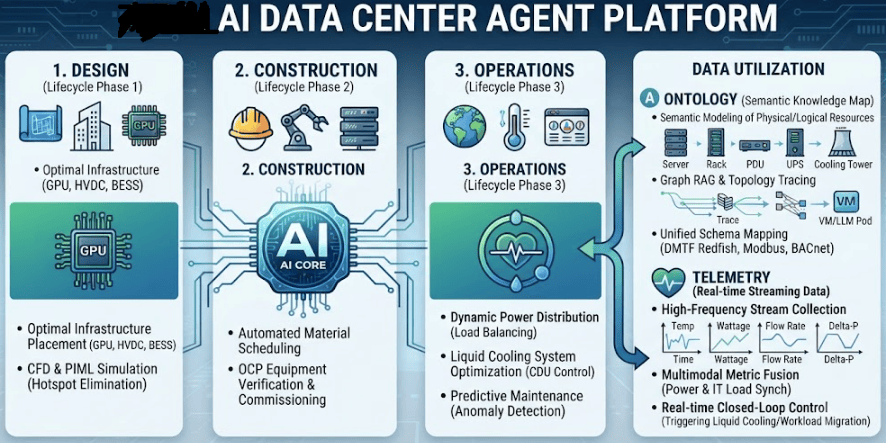
At the top of the image is the title “AI DATA CENTER AGENT PLATFORM”, outlining a system structured around three lifecycle phases and a Data Utilization sector, all orchestrated by the central ‘AI CORE’.
1. DESIGN (Lifecycle Phase 1)
Key Role: Determines optimal infrastructure layouts for high-density GPU clusters, 800V HVDC, and BESS.
Core Technology: Uses CFD and PIML simulations to preemptively eliminate thermal hotspots.
2. CONSTRUCTION (Lifecycle Phase 2)
Key Role: Automates material procurement scheduling and verifies installation compliance for OCP standard equipment.
Core Technology: Streamlines the commissioning process to eliminate human errors and enhance deployment efficiency.
3. OPERATIONS (Lifecycle Phase 3)
Key Role: Executes dynamic power distribution (load balancing) for real-time load fluctuations and optimizes liquid cooling via CDU control.
Core Technology: Performs predictive maintenance with anomaly detection to preemptively prevent failures.
4. DATA UTILIZATION
A. ONTOLOGY (Semantic Knowledge Map)
Defines hierarchical relationships among physical and logical resources (Servers, Racks, PDUs, UPS, Cooling Towers) using semantic modeling.
Utilizes Graph RAG and topology mapping to trace affected VMs or LLM serving Pods within milliseconds during a failure.
Integrates heterogeneous equipment data through standardized schemas (DMTF Redfish, Modbus, BACnet).
B. TELEMETRY (Real-time Streaming Data)
Collects high-frequency time-series streaming data including temperature, wattage, flow rate, and delta-P.
Fuses power infrastructure metrics with IT workload metrics to predict thermal and power peaks proactively.
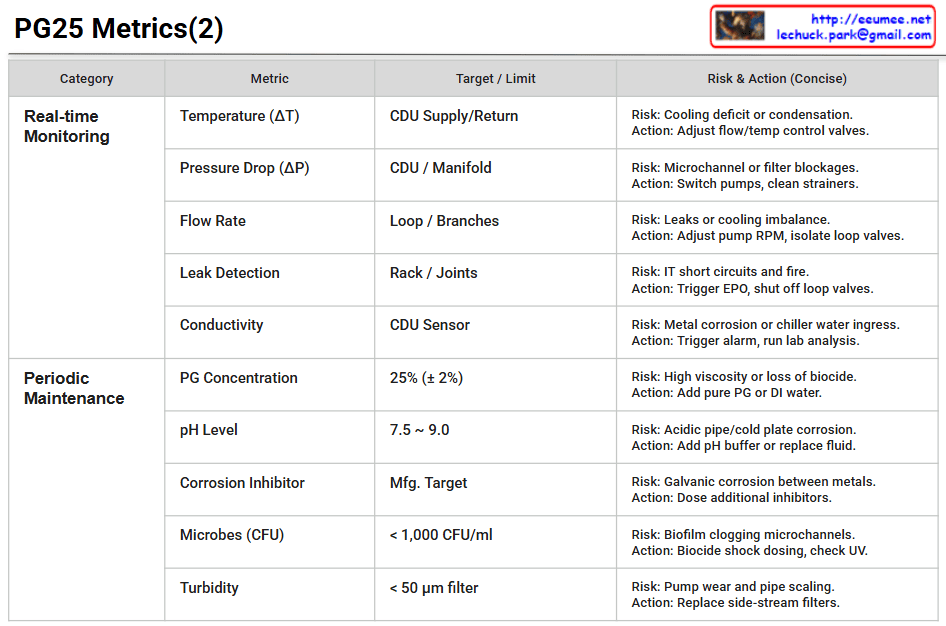
The table categorizes the key metrics required to safely manage a Coolant Distribution Unit (CDU) and its secondary cooling loop using a 25% Propylene Glycol (PG25) mixture into two main sections:
Real-time Monitoring: This section focuses on physical states that require immediate attention. It includes Temperature (ΔT), Pressure Drop (ΔP), Flow Rate, Leak Detection, and Conductivity.
Example: It highlights that a leak at the rack or joints poses a risk of IT short circuits and fire, dictating immediate actions such as triggering the Emergency Power Off (EPO) and shutting off the loop valves.
Periodic Maintenance: This section covers the chemical and biological fluid quality checks that must be performed regularly. It sets targets for PG Concentration (25% ± 2%), pH Level (7.5 ~ 9.0), Corrosion Inhibitor, Microbes (< 1,000 CFU/ml), and Turbidity/Filtration (< 50 μm).
Example: To mitigate the risk of biofilms clogging the tightly packed microchannels, it advises taking actions like biocide shock dosing or checking the UV sterilization system.
📌 Summary
This document is a practical, structured matrix designed for data center operators. It explicitly outlines the essential operational telemetry, potential hardware and fluid risks, and precise mitigation actions needed to maintain a reliable and highly efficient liquid cooling infrastructure.
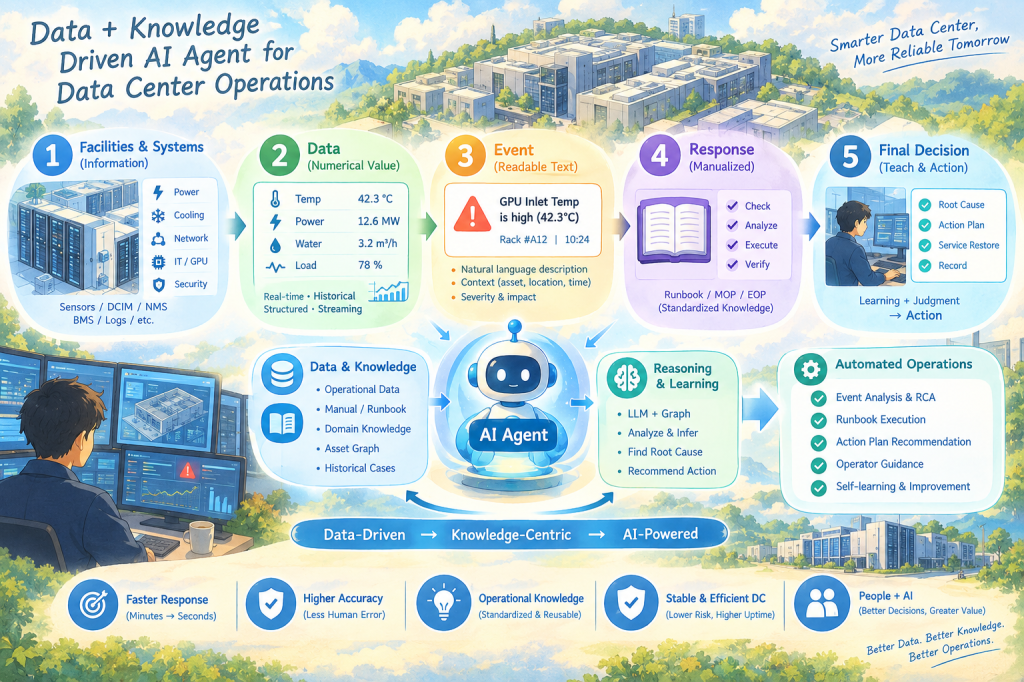
Data & Knowledge Driven AI Agent for Data Center Operations
This illustration describes how data center operations can evolve from facility data → operational knowledge → AI Agent → automated operations.
The key message is not simply that AI controls data center equipment.
Rather, it shows how AI Agents can connect operational data with accumulated human knowledge, understand operational situations, reason about incidents, and support or automate operational actions.
1. Facilities & Systems
The process starts with the physical infrastructure and operational systems of the data center.
The illustration represents:
Power
Cooling
Network
IT / GPU
Security
Environment
Sensors and systems continuously generate operational information.
Systems such as DCIM, NMS, BMS, and log platforms collect this information.
In simple terms:
Facilities generate information, and systems collect it.
2. Data — From Information to Metrics
Facility information is transformed into measurable operational data.
For example:
Temperature → 42.3°C
Power Load → 12.6 MW
Water Flow → 3.2 m³/h
Utilization → 78%
The important point is that the AI Agent uses both:
Real-time Data + Historical Data
Real-time data tells the Agent what is happening now, while historical data provides the operational context and previous experience.
3. Event — Turning Numbers into Meaning
Raw numbers are not always meaningful to operators.
Therefore, data is transformed into understandable events.
For example:
GPU Inlet Temperature is high (42.3°C)
Now the numerical value has become a meaningful operational event.
The event also contains context such as:
What happened + Where + When + Severity + Impact
This is important because the AI Agent does not need to operate only on raw numbers. It can reason about meaningful operational situations.
4. Response — Operational Knowledge
When an event occurs, traditional operations rely on manuals and experienced operators.
The illustration represents this knowledge through:
Runbook
MOP
EOP
SOP
Best Practices
A typical response process can be:
Check → Analyze → Execute → Verify
This represents the transformation of human experience into reusable operational knowledge.
Human Experience → Documentation → Operational Knowledge
This knowledge becomes one of the most important assets for the AI Agent.
5. Final Decision — Judgment & Action
The final stage goes beyond detecting an event.
The operational process becomes:
Root Cause → Action Plan → Service Restore → Record
Traditionally, experienced operators perform much of this reasoning manually.
With an AI Agent, operational data and knowledge can be combined to support:
Root-cause analysis
Action recommendations
Runbook execution
Operator guidance
Controlled automation
In a real data center, however, autonomous action should be governed by policies, safety controls, and human approval where required.
The Center of the Illustration — AI Agent
The AI Agent sits at the center because it connects Data and Knowledge.
Data
Operational Data
Facility & Asset Data
Event & Incident Data
Historical Cases
Asset / Relationship Data
Knowledge
Manuals
Runbooks
SOP / MOP / EOP
Domain Knowledge
Best Practices
Past Cases & Lessons
The Agent combines these two layers to perform:
Learn → Reason → Act
A simple way to express the concept is:
Data tells the Agent what is happening. Knowledge tells the Agent what it means and what to do.
The Core Message
The most important point of the illustration is that the AI Agent itself is not the foundation.
The real foundation is:
Data → Knowledge → AI Agent → Operations
Without accurate data, the Agent cannot reliably understand the current state.
Without structured operational knowledge, the Agent cannot reliably determine what the situation means or what response is appropriate.
Therefore, the real objective of AI-enabled data center operations is not simply:
“Deploy AI.”
It is:
“Make operational data and knowledge usable by AI.”
The Transformation of Data Center Operations
The bottom of the illustration shows:
Data-Driven → Knowledge-Centric → AI-Powered
This represents the evolution of operational models.
Traditional Operations
Human → Data → Manual Analysis → Manual Action
AI Agent-Based Operations
Data + Knowledge → AI Agent → Reasoning → Recommended / Controlled Action
The role of people does not disappear.
Instead, it changes.
AI handles repetitive monitoring, analysis, and operational assistance, while people focus more on judgment, decision-making, exception handling, and continuous improvement.
This is why the final concept is:
People + AI
rather than simply AI replaces People.
One-Sentence Summary
By connecting data generated from data center facilities with operational knowledge, an AI Agent can understand, reason, and support or automate operational actions—transforming human-centered operations into data- and knowledge-driven intelligent operations.
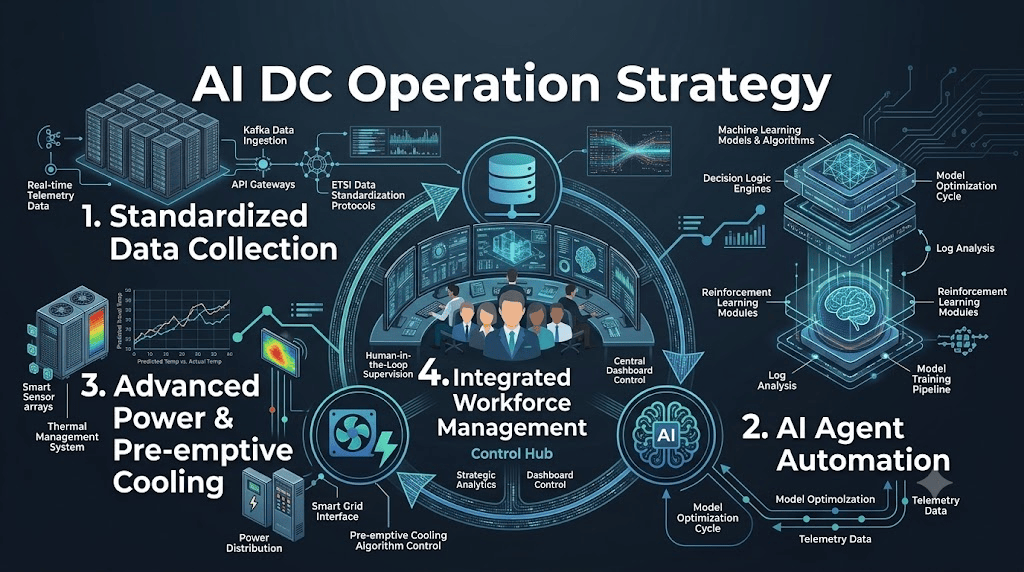
This image is a highly technical, professional infographic utilizing a dark blue and teal neon cybernetic aesthetic to illustrate the organic and automated ecosystem of AI Data Center operations. The overall layout features a continuous feedback loop where four core elements dynamically interact around a central command hub.
1. Standardized Data Collection (Top Left) This section represents the entry point for rapidly and accurately ingesting vast amounts of facility data. Depicting server racks alongside technical nodes like Kafka data pipelines, API Gateways, and standardization protocols (e.g., ETSI), it visually demonstrates the high-speed collection and standardization of real-time telemetry data from diverse infrastructure components.
2. AI Agent Automation (Right) Acting as the “brain” of the operation, this area processes the ingested data to execute intelligent control. Centered around a glowing AI brain icon, it highlights machine learning algorithms, reinforcement learning modules, and decision logic engines. It illustrates a system that goes beyond simple monitoring—where AI models continuously learn, run through model optimization cycles, and elevate the level of operational automation.
3. Advanced Power & Pre-emptive Cooling (Bottom Left) This section addresses the physical infrastructure required to handle the high-density heat and power demands typical of AI workloads. It features smart sensor arrays, power distribution units, and thermal management systems. Notably, a chart comparing “Predicted Temp vs. Actual Temp” visually proves the application of pre-emptive cooling algorithms—shifting from reactive cooling to data-driven, proactive thermal mitigation.
4. Integrated Workforce Management (Center) Positioned at the heart of the graphic, this is the Control Hub that orchestrates the entire advanced ecosystem. A team of professionals is shown surrounded by large dashboard monitors. This emphasizes that AI does not replace humans; rather, it empowers a highly skilled workforce to focus on “Human-in-the-Loop Supervision,” strategic analytics, and continuous data-driven improvement across the expanded data center footprint.
📌 Summary
This infographic illustrates that AI Data Center operations have evolved into an “intelligent, autonomous ecosystem.” It showcases a perfect virtuous cycle: Standardized data (1) feeds AI agents (2), which in turn drive proactive power and pre-emptive cooling infrastructure (3). Ultimately, an empowered, highly-skilled workforce (4) strategically orchestrates, verifies, and optimizes this entire continuous loop from a central control hub.
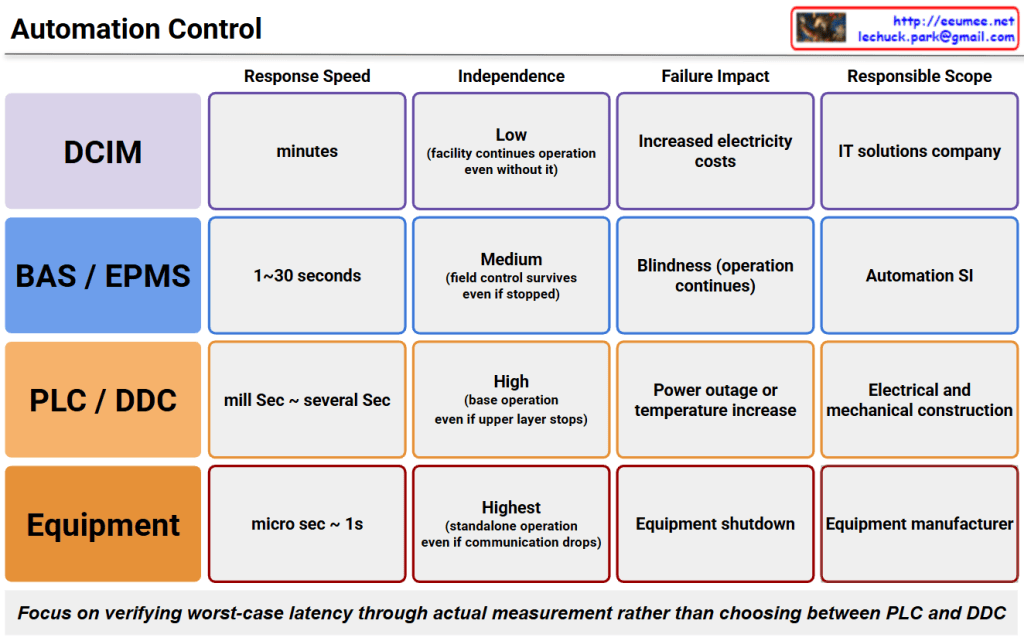
Response Speed: Ranges from microseconds to 1 second, offering the most immediate reaction.
Independence: Highest (Enables standalone operation even if communication drops entirely).
Failure Impact: Results in an immediate shutdown of the specific equipment.
Responsible Scope: Handled by the equipment manufacturer.
PLC / DDC
Response Speed: Milliseconds to several seconds.
Independence: High (Base operations continue even if the upper layer stops).
Failure Impact: Can cause power outages or temperature increases.
Responsible Scope: Handled by electrical and mechanical contractors.
BAS / EPMS
Response Speed: Takes 1 to 30 seconds.
Independence: Medium (Field-level control survives even if the upper system stops).
Failure Impact: Causes “blindness” (loss of monitoring visibility), though physical operation continues.
Responsible Scope: Managed by automation system integrators (SIs).
DCIM
Response Speed: Operates on a time scale of minutes.
Independence: Low (The facility can continue operating even without it).
Failure Impact: Leads to management inefficiencies such as increased electricity costs rather than immediate outages.
Responsible Scope: Handled by IT solution companies.
Core Message
The note at the bottom highlights a critical paradigm shift: rather than debating whether to choose PLC or DDC based on theory, engineering teams must focus on empirically verifying worst-case latency through actual measurements.
Summary
Automation control architectures are strictly layered by response speed and independence, requiring engineers to prioritize measured worst-case latency verification over conventional component selection debates.