2 GPU Throttling

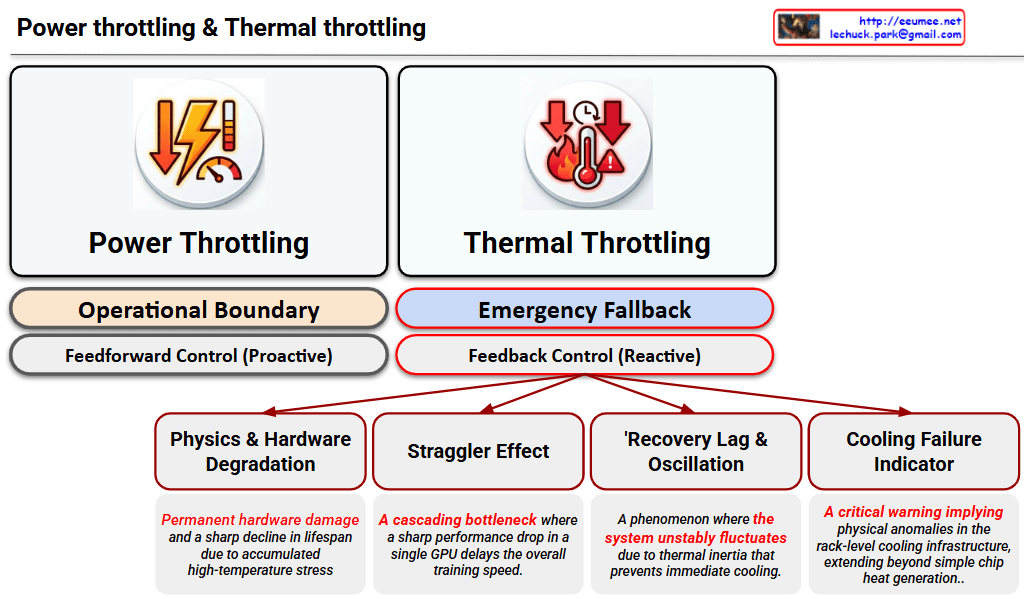
This image is a Visual Engineering diagram that contrasts the fundamental control mechanisms of Power Throttling and Thermal Throttling at a glance, specifically highlighting the critical impact thermal throttling has on the system.


1. Philosophical and Structural Contrast (Top Section)

The diagram places the two throttling methods side-by-side, clearly distinguishing them not just as similar performance limiters, but as mechanisms with completely different operational philosophies.

  • Left: Power Throttling
    • Operational Boundary: Indicates that this acts as a safety line, keeping the system operating ‘normally’ within its designed power limits.
    • Feedforward Control (Proactive): Specifies that this is a proactive control method that restricts input (power demand) before a negative result occurs, fundamentally preventing the issue from happening.
  • Right: Thermal Throttling
    • Emergency Fallback: Shows that this is not a normal operational state, but a ‘last line of defense’ triggered to prevent physical destruction.
    • Feedback Control (Reactive): Emphasizes that this is a reactive control method that drops clock speeds only after detecting the result (high heat exceeding the safe threshold).

2. Four Fatal Risks of Thermal Throttling (Bottom Tree Structure)

The core strength of the diagram lies in placing the sub-tree structure exclusively under Thermal Throttling. This highlights that this phenomenon goes beyond a simple performance drop, breaking down its complex, detrimental impacts on the infrastructure into four key factors:

  1. Physics & Hardware Degradation: Refers to direct damage to semiconductors (silicon) and the shortening of their lifespan (MTBF) due to the accumulated stress of high heat.
  2. Straggler Effect: Points out the bottleneck phenomenon in environments like distributed AI training. A delay in a single, thermally throttled node drags down the synchronization and data processing speed of the entire cluster.
  3. Thermal Inertia & Thermal Oscillations: Describes the unstable fluctuation of system performance. Because heat does not dissipate instantly (thermal inertia), the system repeatedly drops and recovers clock speeds, causing the performance to oscillate.
  4. Cooling Failure Indicator: Acts as a severe alarm. It implies that the issue extends beyond a hot chip—it indicates that the facility’s infrastructure, such as the rack-level Direct Liquid Cooling (DLC) capacity, has reached its physical limit or experienced an anomaly.

Overall Summary:

The diagram logically and intuitively delivers a powerful core message: “Power Throttling is a normal, proactive control within predictable bounds, whereas Thermal Throttling is a severe, reactive warning at both the hardware and infrastructure levels after control is lost.” It is an excellent piece of work that elegantly structures complex system operations using concise text and layout.

#DataCenter #AIInfrastructure #GPUCooling #ThermalThrottling #PowerThrottling #HardwareEngineering #HighPerformanceComputing #LiquidCooling #SystemArchitecture

Time Constant(Delay of the sensor)

Image Interpretation: System Problems Due to Sensor Delay

This diagram explains system performance issues caused by the Time Constant (delay) of temperature sensors.

Top Section: Two Workload Scenarios

LLM Workload (AI Tasks)

  • Runs at 100% workload
  • Almost no delay (No Delay almost)
  • Result: Performance Down and Workload Cost waste

GPU Workload

  • Operating at 80°C
  • Thermal Throttling occurs
  • Transport Delay exists
  • Performance degradation starts at 60°C → Step down

Bottom Section: Core of the Sensor Delay Problem

Timeline:

  1. Sensor UP start (Temperature Sensor activation)
    • Big Delay due to Time Constant
  2. TC63 (After 10-20 seconds)
    • Sensor detects 63% temperature rise
    • Actual temperature is already higher
  3. After 30-40 seconds
    • Sensor detects 86% rise
    • Temperature Divergence, Late Cooling problem occurs

Key Issues

Due to the sensor’s Time Constant delay:

  • Takes too long to detect actual temperature rise
  • Cooling system activates too late
  • GPU already overheated, causing thermal throttling
  • Results in workload cost waste and performance degradation

Summary

Sensor delays create a critical gap between actual temperature and detected temperature, causing cooling systems to react too late. This results in GPU thermal throttling, performance degradation, and wasted computational resources. Real-time monitoring with fast-response sensors is essential for optimal system performance.


#ThermalManagement #SensorDelay #TimeConstant #GPUThrottling #DataCenter #PerformanceOptimization #CoolingSystem #AIWorkload #SystemMonitoring #HardwareEngineering #ThermalThrottling #LatencyChallenges #ComputeEfficiency #ITInfrastructure #TemperatureSensing

With Claude

GPU Throttling

GPU Throttling Architecture Analysis

This diagram illustrates the GPU’s power and thermal management system.

Key Components

1. Two Throttling Triggers

  • Power Throttling: Throttling triggered by power limits
  • Thermal Throttling: Throttling triggered by temperature limits

2. Different Control Approaches

  • Power Limit (Budget) Controller: Slow, Linear Step Down
  • Thermal Safety Controller: Fast, Hard Step Down
    • This aggressive response is necessary because overheating can cause immediate hardware damage

3. Priority Gate

Receives signals from both controllers and determines which limitation to apply.

4. PMU/SMU/DVFS Controller

The Common Control Unit that manages:

  • PMU: Power Management Unit
  • SMU: System Management Unit
  • DVFS: Dynamic Voltage and Frequency Scaling

5. Actual Adjustment Mechanisms

  • Clock Domain Controller: Reduces GPU Frequency
  • Voltage Regulator: Reduces GPU Voltage

6. Final Result

Lower Power/Temp (Throttled): Reduced power consumption and temperature in throttled state

Core Principle

When the GPU reaches power budget or temperature limits, it automatically reduces performance to protect the system. By lowering both frequency and voltage simultaneously, it effectively reduces power consumption (P ∝ V²f).


Summary

GPU throttling uses two controllers—power (slow, linear) and thermal (fast, aggressive)—that feed into a shared PMU/SMU/DVFS system to dynamically reduce clock frequency and voltage. Thermal throttling responds more aggressively than power throttling because overheating poses immediate hardware damage risks. The end result is lower power consumption and temperature, sacrificing performance to maintain system safety and longevity.


#GPUThrottling #ThermalManagement #PowerManagement #DVFS #GPUArchitecture #HardwareOptimization #ThermalSafety #PerformanceVsPower #ComputerHardware #GPUDesign #SystemManagement #ClockSpeed #VoltageRegulation #TechExplained #HardwareEngineering

With Claude