AI Stabilization & Optimization

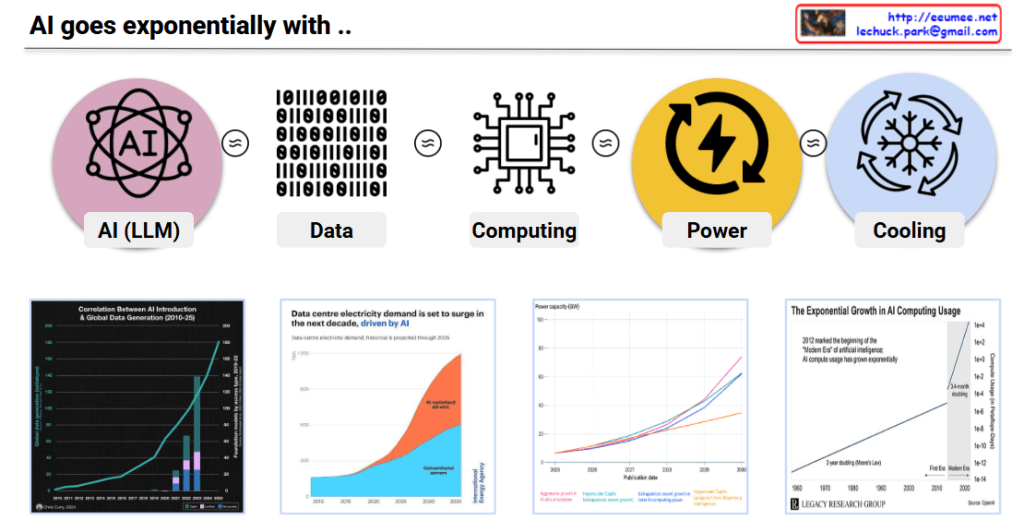
This diagram illustrates the AI Stabilization & Optimization framework addressing the reality where AI’s explosive development encounters critical physical and technological barriers.

Core Concept: Explosive Change Meets Reality Walls

The AI → Explosion → Wall (Limit) pathway shows how rapid AI advancement inevitably hits real-world constraints, requiring immediate strategic responses.

Four Critical Walls (Real-World Limitations)

  • Data Wall: Training data depletion
  • Computing Wall: Processing power and memory constraints
  • Power Wall: Energy consumption explosion (highlighted in red)
  • Cooling Wall: Thermal management limits

Dual Response Strategy

Stabilization – Managing Change

Stable management of rapid changes:

  • LM SW: Fine-tuning, RAG, Guardrails for system stability
  • Computing: Heterogeneous, efficient, modular architecture
  • Power: UPS, dual path, renewable mix for power stability
  • Cooling: CRAC control, monitoring for thermal stability

Optimization – Breaking Through/Approaching Walls

Breaking limits or maximizing utilization:

  • LM SW: MoE, lightweight solutions for efficiency maximization
  • Computing: Near-memory, neuromorphic, quantum for breakthrough
  • Power: AI forecasting, demand response for power optimization
  • Cooling: Immersion cooling, heat reuse for thermal innovation

Summary

This framework demonstrates that AI’s explosive innovation requires a dual strategy: stabilization to manage rapid changes and optimization to overcome physical limits, both happening simultaneously in response to real-world constraints.

#AIOptimization #AIStabilization #ComputingLimits #PowerWall #AIInfrastructure #TechBottlenecks #AIScaling #DataCenterEvolution #QuantumComputing #GreenAI #AIHardware #ThermalManagement #EnergyEfficiency #AIGovernance #TechInnovation

With Claude

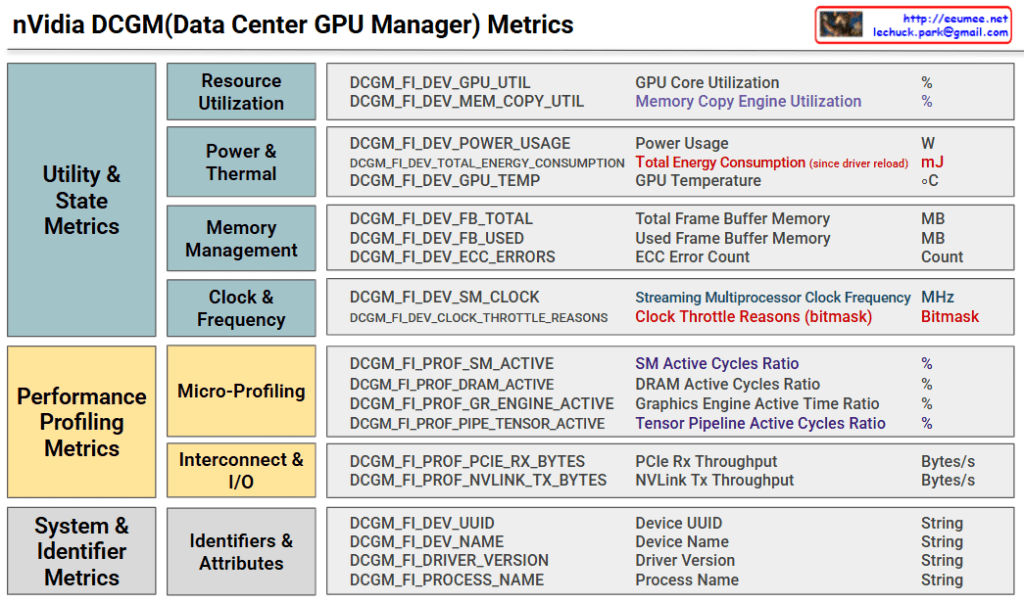
nVidia DCGM(Data Center GPU Manager) Metrics

nVidia DCGM for GPU Stabilization and Optimization

Purpose and Overview

DCGM (Data Center GPU Manager) metrics provide comprehensive real-time monitoring for GPU cluster stability and performance optimization in data center environments. The system enables proactive issue detection and prevention through systematic metric categorization across utility states, performance profiling, and system identification. This integrated approach ensures uninterrupted high-performance operations while extending hardware lifespan and optimizing operational costs.

GPU Stabilization Through Metric Monitoring

Thermal Stability Management

  • GPU Temperature monitoring prevents overheating
  • Clock Throttle Reasons identifies performance degradation causes
  • Automatic workload redistribution when temperature thresholds are reached

Power Management Optimization

  • Power Usage and Total Energy Consumption tracking
  • Priority-based job scheduling when power limits are approached
  • Energy efficiency-based resource allocation

Memory Integrity Assurance

  • ECC Error Count monitoring for early hardware fault detection
  • Frame Buffer Memory utilization tracking prevents OOM scenarios

Clock Throttling-Based Optimization

The Clock Throttle Reasons bitmask provides real-time detection of GPU performance limitations. Normal operation (0x00000000) maintains peak performance, while power limiting (0x00000001) triggers workload distribution to alternate GPUs. Thermal limiting (0x00000002) activates enhanced cooling and temporarily suspends heat-generating tasks. Complex limitation scenarios prompt emergency workload migration and hardware diagnostics to maintain system stability.

Integrated Optimization Strategy

Predictive Management

  • Metric trend analysis for proactive issue prediction
  • Workload pattern learning for optimal resource pre-allocation

Dynamic Scaling

  • SM/DRAM Active Cycles Ratio enables real-time load balancing
  • PCIe/NVLink Throughput optimization for network efficiency

Fault Prevention

  • Rising ECC Error Count triggers GPU isolation and replacement scheduling
  • Driver Version and Process Name tracking resolves compatibility issues

With Claude