AI DC Power Risk


Technical Analysis: AI Load & Weak Grid Interaction

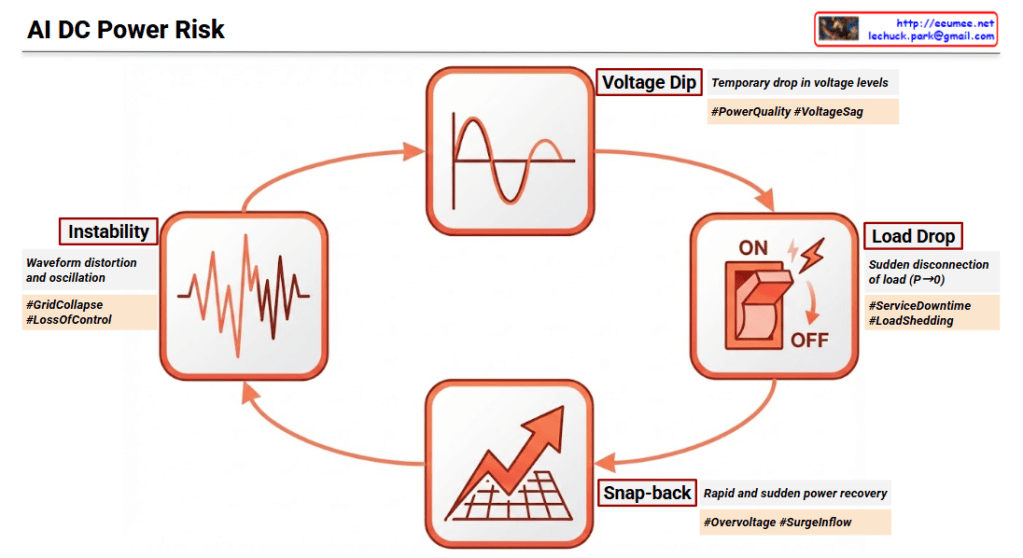
The integration of massive AI workloads into a Weak Grid (SCR:Short Circuit Ratio < 3) creates a high-risk environment where electrical Transients can escalate into systemic failures.

1. Voltage Dip (Transient Voltage Sag)

  • Mechanism: AI workloads are characterized by Step Power Changes and Pulse-type Profiles. When these massive loads activate simultaneously, they cause an immediate Transient Voltage Sag in a weak grid due to high impedance.
  • Impact: This compromises Power Quality, leading to potential malfunctions in voltage-sensitive AI hardware.

2. Load Drop (Transient Load Rejection)

  • Mechanism: If the voltage sag exceeds safety thresholds, protection systems trigger Load Rejection, causing the power consumption to plummet to zero (P -> 0).
  • Impact: This results in Service Downtime and creates a massive power imbalance in the grid, often referred to as Load Shedding.

3. Snap-back (Transient Recovery & Inrush)

  • Mechanism: As the grid attempts to recover or the load is re-engaged, it creates a Transient Recovery Voltage (TRV).
  • Impact: This phase often sees Overvoltage (Overshoot) and a massive Surge Inflow (Inrush Current), which places extreme electrical stress on power components and can damage sensitive circuitry.

4. Instability (Dynamic & Harmonic Oscillation)

  • Mechanism: The repetition of sags and surges leads to Dynamic Oscillation. The control systems of power converters may lose synchronization with the grid frequency.
  • Impact: The result is severe Waveform Distortion, Loss of Control, and eventually a total Grid Collapse (Blackout).

Key Insight (NERC 2025 Warning)

The North American Electric Reliability Corporation (NERC) warns that the reduction of voltage-sensitive loads and the rise of periodic, pulse-like AI workloads are primary drivers of modern grid instability.


Summary

  1. AI Load Dynamics: Rapid step-load changes in AI data centers act as a “shock” to weak grids, triggering a self-reinforcing cycle of electrical failure.
  2. Transient Progression: The cycle moves from a Voltage Sag to a Load Trip, followed by a damaging Power Surge, eventually leading to non-damped Oscillations.
  3. Strategic Necessity: To break this cycle, data centers must implement advanced solutions like Grid-forming Inverters or Fast-acting BESS to provide synthetic inertia and voltage support.

#PowerTransients #WeakGrid #AIDataCenter #GridStability #NERC2025 #VoltageSag #LoadShedding #ElectricalEngineering #AIInfrastructure #SmartGrid #PowerQuality

With Gemini

Peak Shaving


“Power – Peak Shaving” Strategy

The image illustrates a 5-step process for a ‘Peak Shaving’ strategy designed to maximize power efficiency in data centers. Peak shaving is a technique used to reduce electrical load during periods of maximum demand (peak times) to save on electricity costs and ensure grid stability.

1. IT Load & ESS SoC Monitoring

This is the data collection and monitoring phase to understand the current state of the system.

  • Grid Power: Monitoring the maximum power usage from the external power grid.
  • ESS SoC/SoH: Checking the State of Charge (SoC) and State of Health (SoH) of the Energy Storage System (ESS).
  • IT Load (PDU): Measuring the actual load through Power Distribution Units (PDUs) at the server rack level.
  • LLM/GPU Workload: Monitoring the real-time workload of AI models (LLM) and GPUs.

2. ML-based Peak Prediction

Predicting future power demand based on the collected data.

  • Integrated Monitoring: Consolidating data from across the entire infrastructure.
  • Machine Learning Optimization: Utilizing AI algorithms to accurately predict when power peaks will occur and preparing proactive responses.

3. Peak Shaving Via PCS (Power Conversion System)

Utilizing physical energy storage hardware to distribute the power load.

  • Pre-emptive Analysis & Preparation: Determining the “Time to Charge.” The system charges the batteries when electricity rates are low.
  • ESS DC Power: During peak times, the stored Direct Current (DC) in the ESS is converted to Alternating Current (AC) via the PCS to supplement the power supply, thereby reducing reliance on the external grid.

4. Job Relocation (K8s/Slurm)

Adjusting the scheduling of IT tasks based on power availability.

  • Scheduler Decision Engine: Activated when a peak time is detected or when ESS battery levels are low.
  • Job Control: Lower priority jobs are queued or paused, and compute speeds are throttled (power suppressed) to minimize consumption.

5. Parameter & Model Optimization

The most advanced stage, where the efficiency of the AI models themselves is optimized.

  • Real-time Batch Size Adjustment: Controlling throughput to prevent sudden power spikes.
  • Large Model -> sLLM (Lightweight): Transitioning to smaller, lightweight Large Language Models (sLLM) to reduce GPU power consumption without service downtime.

Summary

The core message of this diagram is that High-Quality/High-Resolution Data is the foundation for effective power management. By combining hardware solutions (ESS/PCS), software scheduling (K8s/Slurm), and AI model optimization (sLLM), a data center can significantly reduce operating expenses (OPEX) and ultimately increase profitability (Make money) through intelligent peak shaving.


#AI_DC #PowerControl #DataCenter #EnergyEfficiency #PeakShaving #GreenIT #MachineLearning #ESS #AIInfrastructure #GPUOptimization #Sustainability #TechInnovation

AI Cost


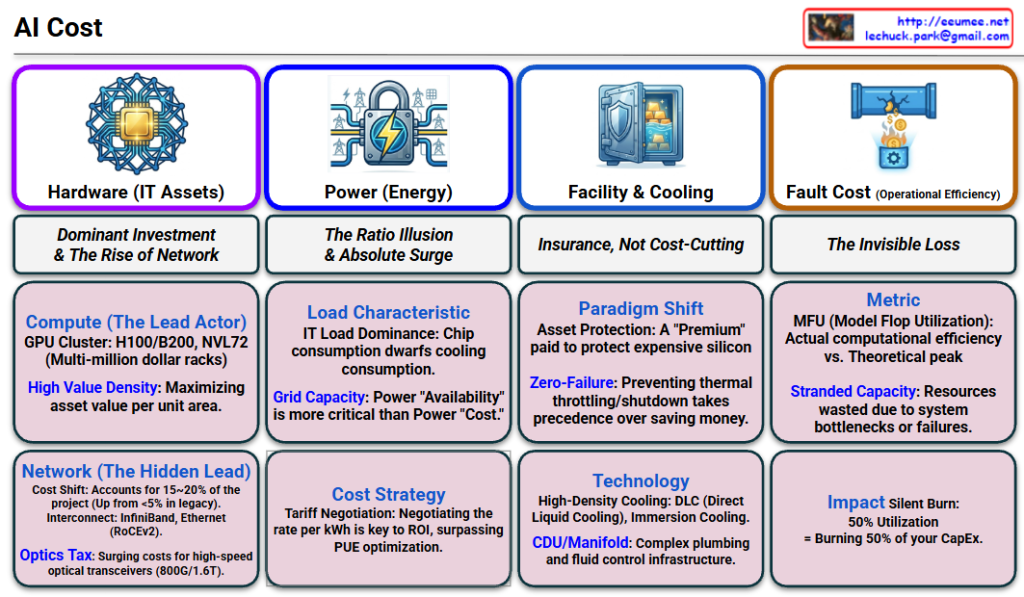
Strategic Analysis of the AI Cost Chart

1. Hardware (IT Assets): “The Investment Core”

  • Icon: A chip embedded in a complex network web.
  • Key Message: The absolute dominant force, consuming ~70% of the total budget.
  • Details:
    • Compute (The Lead): Features GPU clusters (H100/B200, NVL72). These are not just servers; they represent “High Value Density.”
    • Network (The Hidden Lead): No longer just cabling. The cost of Interconnects (InfiniBand/RoCEv2) and Optics (800G/1.6T) has surged to 15~20%, acting as the critical nervous system of the cluster.

2. Power (Energy): “The Capacity War”

  • Icon: An electric grid secured by a heavy lock (representing capacity security).
  • Key Message: A “Ratio Illusion.” While the percentage (~20%) seems stable due to the skyrocketing hardware costs, the absolute electricity bill has exploded.
  • Details:
    • Load Characteristic: The IT Load (Chip power) dwarfs the cooling load.
    • Strategy: The battle is not just about Efficiency (PUE), but about Availability (Grid Capacity) and Tariff Negotiation.

3. Facility & Cooling: “The Insurance Policy”

  • Icon: A vault holding gold bars (Asset Protection).
  • Key Message: Accounting for ~10% of CapEx, this is not an area for cost-cutting, but for “Premium Insurance.”
  • Details:
    • Paradigm Shift: The facility exists to protect the multi-million dollar “Silicon Assets.”
    • Technology: Zero-Failure is the goal. High-density technologies like DLC (Direct Liquid Cooling) and Immersion Cooling are mandatory to prevent thermal throttling.

4. Fault Cost (Operational Efficiency): “The Invisible Loss”

  • Icon: A broken pipe leaking coins (burning money).
  • Key Message: A “Hidden Cost” that determines the actual success or failure of the business.
  • Details:
    • Metric: The core KPI is MFU (Model Flop Utilization).
    • Impact: Any bottleneck (network stall, storage wait) results in “Stranded Capacity.” If utilization drops to 50%, you are effectively engaging in a “Silent Burn” of 50% of your massive CapEx investment.

💡 Architect’s Note

This chart perfectly illustrates “Why we need an AI DC Operating System.”

“Pillars 1, 2, and 3 (Hardware, Power, Facility) represent the massive capital burned during CONSTRUCTION.

Pillar 4 (Fault Cost) is the battleground for OPERATION.”

Your Operating System is the solution designed to plug the leak in Pillar 4, ensuring that the astronomical investments in Pillars 1, 2, and 3 translate into actual computational value.


Summary

The AI Data Center is a “High-Value Density Asset” where Hardware dominates CapEx (~70%), Power dominates OpEx dynamics, and Facility acts as Insurance. However, the Operational System (OS) is the critical differentiator that prevents Fault Cost—the silent killer of ROI—by maximizing MFU.

#AIDataCenter #AIInfrastructure #GPUUnitEconomics #MFU #FaultCost #DataCenterOS #LiquidCooling #CapExStrategy #TechArchitecture

AI Triangle


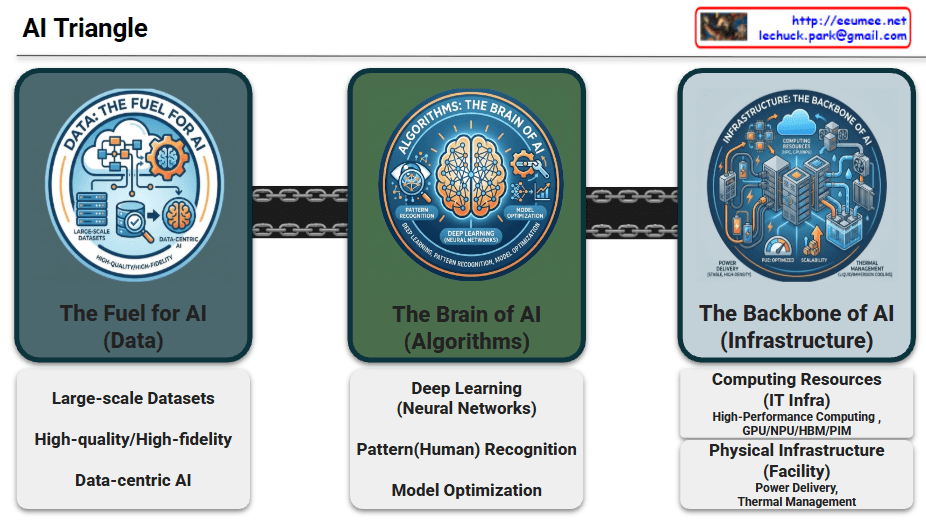
📐 The AI Triangle: Core Pillars of Evolution

1. Data: The Fuel for AI

Data serves as the essential raw material that determines the intelligence and accuracy of AI models.

  • Large-scale Datasets: Massive volumes of information required for foundational training.
  • High-quality/High-fidelity: The emphasis on clean, accurate, and reliable data to ensure superior model performance.
  • Data-centric AI: A paradigm shift focusing on enhancing data quality rather than just iterating on model code.

2. Algorithms: The Brain of AI

Algorithms provide the logical framework and mathematical structures that allow machines to learn from data.

  • Deep Learning (Neural Networks): Multi-layered architectures inspired by the human brain to process complex information.
  • Pattern Recognition: The ability to identify hidden correlations and make predictions from raw inputs.
  • Model Optimization: Techniques to improve efficiency, reduce latency, and minimize computational costs.

3. Infrastructure: The Backbone of AI

The physical and digital foundation that enables massive computations and ensures system stability.

  • Computing Resources (IT Infra):
    • HPC & Accelerators: High-performance clusters utilizing GPUs, NPUs, and HBM/PIM for parallel processing.
  • Physical Infrastructure (Facilities):
    • Power Delivery: Reliable, high-density power systems including UPS, PDU, and smart energy management.
    • Thermal Management: Advanced cooling solutions like Liquid Cooling and Immersion Cooling to handle extreme heat from AI chips.
    • Scalability & PUE: Focus on sustainable growth and maximizing energy efficiency (Power Usage Effectiveness).

📝 Summary

  1. The AI Triangle represents the vital synergy between high-quality Data, sophisticated Algorithms, and robust Infrastructure.
  2. While data fuels the model and algorithms provide the logic, infrastructure acts as the essential backbone that supports massive scaling and operational reliability.
  3. Modern AI evolution increasingly relies on advanced facility management, specifically optimized power delivery and high-efficiency cooling, to sustain next-generation workloads.

#AITriangle #AIInfrastructure #DataCenter #DeepLearning #GPU #LiquidCooling #DataCentric #Sustainability #PUE #TechArchitecture

With Gemini

SRAM, DRAM, HBM

The image provides a comprehensive comparison of SRAM, DRAM, and HBM, which are the three pillars of modern memory architecture. For an expert in AI infrastructure, this hierarchy explains why certain hardware choices are made to balance performance and cost.


1. SRAM (Static Random Access Memory)

  • Role: Ultra-Fast Cache. It serves as the immediate storage for the CPU/GPU to prevent processing delays.
  • Location: On-die. It is integrated directly into the silicon of the processor chip.
  • Capacity: Very small (MB range) due to the large physical size of its 6-transistor structure.
  • Cost: Extremely Expensive (~570x vs. DRAM). This is the “prime real estate” of the semiconductor world.
  • Key Insight: Its primary goal is Latency-focus. It ensures the most frequently used data is available in nanoseconds.

2. DRAM (Dynamic Random Access Memory)

  • Role: Main System Memory. It is the standard “workspace” for a server or PC.
  • Location: Motherboard Slots (DIMM). It sits externally to the processor.
  • Capacity: Large (GB to TB range). It is designed to hold the OS and active applications.
  • Cost: Relatively Affordable (1x). It serves as the baseline for memory pricing.
  • Key Insight: It requires a constant “Refresh” to maintain data, making it “Dynamic,” but it offers the best balance of capacity and price.

3. HBM (High Bandwidth Memory)

  • Role: AI Accelerators & Supercomputing. It is the specialized engine behind modern AI GPUs like the NVIDIA H100.
  • Location: In-package. It is stacked vertically (3D Stack) and placed right next to the GPU die on a silicon interposer.
  • Capacity: High (Latest versions offer 141GB+ per stack).
  • Cost: Very Expensive (Premium, ~6x vs. DRAM).
  • Key Insight: Its primary goal is Throughput-focus. By widening the data “highway,” it allows the GPU to process massive datasets (like LLM parameters) without being bottlenecked by memory speed.

📊 Technical Comparison Summary

FeatureSRAMDRAMHBM
Speed TypeLow LatencyModerateHigh Bandwidth
Price Factor570x1x (Base)6x
PackagingIntegrated in ChipExternal DIMM3D Stacked next to Chip

💡 Summary

  1. SRAM offers ultimate speed at an extreme price, used exclusively for tiny, critical caches inside the processor.
  2. DRAM is the cost-effective “standard” workspace used for general system tasks and large-scale data storage.
  3. HBM is the high-bandwidth solution for AI, stacking memory vertically to feed data-hungry GPUs at lightning speeds.

#SRAM #DRAM #HBM3e #AIInfrastructure #GPUArchitecture #Semiconductor #DataCenter #HighBandwidthMemory #TechComparison

with Gemini

“End-to-End AI Factory Optimization: From Infrastructure to SLA


End-to-End AI Factory Optimization: Bridging Infrastructure and Business Value

This diagram outlines a comprehensive framework for optimizing an “AI Factory”—a modern data center dedicated to AI workloads. The core message is that optimizing AI performance and cost requires a holistic view that connects physical infrastructure realities directly to high-level business Service Level Agreements (SLAs).

Here is a breakdown of the three main pillars of this framework:

1. The AI Factory (Infrastructure Foundation)

On the far left, we see the AI Factory itself. This represents the converged physical infrastructure required to run massive AI models (indicated by the neural network icons).

It emphasizes that the critical hardware components—GPUs (Compute), Networking, Power, and Cooling—cannot be managed in silos. They are marked as “ULTRA CONNECTED,” meaning the behavior of one directly impacts the others (e.g., intense GPU activity spikes power demand and generates immediate heat, requiring instant cooling response).

2. Ultra Data Quality (The Intelligence Layer)

In the center, the diagram highlights the necessity of Ultra Data Quality. To optimize such a complex, interconnected system, standard logging isn’t enough. The telemetry data collected from the infrastructure must meet three critical criteria:

  • Ultra Precision & Resolution: Capturing minute details of operations.
  • Ultra Time-Sync: The ability to perfectly synchronize timestamps across different hardware types (e.g., nanosecond-level GPU events vs. millisecond-level cooling events) to understand cause-and-effect relationships accurately.

3. Cost & SLA vs. Usage+Performance (The Value Realization)

The right section is the most critical, showing the direct mapping between physical operational metrics (Usage+Performance) and business outcomes (Cost & SLA). It argues that physical stability directly dictates business success:

  • TOKEN (Output/Revenue) ↔ Clock Consistency: To maintain a steady stream of AI output (tokens), the GPU clock speeds must remain consistent and stable without fluctuating.
  • FLOPS (Peak Compute Power) ↔ Zero Throttling Events: Achieving maximum floating-point operations per second requires eliminating “throttling”—performance downgrades caused by overheating or power constraints.
  • Watt (Operational Cost) ↔ Power Draw vs TDP: Managing operational expenses (electricity bills) requires optimizing the actual power draw relative to the hardware’s Thermal Design Power (TDP) limits.
  • PUE (Data Center Efficiency) ↔ Thermal Headroom: The overall Power Usage Effectiveness of the facility depends on optimizing “thermal headroom”—managing how close the cooling systems run to their limits without wasting energy.

This diagram illustrates that optimizing an AI business isn’t just about better code or faster chips; it requires an end-to-end approach where the physical realities of power, cooling, and hardware are tightly integrated with data analytics to ensure performance promises (SLAs) are met cost-effectively.


#AIFactory #DataCenterOptimization #AIInfrastructure #GPUComputing #SLAmanagement #EnergyEfficiency #PUE #Operations #TechInnovation #ArtificialIntelligence

AI Workload with Power/Cooling


Breakdown of the “AI Workload with Power/Cooling” Diagram

This diagram illustrates the flow of Power and Cooling changes throughout the execution stages of an AI workload. It divides the process into five phases, explaining how data center infrastructure (Power, Cooling) reacts and responds from the start to the completion of an AI job.

Here are the key details for each phase:

1. Pre-Run (Preparation Phase)

  • Work Job: Job Scheduling.
  • Key Metric: Requested TDP (Thermal Design Power). It identifies beforehand how much heat the job is expected to generate.
  • Power/Cooling: PreCooling. This is a proactive measure where cooling levels are increased based on the predicted TDP before the job actually starts and heat is generated.

2. Init / Ramp-up (Initialization Phase)

  • Work Job: Context Loading. The process of loading AI models and data into memory.
  • Key Metric: HBM Power Usage. The power consumption of High Bandwidth Memory becomes a key indicator.
  • Power/Cooling: As VRAM operates, Power consumption begins to rise (Power UP).

3. Execution (Execution Phase)

  • Work Job: Kernel Launch. The point where actual computation kernels begin running on the GPU.
  • Key Metric: Power Draw. The actual amount of electrical power being drawn.
  • Power/Cooling: Instant Power Peak. A critical moment where power consumption spikes rapidly as computation begins in earnest. The stability of the power supply unit (PSU) is vital here.

4. Sustained (Heavy Load Phase)

  • Work Job: Heavy Load. Continuous heavy computation is in progress.
  • Key Metric: Thermal/Power Cap. Monitoring against set limits for temperature or power.
  • Power/Cooling:
    • Throttling: If “What-if” scenarios occur (such as power supply leaks or reaching a Thermal Over-Limit), protection mechanisms activate. DVFS (Dynamic Voltage and Frequency Scaling) triggers Throttling (Down Clock) to protect the hardware.

5. Cooldown (Completion Phase)

  • Work Job: Job Complete.
  • Key Metric: Power State. The state changes to “Change Down.”
  • Power/Cooling: Although the job is finished, Residual Heat remains in the hardware. Instead of shutting off fans immediately, Ramp-down Control is used to cool the equipment gradually and safely.

Summary & Key Takeaways

This diagram demonstrates that managing AI infrastructure goes beyond simply “running a job.” It requires active control of the infrastructure (e.g., PreCooling, Throttling, Ramp-down) to handle the specific characteristics of AI workloads, such as rapid power spikes and high heat generation.

Phase 1 (PreCooling) for proactive heat management and Phase 4 (Throttling) for hardware protection are the core mechanisms determining the stability and efficiency of an AI Data Center.


#AI #ArtificialIntelligence #GPU #HPC #DataCenter #AIInfrastructure #DataCenterOps #GreenIT #SustainableTech #SmartCooling #PowerEfficiency #PowerManagement #ThermalEngineering #TDP #DVFS #Semiconductor #SystemArchitecture #ITOperations

With Gemini