Thermal Management in the Linux kernel

Thermal Management in the Linux Kernel

This diagram illustrates the closed-loop architecture of the Linux kernel’s thermal management subsystem, specifically detailing how it handles heavy AI workloads by coordinating both internal server hardware and external datacenter cooling infrastructure. The process is broken down into six sequential stages:

  • Stage 1: Workload InitializationWhen a high-intensity AI or LLM task is dispatched, it causes an immediate surge in electrical current across the hardware transistors. As a direct physical effect, the internal die temperature of the accelerator spikes within mere milliseconds.
  • Stage 2: Polling & SensingTo monitor this heat, the kernel utilizes hardware monitoring (hwmon) and ACPI drivers to continuously read data from internal Digital Thermal Sensors. This raw temperature data is mapped into an abstracted “Thermal Zone” and constantly compared against predefined safety thresholds known as “Trip Points.”
  • Stage 3: Trip Point & Governor ActivationIf the temperature crosses a specific threshold (such as a Warning Trip Point), it triggers a Thermal Governor, like the Intelligent Power Allocation (IPA) or Step Wise governor. This governor uses PID control algorithms to calculate a safe “Thermal Budget” that the hardware can sustain without damage.
  • Stage 4: Passive & Active CoolingBased on the calculated budget, the kernel initiates local mitigation through registered Cooling Devices. Active cooling involves instantly cranking up the internal server fan RPMs. Passive cooling relies on Dynamic Voltage and Frequency Scaling (DVFS), interacting with cpufreq to throttle clock speeds and lower voltages, thereby suppressing heat generation at the silicon level.
  • Stage 5: Infrastructure Telemetry SyncIf local cooling is insufficient to handle the load, the kernel exports real-time thermal telemetry via sysfs and IPMI/Redfish agents. The external datacenter infrastructure—specifically the Coolant Distribution Unit (CDU) or Chiller—receives this data and dynamically increases the liquid coolant flow rate directed to that specific server rack. ( Kernel works with BMC & DCIM/BMS.)
  • Stage 6: Thermal Equilibrium / EmergencyThe system continuously evaluates the outcome of these mitigations. Under normal conditions, the cooling capacity matches the heat generation, achieving a state of “Thermal Equilibrium” that allows the workload to run continuously and stably. However, if cooling fails and a Critical Trip Point is breached, the kernel immediately triggers an Emergency Shutdown to protect the hardware from permanent damage.

Summary

  • The Linux kernel continuously monitors hardware temperatures and maps them to virtual Thermal Zones to detect sudden heat spikes caused by heavy AI workloads.
  • Upon reaching safety thresholds, the kernel’s Thermal Governor simultaneously throttles CPU/GPU performance (local) and signals the datacenter’s CDU to increase liquid coolant flow (global).
  • This closed-loop system ultimately aims to achieve thermal equilibrium for stable high-performance computing, or safely halts the system if critical failure conditions are met.

#LinuxKernel #ThermalManagement #DataCenterInfrastructure #LiquidCooling #HPC #AIWorkloads #GreenComputing #ServerArchitecture

With Gemini

AI optimization

AI Optimization Diagram Interpretation

The provided diagram, titled “AI Optimization,” illustrates the process of AI learning and inference in relation to data flow, along with the physical hardware infrastructure optimization (power and thermal management) required to sustain it. It goes beyond simple software algorithms to provide architectural insights into AI infrastructure and system design.

1. Data Acquisition and Preprocessing (Left Section)

  • Infinite World Data (Green Arrow): Represents the vast, unstructured, and infinite source data existing in the real world.
  • For All World Data & RAM: Shows the process of loading this infinite real-world data into RAM (a finite computing resource) so that the AI can process it. This represents the beginning of the data pipeline, where massive amounts of data are ingested, compressed, and refined for the system.

2. AI Computation & Infrastructure Optimization (Center Section)

This is the core of the diagram, showing how software-driven data optimization and hardware-driven power/cooling optimization intersect around the central AI processor (such as a GPU or NPU).

  • Algorithm & Model Optimization (Horizontal Flow):
    • Learning: The process where the AI trains on and optimizes data based on human-built statistical frameworks (Human Statistics).
    • Inference: The process of executing the trained model to run computations on new inputs and derive actionable results.
  • Physical Infrastructure Optimization (Vertical Flow): Represents the data center-level physical management required to sustain high-performance AI workloads.
    • Fit Optimization For Computing (Top): The lightning bolt icon signifies the optimization of high-density power supply systems and computing efficiency necessary for heavy AI workloads.
    • Fit Optimization For Heat (Bottom): The snowflake and circulation icon represents thermal management and cooling system optimization (such as liquid immersion cooling or advanced HVAC) to control the massive heat generated by the chips during intense computation.

3. Generation of Meaningful Information (Right Section)

  • For All Human Data & RAM: Shows the final output derived from the AI’s inference process being loaded back into the memory (RAM).
  • Unlike the large, single bar of raw source data on the left, the data on the right is fragmented into multiple smaller blocks. This symbolizes that massive, unrefined data has been successfully processed by the AI into structured, meaningful, and digestible information that humans can immediately consume and utilize for specific purposes.

Summary

This diagram emphasizes that AI value creation is not merely a software algorithm that takes data in and spits results out. It conveys a system engineering philosophy: true AI Optimization can only be achieved when software models are perfectly synchronized with the physical architecture—specifically high-density power delivery (Computing) and efficient thermal management (Heat)—that supports the hardware at its core.

#AIOptimization #AIInfrastructure #SystemArchitecture #MachineLearning #DeepLearning #DataPipeline #DataCenter #ThermalManagement #ComputingPower #ArtificialIntelligence #TechInference #BigData

Linux kernel accelerator

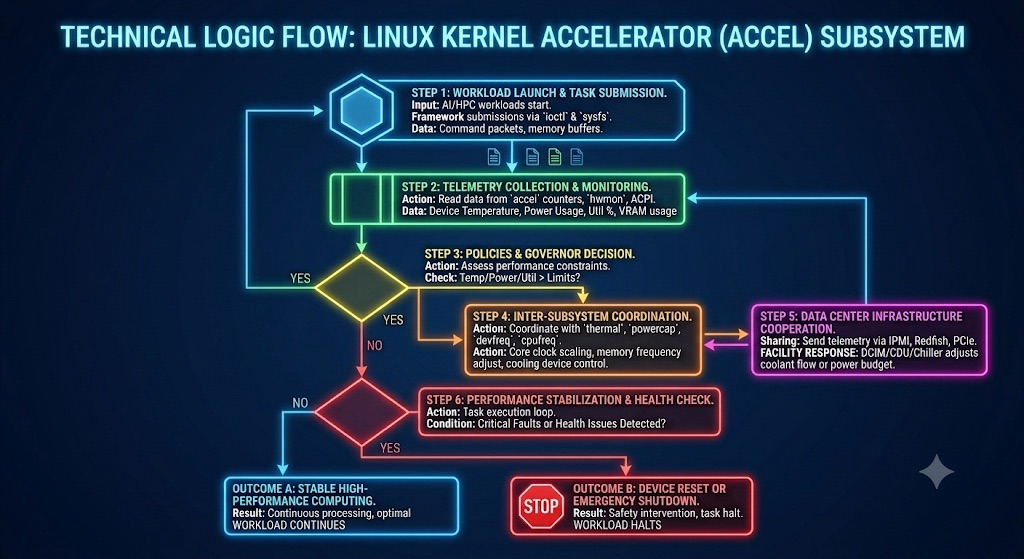
This diagram outlines the sequential, closed-loop technical logic flow of the Linux Kernel Accelerator (accel) subsystem as it manages heavy AI/HPC workloads while interacting with data center cooling infrastructure.
Here is the step-by-step breakdown of how it works:

1. Workload Initiation & Telemetry (Steps 1 & 2)

  • Step 1: AI tasks enter the pipeline via standard ioctl and sysfs calls, pushing command packets and memory buffers to the hardware.
  • Step 2: The kernel instantly goes into monitoring mode, using hwmon and ACPI to pull critical telemetry data points: Device Temperature, Power Usage, Utilization %, and VRAM usage.

2. Policy Check & Mitigation Loop (Steps 3, 4, & 5)

  • Step 3: The Thermal/Power Governor evaluates the telemetry against strict safety limits.
  • If Limits Are Exceeded (YES): It triggers a two-pronged defense strategy:
  • Step 4 (Local Action): The kernel coordinates internally with thermal, powercap, and devfreq subsystems to scale down core clocks and crank up internal fans.
  • Step 5 (Global Action): It broadcasts this telemetry outward via IPMI/Redfish. The data center’s CDU (Coolant Distribution Unit) or Chiller responds by dynamically boosting liquid coolant flow to that specific rack. This loops back to Step 2 to re-evaluate the system.

3. Stabilization & Final Outcomes (Step 6)

  • Step 6: If thresholds are safe (NO at Step 3), the workload runs in a stable execution loop while continuously checking for critical system faults.
  • Outcome A (All Good): If no critical issues are found, the system achieves Stable High-Performance Computing, and the AI workload continues running at peak efficiency.
  • Outcome B (Emergency): If a critical safety fault is detected, the kernel triggers a Device Reset or Emergency Shutdown to protect the physical hardware, halting the workload immediately.

💡 Summary Takeaway:
It is an automated playbook showing how the Linux kernel balances raw AI computing performance with hardware safety—acting locally on the chip and globally with the data center’s physical cooling loops.

With Gemini

Power/Cooling in the linux kernel

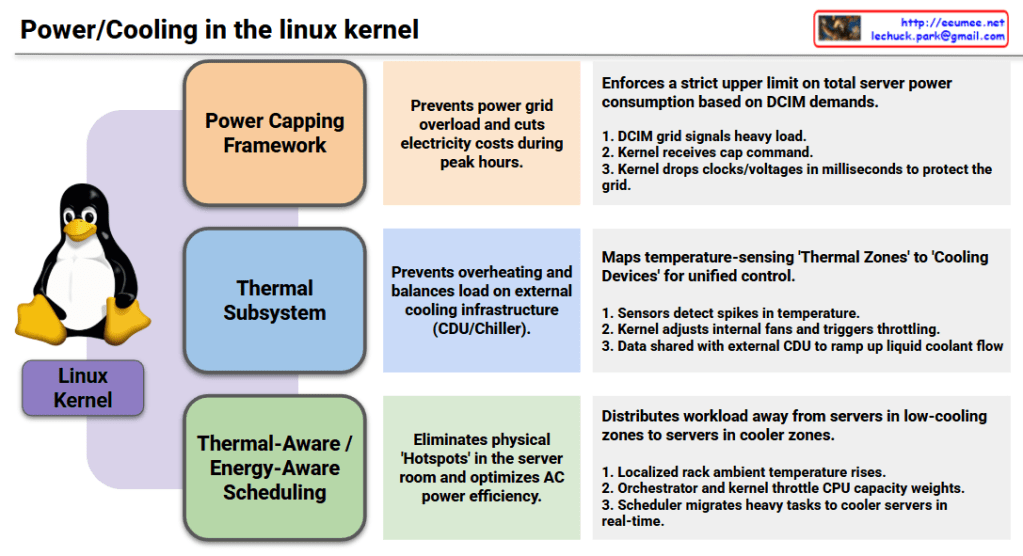
1. Power Capping Framework

  • Objective (Center): Prevents power grid overload and cuts electricity costs during peak hours.
  • Mechanism (Right): Enforces a strict upper limit on total server power consumption based on DCIM (Datacenter Infrastructure Management) demands.
    1. The DCIM grid signals a heavy load status.
    2. The Linux kernel receives the specific power capping command.
    3. The kernel immediately drops processor clocks and voltages in milliseconds to protect the local power grid.

2. Thermal Subsystem

  • Objective (Center): Prevents hardware overheating and balances the load on external cooling infrastructure, such as Coolant Distribution Units (CDUs) and chillers.
  • Mechanism (Right): Maps temperature-sensing ‘Thermal Zones’ directly to hardware ‘Cooling Devices’ for unified, holistic control.
    1. Hardware sensors detect sudden spikes in internal temperature.
    2. The kernel dynamically adjusts internal server fans and triggers safety throttling.
    3. Temperature telemetry data is actively shared with the external datacenter CDU to ramp up liquid coolant flow rates.

3. Thermal-Aware / Energy-Aware Scheduling

  • Objective (Center): Eliminates physical ‘Hotspots’ within the server room layout and optimizes overall air conditioning (AC) power efficiency.
  • Mechanism (Right): Distributes heavy workloads away from physical servers trapped in low-cooling zones to servers located in cooler zones.
    1. The localized ambient temperature around a specific server rack rises.
    2. The datacenter orchestrator and the kernel work together to throttle the target CPU’s capacity weights.
    3. The Linux scheduler automatically migrates heavy compute tasks to cooler servers across the room in real-time.

Modern Linux has evolved beyond managing isolated servers; it now acts as a holistic orchestrator that treats the datacenter’s power grid, liquid cooling loops, and air conditioning as a single, unified organism.

#LinuxKernel #PowerManagement #ThermalSubsystem #EnergyAwareScheduling #DatacenterInfrastructure #DCIM #LiquidCooling #GreenComputing #HPC #InfrastructureAutomation #CloudInfrastructure

With Gemini