Operation with LLM

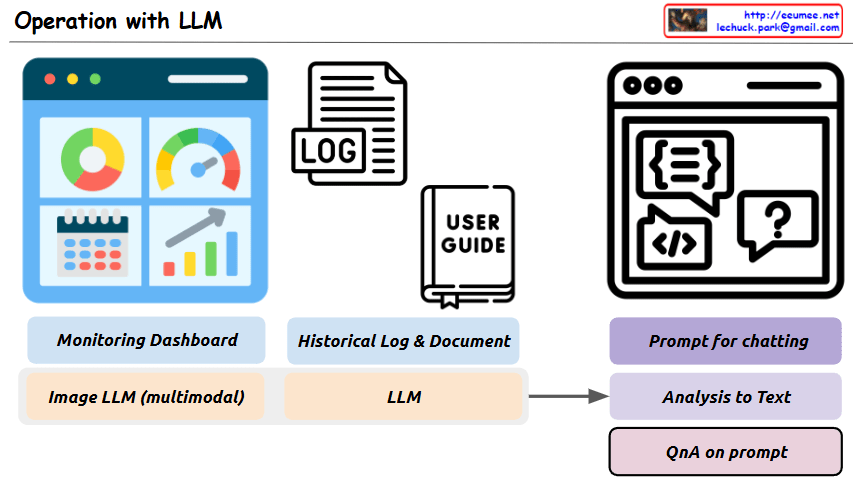
This image is a diagram titled “Operation with LLM,” showing a system architecture that integrates Large Language Models (LLMs) with existing operational technologies.

The main purpose of this system is to more efficiently analyze and solve various operational data and situations using LLMs.

Key components and functions:

  1. Top Left: “Monitoring Dashboard” – Provides an environment where LLMs can interpret image data collected from monitoring screens.
  2. Top Center: “Historical Log & Document” – LLMs analyze system log files and organize related processes from user manuals.
  3. Top Right: “Prompt for chatting” – An interface for interacting with LLMs through appropriate prompts.
  4. Bottom Left: “Image LLM (multimodal)” – Represents multimodal LLM functionality for interpreting images from monitoring screens.
  5. Bottom Center: “LLM” – The core language model component that processes text-based logs and documents.
  6. Bottom Right:
    • “Analysis to Text” – LLMs analyze various input sources and convert them to text
    • “QnA on prompt” – Users can ask questions about problem situations, and LLMs provide answers

This system aims to build an integrated operational environment where problems occurring in operational settings can be easily analyzed through LLM prompting and efficiently solved through a question-answer format.

With Claude

Operation with system

Key Analysis of Operation Cost Diagram

This diagram illustrates the cost structure of system implementation and operation, highlighting the following key concepts:

  1. High Initial Deployment Cost: At the beginning of a system’s lifecycle, deployment costs are substantial. This represents a one-time investment but requires significant capital.
  2. Perpetual Nature of Operation Costs: Operation costs continue indefinitely as long as the system exists, making them a permanent expense factor.
  3. Components of Operation Cost: Operation costs consist of several key elements:
    • Energy Cost
    • Labor Cost
    • Disability Cost
    • Additional miscellaneous costs (+@)
  4. Role of Automation Systems: As shown on the right side of the diagram, implementing automation systems can significantly reduce operation costs over time.
  5. Timing of Automation Investment: While automation systems also require initial investment during the early phases, they deliver long-term operation cost reduction benefits, ultimately improving the overall cost structure.

This diagram effectively visualizes the relationship between initial costs and long-term operational expenses, as well as the cost optimization strategy through automation.

With Claude

Operation

With a Claude’s Help

  1. Normal State:
  • Represented by a gear icon with a green checkmark
  • Indicates system operating under normal conditions
  • Initial state of the monitoring process
  1. Anomaly Detection:
  • Shown with a magnifying glass and graph patterns
  • The graph patterns are more clearly visualized than before
  • Represents the phase where deviations from normal patterns are detected
  1. Abnormal State:
  • Depicted by a human figure with warning indicators
  • Represents confirmed abnormal conditions requiring intervention
  • Links directly to action steps
  1. Analysis and Response Process:
  • Comparison with normal: Shown through A/B document comparison icons
  • Analysis: Data examination phase
  • predictive Action: Now written in lowercase, indicating predicted response measures
  • Recovery Action: Implementation of actual recovery measures
  1. Learning Feedback:
  • Shows how lessons from recovery actions are fed back into the system
  • Creates a continuous improvement loop
  • Connects recovery actions back to normal operations

The workflow continues to effectively illustrate the complete operational cycle, from monitoring and detection through analysis, response, and continuous learning. It demonstrates a systematic approach to handling operational anomalies and maintaining system stability.

DC OP Platform

From Claude with some prompting
This image depicts a diagram of the “DC op Platform” (Data Center Operations Platform). The main components are as follows:

  1. On the left, there’s “DC Op Env.” (Data Center Operations Environment), which consists of three main parts:
    • DCIM (Data Center Infrastructure Management)
    • Auto Control
    • Facility These three elements undergo a “Standardization” process.
  2. In the center, there are two “Standardization” server icons, representing the standardization process of the platform.
  3. On the right, there’s the “Data Center Op. Platform”, which comprises three main components:
    • Service Development
    • Integrated operations
    • Server Room Digital Twin
  4. Arrows show how the standardized elements connect to these three main components.

This diagram visually illustrates how the data center operations environment evolves through a standardization process into an integrated data center operations platform.

AI DC Key

From Claude with some prompting
This image titled “AI DC Key” illustrates the key components of an AI data center. Here’s an interpretation of the diagram:

  1. On the left, there’s an icon representing “Massive Data”.
  2. The center showcases four core elements of AI:
    • “Super Power”
    • “Super Computing” (utilizing GPU)
    • “Super Cooling”
    • “Optimizing Operation”
  3. Below each core element, key considerations are listed:
    • Super Power: “Nature & Consistent”
    • Super Computing: “Super Parallel”
    • Super Cooling: “Liquid Cooling”
    • Optimizing Operation: “Data driven Auto & AI”
  4. On the right, an icon represents “Analyzed Data”.
  5. The overall flow illustrates the process of massive data being input, processed through the AI core elements, and resulting in analyzed data.

This diagram visualizes the essential components of a modern AI data center and their key considerations. It demonstrates how high-performance computing, efficient power management, advanced cooling technology, and optimized operations effectively process and analyze large-scale data, emphasizing the critical technologies or approaches for each element.

Standardized Platform with the AI

From Claude with some prompting
This image illustrates a “Standardized Platform with the AI”. Here’s a breakdown of the key components and processes:

  1. Left side: Various devices or systems (generator, HVAC system, fire detector, etc.) are shown. Each device is connected to an alarm system and a monitoring screen.
  2. Center: “Metric Data” from these devices is sent to a central gear-shaped icon, representing a data processing system.
  3. Upper right: The processed data is displayed on a dashboard or analytics screen.
  4. Lower right: There’s a section labeled “Operation Process”, indicating management or optimization of operational processes.
  5. Far right: Boxes representing the system’s components:
    • “Standardization”
    • “Platform”
    • “AI”
  6. Bottom: “Digitalization strategy” serves as the foundation for the entire system.

This diagram visualizes a digital transformation strategy that collects data from various systems and devices, processes it using AI on a standardized platform, and uses this to optimize and manage operations.

The flow shows how raw data from different sources is standardized, processed, and utilized to create actionable insights and improve operational efficiency, all underpinned by a comprehensive digitalization strategy.