DLSS

DLSS is a graphics processing technology that consists of several key steps:

  1. Initial 3D Data
  • The process begins with 3D model/data input
  1. Rendering Process
  • Uses GPU to render 3D data into 2D screen output
  • Notes that higher resolution rendering requires more computing power
  1. Low Resolution Stage
  • Initially processes images at a lower resolution
  • This helps conserve computing resources
  1. DLSS Processing
  • Utilizes AI models and specialized hardware
  • Employs deep learning technology to enhance image quality
  • Combines lower computing requirements with AI processing
  1. Final Output
  • Upscales the low resolution image to appear high resolution
  • Delivers high-quality visual output that looks like native high resolution

The key advantage of DLSS is its ability to produce high-quality graphics while using less computing power. This technology is particularly valuable in applications requiring real-time rendering, such as gaming, where it can maintain visual quality while improving performance.

This innovative approach effectively balances the trade-off between visual quality and computational resources, making high-quality graphics more accessible on a wider range of hardware.

With Claude
What is The Next?

With Claude
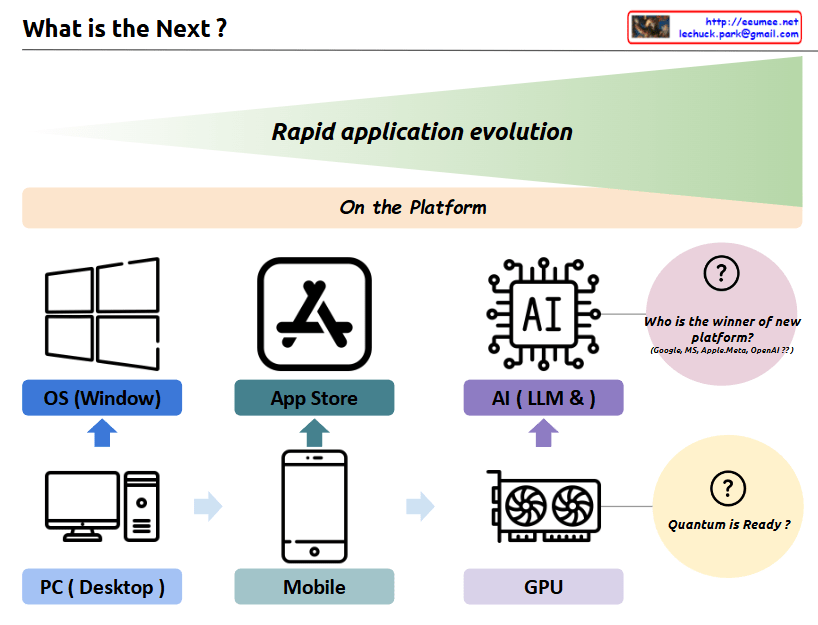
a comprehensive interpretation of the image and its concept of “Rapid application evolution”:

The diagram illustrates the parallel evolution of both hardware infrastructure and software platforms, which has driven rapid application development and user experiences:

  1. Hardware Infrastructure Evolution:
  • PC/Desktop → Mobile Devices → GPU
  • Represents the progression of core computing power platforms
  • Each transition brought fundamental changes in how users interact with technology
  1. Software Platform Evolution:
  • Windows OS → App Store → AI/LLM
  • Shows the evolution of application ecosystems
  • Each platform created new possibilities for user applications

The symbiotic relationship between these two axes:

  • PC Era: Integration of PC hardware with Windows OS
  • Mobile Era: Combination of mobile devices with app store ecosystems
  • AI Era: Marriage of GPU infrastructure with LLM/AI platforms

Each transition has led to exponential growth in application capabilities and user experiences, with hardware and software platforms developing in parallel and reinforcing each other.

Future Outlook:

  1. “Who is the winner of new platform?”
  • Current competition between Google, MS, Apple/Meta, OpenAI
  • Platform leadership in the AI era remains undecided
  • Possibility for new players to emerge
  1. “Quantum is Ready?”
  • Suggests quantum computing as the next potential hardware revolution
  • Implies the possibility of new software platforms emerging to leverage quantum capabilities
  • Continues the pattern of hardware-software co-evolution

This cyclical pattern of hardware-software evolution suggests that we’ll continue to see new infrastructure innovations driving platform development, and vice versa. Each cycle has dramatically expanded the possibilities for applications and user experiences, and this trend is likely to continue with future technological breakthroughs.

The key insight is that major technological leaps happen when both hardware infrastructure and software platforms evolve together, creating new opportunities for application development and user experiences that weren’t previously possible.

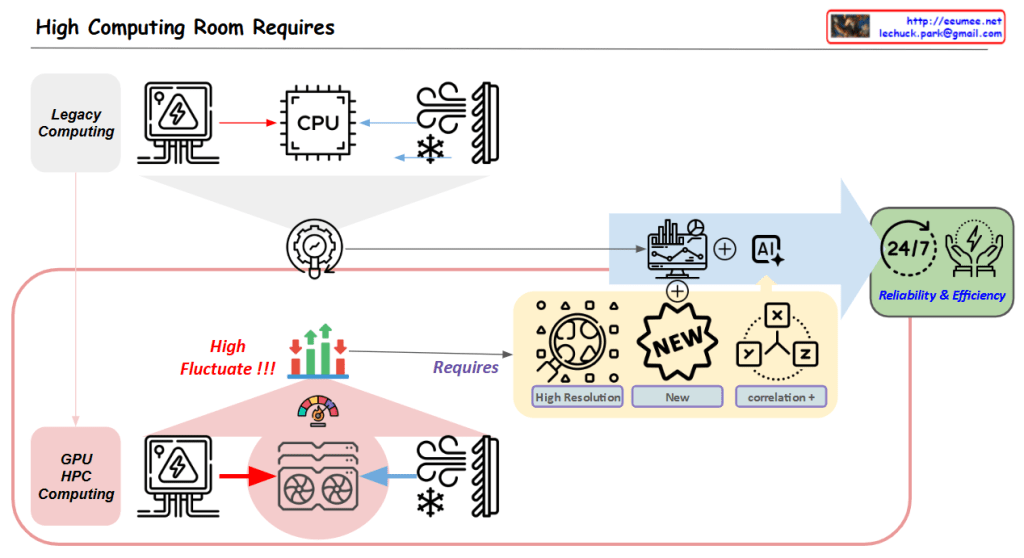
High Computing Room Requires

With a Claude’s Help
Core Challenge:

  1. High Variability in GPU/HPC Computing Room
  • Dramatic fluctuations in computing loads
  • Significant variations in power consumption
  • Changing cooling requirements

Solution Approach:

  1. Establishing New Data Collection Systems
  • High Resolution Data: More granular, time-based data collection
  • New Types of Data Acquisition
  • Identification of previously overlooked data points
  1. New Correlation Analysis
  • Understanding interactions between computing/power/cooling
  • Discovering hidden patterns among variables
  • Deriving predictable correlations

Objectives:

  • Managing variability through AI-based analysis
  • Enhancing system stability
  • Improving overall facility operational efficiency

In essence, the diagram emphasizes that to address the high variability challenges in GPU/HPC environments, the key strategy is to collect more precise and new types of data, which enables the discovery of new correlations, ultimately leading to improved stability and efficiency.

This approach specifically targets the inherent variability of GPU/HPC computing rooms by focusing on data collection and analysis as the primary means to achieve better operational outcomes.

Network for GPUs

with a Claude’s Help
The network architecture demonstrates 3 levels of connectivity technologies:

  1. NVLink (Single node Parallel processing)
  • Technology for directly connecting GPUs within a single node
  • Supports up to 256 GPU connections
  • Physical HBM (High Bandwidth Memory) sharing
  • Optimized for high-performance GPU parallel processing within individual servers
  1. NVSwitch
  • Switching technology that extends NVLink limitations
  • Provides logical HBM sharing
  • Key component for large-scale AI model operations
  • Enables complete mesh network configuration between GPU groups
  • Efficiently connects multiple GPU groups within One Box Server
  • Targets large AI model workloads
  1. InfiniBand
  • Network technology for server clustering
  • Supports RDMA (Remote Direct Memory Access)
  • Used for distributed computing and HPC (High Performance Computing) tasks
  • Implements hierarchical network topology
  • Enables large-scale cluster configuration across multiple servers
  • Focuses on distributed and HPC workloads

This 3-tier architecture provides scalability through:

  • GPU parallel processing within a single server (NVLink)
  • High-performance connectivity between GPU groups within a server (NVSwitch)
  • Cluster configuration between multiple servers (InfiniBand)

The architecture enables efficient handling of various workload scales, from small GPU tasks to large-scale distributed computing. It’s particularly effective for maximizing GPU resource utilization in large-scale AI model training and HPC workloads.

Key Benefits:

  • Hierarchical scaling from single node to multi-server clusters
  • Efficient memory sharing through both physical and logical HBM
  • Flexible topology options for different computing needs
  • Optimized for both AI and high-performance computing workloads
  • Comprehensive solution for GPU-based distributed computing

This structure provides a complete solution from single-server GPU operations to complex distributed computing environments, making it suitable for a wide range of high-performance computing needs.

Evolutions

From Claude with some prompting
Summarize the key points from the image :

  1. Manually Control:
    • This stage involves direct human control of the system.
    • Human intervention and judgment are crucial at this stage.
  2. Data Driven:
    • This stage uses data analysis to control the system.
    • Data collection and analysis are the core elements.
  3. AI Control:
    • This stage leverages artificial intelligence technologies to control the system.
    • Technologies like machine learning and deep learning are utilized.
  4. Virtual:
    • This stage involves the implementation of systems in a virtual environment.
    • Simulation and digital twin technologies are employed.
  5. Massive Data:
    • This stage emphasizes the importance of collecting, processing, and utilizing vast amounts of data.
    • Technologies like big data and cloud computing are utilized.

Throughout this progression, there is a gradual shift towards automation and increased intelligence. The development of data and AI technologies plays a critical role, while the use of virtual environments and massive data further accelerates this technological evolution.

Computing Power 4-Optimizations

From Claude with some prompting
The image “Computing Power 4-Optimizations” highlights four key areas for optimizing computing power, emphasizing a comprehensive approach that goes beyond infrastructure to include both hardware and software perspectives:

  1. Processing Optimizing: Focuses on hardware-level optimization, utilizing advanced manufacturing process technology to develop low-power GPUs and CPUs. It incorporates techniques like dynamic voltage and frequency scaling, and clock/power gating to maximize chip efficiency.
  2. Power Supply Optimizing: Addresses infrastructure-level optimization, improving power management and distribution across the entire system. This involves efficient power supply units and intelligent power management systems.
  3. Cooling Supply Optimizing: Another infrastructure-level optimization, enhancing thermal management of the system. Efficient cooling is crucial for maintaining computing performance while reducing power consumption.
  4. Code Optimizing: Emphasizes software-level optimization, including programming optimization, workload optimization at the OS level, and ‘green coding’ practices. This underscores the importance of considering energy efficiency in the software development process.

The diagram effectively illustrates that computing power optimization is not limited to hardware or infrastructure improvements alone. It stresses the need for a holistic approach, from chip design to code writing, to achieve effective optimization. By considering both hardware (chip) and software (code) level optimizations together, the overall system efficiency can be maximized. This comprehensive view is essential for addressing the complex challenges of power management in modern computing systems.

Parallel Processing ( Process – Data works)

From Claude with some prompting
This image illustrates different architectures of Parallel Processing:

  1. Single Core CPU: A single CPU connected to memory via one memory channel. The memory is divided into Instruction (Computing) and Data sections.
  2. Multi Core CPU: A CPU with multiple cores connected to memory through multiple memory channels. The memory structure is similar to the single core setup.
  3. NUMA (Non-Uniform Memory Access): Multiple multi-core CPUs, each with local memory. CPUs can access memory attached to other CPUs, but with “More Hop Memory Access”.
  4. GPU (Graphics Processing Unit): Described as “Completely Independent Processing-Memory Units”. It uses High Bandwidth Memory and has a large number of processing units directly mapped to data.

The GPU architecture shows many small processing units connected to a shared high-bandwidth memory, illustrating its capacity for massive parallel processing.

This diagram effectively contrasts CPU and GPU architectures, highlighting how CPUs are optimized for sequential processing while GPUs are designed for highly parallel tasks.