Computing Power 4-Optimizations

From Claude with some prompting
The image “Computing Power 4-Optimizations” highlights four key areas for optimizing computing power, emphasizing a comprehensive approach that goes beyond infrastructure to include both hardware and software perspectives:

  1. Processing Optimizing: Focuses on hardware-level optimization, utilizing advanced manufacturing process technology to develop low-power GPUs and CPUs. It incorporates techniques like dynamic voltage and frequency scaling, and clock/power gating to maximize chip efficiency.
  2. Power Supply Optimizing: Addresses infrastructure-level optimization, improving power management and distribution across the entire system. This involves efficient power supply units and intelligent power management systems.
  3. Cooling Supply Optimizing: Another infrastructure-level optimization, enhancing thermal management of the system. Efficient cooling is crucial for maintaining computing performance while reducing power consumption.
  4. Code Optimizing: Emphasizes software-level optimization, including programming optimization, workload optimization at the OS level, and ‘green coding’ practices. This underscores the importance of considering energy efficiency in the software development process.

The diagram effectively illustrates that computing power optimization is not limited to hardware or infrastructure improvements alone. It stresses the need for a holistic approach, from chip design to code writing, to achieve effective optimization. By considering both hardware (chip) and software (code) level optimizations together, the overall system efficiency can be maximized. This comprehensive view is essential for addressing the complex challenges of power management in modern computing systems.

Parallel Processing ( Process – Data works)

From Claude with some prompting
This image illustrates different architectures of Parallel Processing:

  1. Single Core CPU: A single CPU connected to memory via one memory channel. The memory is divided into Instruction (Computing) and Data sections.
  2. Multi Core CPU: A CPU with multiple cores connected to memory through multiple memory channels. The memory structure is similar to the single core setup.
  3. NUMA (Non-Uniform Memory Access): Multiple multi-core CPUs, each with local memory. CPUs can access memory attached to other CPUs, but with “More Hop Memory Access”.
  4. GPU (Graphics Processing Unit): Described as “Completely Independent Processing-Memory Units”. It uses High Bandwidth Memory and has a large number of processing units directly mapped to data.

The GPU architecture shows many small processing units connected to a shared high-bandwidth memory, illustrating its capacity for massive parallel processing.

This diagram effectively contrasts CPU and GPU architectures, highlighting how CPUs are optimized for sequential processing while GPUs are designed for highly parallel tasks.

CPU + GPU

From Claude with some prompting
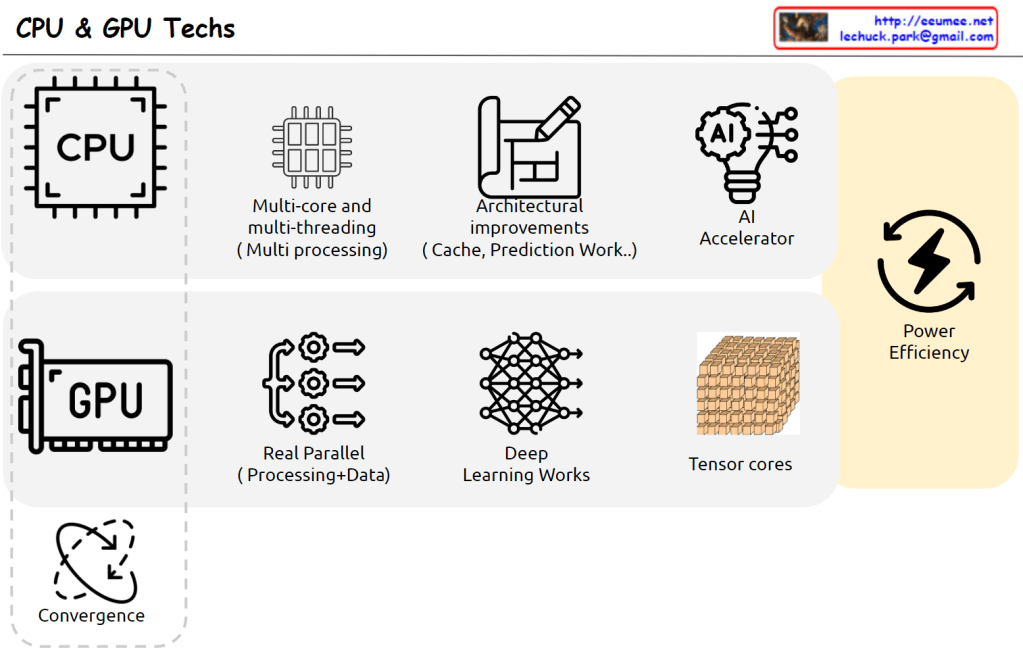
This image outlines the latest trends and developments in CPU and GPU technologies. The key points are:

  1. CPU: It shows advancements in multi-core and multi-threading (multi-processing) capabilities, as well as architectural improvements (cache, prediction work).
  2. GPU: It highlights the improvements in real-time parallel processing and data-centric processing capabilities.
  3. AI Accelerator: Hardware technologies that accelerate AI algorithms are evolving.
  4. Power Efficiency: Improving power efficiency is emerging as an important challenge.
  5. Convergence: The image suggests a trend of convergence and integration between CPUs and GPUs.

Overall, the image presents the evolving directions where CPU and GPU technologies are complementing each other and converging. This is expected to drive improvements in performance and power efficiency.

Computing Room Digital Twin for AI Computing

From Claude with some prompting
focusing on the importance of the digital twin-based floor operation optimization system for high-performance computing rooms in AI data centers, emphasizing stability and energy efficiency. I’ll highlight the key elements marked with exclamation points.

Purpose of the system:

  1. Enhance stability
  2. Improve energy efficiency
  3. Optimize floor operations

Key elements (marked with exclamation points):

  1. Interface:
    • Efficient data collection interface using IPMI, Redis and Nvidia DCGM
    • Real-time monitoring of high-performance servers and GPUs to ensure stability
  2. Intelligent/Smart PDU:
    • Precise power usage measurement contributing to energy efficiency
    • Early detection of anomalies to improve stability
  3. High Resolution under 1 sec:
    • High-resolution data collection in less than a second enables real-time response
    • Immediate detection of rapid changes or anomalies to enhance stability
  4. Analysis with AI:
    • AI-based analysis of collected data to derive optimization strategies
    • Utilized for predictive maintenance and energy usage optimization
  5. Computing Room Digital Twin:
    • Virtual replication of the actual computing room for simulation and optimization
    • Scenario testing for various situations to improve stability and efficiency

This system collects and analyzes data from high-power servers, power distribution units, cooling facilities, and environmental sensors. It optimizes the operation of AI data center computing rooms, enhances stability, and improves energy efficiency.

By leveraging digital twin technology, the system enables not only real-time monitoring but also predictive maintenance, energy usage optimization, and proactive response to potential issues. This leads to improved stability and reduced operational costs in high-performance computing environments.

Ultimately, this system serves as a critical infrastructure for efficient operation of AI data centers, energy conservation, and stable service provision. It addresses the unique challenges of managing high-density, high-performance computing environments, ensuring optimal performance while minimizing risks and energy consumption.

New OS

From Claude with some prompting
This image illustrates a more comprehensive structure of a new operating system integrated with AI. Here’s a summary of the key changes and features:

  1. Cloud Connectivity: A “Cloud Connected” element has been added, linked to AI Applications. This represents the integration between local AI and cloud-based AI services.
  2. User Data Protection: The “User Data (Private)” section now includes various icons, visualizing the management of different types of user data and emphasizing privacy protection.
  3. New Interface: The Q&A-style “New Interface” is more prominently displayed, highlighting direct interaction between AI and users.
  4. AI Application Integration: AI Applications are closely connected to User Applications, the Inference Model, and User Data.
  5. Hardware Utilization: The GPU (inference) is clearly marked as specialized hardware for AI tasks.
  6. Localized Learning Data: “Learned Data (Localized)” is included as part of the system, indicating the capability to provide personalized AI experiences.

This structure offers several advantages:

  • Enhanced User Experience: Intuitive interaction through AI-based interfaces
  • Privacy Protection: Secure management of user data
  • Hybrid Cloud-Local AI: Balanced use of local processing and cloud resources
  • Performance Optimization: Efficient AI task processing through GPU
  • Personalization: Customized AI services using localized learning data

This new OS architecture integrates AI as a core component, seamlessly combining traditional OS functions with advanced AI capabilities to present a next-generation computing environment.

AI DC Key

From Claude with some prompting
This image titled “AI DC Key” illustrates the key components of an AI data center. Here’s an interpretation of the diagram:

  1. On the left, there’s an icon representing “Massive Data”.
  2. The center showcases four core elements of AI:
    • “Super Power”
    • “Super Computing” (utilizing GPU)
    • “Super Cooling”
    • “Optimizing Operation”
  3. Below each core element, key considerations are listed:
    • Super Power: “Nature & Consistent”
    • Super Computing: “Super Parallel”
    • Super Cooling: “Liquid Cooling”
    • Optimizing Operation: “Data driven Auto & AI”
  4. On the right, an icon represents “Analyzed Data”.
  5. The overall flow illustrates the process of massive data being input, processed through the AI core elements, and resulting in analyzed data.

This diagram visualizes the essential components of a modern AI data center and their key considerations. It demonstrates how high-performance computing, efficient power management, advanced cooling technology, and optimized operations effectively process and analyze large-scale data, emphasizing the critical technologies or approaches for each element.

Computing with supers

From Claude with some prompting
This diagram titled “Computing works with supers” illustrates the structure and operational principles of modern high-performance computing systems. Key features include:

  1. Power Management: The “Making Power” section features a power icon labeled “Super,” indicating the massive power supply required for high-performance computing. This is emphasized by the phrase “Super Energy is required.”
  2. Central Processing Unit (CPU): Responsible for “Making Infra” and “Making Logic,” performing basic computational functions.
  3. Graphics Processing Unit (GPU) and AI: Located below the CPU, the GPU is directly connected to an AI model. The phrase “Delegate work to AI” demonstrates AI’s significant role in handling complex computing tasks.
  4. Heat Management: The diagram shows “Making Super Heat” from the GPU, managed by a “Control It with Cooling” system, highlighting the importance of thermal management.
  5. Integrated Management: The right sidebar groups power, GPU, and cooling systems together, with the caption “Must Manage All connected Supers.” This underscores the interconnectedness of these core elements and the need for integrated management.
  6. System Efficiency: Each major component is labeled “Super,” emphasizing their crucial roles in the high-performance system. This suggests that harmonious management of these elements determines the overall system’s efficiency and performance.
  7. Output: The “Super” human icon at the top right implies that this high-performance system produces exceptional results.

This diagram emphasizes that power management, GPU utilization, heat management, and AI integration are critical in modern high-performance computing. It highlights that efficient integrated management of these elements is key to determining the overall system’s performance and efficiency. Additionally, it suggests the growing importance of AI and automation technologies in effectively managing such complex systems.