Computing Changes with Power/Cooling

This chart compares power consumption and cooling requirements for server-grade computing hardware.

CPU Servers (Intel Xeon, AMD EPYC)

  • 1U-4U Rack: 0.2-1.2kW power consumption
  • 208V power supply
  • Standard air cooling (CRAC, server fans) sufficient
  • PUE: 1.4-1.6 (Power Usage Effectiveness)

GPU Servers (DGX Series)

Power consumption and cooling complexity increase dramatically:

Low-Power Models (DGX-1, DGX-2)

  • 3.5-10kW power consumption
  • Tesla V100 GPUs
  • High-performance air cooling required

Medium-Power Models (DGX A100, H100)

  • 6.5-10.2kW power consumption
  • 400V high voltage required
  • Liquid cooling recommended or essential

Highest-Performance Models (DGX B200, GB200)

  • 14.3-120kW extreme power consumption
  • Blackwell architecture GPUs
  • Full liquid cooling essential
  • PUE 1.1-1.2 with improved cooling efficiency

Key Trends Summary

The evolution from CPU to GPU computing represents a fundamental shift in data center infrastructure requirements. Power consumption scales dramatically from kilowatts to tens of kilowatts, driving the transition from traditional air cooling to sophisticated liquid cooling systems. Higher-performance systems paradoxically achieve better power efficiency through advanced cooling technologies, while requiring substantial infrastructure upgrades including high-voltage power delivery and comprehensive thermal management solutions.

※ Disclaimer: All figures presented in this chart are approximate reference values and may vary significantly depending on actual environmental conditions, workloads, configurations, ambient temperature, and other operational factors.

WIth Claude

GPU Server Room : Changes

Image Overview

This dashboard displays the cascading resource changes that occur when GPU workload increases in an AI data center server room monitoring system.

Key Change Sequence (Estimated Values)

  1. GPU Load Increase: 30% → 90% (AI computation tasks initiated)
  2. Power Consumption Rise: 0.42kW → 1.26kW (3x increase)
  3. Temperature Delta Rise: 7°C → 17°C (increased heat generation)
  4. Cooling System Response:
    • Water flow rate: 200 LPM → 600 LPM (3x increase)
    • Fan speed: 600 RPM → 1200 RPM (2x increase)

Operational Prediction Implications

  • Operating Costs: Approximately 3x increase from baseline expected
  • Spare Capacity: 40% cooling system capacity remaining
  • Expansion Capability: Current setup can accommodate additional 67% GPU load

This AI data center monitoring dashboard illustrates the cascading resource changes when GPU workload increases from 30% to 90%, triggering proportional increases in power consumption (3x), cooling flow rate (3x), and fan speed (2x). The system demonstrates predictable operational scaling patterns, with current cooling capacity showing 40% remaining headroom for additional GPU load expansion. Note: All values are estimated figures for demonstration purposes.

Note: All numerical values are estimated figures for demonstration purposes and do not represent actual measured data.

With Claude

Data in AI DC

This image illustrates a data monitoring system for an AI data center server room. Titled “Data in AI DC Server Room,” it depicts the relationships between key elements being monitored in the data center.

The system consists of four main components, each with detailed metrics:

  1. GPU Workload – Right center
    • Computing Load: GPU utilization rate (%) and type of computational tasks (training vs. inference)
    • Power Consumption: Real-time power consumption of each GPU (W) – Example: NVIDIA H100 GPU consumes up to 700W
    • Workload Pattern: Periodicity of workload (peak/off-peak times) and predictability
    • Memory Usage: GPU memory usage patterns (e.g., HBM3 memory bandwidth usage)
  2. Power Infrastructure – Left
    • Power Usage: Real-time power output and efficiency of UPS, PDU, and transformers
    • Power Quality: Voltage, frequency stability, and power loss rate
    • Power Capacity: Types and proportions of supplied energy, ensuring sufficient power availability for current workload operations
  3. Cooling System – Right
    • Cooling Device Status: Air-cooling fan speed (RPM), liquid cooling pump flow rate (LPM), and coolant temperature (°C)
    • Environmental Conditions: Data center internal temperature, humidity, air pressure, and hot/cold zone temperatures – critical for server operations
    • Cooling Efficiency: Power Usage Effectiveness (PUE) and proportion of power consumed by the cooling system
  4. Server/Rack – Top center
    • Rack Power Density: Power consumption per rack (kW) – Example: GPU server racks range from 30 to 120 kW
    • Temperature Profile: Temperature (°C) of GPUs, CPUs, memory modules, and heat distribution
    • Server Status: Operational state of servers (active/standby) and workload distribution status

The workflow sequence indicated at the bottom of the diagram represents:

  1. ① GPU WORK: Initial execution of AI workloads – GPU computational tasks begin, generating system load
  2. ② with POWER USE: Increased power supply for GPU operations – Power demand increases with GPU workload, and power infrastructure responds accordingly
  3. ③ COOLING WORK: Cooling processes activated in response to heat generation
    • Sensing: Temperature sensors detect server and rack thermal conditions, monitoring hot/cold zone temperature differentials
    • Analysis: Analysis of collected temperature data, determining cooling requirements
    • Action: Adjustment of cooling equipment (fan speed, coolant flow rate, etc. automatically regulated)
  4. ④ SERVER OK: Maintenance of normal server operation through proper power supply and cooling – Temperature and power remain stable, allowing GPU workloads to continue running under optimal conditions

The arrows indicate data flow and interrelationships between systems, showing connections from power infrastructure to servers and from cooling systems to servers. This integrated system enables efficient and stable data center operation by detecting increased power demand and heat generation from GPU workloads, and adjusting cooling systems in real-time accordingly.

With Claude

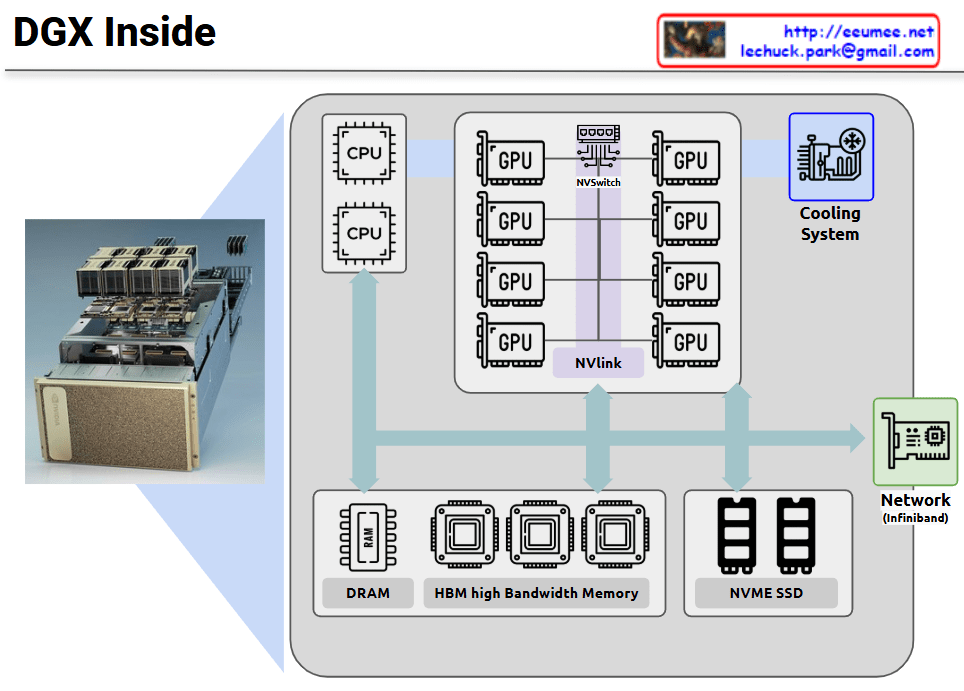
DGX Inside

NVIDIA DGX is a specialized server system optimized for GPU-centric high-performance computing. This diagram illustrates the internal architecture of DGX, which maintains a server-like structure but is specifically designed for massive parallel processing.

The core of the DGX system consists of multiple high-performance GPUs interconnected not through conventional PCIe, but via NVIDIA’s proprietary NVLink and NVSwitch technologies. This configuration dramatically increases GPU-to-GPU communication bandwidth, maximizing parallel processing efficiency.

Key features:

  • Integration of multiple CPUs and eight GPUs through high-performance interconnects
  • Mesh network configuration between all GPUs via NVSwitch, minimizing bottlenecks
  • Hierarchical memory architecture combining High Bandwidth Memory (HBM) and DRAM
  • NVMe SSDs for high-speed storage
  • High-efficiency cooling system supporting dense computing environments
  • InfiniBand networking for high-speed connections between multiple DGX systems

This configuration is optimized for workloads requiring parallel processing such as deep learning, AI model training, and large-scale data analysis, enabling much more efficient GPU utilization compared to conventional servers.

With Claude

NVLink, Infiniband

This diagram compares two GPU networking technologies: NVLink and InfiniBand, both essential for parallel computing expansion.

On the left side, the “NVLink” section shows multiple GPUs connected vertically through purple interconnect bars. This represents the “Scale UP” approach, where GPUs are vertically scaled within a single system for tight integration.

On the right side, the “InfiniBand” section demonstrates how multiple server nodes connect through an InfiniBand network. This illustrates the “Scale Out” approach, where computing power expands horizontally across multiple independent systems.

Both technologies share the common goal of expanding parallel processing capabilities, but they do so in different architectural approaches. NVLink focuses on high-speed, direct connections between GPUs in a single system, while InfiniBand specializes in networking across multiple systems to support distributed computing environments.

The optimization of these expansion configurations is crucial for maximizing performance in high-performance computing, AI training, and other compute-intensive applications. System architects must carefully consider workload characteristics, data movement patterns, and scaling requirements when choosing between these technologies or determining how to best implement them together in hybrid configurations.

With Claude

Connected in AI DC

This diagram titled “Data is Connected in AI DC” illustrates the relationships starting from workload scheduling in an AI data center.

Key aspects of the diagram:

  1. The entire system’s interconnected relationships begin with workload scheduling.
  2. The diagram divides the process into two major phases:
    • Deterministic phase: Primarily concerned with power requirements that operate in a predictable, planned manner.
    • Statistical phase: Focused on cooling requirements, where predictions vary based on external environmental conditions.
  3. The “Prophet Commander” at the workload scheduling stage can predict/direct future requirements, allowing the system to prepare power (1.1 Power Ready!!) and cooling (1.2 Cooling Ready!!) in advance.
  4. Process flow:
    • Job allocation from workload scheduling to GPU cluster
    • GPUs request and receive power
    • Temperature rises due to operations
    • Cooling system detects temperature and activates cooling

This diagram illustrates the interconnected workflow in AI data centers, beginning with workload scheduling that enables predictive resource management. The process flows from deterministic power requirements to statistical cooling needs, with the “Prophet Commander” enabling proactive preparation of power and cooling resources. This integrated approach demonstrates how workload prediction can drive efficient resource allocation throughout the entire AI data center ecosystem.

With Claude

Analytical vs Empirical

Analytical vs Empirical Approaches

Analytical Approach

  1. Theory Driven: Based on mathematical theories and logical reasoning
  2. Programmable with Design: Implemented through explicit rules and algorithms
  3. Sequential by CPU: Tasks are processed one at a time in sequence
  4. Precise & Explainable: Results are accurate and decision-making processes are transparent

Empirical Approach

  1. Data Driven: Based on real data and observations
  2. Deep Learning with Learn: Neural networks automatically learn from data
  3. Parallel by GPU: Multiple tasks are processed simultaneously for improved efficiency
  4. Approximate & Unexplainable: Results are approximations and internal workings are difficult to explain

Summary

This diagram illustrates the key differences between traditional programming methods and modern machine learning approaches. The analytical approach follows clearly defined rules designed by humans and can precisely explain results, while the empirical approach learns patterns from data and improves efficiency through parallel processing but leaves decision-making processes as a black box.

with claude