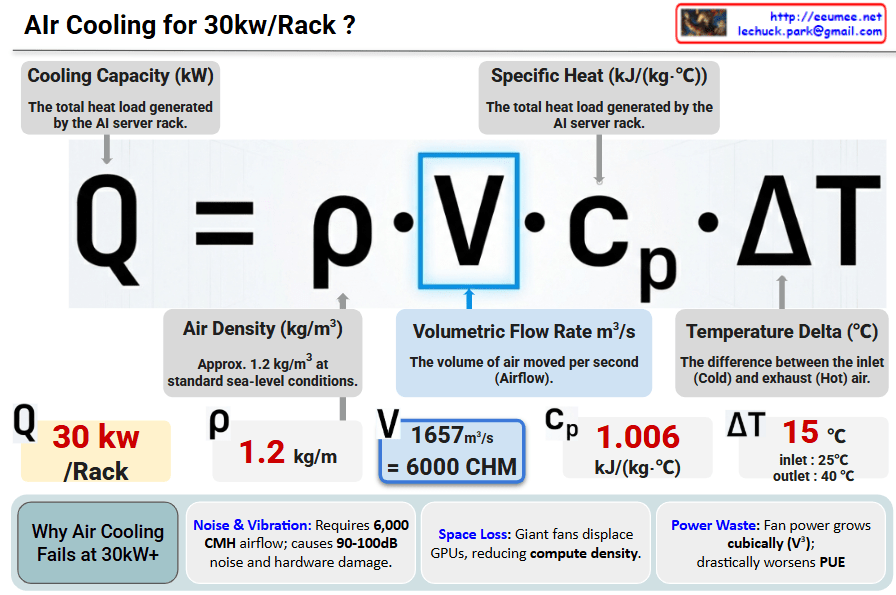
Power Waste: Fan power consumption grows cubically (V^3), causing a significant spike in PUE (Power Usage Effectiveness).
Conclusion: At 30kW/Rack, air cooling hits a physical and economic “wall”. Transitioning to Liquid Cooling is mandatory for next-generation AI Data Centers.
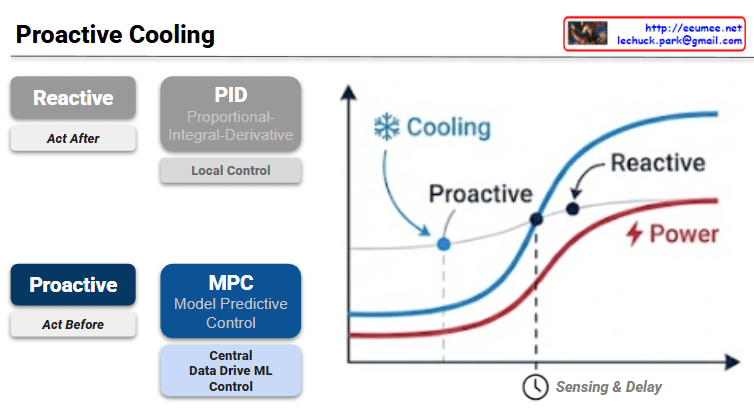
The provided image illustrates the fundamental shift in data center thermal management from traditional Reactive methods to AI-driven Proactive strategies.
1. Comparison of Control Strategies
The slide contrasts two distinct approaches to managing the cooling load in a high-density environment, such as an AI data center.
Feature
Reactive (Traditional)
Proactive (Advanced)
Philosophy
Act After: Responds to changes.
Act Before: Anticipates changes.
Mechanism
PID Control: Proportional-Integral-Derivative.
MPC: Model Predictive Control.
Scope
Local Control: Focuses on individual units/sensors.
Central ML Control: Data-driven, system-wide optimization.
Logic
Feedback-based (error correction).
Feedforward-based (predictive modeling).
2. Graph Analysis: The “Sensing & Delay” Factor
The graph on the right visualizes the efficiency gap between these two methods:
Power (Red Line): Represents the IT load or power consumption which generates heat.
Sensing & Delay: There is a temporal gap between when a server starts consuming power and when the cooling system’s sensors detect the temperature rise and physically ramp up the fans or chilled water flow.
Reactive Cooling (Dashed Blue Line): Because it “acts after,” the cooling response lags behind the power curve. This often results in thermal overshoot, where the hardware momentarily operates at higher temperatures than desired, potentially triggering throttling.
Proactive Cooling (Solid Blue Line): By using Model Predictive Control (MPC), the system predicts the impending power spike. It initiates cooling before the heat is fully sensed, aligning the cooling curve more closely with the power curve to maintain a steady temperature.
3. Technical Implications for AI Infrastructure
In modern data centers, especially those handling fluctuating AI workloads (like LLM training or high-concurrency inference), the “Sensing & Delay” in traditional PID systems can lead to significant energy waste and hardware stress. MPC leverages historical data and real-time telemetry to:
Reduce PUE (Power Usage Effectiveness): By avoiding over-cooling and sudden spikes in fan power.
Improve Reliability: By maintaining a constant thermal envelope, reducing mechanical stress on chips.
Optimize Operational Costs: Through centralized, intelligent resource allocation.
Summary
Proactive Cooling utilizes Model Predictive Control (MPC) and Machine Learning to anticipate heat loads before they occur.
Unlike traditional PID systems that respond to temperature errors, MPC eliminates the Sensing & Delay lag by acting on predicted power spikes.
This shift enables superior energy efficiency and thermal stability, which is critical for high-density AI data center operations.
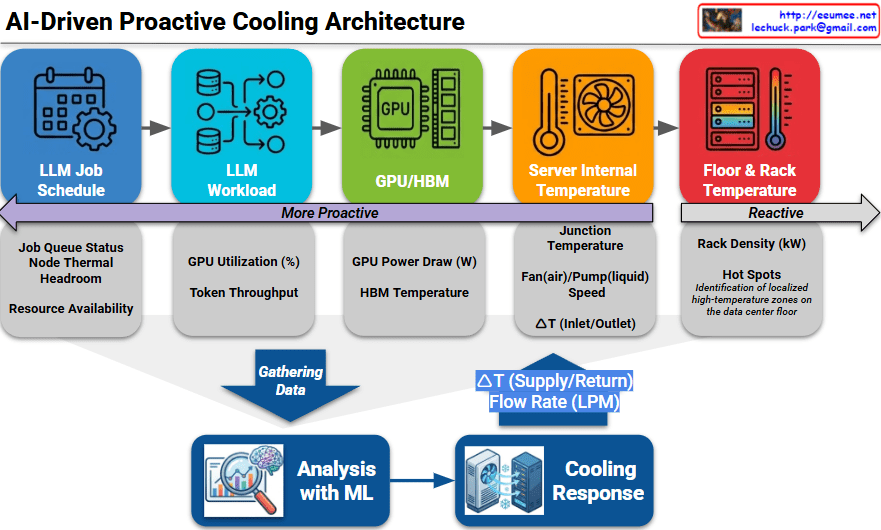
The provided image illustrates an AI-Driven Proactive Cooling Architecture, detailing a sophisticated pipeline that transforms operational data into precise thermal management.
1. The Proactive Data Hierarchy
The architecture categorizes data sources along a spectrum, moving from “More Proactive” (predicting future heat) to “Reactive” (measuring existing heat).
LLM Job Schedule (Most Proactive): This layer looks at the job queue, node thermal headroom, and resource availability. It allows the system to prepare for heat before the first calculation even begins.
LLM Workload: Monitors real-time GPU utilization (%) and token throughput to understand the intensity of the current processing task.
GPU / HBM: Captures direct hardware telemetry, including GPU power draw (Watts) and High Bandwidth Memory (HBM) temperatures.
Server Internal Temperature: Measures the junction temperature, fan/pump speeds, and the $\Delta T$ (temperature difference) between server inlet and outlet.
Floor & Rack Temperature (Reactive): The traditional monitoring layer that identifies hot spots and rack density (kW) once heat has already entered the environment.
2. The Analysis and Response Loop
The bottom section of the diagram shows how this multi-layered data is converted into action:
Gathering Data: Telemetry from all five layers is aggregated into a central repository.
Analysis with ML: A Machine Learning engine processes this data to predict thermal trends. It doesn’t just look at where the temperature is now, but where it will be in the next few minutes based on the workload.
Cooling Response: The ML insights trigger physical adjustments in the cooling infrastructure, specifically controlling the $\Delta T$ (Supply/Return) and Flow Rate (LPM – Liters Per Minute) of the coolant.
3. Technical Significance
By shifting the control logic “left” (toward the LLM Job Schedule), data centers can eliminate the thermal lag inherent in traditional systems. This is particularly critical for AI infrastructure, where GPU power consumption can spike almost instantaneously, often faster than traditional mechanical cooling systems can ramp up.
Summary
This architecture shifts cooling from a reactive sensor-based model to a proactive workload-aware model using AI/ML.
It integrates data across the entire stack, from high-level LLM job queues down to chip-level GPU power draw and rack temperatures.
The ML engine predicts thermal demand to dynamically adjust coolant flow rates and supply temperatures, significantly improving energy efficiency and hardware longevity.
Results in workload cost waste and performance degradation
Summary
Sensor delays create a critical gap between actual temperature and detected temperature, causing cooling systems to react too late. This results in GPU thermal throttling, performance degradation, and wasted computational resources. Real-time monitoring with fast-response sensors is essential for optimal system performance.
This diagram illustrates the GPU’s power and thermal management system.
Key Components
1. Two Throttling Triggers
Power Throttling: Throttling triggered by power limits
Thermal Throttling: Throttling triggered by temperature limits
2. Different Control Approaches
Power Limit (Budget) Controller: Slow, Linear Step Down
Thermal Safety Controller: Fast, Hard Step Down
This aggressive response is necessary because overheating can cause immediate hardware damage
3. Priority Gate
Receives signals from both controllers and determines which limitation to apply.
4. PMU/SMU/DVFS Controller
The Common Control Unit that manages:
PMU: Power Management Unit
SMU: System Management Unit
DVFS: Dynamic Voltage and Frequency Scaling
5. Actual Adjustment Mechanisms
Clock Domain Controller: Reduces GPU Frequency
Voltage Regulator: Reduces GPU Voltage
6. Final Result
Lower Power/Temp (Throttled): Reduced power consumption and temperature in throttled state
Core Principle
When the GPU reaches power budget or temperature limits, it automatically reduces performance to protect the system. By lowering both frequency and voltage simultaneously, it effectively reduces power consumption (P ∝ V²f).
Summary
GPU throttling uses two controllers—power (slow, linear) and thermal (fast, aggressive)—that feed into a shared PMU/SMU/DVFS system to dynamically reduce clock frequency and voltage. Thermal throttling responds more aggressively than power throttling because overheating poses immediate hardware damage risks. The end result is lower power consumption and temperature, sacrificing performance to maintain system safety and longevity.
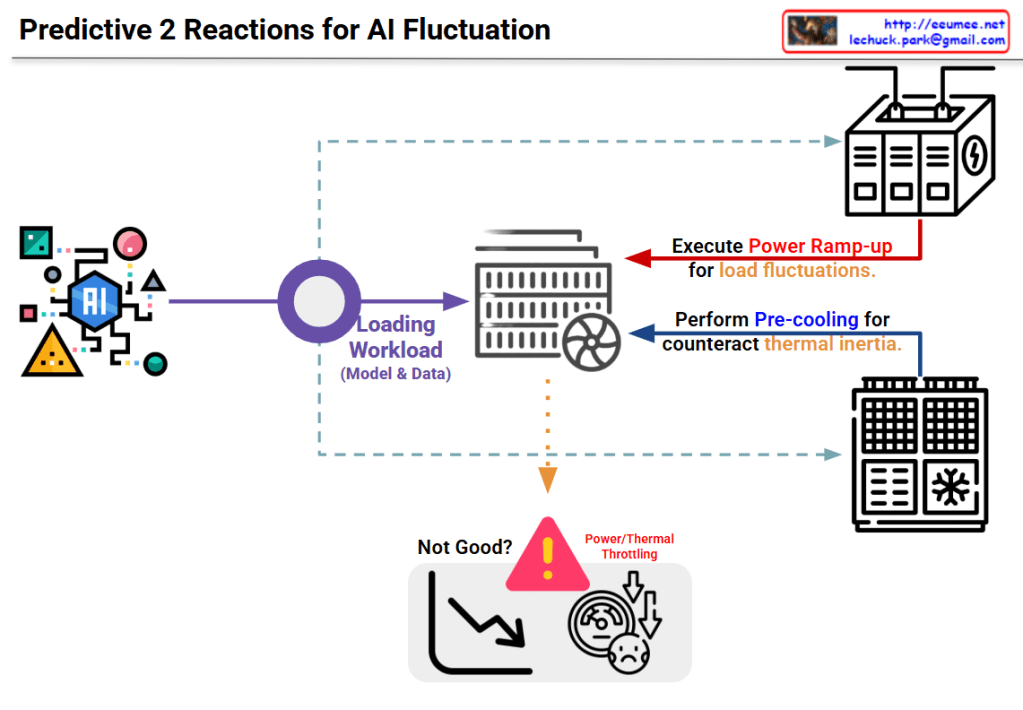
Image Interpretation: Predictive 2-Stage Reactions for AI Fluctuation
This diagram illustrates a two-stage predictive strategy to address load fluctuation issues in AI systems.
System Architecture
Input Stage:
The AI model on the left generates various workloads (model and data)
Processing Stage:
Generated workloads are transferred to the central server/computing system
Two-Stage Predictive Reaction Mechanism
Stage 1: Power Ramp-up
Purpose: Prepare for load fluctuations
Method: The power supply system at the top proactively increases power in advance
Preventive measure to secure power before the load increases
Stage 2: Pre-cooling
Purpose: Counteract thermal inertia
Method: The cooling system at the bottom performs cooling in advance
Proactive response to lower system temperature before heat generation
Problem Scenario
The warning area at the bottom center shows problems that occur without these responses:
Power/Thermal Throttling
Performance degradation (downward curve in the graph)
System dissatisfaction state
Key Concept
This system proposes an intelligent infrastructure management approach that predicts rapid fluctuations in AI workloads and proactively adjusts power and cooling before actual loads occur, thereby preventing performance degradation.
Summary
This diagram presents a predictive two-stage reaction system for AI workload management that combines proactive power ramp-up and pre-cooling to prevent thermal throttling. By anticipating load fluctuations before they occur, the system maintains optimal performance without degradation. The approach represents a shift from reactive to predictive infrastructure management in AI computing environments.
This image illustrates the structural differences between UPS (Uninterruptible Power System) and ESS (Energy Storage System), emphasizing the advanced safety technologies required for ESS due to its “High Power, High Risk” nature.
1. Left Side: System Comparison (UPS vs. ESS)
This section contrasts the purpose and scale of the two systems, highlighting why ESS requires stricter safety measures.
UPS (Traditional System)
Purpose: Bridges the power gap for a short duration (10–30 mins) until the backup generator starts (Generator Wake-Up Time).
Scale: Relatively low capacity (25–500 kWh) and output (100 kW – N MW).
ESS (High-Capacity System)
Purpose: Stores energy for long durations (4+ hours) for active grid management, such as Peak Shaving.
Scale: Handles massive power (~100+ MW) and capacity (~400+ MWh).
Risk Factor: Labeled as “High Power, High Risk,” indicating that the sheer energy density makes it significantly more hazardous than UPS.
2. Right Side: 4 Key Safety Technologies for ESS
Since standard UPS technologies (indicated in gray text) are insufficient for ESS, the image outlines four critical technological upgrades (indicated in bold text).
① Battery Management System (BMS)
(From) Simple voltage monitoring and cut-off.
[To] Active Balancing & Precise State Estimation: Requires algorithms that actively balance cell voltages and accurately calculate SOC (State of Charge) and SOH (State of Health).
② Thermal Management System
(From) Simple air cooling or fans.
[To] Forced Air (HVAC) / Liquid Cooling: Due to high heat generation, robust air conditioning (HVAC) or direct Liquid Cooling systems are necessary.
③ Fire Detection & Suppression
(From) Detecting smoke after a fire starts.
[To] Off-gas Detection & Dedicated Suppression: Detects Off-gas (released before thermal runaway) to prevent fires early, using specialized suppressants like Clean Agents or Water Mist.
④ Physical/Structural Safety
(From) Standard metal enclosures.
[To] Explosion-proof & Venting Design: Enclosures must withstand explosions and safely vent gases.
[To] Fire Propagation Prevention: Includes fire barriers and BPU (Battery Protective Units) to stop fire from spreading between modules.
Summary
Scale: ESS handles significantly higher power and capacity (>400 MWh) compared to UPS, serving long-term grid needs rather than short-term backup.
Risk: Due to the “High Power, High Risk” nature of ESS, standard safety measures used in UPS are insufficient.
Solution: Advanced technologies—such as Liquid Cooling, Off-gas Detection, and Active Balancing BMS—are mandatory to ensure safety and prevent thermal runaway.



 Lechuck Park