New OS

From Claude with some prompting
This image illustrates a more comprehensive structure of a new operating system integrated with AI. Here’s a summary of the key changes and features:

  1. Cloud Connectivity: A “Cloud Connected” element has been added, linked to AI Applications. This represents the integration between local AI and cloud-based AI services.
  2. User Data Protection: The “User Data (Private)” section now includes various icons, visualizing the management of different types of user data and emphasizing privacy protection.
  3. New Interface: The Q&A-style “New Interface” is more prominently displayed, highlighting direct interaction between AI and users.
  4. AI Application Integration: AI Applications are closely connected to User Applications, the Inference Model, and User Data.
  5. Hardware Utilization: The GPU (inference) is clearly marked as specialized hardware for AI tasks.
  6. Localized Learning Data: “Learned Data (Localized)” is included as part of the system, indicating the capability to provide personalized AI experiences.

This structure offers several advantages:

  • Enhanced User Experience: Intuitive interaction through AI-based interfaces
  • Privacy Protection: Secure management of user data
  • Hybrid Cloud-Local AI: Balanced use of local processing and cloud resources
  • Performance Optimization: Efficient AI task processing through GPU
  • Personalization: Customized AI services using localized learning data

This new OS architecture integrates AI as a core component, seamlessly combining traditional OS functions with advanced AI capabilities to present a next-generation computing environment.

AI DC Key

From Claude with some prompting
This image titled “AI DC Key” illustrates the key components of an AI data center. Here’s an interpretation of the diagram:

  1. On the left, there’s an icon representing “Massive Data”.
  2. The center showcases four core elements of AI:
    • “Super Power”
    • “Super Computing” (utilizing GPU)
    • “Super Cooling”
    • “Optimizing Operation”
  3. Below each core element, key considerations are listed:
    • Super Power: “Nature & Consistent”
    • Super Computing: “Super Parallel”
    • Super Cooling: “Liquid Cooling”
    • Optimizing Operation: “Data driven Auto & AI”
  4. On the right, an icon represents “Analyzed Data”.
  5. The overall flow illustrates the process of massive data being input, processed through the AI core elements, and resulting in analyzed data.

This diagram visualizes the essential components of a modern AI data center and their key considerations. It demonstrates how high-performance computing, efficient power management, advanced cooling technology, and optimized operations effectively process and analyze large-scale data, emphasizing the critical technologies or approaches for each element.

Computing with supers

From Claude with some prompting
This diagram titled “Computing works with supers” illustrates the structure and operational principles of modern high-performance computing systems. Key features include:

  1. Power Management: The “Making Power” section features a power icon labeled “Super,” indicating the massive power supply required for high-performance computing. This is emphasized by the phrase “Super Energy is required.”
  2. Central Processing Unit (CPU): Responsible for “Making Infra” and “Making Logic,” performing basic computational functions.
  3. Graphics Processing Unit (GPU) and AI: Located below the CPU, the GPU is directly connected to an AI model. The phrase “Delegate work to AI” demonstrates AI’s significant role in handling complex computing tasks.
  4. Heat Management: The diagram shows “Making Super Heat” from the GPU, managed by a “Control It with Cooling” system, highlighting the importance of thermal management.
  5. Integrated Management: The right sidebar groups power, GPU, and cooling systems together, with the caption “Must Manage All connected Supers.” This underscores the interconnectedness of these core elements and the need for integrated management.
  6. System Efficiency: Each major component is labeled “Super,” emphasizing their crucial roles in the high-performance system. This suggests that harmonious management of these elements determines the overall system’s efficiency and performance.
  7. Output: The “Super” human icon at the top right implies that this high-performance system produces exceptional results.

This diagram emphasizes that power management, GPU utilization, heat management, and AI integration are critical in modern high-performance computing. It highlights that efficient integrated management of these elements is key to determining the overall system’s performance and efficiency. Additionally, it suggests the growing importance of AI and automation technologies in effectively managing such complex systems.

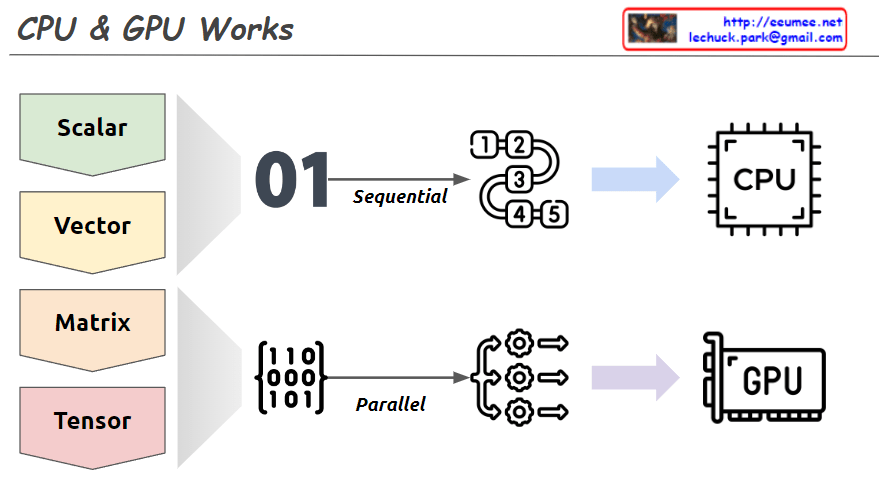
CPU & GPU Works

From Claude with some prompting
This image explains the working principles of CPU (Central Processing Unit) and GPU (Graphics Processing Unit) in a visual manner.

  1. Data Types:
    • Scalar: A single value
    • Vector: One-dimensional array
    • Matrix: Two-dimensional array
    • Tensor: Multi-dimensional array
  2. CPU Work Method:
    • Sequential processing, denoted by ’01’
    • Tasks are processed in order, as shown by 1, 2, 3, 4, 5
    • Primarily handles scalar data, processing complex tasks sequentially
  3. GPU Work Method:
    • Parallel processing, represented by a matrix
    • Icons show multiple tasks being processed simultaneously
    • Mainly deals with multi-dimensional data like matrices or tensors, processing many tasks in parallel

The image demonstrates that while CPUs process tasks sequentially, GPUs can handle many tasks simultaneously in parallel. This helps explain which processing unit is more efficient based on the complexity and volume of data. Complex and large-scale data (matrices, tensors) are better suited for GPUs, while simple, sequential tasks are more appropriate for CPUs.

Inside H100

From Claude with some prompting
This image illustrates the internal architecture of the Nvidia H100 GPU. It shows the key components and interconnections within the GPU. A few key points from the image:

The PCIe Gen5 interface connects the H100 GPU to the external system, CPUs, storage devices, an

The NVLink allows interconnecting multiple H100 GPUs, supporting up to 6 NVlink connections with a 900GB/s bandwidth.

The GPU has an internal HBM3 memory of 80GB, which is 2x faster than the previous HBM2 memory.

New infra age

From Claude with some prompting
This image illustrates the surge in data and the advancement of AI technologies, particularly parallel processing techniques that efficiently handle massive amounts of data. As a result, there is a growing need for infrastructure technologies that can support such data processing capabilities. Technologies like big data processing, parallel processing, direct memory access, and GPU computing have evolved to meet this demand. The overall flow depicts the data explosion, the advancement of AI and parallel processing techniques, and the evolution of supporting infrastructure technologies.

CPU,FPGA,ASIC

From Claude with some prompting
The CPU is described as a central processing unit for general-purpose computing, handling diverse tasks with high performance but at a low cost/price ratio.

This image provides an overview of different types of processors and their key characteristics. It compares CPUs, ASICs (Application-Specific Integrated Circuits), FPGAs (Field-Programmable Gate Arrays), and GPUs (Graphics Processing Units).

The ASIC is an application-specific integrated circuit designed for specific tasks like cryptography and AI. It has low performance per price but is highly optimized for its intended use cases.

The FPGA is a reconfigurable processor that allows design changes and prototyping. It has medium performance per price and is suitable for data processing sequences.

The GPU is designed for graphic processing and parallel data processing. It excels at high-performance computing for graphics-intensive applications, but has a medium to high cost/price ratio.

The image highlights the key differences in terms of processing capability, specialization, reconfigurability, performance, and cost among these processor types.