TDP (Thermal Design power)

TDP (Thermal Design Power) Interpretation

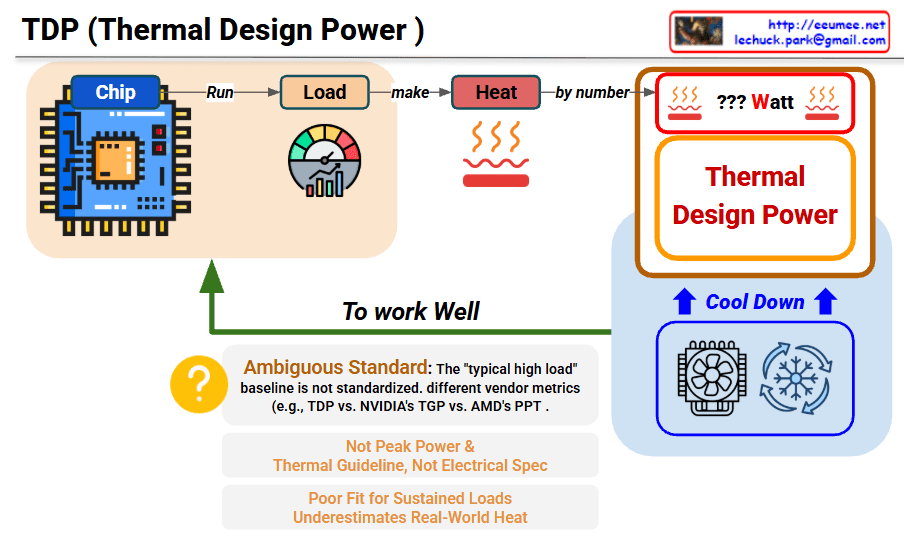
This image explains the concept and limitations of TDP (Thermal Design Power).

Main Process

Chip → Run Load → Generate Heat → TDP Measurement

  1. Chip: Processor/chip operates
  2. Load (Run): Executes specific workload
  3. Heat (make): Heat is generated (measured by number)
  4. ??? Watt: Displayed as TDP value

Role of TDP

  • Thermal Design Guideline: Reference for cooling system design
  • Cool Down: Serves as baseline for cooling solutions like fans and coolers

⚠️ Critical Limitations

Ambiguous Standard

  • “Typical high load” baseline is not standardized
  • Different measurement methods across vendors:
    • Intel’s TDP
    • NVIDIA’s TGP (Total Graphics Power)
    • AMD’s PPT (Package Power Tracking)

Problems with TDP

  1. Not Peak Power – Average value, not maximum power consumption
  2. Thermal Guideline, Not Electrical Spec – Just a guide for thermal management
  3. Poor Fit for Sustained Loads – Doesn’t properly reflect real high-load scenarios
  4. Underestimates Real-World Heat – Measured lower than actual heat generation

Summary

TDP is a thermal guideline for cooling system design, not an accurate measure of actual power consumption or heat generation. Different manufacturers use inconsistent standards (TDP/TGP/PPT), making comparisons difficult. It underestimates real-world heat and peak power, serving only as a reference point rather than a precise specification.

#TDP #ThermalDesignPower #CPUCooling #PCHardware #ThermalManagement #ComputerCooling #ProcessorSpecs #HardwareEducation #TechExplained #CoolingSystem #PowerConsumption #PCBuilding #TechSpecs #HeatDissipation #HardwareLimitations

With Claude

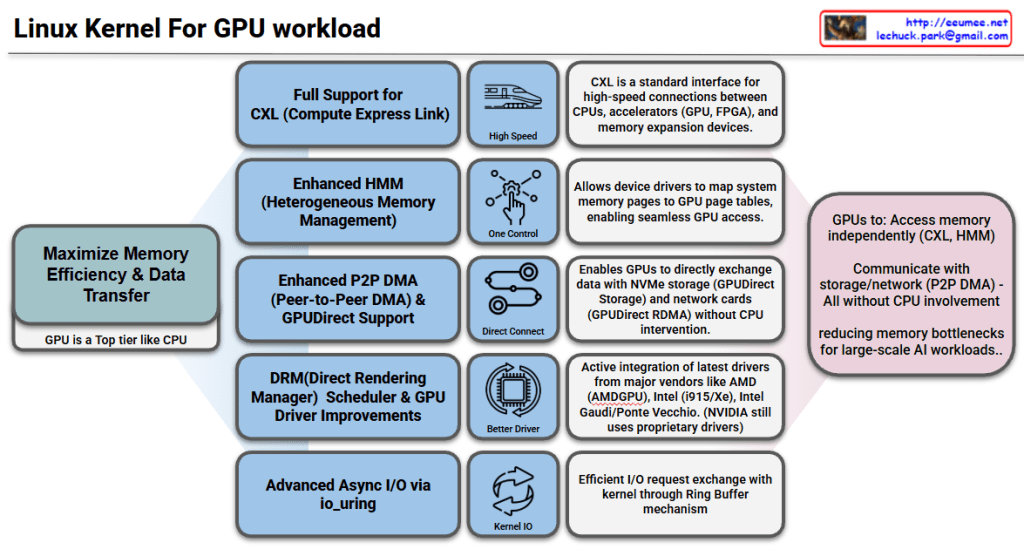
Linux kernel for GPU Workload

Linux Kernel GPU Workload Support Features

Goal: Maximize Memory Efficiency & Data Transfer

The core objective is to treat GPUs as a top-tier component like CPUs, reducing memory bottlenecks for large-scale AI workloads.

Key Features

1. Full CXL (Compute Express Link) Support

  • Standard interface for high-speed connections between CPUs, accelerators (GPU, FPGA), and memory expansion devices
  • Enables high-speed data transfer

2. Enhanced HMM (Heterogeneous Memory Management)

  • Heterogeneous memory management capabilities
  • Allows device drivers to map system memory pages to GPU page tables
  • Enables seamless GPU memory access

3. Enhanced P2P DMA & GPUDirect Support

  • Enables direct data exchange between GPUs
  • Direct communication with NVMe storage and network cards (GPUDirect RDMA)
  • Operates without CPU intervention for improved performance

4. DRM Scheduler & GPU Driver Improvements

  • Enhanced Direct Rendering Manager scheduling functionality
  • Active integration of latest drivers from major vendors: AMD (AMDGPU), Intel (i915/Xe), Intel Gaudi/Ponte Vecchio
  • NVIDIA still uses proprietary drivers

5. Advanced Async I/O via io_uring

  • Efficient I/O request exchange with kernel through Ring Buffer mechanism
  • Optimized asynchronous I/O performance

Summary

The Linux kernel now enables GPUs to independently access memory (CXL, HMM), storage, and network resources (P2P DMA, GPUDirect) without CPU involvement. Enhanced drivers from AMD, Intel, and improved schedulers optimize GPU workload management. These features collectively eliminate CPU bottlenecks, making the kernel highly efficient for large-scale AI and HPC workloads.

#LinuxKernel #GPU #AI #HPC #CXL #HMM #GPUDirect #P2PDMA #AMDGPU #IntelGPU #MachineLearning #HighPerformanceComputing #DRM #io_uring #HeterogeneousComputing #DataCenter #CloudComputing

With Claude

FP8 Mixed-Precision Training

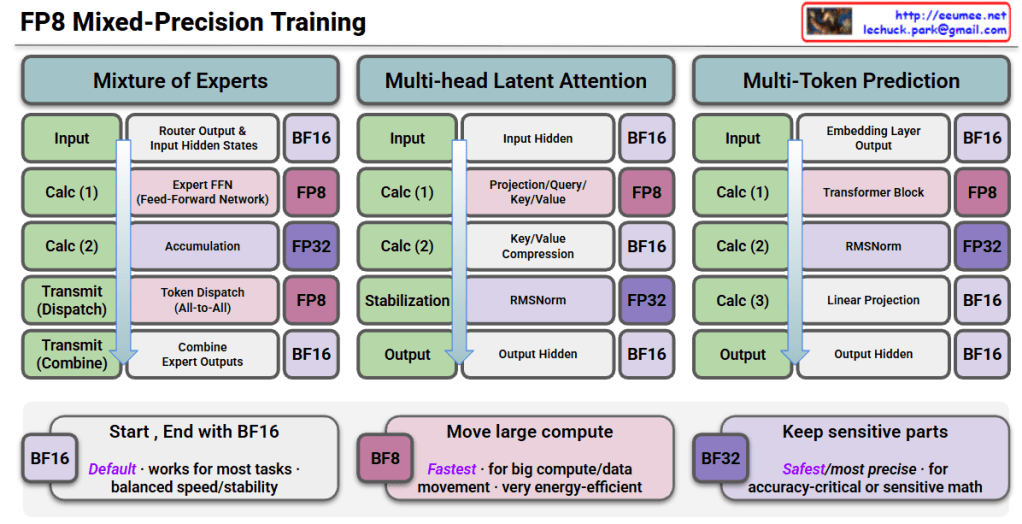
FP8 Mixed-Precision Training Interpretation

This image is a technical diagram showing FP8 (8-bit Floating Point) Mixed-Precision Training methodology.

Three Main Architectures

1. Mixture of Experts (MoE)

  • Input: Starts with BF16 precision
  • Calc (1): Router output & input hidden states → BF16
  • Calc (2): Expert FFN (Feed-Forward Network) → FP8 computation
  • Calc (3): Accumulation → FP32
  • Transmit (Dispatch): Token dispatch (All-to-All) → FP8
  • Transmit (Combine): Combine expert outputs → BF16
  • Output: BF16

2. Multi-head Latent Attention

  • Input: BF16
  • Calc (1): Input hidden states → BF16
  • Calc (2): Projection/Query/Key/Value → FP8
  • Calc (3): Key/Value compression → BF16
  • Stabilization: RMSNorm → FP32
  • Output: Output hidden states → BF16

3. Multi-Token Prediction

  • Input: BF16
  • Calc (1): Embedding layer output → BF16
  • Calc (2): Transformer block → FP8
  • Calc (3): RMSNorm → FP32
  • Calc (4): Linear projection → BF16
  • Output: Output hidden states → BF16

Precision Strategy (Bottom Boxes)

🟦 BF16 (Default)

  • Works for most tasks
  • Balanced speed/stability

🟪 BF8 (Fastest)

  • For large compute/data movement
  • Very energy-efficient

🟣 BF32 (Safest/Most Precise)

  • For accuracy-critical or sensitive math operations

Summary

FP8 mixed-precision training strategically uses different numerical precisions across model operations: FP8 for compute-intensive operations (FFN, attention, transformers) to maximize speed and efficiency, FP32 for sensitive operations like accumulation and normalization to maintain numerical stability, and BF16 for input/output and communication to balance performance. This approach enables faster training with lower energy consumption while preserving model accuracy, making it ideal for training large-scale AI models efficiently.


#FP8Training #MixedPrecision #AIOptimization #DeepLearning #ModelEfficiency #NeuralNetworks #ComputeOptimization #MLPerformance #TransformerTraining #EfficientAI #LowPrecisionTraining #AIInfrastructure #MachineLearning #GPUOptimization #ModelTraining

With Claude

LLM goes with Computing-Power-Cooling

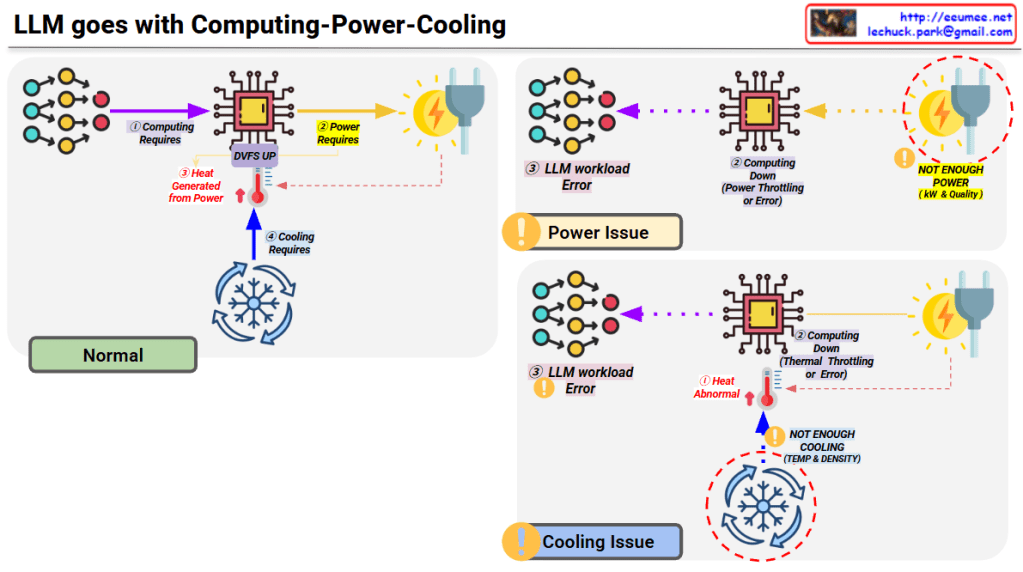
LLM’s Computing-Power-Cooling Relationship

This diagram illustrates the technical architecture and potential issues that can occur when operating LLMs (Large Language Models).

Normal Operation (Top Left)

  1. Computing Requires – LLM workload is delivered to the processor
  2. Power Requires – Power supplied via DVFS (Dynamic Voltage and Frequency Scaling)
  3. Heat Generated – Heat is produced during computing processes
  4. Cooling Requires – Temperature management through proper cooling systems

Problem Scenarios

Power Issue (Top Right)

  • Symptom: Insufficient power (kW & Quality)
  • Results:
    • Computing performance degradation
    • Power throttling or errors
    • LLM workload errors

Cooling Issue (Bottom Right)

  • Symptom: Insufficient cooling (Temperature & Density)
  • Results:
    • Abnormal heat generation
    • Thermal throttling or errors
    • Computing performance degradation
    • LLM workload errors

Key Message

For stable LLM operations, the three elements of Computing-Power-Cooling must be balanced. If any one element is insufficient, it leads to system-wide performance degradation or errors. This emphasizes that AI infrastructure design must consider not only computing power but also adequate power supply and cooling systems together.


Summary

  • LLM operation requires a critical balance between computing, power supply, and cooling infrastructure.
  • Insufficient power causes power throttling, while inadequate cooling leads to thermal throttling, both resulting in workload errors.
  • Successful AI infrastructure design must holistically address all three components rather than focusing solely on computational capacity.

#LLM #AIInfrastructure #DataCenter #ThermalManagement #PowerManagement #AIOperations #MachineLearning #HPC #DataCenterCooling #AIHardware #ComputeOptimization #MLOps #TechInfrastructure #AIatScale #GreenAI

WIth Claude

Basic LLM Workflow

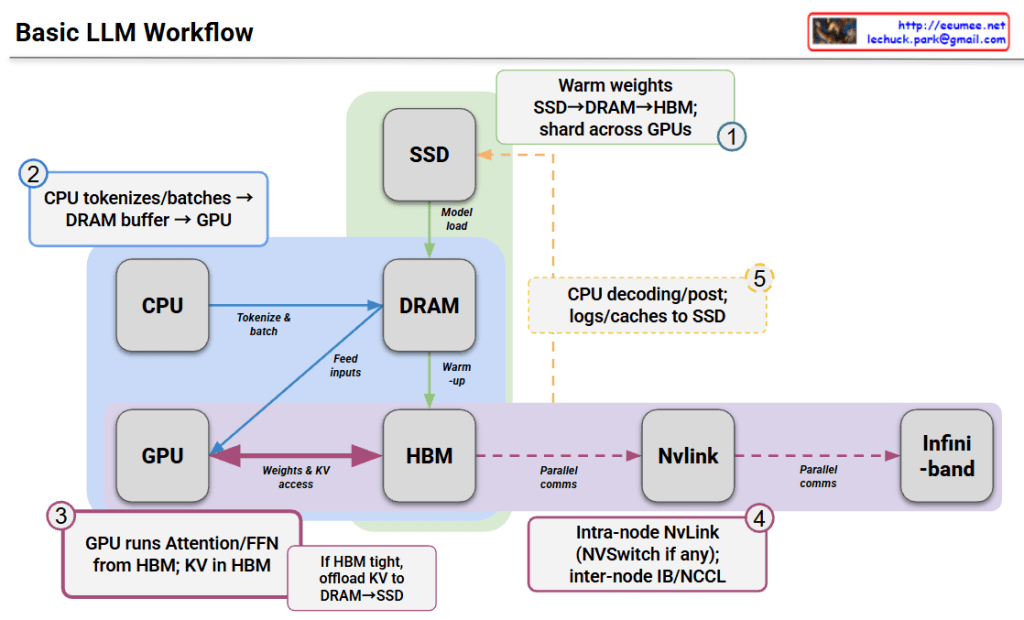
Basic LLM Workflow Interpretation

This diagram illustrates how data flows through various hardware components during the inference process of a Large Language Model (LLM).

Step-by-Step Breakdown

① Initialization Phase (Warm weights)

  • Model weights are loaded from SSD → DRAM → HBM (High Bandwidth Memory)
  • Weights are distributed and shared across multiple GPUs

② Input Processing (CPU tokenizes/batches)

  • CPU tokenizes input text and processes batches
  • Data is transferred through DRAM buffer to GPU

③ GPU Inference Execution

  • GPU performs Attention and FFN (Feed-Forward Network) computations from HBM
  • KV cache (Key-Value cache) is stored in HBM
  • If HBM is tight, KV cache can be offloaded to DRAM or SSD

④ Distributed Communication (NvLink/Infiniband)

  • Intra-node: High-speed communication between GPUs via NvLink (with NVSwitch if available)
  • Inter-node: Parallel communication through InfiniBand or NCCL

⑤ Post-processing (CPU decoding/post)

  • CPU decodes generated tokens and performs post-processing
  • Logs and caches are saved to SSD

Key Characteristics

This architecture leverages a memory hierarchy to efficiently execute large-scale models:

  • SSD: Long-term storage (slowest, largest capacity)
  • DRAM: Intermediate buffer
  • HBM: GPU-dedicated high-speed memory (fastest, limited capacity)

When model size exceeds GPU memory, strategies include distributing across multiple GPUs or offloading data to higher-level memory tiers.


Summary

This diagram shows how LLMs process data through a memory hierarchy (SSD→DRAM→HBM) across CPU and GPU components. The workflow involves loading model weights, tokenizing inputs on CPU, running inference on GPU with HBM, and using distributed communication (NvLink/InfiniBand) for multi-GPU setups. Memory management strategies like KV cache offloading enable efficient execution of large models that exceed single GPU capacity.

#LLM #DeepLearning #GPUComputing #MachineLearning #AIInfrastructure #NeuralNetworks #DistributedComputing #HPC #ModelOptimization #AIArchitecture #NvLink #Transformer #MLOps #AIEngineering #ComputerArchitecture

With Claude