Data Center Shift with AI

Data Center Shift with AI

This diagram illustrates how data centers are transforming as they enter the AI era.

๐Ÿ“… Timeline of Technological Evolution

The top section shows major technology revolutions and their timelines:

  • Internet ’95 (Internet era)
  • Mobile ’07 (Mobile era)
  • Cloud ’10 (Cloud era)
  • Blockchain
  • AI(LLM) ’22 (Large Language Model-based AI era)

๐Ÿข Traditional Data Center Components

Conventional data centers consisted of the following core components:

  • Software
  • Server
  • Network
  • Power
  • Cooling

These were designed as relatively independent layers.

๐Ÿš€ New Requirements in the AI Era

With the introduction of AI (especially LLMs), data centers require specialized infrastructure:

  1. LLM Model – Operating large language models
  2. GPU – High-performance graphics processing units (essential for AI computations)
  3. High B/W – High-bandwidth networks (for processing large volumes of data)
  4. SMR/HVDC – Switched-Mode Rectifier/High-Voltage Direct Current power systems
  5. Liquid/CDU – Liquid cooling/Cooling Distribution Units (for cooling high-heat GPUs)

๐Ÿ”— Key Characteristic of AI Data Centers: Integrated Design

The circular connection in the center of the diagram represents the most critical feature of AI data centers:

Tight Interdependency between SW/Computing/Network โ†” Power/Cooling

Unlike traditional data centers, in AI data centers:

  • GPU-based computing consumes enormous power and generates significant heat
  • High B/W networks consume additional power during massive data transfers between GPUs
  • Power systems (SMR/HVDC) must stably supply high power density
  • Liquid cooling (Liquid/CDU) must handle high-density GPU heat in real-time

These elements must be closely integrated in design, and optimizing just one element cannot guarantee overall system performance.

๐Ÿ’ก Key Message

AI workloads require moving beyond the traditional layer-by-layer independent design approach of conventional data centers, demanding that computing-network-power-cooling be designed as one integrated system. This demonstrates that a holistic approach is essential when building AI data centers.


๐Ÿ“ Summary

AI data centers fundamentally differ from traditional data centers through the tight integration of computing, networking, power, and cooling systems. GPU-based AI workloads create unprecedented power density and heat generation, requiring liquid cooling and HVDC power systems. Success in AI infrastructure demands holistic design where all components are co-optimized rather than independently engineered.

#AIDataCenter #DataCenterEvolution #GPUInfrastructure #LiquidCooling #AIComputing #LLM #DataCenterDesign #HighPerformanceComputing #AIInfrastructure #HVDC #HolisticDesign #CloudComputing #DataCenterCooling #AIWorkloads #FutureOfDataCenters

With Claude

network issue in a GPU workload

This diagram illustrates network bottleneck issues in large-scale AI/ML systems.

Key Components:

Left side:

  • Big Data and AI Model/Workload connected to the system via network

Center:

  • Large-scale GPU cluster (multiple GPUs arranged in a grid pattern)
  • Each GPU is interconnected for distributed processing

Right side:

  • Power supply and cooling systems

Core Problem:

The network interface specifications shown at the bottom reveal bandwidth mismatches:

  • inter GPU NVLink: 600GB/s
  • inter Server Infiniband: 400Gbps
  • CPU/RAM/DISK PCIe/NVLink: (relatively lower bandwidth)

“One Issue” – System-wide Propagation:

A network bottleneck or failure at a specific point (marked with red circle) “spreads throughout the entire system” as indicated by the yellow arrows.

This diagram warns that in large-scale AI training, a single network bottleneck can have catastrophic effects on overall system performance. It visualizes how bandwidth imbalances at various levels – GPU-to-GPU communication, server-to-server communication, and storage access – can compromise the efficiency of the entire system. The cascading effect demonstrates how network issues can quickly propagate and impact the performance of distributed AI workloads across the infrastructure.

with Claude

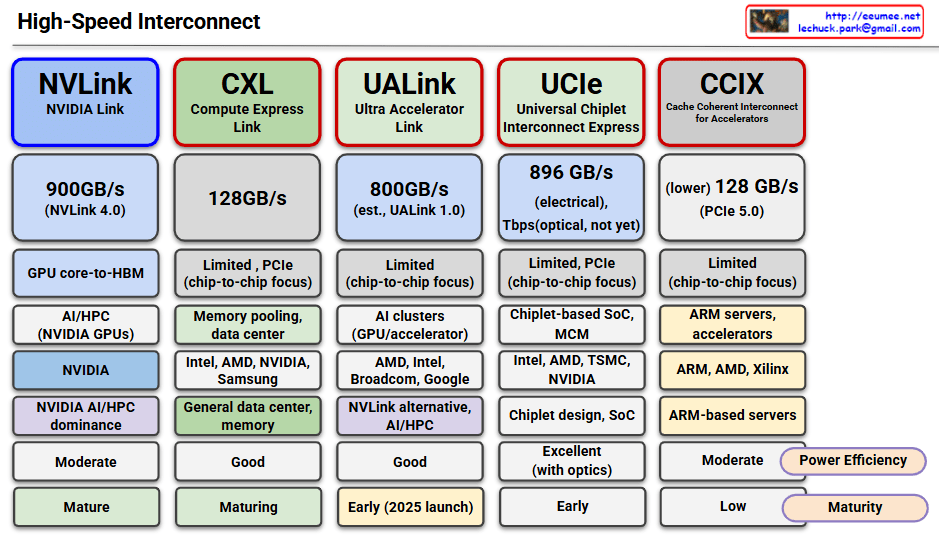
High-Speed Interconnect

This image compares five major high-speed interconnect technologies:

NVLink (NVIDIA Link)

  • Speed: 900GB/s (NVLink 4.0)
  • Use Case: GPU core-to-HBM, AI/HPC with NVIDIA GPUs
  • Features: NVIDIA proprietary, dominates AI/HPC market
  • Maturity: Mature

CXL (Compute Express Link)

  • Speed: 128GB/s
  • Use Case: Memory pooling, data center, general data center memory
  • Features: Supported by Intel, AMD, NVIDIA, Samsung; PCIe-based with chip-to-chip focus
  • Maturity: Maturing

UALink (Ultra Accelerator Link)

  • Speed: 800GB/s (estimated, UALink 1.0)
  • Use Case: AI clusters, GPU/accelerator interconnect
  • Features: Led by AMD, Intel, Broadcom, Google; NVLink alternative
  • Maturity: Early (2025 launch)

UCIe (Universal Chiplet Interconnect Express)

  • Speed: 896GB/s (electrical), 7Tbps (optical, not yet available)
  • Use Case: Chiplet-based SoC, MCM (Multi-Chip Module)
  • Features: Supported by Intel, AMD, TSMC, NVIDIA; chiplet design focus
  • Maturity: Early stage, excellent performance with optical version

CCIX (Cache Coherent Interconnect for Accelerators)

  • Speed: 128GB/s (PCIe 5.0-based)
  • Use Case: ARM servers, accelerators
  • Features: Supported by ARM, AMD, Xilinx; ARM-based server focus
  • Maturity: Low, limited power efficiency

Summary: All technologies are converging toward higher bandwidth, lower latency, and chip-to-chip connectivity to address the growing demands of AI/HPC workloads. The effectiveness varies by ecosystem, with specialized solutions like NVLink leading in performance while universal standards like CXL focus on broader compatibility and adoption.

With Claude

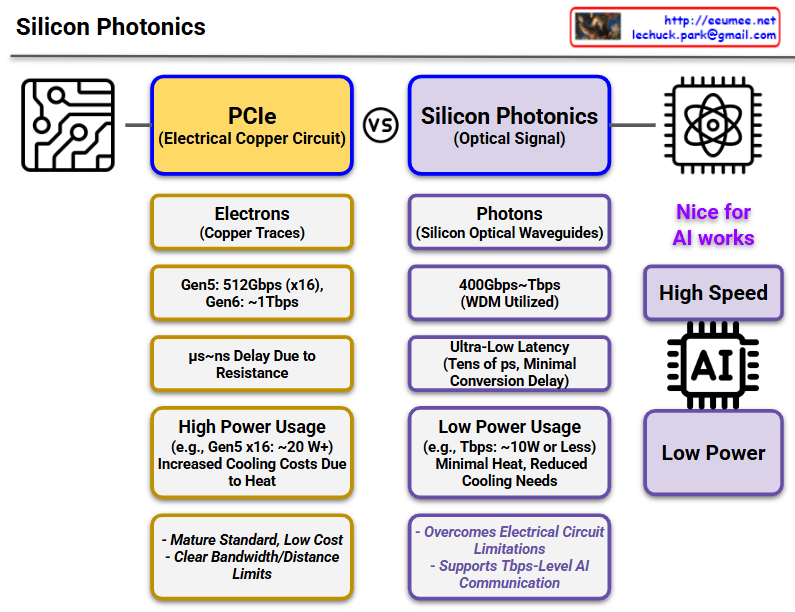
Silicon Photonics

This diagram compares PCIe (Electrical Copper Circuit) and Silicon Photonics (Optical Signal) technologies.

PCIe (Left, Yellow Boxes)

  • Signal Transmission: Uses electrons (copper traces)
  • Speed: Gen5 512Gbps (x16), Gen6 ~1Tbps expected
  • Latency: ฮผs~ns level delay due to resistance
  • Power Consumption: High (e.g., Gen5 x16 ~20W), increased cooling costs due to heat generation
  • Pros/Cons: Mature standard with low cost, but clear bandwidth/distance limitations

Silicon Photonics (Right, Purple Boxes)

  • Signal Transmission: Uses photons (silicon optical waveguides)
  • Speed: 400Gbps~7Tbps (utilizing WDM technology)
  • Latency: Ultra-low latency (tens of ps, minimal conversion delay)
  • Power Consumption: Low (e.g., 7Tbps ~10W or less), minimal heat with reduced cooling needs
  • Key Benefits:
    • Overcomes electrical circuit limitations
    • Supports 7Tbps-level AI communication
    • Optimized for AI workloads (high speed, low power)

Key Message

Silicon Photonics overcomes the limitations of existing PCIe technology (high power consumption, heat generation, speed limitations), making it a next-generation technology particularly well-suited for AI workloads requiring high-speed data processing.

With Claude

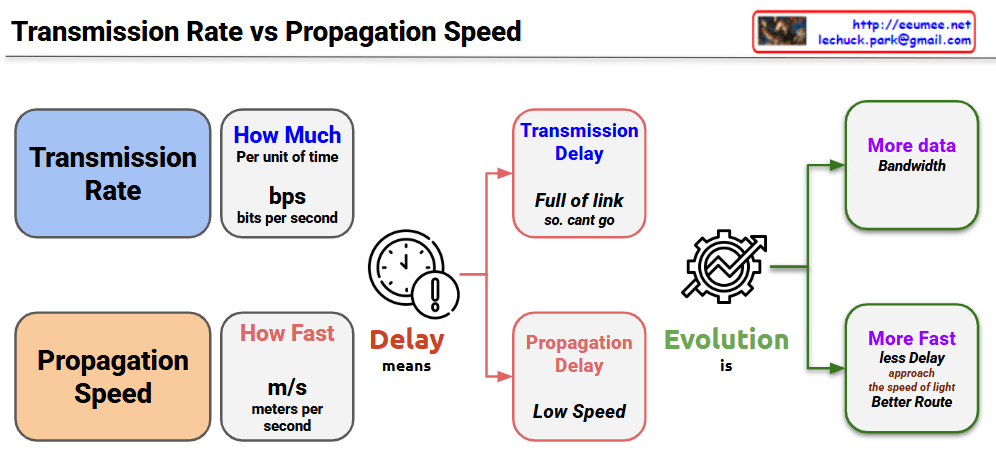
Transmission Rate vs Propagation Speed

Key Concepts

Transmission Rate

  • Amount of data processable per unit time (bps – bits per second)
  • “Processing speed” concept – how much data can be handled simultaneously
  • Low transmission rate causes Transmission Delay
  • “Link is full, cannot send data”

Propagation Speed

  • Speed of signal movement through physical media (m/s – meters per second)
  • “Travel speed” concept – how fast signals move
  • Slow propagation speed causes Propagation Delay
  • “Arrives late due to long distance”

Meaning of Delay

Two types of delays affect network performance through different principles. Transmission delay is packet size divided by transmission rate – the time to push data into the link. Propagation delay is distance divided by propagation speed – the time for signals to physically travel.

Two Directions of Technology Evolution

Bandwidth Expansion (More Data Bandwidth)

  • Improved data processing capability through transmission rate enhancement
  • Development of high-speed transmission technologies like optical fiber and 5G
  • No theoretical limits – continuous improvement possible

Path Optimization (More Fast, Less Delay)

  • Faster response times through propagation delay improvement
  • Physical distance reduction, edge computing, optimal routing
  • Fundamental physical limits exist: cannot exceed speed of light (c = 3ร—10โธ m/s)
  • Actual media is slower due to refractive index (optical fiber: ~2ร—10โธ m/s)

Network communication involves two distinct “speed” concepts: Transmission Rate (how much data can be processed per unit time in bps) and Propagation Speed (how fast signals physically travel in m/s). While transmission rate can be improved infinitely through technological advancement, propagation speed faces an absolute physical limit – the speed of light – creating fundamentally different approaches to network optimization. Understanding this distinction is crucial because transmission delays require bandwidth solutions, while propagation delays require path optimization within unchangeable physical constraints.

With Claude

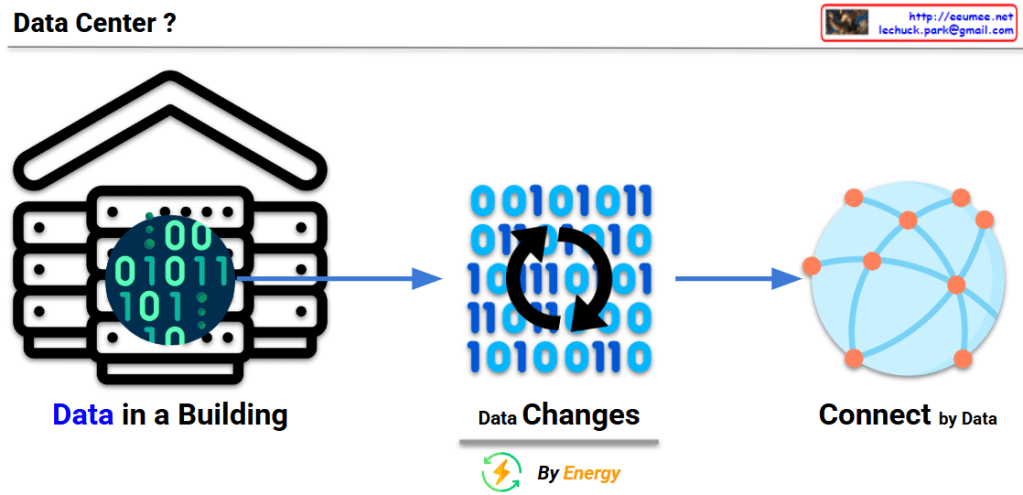
Data Center

This image explains the fundamental concept and function of a data center:

  1. Left: “Data in a Building” – Illustrates a data center as a physical building that houses digital data (represented by binary code of 0s and 1s).
  2. Center: “Data Changes” – With the caption “By Energy,” showing how data is processed and transformed through the consumption of energy.
  3. Right: “Connect by Data” – Demonstrates how processed data from the data center connects to the outside world, particularly the internet, forming networks.

This diagram visualizes the essential definition of a data center – a physical building that stores data, consumes energy to process that data, and plays a crucial role in connecting this data to the external world through the internet.

With Claude

TCP Challenge ACK

This image explains the TCP Challenge ACK mechanism.

At the top, it shows a normal “TCP Connection Established” state. Below that, it illustrates two attack scenarios and the defense mechanism:

  1. First scenario: An attacker sends a SYN packet with SEQ(attack) value to an already connected session. The server responds with a TCP Challenge ACK.
  2. Second scenario: An attacker sends an RST packet with SEQ(attack) value. The server checks if the SEQ(attack) value is within the receive window size (RECV_WIN_SIZE):
    • If the value is inside the window (YES) – The session is reset.
    • If the value is outside the window (NO) – A TCP Challenge ACK is sent.

Additional information at the bottom includes:

  • The Challenge ACK is generated in the format seed ACK = SEQ(attack)+@
  • The net.ipv4.tcp_challenge_ack_limit setting indicates the limit number of TCP Challenge ACKs sent per second, which is used to block RST DDoS attacks.

Necessity and Effectiveness of TCP Challenge ACK:

TCP Challenge ACK is a critical mechanism for enhancing network security. Its necessity and effectiveness include:

  • Preventing Connection Hijacking: Detects and blocks attempts by attackers trying to hijack legitimate TCP connections.
  • Session Protection: Protects existing TCP sessions from RST/SYN packets with invalid sequence numbers.
  • Attack Validation: Verifies the authenticity of packets through Challenge ACKs, preventing connection termination by malicious packets.
  • DDoS Mitigation: Protects systems from RST flood attacks that maliciously terminate TCP connections.
  • Defense Against Blind Attacks: Increases the difficulty of blind attacks by requiring attackers to correctly guess the exact sequence numbers for successful attacks.

With Claude