Dynamic Voltage and Frequency Scaling (in GPU)

This image illustrates the DVFS (Dynamic Voltage and Frequency Scaling) system workflow, which is a power management technique that dynamically adjusts CPU/GPU voltage and frequency to optimize power consumption.

Key Components and Operation Flow

1. Main Process Flow (Top Row)

  • Workload InitWorkload AnalysisDVFS Policy DecisionClock Frequency AdjustmentVoltage AdjustmentWorkload ExecutionWorkload Finish

2. Core System Components

Power State Management:

  • Basic power states: P0~P12 (P0 = highest performance, P12 = lowest power)
  • Real-time monitoring through PMU (Power Management Unit)

Analysis & Decision Phase:

  • Applies dynamic power consumption formula using algorithms
  • Considers thermal limits in analysis
  • Selects new power state (High: P0-P2, Low: P8-P10)
  • P-State changes occur within 10μs~1ms

Frequency Adjustment (PLL – Phase-Locked Loop):

  • Adjusts GPU core and memory clock frequencies
  • Typical range: 1,410MHz~1,200MHz (memory), 1,000MHz~600MHz (core)
  • Adjustment time: 10-100 microseconds

Voltage Adjustment (VRM – Voltage Regulator Module):

  • Adjusts voltage supplied to GPU core and memory
  • Typical range: 1.1V (P0) to 0.8V (P8)
  • VRM stabilizes voltage within tens of microseconds

3. Real-time Feedback Loop

The system operates a continuous feedback loop that readjusts P-states in real-time based on workload changes, maintaining optimal balance between performance and power efficiency.

4. Execution Phase

The GPU executes workloads at new frequency and voltage settings, with asynchronous adjustments based on frequency and voltage changes. After completion, the system transitions to low-power states (e.g., P10, P12) to conserve energy.


Summary: Key Benefits of DVFS

DVFS technology is for AI data centers as it optimizes GPU efficiency management to achieve maximum overall power efficiency. By intelligently scaling thousands of GPUs based on AI workload demands, DVFS can reduce total data center power consumption by 30-50% while maintaining peak AI performance during training and inference operations, making it essential for sustainable and cost-effective AI infrastructure at scale.

With Claude

Power Control : UPS vs ESS

ESS System Analysis for AI Datacenter Power Control

This diagram illustrates the ESS (Energy Storage System) technology essential for providing flexible high-power supply for AI datacenters. Goldman Sachs Research forecasts that AI will drive a 165% increase in datacenter power demand by 2030, with AI representing about 19% of datacenter power demand by 2028, necessitating advanced power management beyond traditional UPS limitations.

ESS System Features for AI Datacenter Applications

1. High Power Density Battery System

  • Rapid Charge/Discharge: Immediate response to sudden power fluctuations in AI workloads
  • Large-Scale Storage: Massive power backup capacity for GPU-intensive AI processing
  • High Power Density: Optimized for space-constrained datacenter environments

2. Intelligent Power Management Capabilities

  • Overload Management: Handles instantaneous high-power demands during AI inference/training
  • GPU Load Prediction: Analyzes AI model execution patterns to forecast power requirements
  • High Response Speed: Millisecond-level power injection/conversion preventing AI processing interruptions
  • Predictive Analytics: Machine learning-based power demand forecasting

3. Flexible Operation Optimization

  • Peak Shaving: Reduces power costs during AI workload peak hours
  • Load Balancing: Distributes power loads across multiple AI model executions
  • Renewable Energy Integration: Supports sustainable AI datacenter operations
  • Cost Optimization: Minimizes AI operational expenses through intelligent power management

Central Power Management System – Essential Core Component of ESS

The Central Power Management System is not merely an auxiliary feature but a critical essential component of ESS for AI datacenters:

1. Precise Data Collection

  • Real-time monitoring of power consumption patterns by AI workload type
  • Tracking power usage across GPU, CPU, memory, and other components
  • Integration of environmental conditions and cooling system power data
  • Comprehensive telemetry from all datacenter infrastructure elements

2. AI-Based Predictive Analysis

  • Machine learning algorithms for AI workload prediction
  • Power demand pattern learning and optimization
  • Predictive maintenance for failure prevention
  • Dynamic resource allocation based on anticipated needs

3. Fast Automated Logic

  • Real-time automated power distribution control
  • Priority-based power allocation during emergency situations
  • Coordinated control across multiple ESS systems
  • Autonomous decision-making for optimal power efficiency

ESS Advantages over UPS for AI Datacenter Applications

While traditional UPS systems are limited to simple backup power during outages, ESS is specifically designed for the complex and dynamic power requirements of AI datacenters:

Proactive vs. Reactive

  • UPS: Reactive response to power failures
  • ESS: Proactive management of power demands before issues occur

Intelligence Integration

  • UPS: Basic power switching functionality
  • ESS: AI-driven predictive analytics and automated optimization

Scalability and Flexibility

  • UPS: Fixed capacity backup power
  • ESS: Dynamic scaling to handle AI servers that use up to 10 times the power of standard servers

Operational Optimization

  • UPS: Emergency power supply only
  • ESS: Continuous power optimization, cost reduction, and efficiency improvement

This advanced ESS approach is critical as datacenter capacity has grown 50-60% quarter over quarter since Q1 2023, requiring sophisticated power management solutions that can adapt to the unprecedented energy demands of modern AI infrastructure.

Future-Ready Infrastructure

ESS represents the evolution from traditional backup power to intelligent energy management, essential for supporting the next generation of AI datacenters that demand both reliability and efficiency at massive scale.

With Cluade

GPU Server Room : Changes

Image Overview

This dashboard displays the cascading resource changes that occur when GPU workload increases in an AI data center server room monitoring system.

Key Change Sequence (Estimated Values)

  1. GPU Load Increase: 30% → 90% (AI computation tasks initiated)
  2. Power Consumption Rise: 0.42kW → 1.26kW (3x increase)
  3. Temperature Delta Rise: 7°C → 17°C (increased heat generation)
  4. Cooling System Response:
    • Water flow rate: 200 LPM → 600 LPM (3x increase)
    • Fan speed: 600 RPM → 1200 RPM (2x increase)

Operational Prediction Implications

  • Operating Costs: Approximately 3x increase from baseline expected
  • Spare Capacity: 40% cooling system capacity remaining
  • Expansion Capability: Current setup can accommodate additional 67% GPU load

This AI data center monitoring dashboard illustrates the cascading resource changes when GPU workload increases from 30% to 90%, triggering proportional increases in power consumption (3x), cooling flow rate (3x), and fan speed (2x). The system demonstrates predictable operational scaling patterns, with current cooling capacity showing 40% remaining headroom for additional GPU load expansion. Note: All values are estimated figures for demonstration purposes.

Note: All numerical values are estimated figures for demonstration purposes and do not represent actual measured data.

With Claude

Basic Power Operations

This image illustrates “Basic Power Operations,” showing the path and processes of electricity flowing from source to end-use.

The upper diagram includes the following key components from left to right:

  • Power Source/Intake – High voltage for efficient delivery with high warning
  • Transformer – Performs voltage step-down
  • Generator and Fuel Tank – Backup Power
  • Transformer #2 – Additional voltage step-down
  • UPS/Battery – 2nd Backup Power
  • PDU/TOB – Supplies power to the final servers

The diagram displays two backup power systems:

  • Backup power (Full outage) – Functions during complete power failures with backup time provided by Oil Tank with Generators
  • Backup Power (Partial outage) – Operates during partial outages with backup time provided by the Battery with UPSs

The simplified diagram at the bottom summarizes the complex power system into these fundamental elements:

  1. Source – Origin point of power
  2. Step-down – Voltage conversion
  3. Backup – Emergency power supply
  4. Use – Final power consumption

Throughout all stages of this process, two critical functions occur continuously:

  • Transmit – The ongoing process of transferring power that happens between and during all steps
  • Switching/Block – Control points distributed throughout the system that direct, regulate, or block power flow as needed

This demonstrates that seemingly complex power systems can be distilled into these essential concepts, with transmission and switching/blocking functioning as integral operations that connect and control all stages of the power delivery process.

WIth Claude

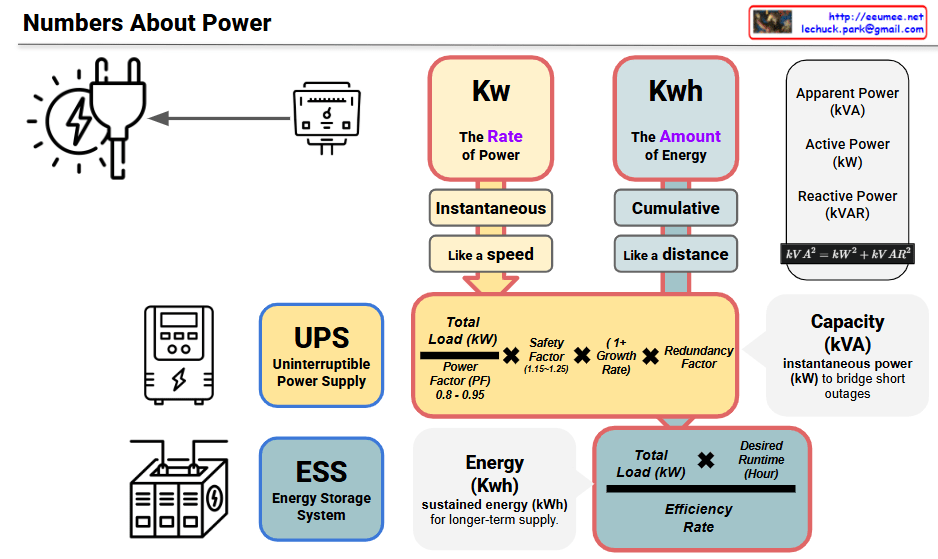
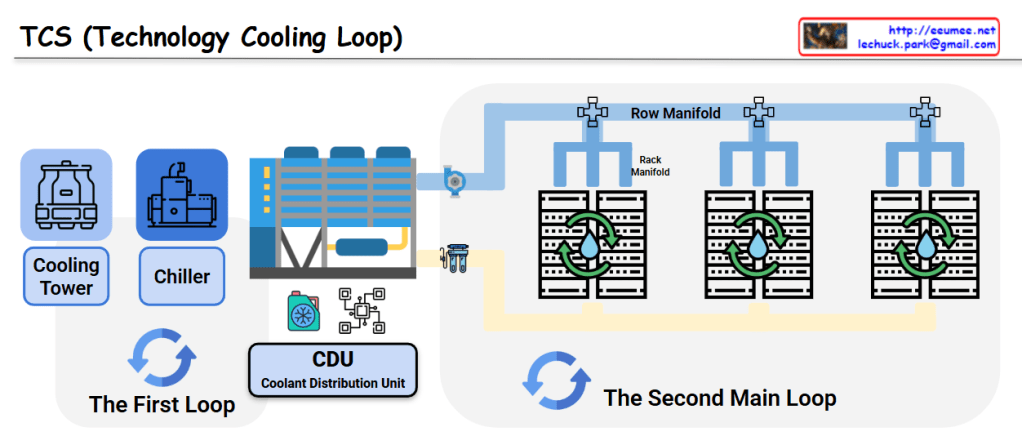
CDU (Coolant Distribution Unit)

This image illustrates a Coolant Distribution Unit (CDU) with its key components and the liquid cooling system implemented in modern AI data centers. The diagram shows five primary components:

  1. Coolant Circulation and Distribution: The central component that efficiently distributes liquid coolant throughout the entire system.
  2. Heat Exchange: This section removes heat absorbed by the liquid coolant to maintain the cooling system’s efficiency.
  3. Pumping and Flow Control: Includes pumps and control devices that precisely manage the movement of coolant throughout the system.
  4. Filtration and Coolant Quality Management: A filtration system that purifies the liquid coolant and maintains optimal quality for cooling efficiency.
  5. Monitoring and Control: An interface that provides real-time monitoring and control of the entire liquid cooling system.

The three devices shown at the bottom of the diagram represent different levels of liquid cooling application in modern AI data centers:

  • Rack-level liquid cooling
  • Individual server-level liquid cooling
  • Direct processor (CPU/GPU) chip-level liquid cooling

This diagram demonstrates how advanced liquid cooling technology has evolved from traditional air cooling methods to effectively manage the high heat generated in AI-intensive modern data centers. It shows an integrated approach where the CDU facilitates coolant circulation to efficiently remove heat at rack, server, and chip levels.

With Claude

Data in AI DC

This image illustrates a data monitoring system for an AI data center server room. Titled “Data in AI DC Server Room,” it depicts the relationships between key elements being monitored in the data center.

The system consists of four main components, each with detailed metrics:

  1. GPU Workload – Right center
    • Computing Load: GPU utilization rate (%) and type of computational tasks (training vs. inference)
    • Power Consumption: Real-time power consumption of each GPU (W) – Example: NVIDIA H100 GPU consumes up to 700W
    • Workload Pattern: Periodicity of workload (peak/off-peak times) and predictability
    • Memory Usage: GPU memory usage patterns (e.g., HBM3 memory bandwidth usage)
  2. Power Infrastructure – Left
    • Power Usage: Real-time power output and efficiency of UPS, PDU, and transformers
    • Power Quality: Voltage, frequency stability, and power loss rate
    • Power Capacity: Types and proportions of supplied energy, ensuring sufficient power availability for current workload operations
  3. Cooling System – Right
    • Cooling Device Status: Air-cooling fan speed (RPM), liquid cooling pump flow rate (LPM), and coolant temperature (°C)
    • Environmental Conditions: Data center internal temperature, humidity, air pressure, and hot/cold zone temperatures – critical for server operations
    • Cooling Efficiency: Power Usage Effectiveness (PUE) and proportion of power consumed by the cooling system
  4. Server/Rack – Top center
    • Rack Power Density: Power consumption per rack (kW) – Example: GPU server racks range from 30 to 120 kW
    • Temperature Profile: Temperature (°C) of GPUs, CPUs, memory modules, and heat distribution
    • Server Status: Operational state of servers (active/standby) and workload distribution status

The workflow sequence indicated at the bottom of the diagram represents:

  1. ① GPU WORK: Initial execution of AI workloads – GPU computational tasks begin, generating system load
  2. ② with POWER USE: Increased power supply for GPU operations – Power demand increases with GPU workload, and power infrastructure responds accordingly
  3. ③ COOLING WORK: Cooling processes activated in response to heat generation
    • Sensing: Temperature sensors detect server and rack thermal conditions, monitoring hot/cold zone temperature differentials
    • Analysis: Analysis of collected temperature data, determining cooling requirements
    • Action: Adjustment of cooling equipment (fan speed, coolant flow rate, etc. automatically regulated)
  4. ④ SERVER OK: Maintenance of normal server operation through proper power supply and cooling – Temperature and power remain stable, allowing GPU workloads to continue running under optimal conditions

The arrows indicate data flow and interrelationships between systems, showing connections from power infrastructure to servers and from cooling systems to servers. This integrated system enables efficient and stable data center operation by detecting increased power demand and heat generation from GPU workloads, and adjusting cooling systems in real-time accordingly.

With Claude

Key Factors in DC

This image is a diagram showing the key components of a Data Center (DC).

The diagram visually represents the core elements that make up a data center:

  1. Building – Shown on the left with a building icon, representing the physical structure of the data center.
  2. Core infrastructure elements (in the central blue area):
    • Network – Data communication infrastructure
    • Computing – Servers and processing equipment
    • Power – Energy supply systems
    • Cooling – Temperature regulation systems
  3. The central orange circle represents server racks, which is connected to power supply units (transformers), cooling equipment, and network devices.
  4. Digital Service – Displayed on the right, representing the end services that all this infrastructure ultimately delivers.

This diagram illustrates how a data center flows from a physical building through core elements like network, computing, power, and cooling to ultimately provide digital services.

With Claude