DAS / NAS / SAN

With a Claude
This image is a diagram comparing three major storage systems – DAS (Direct Access Storage), NAS (Network Access Storage), and SAN (Storage Network Array).

Let’s examine each system in detail:

  1. DAS (Direct Access Storage):
  • Direct storage system connected to the CPU
  • Shows direct connections between RAM and disk drives
  • Most basic storage architecture
  • Connected directly to the computer system
  1. NAS (Network Access Storage):
  • Storage accessible through the network
  • Marked with “Over The Network” indicating network connectivity
  • Consists of standalone storage units
  • Provides shared storage access through network
  1. SAN (Storage Network Array):
  • Most sophisticated and complex storage system
  • Features shown include:
    • High Speed Dedicated Network
    • Centralization Control
    • Block Storage
    • HA with RAID (High Availability with RAID)
    • Scale-out capabilities

The diagram effectively illustrates the evolution and increasing complexity of storage systems. It shows the progression from the simple direct-attached storage (DAS) through network-attached storage (NAS) to the more complex storage area network (SAN), with each iteration adding more sophisticated features and capabilities.

The layout of the diagram moves from left to right, demonstrating how each storage solution becomes more complex but also more capable, with SAN offering the most advanced features for enterprise-level storage needs.

Fast Copy over network

With a Claude
This image illustrates a system architecture diagram for “Fast Copy over network”. Here’s a detailed breakdown:

  1. Main Sections:
  • Fast Copy over network
  • Minimize Copy stacks
  • Minimize Computing
  • API optimization for read/write
  1. System Components:
  • Basic computing layer including OS (Operating System) and CPU
  • RAM (memory) layer
  • Hardware device layer
  1. Key Features:
  • The purple area on the left focuses on minimizing Count & Copy with API
  • The blue center area represents minimized computing works (Program Code)
  • The orange area on the right shows programmable API implementation
  1. Data Flow:
  • Arrows indicating bi-directional communication between systems
  • Vertical data flow from OS to RAM to hardware
  • Horizontal data exchange between systems

The architecture demonstrates a design aimed at optimizing data copying operations over networks while efficiently utilizing system resources.

Data Center Pipeline

With a Claude
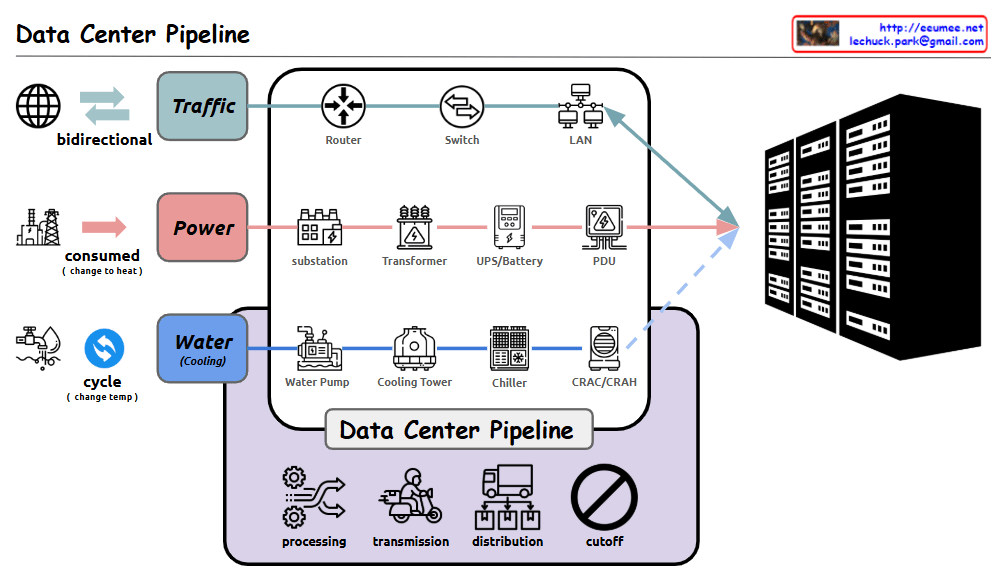
Detailed analysis of the Data Center Pipeline diagram:

  1. Traffic Pipeline
  • Bidirectional network traffic handling
  • Infrastructure flow: Router → Switch → LAN
  • Responsible for stable data transmission and reception
  1. Power Pipeline
  • Power consumption converted to heat
  • Flow: Substation → Transformer → UPS/Battery → PDU (Power Distribution Unit)
  • Ensures stable power supply and backup systems
  1. Water (Cooling) Pipeline
  • Circulation cooling system through temperature change
  • Flow: Water Pump → Cooling Tower → Chiller → CRAC/CRAH (Computer Room Air Conditioning/Handler)
  • Efficiently controls server heat generation
  1. Data Center Management Functions
  • Processing: Data and system processing
  • Transmission: Data transfer
  • Distribution: Resource allocation
  • Cutoff: System protection during emergencies

Comprehensive Summary: This diagram illustrates the core infrastructure of a modern data center. It shows the seamless integration of three critical pipelines: network traffic for data processing, power supply for system operation, and cooling systems for equipment protection. Each pipeline undergoes multiple processing stages, working harmoniously to ensure stable data center operations. The four core management functions – processing, transmission, distribution, and cutoff – guarantee the efficiency and stability of the entire system. This integrated infrastructure design enables reliable operation of data centers, which form the foundation of modern digital services. The careful balance between these systems is crucial for maintaining optimal performance, ensuring business continuity, and protecting valuable computing resources. The design demonstrates how modern data centers handle the complex requirements of digital infrastructure while maintaining reliability and efficiency. 

Network for GPUs

with a Claude’s Help
The network architecture demonstrates 3 levels of connectivity technologies:

  1. NVLink (Single node Parallel processing)
  • Technology for directly connecting GPUs within a single node
  • Supports up to 256 GPU connections
  • Physical HBM (High Bandwidth Memory) sharing
  • Optimized for high-performance GPU parallel processing within individual servers
  1. NVSwitch
  • Switching technology that extends NVLink limitations
  • Provides logical HBM sharing
  • Key component for large-scale AI model operations
  • Enables complete mesh network configuration between GPU groups
  • Efficiently connects multiple GPU groups within One Box Server
  • Targets large AI model workloads
  1. InfiniBand
  • Network technology for server clustering
  • Supports RDMA (Remote Direct Memory Access)
  • Used for distributed computing and HPC (High Performance Computing) tasks
  • Implements hierarchical network topology
  • Enables large-scale cluster configuration across multiple servers
  • Focuses on distributed and HPC workloads

This 3-tier architecture provides scalability through:

  • GPU parallel processing within a single server (NVLink)
  • High-performance connectivity between GPU groups within a server (NVSwitch)
  • Cluster configuration between multiple servers (InfiniBand)

The architecture enables efficient handling of various workload scales, from small GPU tasks to large-scale distributed computing. It’s particularly effective for maximizing GPU resource utilization in large-scale AI model training and HPC workloads.

Key Benefits:

  • Hierarchical scaling from single node to multi-server clusters
  • Efficient memory sharing through both physical and logical HBM
  • Flexible topology options for different computing needs
  • Optimized for both AI and high-performance computing workloads
  • Comprehensive solution for GPU-based distributed computing

This structure provides a complete solution from single-server GPU operations to complex distributed computing environments, making it suitable for a wide range of high-performance computing needs.

DC Key metrics for operating

From Claude with some prompting
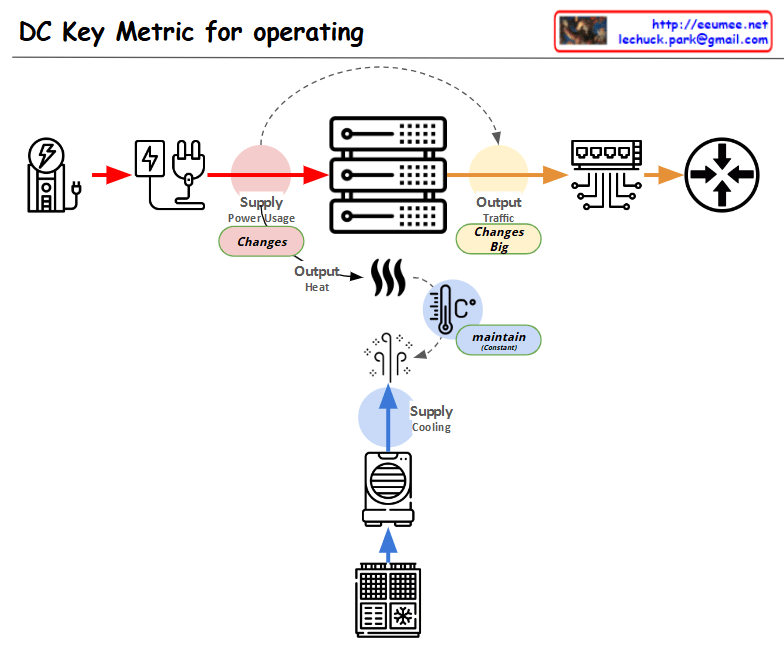
This diagram showing the key metrics for Data Center (DC) operations:

  1. Power Supply Chain:
  • Power input → Power conversion/distribution → Server equipment
  • Marked as “Supply Power Usage” with a note indicating “Changes” in variability
  1. Server Operations:
  • Server racks shown in the center
  • Two main outputs:
    • Top: “Output Traffic” with a note “Changes Big” indicating high variability
    • Bottom: “Output Heat” generation
  1. Cooling System:
  • Cooling equipment shown at the bottom
  • Marked as “Supply Cooling”
  • Temperature icon with “maintain” indicator showing the need to maintain consistent temperature
  1. Overall Flow:
  • Power input → Server operations → Network output
  • Separate cooling circulation system for heat management

The diagram illustrates the interconnection between three critical elements of data center operations:

  • Power supply management
  • Server operations
  • Cooling system

Each component shows potential variability points (marked as “Changes”) and management requirements, with special attention to:

  • Power usage monitoring
  • Traffic output management
  • Heat dissipation and temperature control

This visualization effectively demonstrates how these systems work together in a data center environment, highlighting the key areas that require monitoring and management for optimal operation.

Lechuck History

From Claude with some prompting
“Lechuck History” diagram demonstrates the following technical career progression:

  1. “with Computer” section:
    • Advanced from C-based programming to system programming, O&M solutions, and network programming
    • Possess deep understanding of Linux kernel, RTOS, and TCP/IP stack
    • Performed “Single-Handedly A to Z” tasks in web service analysis/monitoring
    • Grew into the role of a software engineer
  2. “with People” section:
    • Gained experience in large ISP data centers, system management, large-scale network operations management, and CDN development/management
    • Developed skills to optimize and maximize existing system infrastructure
    • Created new service solutions including D/C business web portals, NMS big-data, DCIM, packet analysis customer solutions, and data analysis platforms
    • Managed “Big DC Op. System Design & DevOps”, demonstrating ability to handle customer-facing roles and collaborate with various partners

Additional key competencies:

  1. Maintain continuous interest in new technologies
  2. Possess the ability to quickly learn based on a solid understanding of fundamentals
  3. Currently enjoy learning cutting-edge technologies including AI and Quantum computing

This career path and skill set demonstrate the profile of a professional who continuously grows and pursues innovation in a rapidly changing technological environment.

Changes of the network traffic

From Claude with some prompting
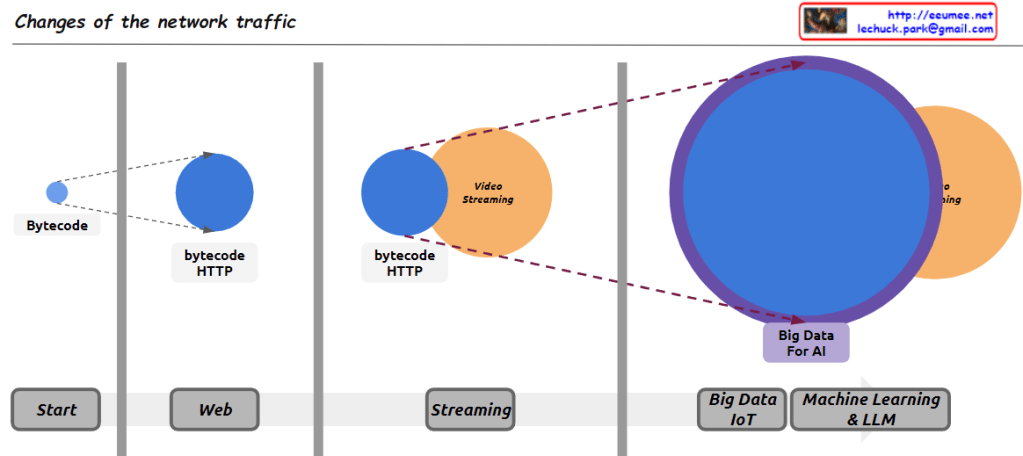
Here’s an interpretation of the diagram in English, focusing on the major changes in internet traffic types:

  1. Early Internet (Start): The small “Bytecode” circle represents the limited data exchange of the early internet. This period was primarily characterized by simple, text-based information exchange.
  2. Web Era (Web): The larger “bytecode HTTP” circle illustrates the surge in HTTP traffic with the advent of the World Wide Web. This represents increased traffic from web browsing, email, and early online services.
  3. Streaming Age (Streaming): The addition of the “Video Streaming” circle signifies the explosive growth in video streaming traffic, driven by platforms like YouTube and Netflix. This marks a paradigm shift in internet bandwidth usage.
  4. Big Data and AI Era (Big Data IoT / Machine Learning & LLM): The largest circle, “Big Data For AI,” represents the enormous traffic increase due to IoT device proliferation, cloud computing ubiquity, and large-scale data processing for AI and machine learning. This suggests it now constitutes the largest portion of internet traffic.

This diagram effectively shows the evolution of internet traffic from simple data exchange to web-based services, media streaming, and the current data-centric, AI-driven era.

Comments (points to be cautious about):

  1. Accuracy: It’s unclear if the circle sizes accurately reflect actual traffic volumes. This should be understood as a conceptual representation.
  2. Time scale: The time intervals between stages may not be uniform, which is not indicated in the diagram.
  3. Overlap: In reality, these traffic types coexist and are not as distinctly separated as the diagram suggests.
  4. Recent trends: The diagram doesn’t reflect traffic changes due to latest technological trends like 5G or edge computing.
  5. Regional differences: These changes may not have occurred uniformly worldwide, which is not reflected in the diagram.

It’s important to consider these points when interpreting the diagram. Overall, this image effectively conveys the macroscopic trends in the evolution of internet traffic in a concise and impactful manner.