The High Stakes of Ultra-High Density: Seconds to React, Massive Costs

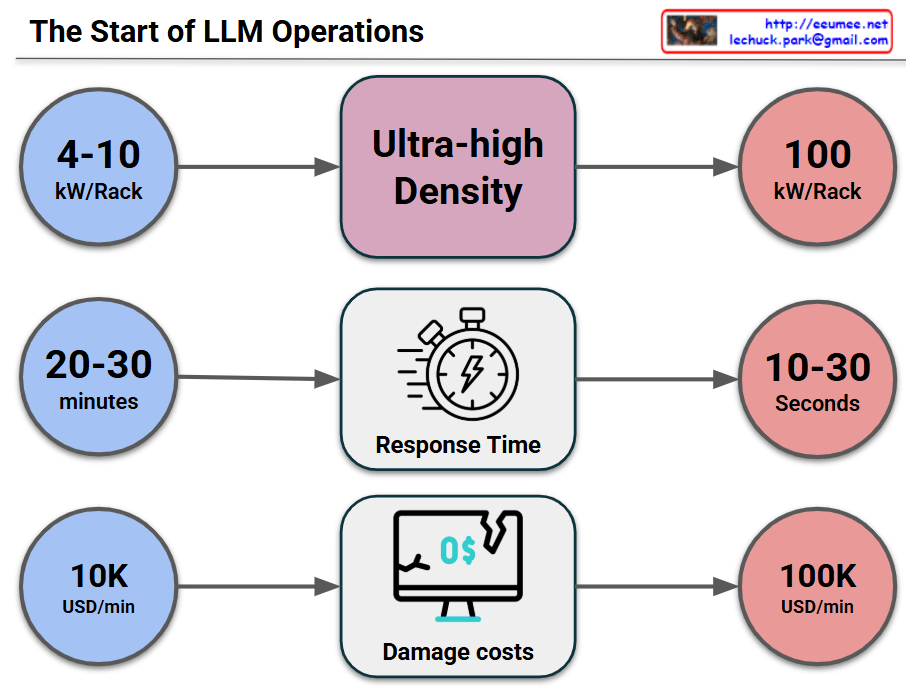
This image visually compares the critical changes and risks that occur when a data center or IT infrastructure transitions to an “Ultra-high Density” environment across three key metrics.

1. Surge in Power Density (Top Row)

  • Past/Standard Environment (Blue): Racks typically operated at a power density of 4-10 kW per Rack.
  • Transition (Middle): The shift toward Ultra-high Density infrastructure (driven by AI, High-Performance Computing, etc.).
  • Current/Ultra-high Density (Red): Power density explodes to 100 kW per Rack, which is a 10-fold increase.

2. Drastic Drop in Response Time (Middle Row)

  • Past/Standard Environment: In the event of a cooling failure or system issue, operators had a comfortable golden window of 20-30 minutes to react before systems went down.
  • Transition: Focusing on the change in Response Time.
  • Current/Ultra-high Density: Due to the massive, instantaneous heat generation, the reaction window plummets to a mere 10-30 seconds. This makes manual human intervention practically impossible.

3. Explosion of Damage Costs (Bottom Row)

  • Past/Standard Environment: The financial loss caused by system downtime was around $10,000 (10K USD) per minute.
  • Transition: Focusing on the change in Damage costs.
  • Current/Ultra-high Density: Because of the high value of the equipment and the critical nature of the data being processed, the cost of downtime skyrockets to $100,000 (100K USD) per minute—a 10x increase.

💡 Overall Summary

The core message of this infographic is a strong warning: “In ultra-high density environments reaching 100kW per rack, the window for disaster response shrinks from minutes to mere seconds, while the financial loss per minute multiplies tenfold.” This perfectly illustrates why immediate, automated cooling and response systems (such as liquid cooling or AI-driven automation) are no longer optional, but mandatory for modern data centers.


#DataCenter #UltraHighDensity #HighDensityComputing #ITInfrastructure #Downtime #CostOfDowntime #RiskManagement

With Gemini

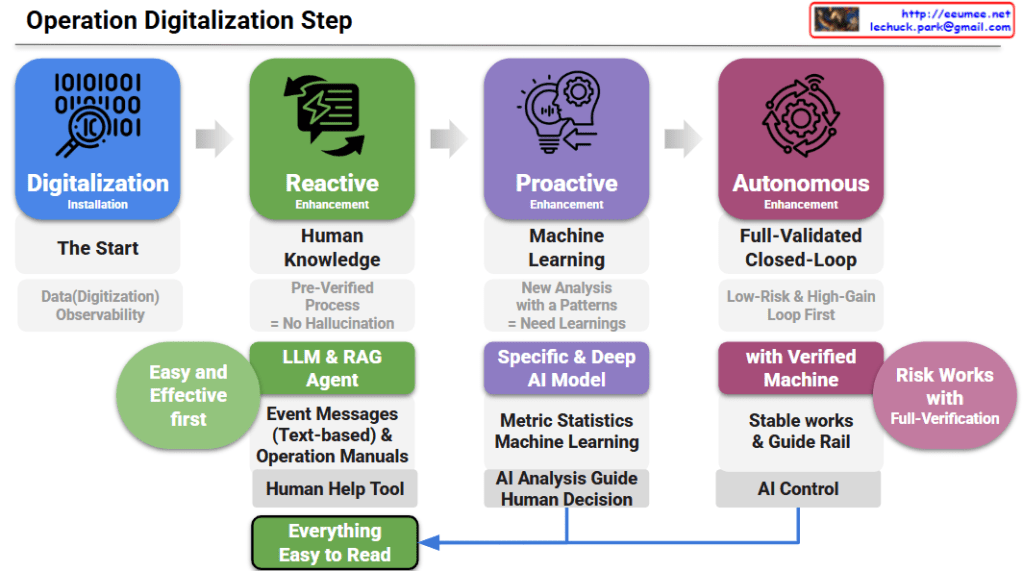
Operation Digitalization Step

Operation Digitalization Step: A 4-Step Roadmap

Step 1: Digitalization (The Start)

  • Goal: Securing data digitization and observability. It is the foundational phase of gathering and monitoring data before applying any advanced automation.

Step 2: Reactive Enhancement (Human Knowledge)

  • Goal: Applying LLM & RAG agents as a “Human Help Tool.”
  • Details: It relies on pre-verified processes to prevent AI hallucinations. By analyzing text-based event messages and operation manuals, it provides an “Easy and Effective first” approach to assist human operators.

Step 3: Proactive Enhancement (Machine Learning)

  • Goal: Deriving new insights through pattern analysis and machine learning.
  • Details: It utilizes specific and deep AI models based on metric statistics to provide an “AI Analysis Guide.” However, the final action still relies on a “Human Decision.”

Step 4: Autonomous Enhancement (Full-Validated Closed-Loop)

  • Goal: Achieving stable, AI-controlled operations.
  • Details: It prioritizes low-risk, high-gain loops. Through verified machines and strict guide rails, the system executes autonomous “AI Control” under full verification to manage risks.
  • Core Feedback Loop: The outcomes from both human decisions (Step 3) and AI control (Step 4) are ultimately designed to make “Everything Easy to Read,” ensuring transparency and intuitive understanding for operators.

  1. Progressive Evolution: The roadmap illustrates a strategic 4-step journey from basic data observability to fully autonomous, AI-controlled operations.
  2. Practical AI Adoption: It emphasizes a safe, low-risk strategy, starting with LLM/RAG as human-assist tools before advancing to predictive machine learning and closed-loop automation.
  3. Human-Centric Transparency: Regardless of the automation level, the ultimate design ensures all AI actions and system insights remain intuitive and “Easy to Read” for human operators.

#OperationDigitalization #AIOps #AutonomousOperations #DataCenterManagement #ITInfrastructure #LLM #RAG #MachineLearning #DigitalTransformation

Time Constant(Delay of the sensor)

Image Interpretation: System Problems Due to Sensor Delay

This diagram explains system performance issues caused by the Time Constant (delay) of temperature sensors.

Top Section: Two Workload Scenarios

LLM Workload (AI Tasks)

  • Runs at 100% workload
  • Almost no delay (No Delay almost)
  • Result: Performance Down and Workload Cost waste

GPU Workload

  • Operating at 80°C
  • Thermal Throttling occurs
  • Transport Delay exists
  • Performance degradation starts at 60°C → Step down

Bottom Section: Core of the Sensor Delay Problem

Timeline:

  1. Sensor UP start (Temperature Sensor activation)
    • Big Delay due to Time Constant
  2. TC63 (After 10-20 seconds)
    • Sensor detects 63% temperature rise
    • Actual temperature is already higher
  3. After 30-40 seconds
    • Sensor detects 86% rise
    • Temperature Divergence, Late Cooling problem occurs

Key Issues

Due to the sensor’s Time Constant delay:

  • Takes too long to detect actual temperature rise
  • Cooling system activates too late
  • GPU already overheated, causing thermal throttling
  • Results in workload cost waste and performance degradation

Summary

Sensor delays create a critical gap between actual temperature and detected temperature, causing cooling systems to react too late. This results in GPU thermal throttling, performance degradation, and wasted computational resources. Real-time monitoring with fast-response sensors is essential for optimal system performance.


#ThermalManagement #SensorDelay #TimeConstant #GPUThrottling #DataCenter #PerformanceOptimization #CoolingSystem #AIWorkload #SystemMonitoring #HardwareEngineering #ThermalThrottling #LatencyChallenges #ComputeEfficiency #ITInfrastructure #TemperatureSensing

With Claude