DynamoLLM

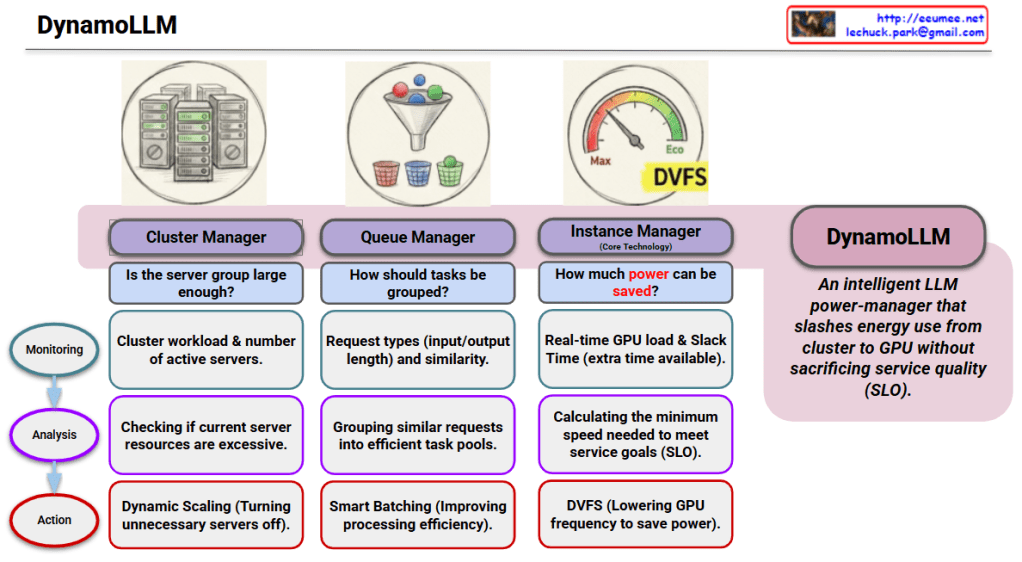
The provided infographic illustrates DynamoLLM, an intelligent power-saving framework specifically designed for operating Large Language Models (LLMs). Its primary mission is to minimize energy consumption across the entire infrastructure—from the global cluster down to individual GPU nodes—while strictly maintaining Service Level Objectives (SLO).


## 3-Step Intelligent Power Saving

1. Cluster Manager (Infrastructure Level)

This stage ensures that the overall server resources match the actual demand to prevent idle waste.

  • Monitoring: Tracks the total cluster workload and the number of currently active servers.
  • Analysis: Evaluates if the current server group is too large or if resources are excessive.
  • Action: Executes Dynamic Scaling by turning off unnecessary servers to save power at the fleet level.

2. Queue Manager (Workload Level)

This stage organizes incoming requests to maximize the efficiency of the processing phase.

  • Monitoring: Identifies request types (input/output token lengths) and their similarities.
  • Analysis: Groups similar requests into efficient “task pools” to streamline computation.
  • Action: Implements Smart Batching to improve processing efficiency and reduce operational overhead.

3. Instance Manager (GPU Level)

As the core technology, this stage manages real-time power at the hardware level.

  • Monitoring: Observes real-time GPU load and Slack Time (the extra time available before a deadline).
  • Analysis: Calculates the minimum processing speed required to meet the service goals (SLO) without over-performing.
  • Action: Utilizes DVFS (Dynamic Voltage and Frequency Scaling) to lower GPU frequency and minimize power draw.

# Summary

  1. DynamoLLM is an intelligent framework that minimizes LLM energy use across three layers: Cluster, Queue, and Instance.
  2. It maintains strict service quality (SLO) by calculating the exact performance needed to meet deadlines without wasting power.
  3. The system uses advanced techniques like Dynamic Scaling and DVFS to ensure GPUs only consume as much energy as a task truly requires.

#DynamoLLM #GreenAI #LLMOps #EnergyEfficiency #GPUOptimization #SustainableAI #CloudComputing

With Gemini

Peak Shaving


“Power – Peak Shaving” Strategy

The image illustrates a 5-step process for a ‘Peak Shaving’ strategy designed to maximize power efficiency in data centers. Peak shaving is a technique used to reduce electrical load during periods of maximum demand (peak times) to save on electricity costs and ensure grid stability.

1. IT Load & ESS SoC Monitoring

This is the data collection and monitoring phase to understand the current state of the system.

  • Grid Power: Monitoring the maximum power usage from the external power grid.
  • ESS SoC/SoH: Checking the State of Charge (SoC) and State of Health (SoH) of the Energy Storage System (ESS).
  • IT Load (PDU): Measuring the actual load through Power Distribution Units (PDUs) at the server rack level.
  • LLM/GPU Workload: Monitoring the real-time workload of AI models (LLM) and GPUs.

2. ML-based Peak Prediction

Predicting future power demand based on the collected data.

  • Integrated Monitoring: Consolidating data from across the entire infrastructure.
  • Machine Learning Optimization: Utilizing AI algorithms to accurately predict when power peaks will occur and preparing proactive responses.

3. Peak Shaving Via PCS (Power Conversion System)

Utilizing physical energy storage hardware to distribute the power load.

  • Pre-emptive Analysis & Preparation: Determining the “Time to Charge.” The system charges the batteries when electricity rates are low.
  • ESS DC Power: During peak times, the stored Direct Current (DC) in the ESS is converted to Alternating Current (AC) via the PCS to supplement the power supply, thereby reducing reliance on the external grid.

4. Job Relocation (K8s/Slurm)

Adjusting the scheduling of IT tasks based on power availability.

  • Scheduler Decision Engine: Activated when a peak time is detected or when ESS battery levels are low.
  • Job Control: Lower priority jobs are queued or paused, and compute speeds are throttled (power suppressed) to minimize consumption.

5. Parameter & Model Optimization

The most advanced stage, where the efficiency of the AI models themselves is optimized.

  • Real-time Batch Size Adjustment: Controlling throughput to prevent sudden power spikes.
  • Large Model -> sLLM (Lightweight): Transitioning to smaller, lightweight Large Language Models (sLLM) to reduce GPU power consumption without service downtime.

Summary

The core message of this diagram is that High-Quality/High-Resolution Data is the foundation for effective power management. By combining hardware solutions (ESS/PCS), software scheduling (K8s/Slurm), and AI model optimization (sLLM), a data center can significantly reduce operating expenses (OPEX) and ultimately increase profitability (Make money) through intelligent peak shaving.


#AI_DC #PowerControl #DataCenter #EnergyEfficiency #PeakShaving #GreenIT #MachineLearning #ESS #AIInfrastructure #GPUOptimization #Sustainability #TechInnovation

AI GPU Cost

AI GPU Service Cost Proof

This image outlines a framework for justifying the cost of AI GPU services (such as cloud or bare-metal leasing) by strictly proving performance quality. The core theme is “Transparency with Metrics,” demonstrating Stability and Efficiency through data rather than empty promises.

Here is a breakdown of the four key quadrants:

1. Clock Speed Consistency (Top Left)

  • Metric: Stable SM (Streaming Multiprocessor) Clock.
  • Meaning: This tracks the operating frequency of the GPU’s core compute units over time.
  • Significance: The graph should ideally be a flat line. Fluctuations indicate “clock jitter,” which leads to unpredictable training times and inconsistent performance. A stable clock proves the power delivery is clean and the workload is steady.

2. Zero Throttling Events (Top Right)

  • Metric: Count of ‘SW Power Cap’ and ‘Thermal Slowdown’ events.
  • Meaning: It verifies whether the GPU had to forcibly lower its performance (throttle) due to overheating or hitting power limits.
  • Significance: The goal is Zero (0). Any positive number means the infrastructure failed to support the GPU’s maximum potential, wasting the customer’s money and time.

3. Thermal Headroom (Bottom Left)

  • Metric: Temperature Margin (vs. $T_{limit}$).
    • (Note: The text box in the image incorrectly repeats “Streaming Multiprocessor Clock Changes,” likely a copy-paste error, but the gauge clearly indicates Temperature).
  • Meaning: It displays the gap between the current operating temperature and the GPU’s thermal limit.
  • Significance: Operating with a safe margin (headroom) prevents thermal throttling and ensures hardware longevity during long-running AI workloads.

4. Power Draw vs TDP (Bottom Right)

  • Metric: Max Power Utilization vs. Thermal Design Power (TDP).
    • (Note: The text box here also appears to be a copy-paste error from the top right, but the gauge represents Power/Watts).
  • Meaning: It measures how close the actual power consumption is to the GPU’s rated maximum (TDP).
  • Significance: If the power draw is consistently close to the TDP (e.g., 700W), it proves the GPU is being fully utilized. If it’s low despite a heavy workload, it suggests a bottleneck elsewhere (network, CPU, or power delivery issues).

Summary

  1. Objective: To validate service fees by providing transparent, data-driven proof of infrastructure quality.
  2. Key Metrics: Focuses on maintaining Stable Clocks, ensuring Zero Throttling, securing Thermal Headroom, and maximizing Power Utilization.
  3. Value: It acts as a technical SLA (Service Level Agreement), assuring users that the environment allows the GPUs to perform at 100% capacity without degradation.

#AIDataCenter #GPUOptimization #ServiceLevelAgreement #CloudInfrastructure #Nvidia #HighPerformanceComputing #DataCenterOps #GreenComputing #TechTransparency #AIInfrastructure

With Gemini

vLLM Features

vLLM Features & Architecture Breakdown

This chart outlines the key components of vLLM (Virtual Large Language Model), a library designed to optimize the inference speed and memory efficiency of Large Language Models (LLMs).

1. Core Algorithm

  • PagedAttention
    • Concept: Applies the operating system’s (OS) virtual memory paging mechanism to the attention mechanism.
    • Benefit: It resolves memory fragmentation and enables the storage of the KV (Key-Value) cache in non-contiguous memory spaces, significantly reducing memory waste.

2. Data Unit

  • Block (Page)
    • Concept: The minimum KV cache unit with a fixed token size (e.g., 16 tokens).
    • Benefit: Increases management efficiency via fixed-size allocation and minimizes wasted space (internal fragmentation) within slots.
  • Block Table
    • Concept: A mapping table that connects Logical Blocks to Physical Blocks.
    • Benefit: Allows non-contiguous physical memory to be processed as if it were a continuous context.

3. Operation

  • Pre-allocation (Profiling)
    • Concept: Reserves the maximum required VRAM at startup by running a dummy simulation.
    • Benefit: Eliminates the overhead of runtime memory allocation/deallocation and prevents Out Of Memory (OOM) errors at the source.

4. Memory Handling

  • Swapping
    • Concept: Offloads data to CPU RAM when GPU memory becomes full.
    • Benefit: Handles traffic bursts without server downtime and preserves the context of suspended (waiting) requests.
  • Recomputation
    • Concept: Recalculates data instead of swapping it when recalculation is more cost-effective.
    • Benefit: Optimizes performance for short prompts or in environments with slow interconnects (e.g., PCIe limits).

5. Scheduling

  • Continuous Batching
    • Concept: Iteration-level scheduling that fills idle slots immediately without waiting for other requests to finish.
    • Benefit: Eliminates GPU idle time and maximizes overall throughput.

Summary

  1. vLLM adapts OS memory management techniques (like Paging and Swapping) to optimize LLM serving, solving critical memory fragmentation issues.
  2. Key technologies like PagedAttention and Continuous Batching minimize memory waste and eliminate GPU idle time to maximize throughput.
  3. This architecture ensures high performance and stability by preventing memory crashes (OOM) and efficiently handling traffic bursts.

#vLLM #LLMInference #PagedAttention #AIArchitecture #GPUOptimization #MachineLearning #SystemDesign #AIInfrastructure

With Gemini

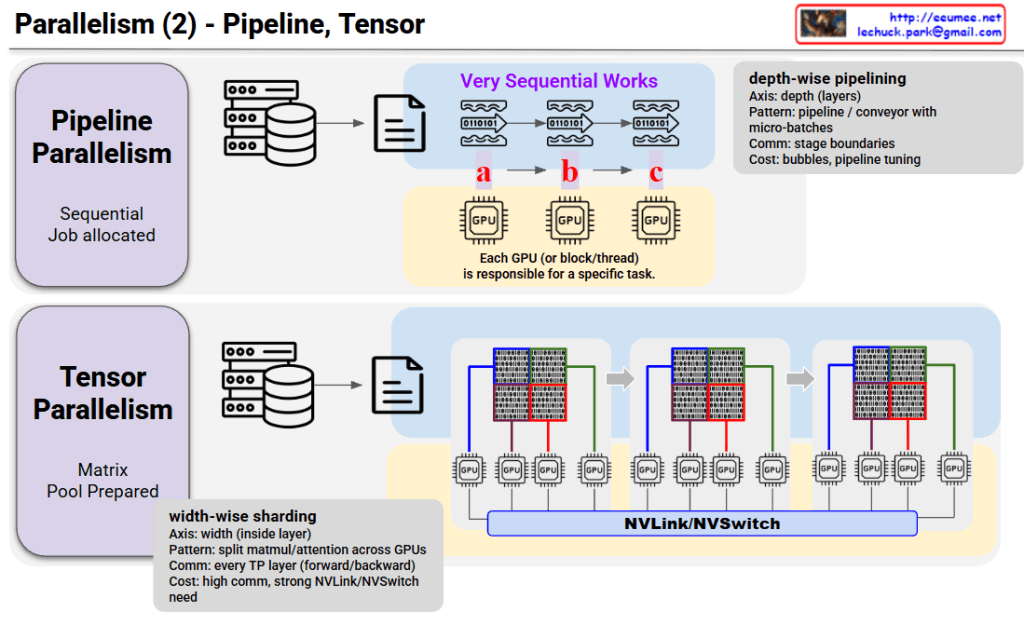
Parallelism (2) – Pipeline, Tensor

Parallelism (2) – Pipeline vs Tensor Parallelism

This image compares two parallel processing techniques: Pipeline Parallelism and Tensor Parallelism.

Pipeline Parallelism

Core Concept:

  • Sequential work is divided into multiple stages
  • Each GPU is responsible for a specific task (a → b → c)

Characteristics:

  • Axis: Depth-wise – splits by layers
  • Pattern: Pipeline/conveyor belt with micro-batches
  • Communication: Only at stage boundaries
  • Cost: Bubbles (idle time), requires pipeline tuning

How it works: Data flows sequentially like waves, with each GPU processing its assigned stage before passing to the next GPU.


Tensor Parallelism

Core Concept:

  • Matrix pool is prepared and split in advance
  • All GPUs simultaneously process different parts of the same data

Characteristics:

  • Axis: Width-wise – splits inside layers
  • Pattern: Width-wise sharding – splits matrix/attention across GPUs
  • Communication: Occurs at every Transformer layer (forward/backward)
  • Cost: High communication overhead, requires strong NVLink/NVSwitch

How it works: Large matrices are divided into chunks, with each GPU processing simultaneously while continuously communicating via NVLink/NVSwitch.


Key Differences

AspectPipelineTensor
Split MethodLayer-wise (vertical)Within-layer (horizontal)
GPU RoleDifferent tasksParts of same task
CommunicationLow (stage boundaries)High (every layer)
Hardware NeedsStandardHigh-speed interconnect required

Summary

Pipeline Parallelism splits models vertically by layers with sequential processing and low communication cost, while Tensor Parallelism splits horizontally within layers for parallel processing but requires high-speed interconnects. These two techniques are often combined in training large-scale AI models to maximize efficiency.

#ParallelComputing #DistributedTraining #DeepLearning #GPUOptimization #MachineLearning #ModelParallelism #AIInfrastructure #NeuralNetworks #ScalableAI #HPC

With Claude

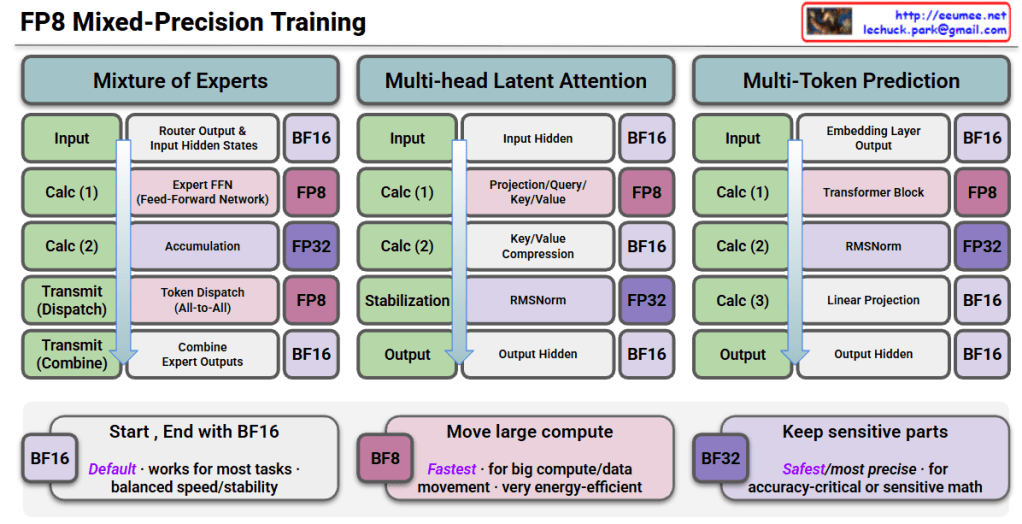
FP8 Mixed-Precision Training

FP8 Mixed-Precision Training Interpretation

This image is a technical diagram showing FP8 (8-bit Floating Point) Mixed-Precision Training methodology.

Three Main Architectures

1. Mixture of Experts (MoE)

  • Input: Starts with BF16 precision
  • Calc (1): Router output & input hidden states → BF16
  • Calc (2): Expert FFN (Feed-Forward Network) → FP8 computation
  • Calc (3): Accumulation → FP32
  • Transmit (Dispatch): Token dispatch (All-to-All) → FP8
  • Transmit (Combine): Combine expert outputs → BF16
  • Output: BF16

2. Multi-head Latent Attention

  • Input: BF16
  • Calc (1): Input hidden states → BF16
  • Calc (2): Projection/Query/Key/Value → FP8
  • Calc (3): Key/Value compression → BF16
  • Stabilization: RMSNorm → FP32
  • Output: Output hidden states → BF16

3. Multi-Token Prediction

  • Input: BF16
  • Calc (1): Embedding layer output → BF16
  • Calc (2): Transformer block → FP8
  • Calc (3): RMSNorm → FP32
  • Calc (4): Linear projection → BF16
  • Output: Output hidden states → BF16

Precision Strategy (Bottom Boxes)

🟦 BF16 (Default)

  • Works for most tasks
  • Balanced speed/stability

🟪 BF8 (Fastest)

  • For large compute/data movement
  • Very energy-efficient

🟣 BF32 (Safest/Most Precise)

  • For accuracy-critical or sensitive math operations

Summary

FP8 mixed-precision training strategically uses different numerical precisions across model operations: FP8 for compute-intensive operations (FFN, attention, transformers) to maximize speed and efficiency, FP32 for sensitive operations like accumulation and normalization to maintain numerical stability, and BF16 for input/output and communication to balance performance. This approach enables faster training with lower energy consumption while preserving model accuracy, making it ideal for training large-scale AI models efficiently.


#FP8Training #MixedPrecision #AIOptimization #DeepLearning #ModelEfficiency #NeuralNetworks #ComputeOptimization #MLPerformance #TransformerTraining #EfficientAI #LowPrecisionTraining #AIInfrastructure #MachineLearning #GPUOptimization #ModelTraining

With Claude