Computing Evolutions

This diagram illustrates the “Computing Evolutions” from the perspective of data’s core attributes development.

Top: Core Data Properties

  • Data: Foundation of digital information composed of 0s and 1s
  • Store: Data storage technology
  • Transfer: Data movement and network technology
  • Computing: Data processing and computational technology
  • AI Era: The convergence of all these technologies into the artificial intelligence age

Bottom: Evolution Stages Centered on Each Property

  1. Storage-Centric Era: Data Center
    • Focus on large-scale data storage and management
    • Establishment of centralized server infrastructure
  2. Transfer-Centric Era: Internet
    • Dramatic advancement in network technology
    • Completion of global data transmission infrastructure
    • “Data Ready”: The point when vast amounts of data became available and accessible
  3. Computing-Centric Era: Cloud Computing
    • Democratization and scalability of computing power
    • Development of GPU-based parallel processing (blockchain also contributed)
    • “Infra Ready”: The point when large-scale computing infrastructure was prepared

Convergence to AI Era With data prepared through the Internet and computing infrastructure ready through the cloud, all these elements converged to enable the current AI era. This evolutionary process demonstrates how each technological foundation systematically contributed to the emergence of artificial intelligence.

#ComputingEvolution #DigitalTransformation #AIRevolution #CloudComputing #TechHistory #ArtificialIntelligence #DataCenter #TechInnovation #DigitalInfrastructure #FutureOfWork #MachineLearning #TechInsights #Innovation

With Claude
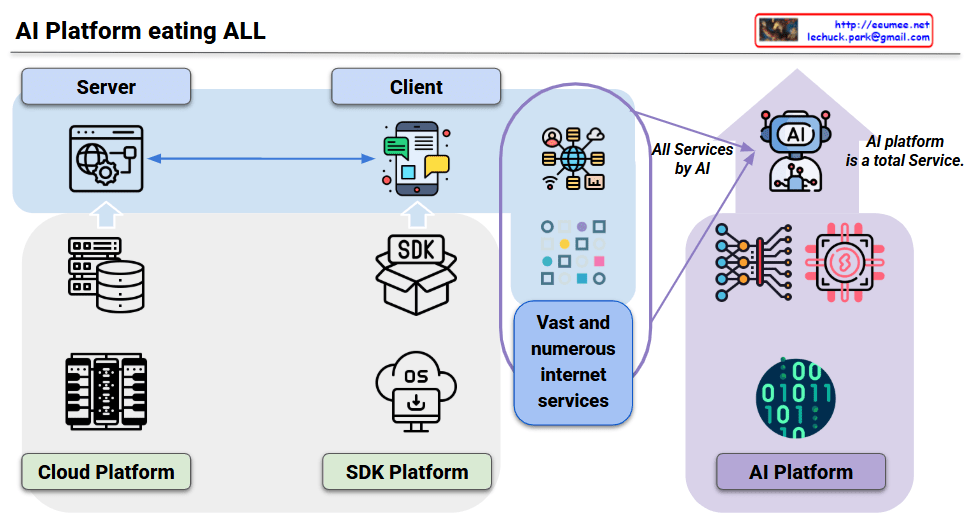
AI Platform eating all

This diagram illustrates the fundamental paradigm shift in service development across three platform evolution stages.

Platform Evolution:

  1. Cloud Platform
    • Server-Client separation with cloud infrastructure development
    • Developers directly build servers and databases to provide services
  2. SDK Platform
    • Client-side evolution based on specific OS/SDK ecosystems (iOS, Android, Windows)
    • Each platform provides development environments and tools
    • This stage generated “Vast and numerous internet services” – an explosive growth of diverse internet services
  3. AI Platform – “Eating ALL”
    • Fundamental paradigm shift: Instead of developers building individual services, the AI platform itself generates and provides services
    • “All Services by AI”: AI directly provides the diverse services that developers previously created
    • Multimodal capabilities: AI can understand and process all human senses and communication methods (language, vision, audio), enabling all functionalities through natural language conversation without specialized apps or services

Key Transformation:

  • Traditional: Developer → Platform → Service Development → User
  • AI Era: User → AI Platform → Instant Service Generation/Provision

This represents not just tool evolution, but a fundamental reorganization of the service ecosystem where countless specialized services converge into one unified AI platform due to AI’s universal cognitive abilities. The AI platform becomes a total service provider, essentially “eating” all existing service categories.

With Claude

DC growth

Data centers have expanded rapidly from the early days of cloud computing to the explosive growth driven by AI and ML.
Initially, growth was steady as enterprises moved to the cloud. However, with the rise of AI and ML, demand for powerful GPU-based computing has surged.
The global data center market, which grew at a CAGR of around 10% during the cloud era, is now accelerating to an estimated CAGR of 15–20% fueled by AI workloads.
This shift is marked by massive parallel processing with GPUs, transforming data centers into AI factories.

With ChatGPT

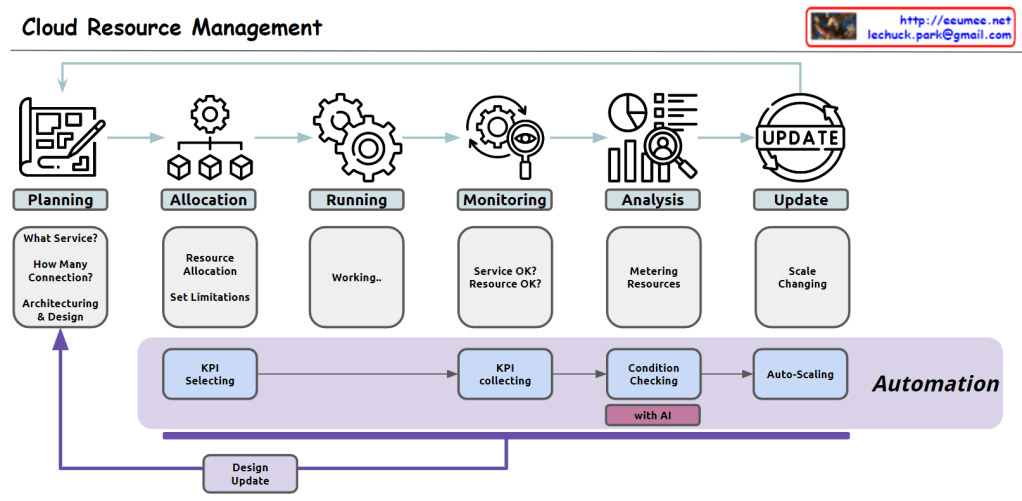
Cloud Resource Management

From Claude with some prompting
Here’s the comprehensive overview of cloud resource management in English:

  1. Planning:
    • Service selection: Determining appropriate cloud computing service types (e.g., virtual machines, containers, serverless)
    • Capacity forecasting: Estimating required resource scale based on expected traffic and workload
    • Architecture design: Designing system structure considering scalability, availability, and security
    • Infrastructure definition tool selection: Choosing tools for defining and managing infrastructure as code
  2. Allocation:
    • Resource provisioning: Creating and configuring necessary cloud resources using defined infrastructure code
    • Resource limitation setup: Configuring usage limits for CPU, memory, storage, network bandwidth, etc.
    • Access control configuration: Building a granular permission management system based on users, groups, and roles
  3. Running:
    • Application deployment management: Deploying and managing services through container orchestration tools
    • Automated deployment pipeline operation: Automating the process from code changes to production environment reflection
  4. Monitoring:
    • Real-time performance monitoring: Continuous collection and visualization of system and application performance metrics
    • Log management: Operating a centralized log collection, storage, and analysis system
    • Alert system setup: Configuring a system to send immediate notifications when performance metrics exceed thresholds
  5. Analysis:
    • Resource usage tracking: Analyzing cloud resource usage patterns and efficiency
    • Cost optimization analysis: Evaluating cost-effectiveness relative to resource usage and identifying areas for improvement
    • Performance bottleneck analysis: Identifying causes of application performance degradation and optimization points
  6. Update:
    • Dynamic resource adjustment: Implementing automatic scaling mechanisms based on demand changes
    • Zero-downtime update strategy: Applying methodologies for deploying new versions without service interruption
    • Security and patch management: Building automated processes for regularly checking and patching system vulnerabilities

Automation process:

  1. Key Performance Indicator (KPI) definition: Selecting key metrics reflecting system performance and business goals
  2. Data collection: Establishing a real-time data collection system for selected KPIs
  3. Intelligent analysis: Detecting anomalies and predicting future demand based on collected data
  4. Automatic optimization: Implementing a system to automatically adjust resource allocation based on analysis results

This approach enables efficient management of cloud resources, cost optimization, and continuous improvement of service stability and scalability.

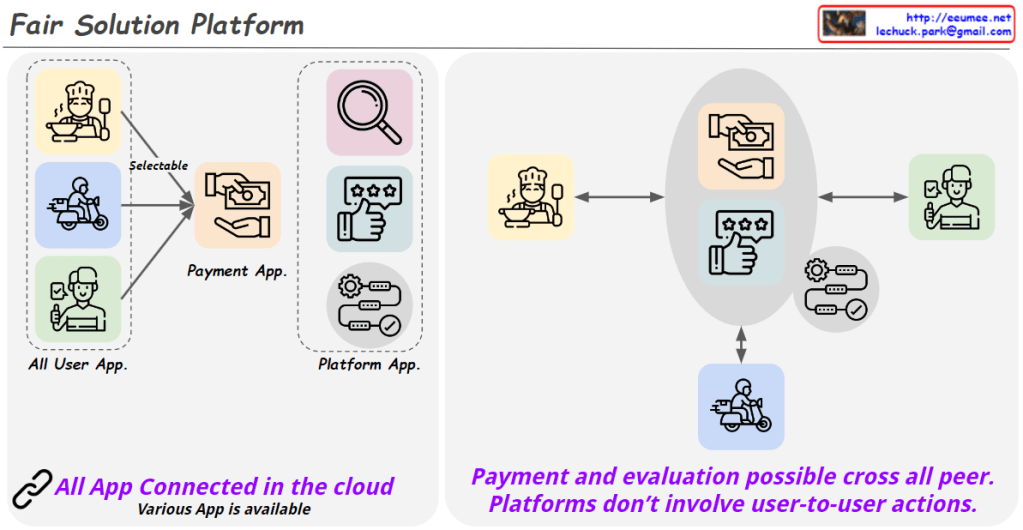
Fair Solution Platform

From Claude with some prompting
The “Fair Solution Platform” is designed with the following key concepts:

  1. User Empowerment:
    • All users (chefs, delivery personnel, customers, etc.) can directly choose which service apps to use for actual interactions (ordering, payment, delivery, evaluation, etc.).
  2. Platform Neutrality:
    • The platform provider does not interfere with direct user-to-user interactions.
    • Instead, it creates an environment where various apps can connect and be provided.
  3. Connectivity and Diversity:
    • All apps are connected through the cloud.
    • The platform fosters an ecosystem where diverse apps can be offered.
  4. Additional Features:
    • Provides functionality to search for services and activity results conducted on the platform.
  5. Fair Cost Structure:
    • The platform only charges fees related to its role as a platform.
    • Terms of transactions between users are decided directly by the parties involved.
  6. User Rights Protection:
    • This model aims to safeguard the rights of actual producers and consumers.
    • It facilitates direct transactions with minimal intermediary intervention.

The platform aims to maximize user autonomy, maintain platform neutrality, and create a fair trading environment. By doing so, it seeks to overcome the limitations of traditional platform models and create a more equitable and efficient service ecosystem.

AI Data Center

From Claude with some prompting
The image provides a comprehensive overview of the key components and infrastructure required for an AI data center. At the core lies the high computing power, facilitated by cutting-edge CPUs, GPUs, large memory capacity, and high-speed interconnects for parallel and fast data processing.

However, the intense computational demands of AI workloads generate significant heat, which the image highlights as a critical challenge. To address this, the diagram depicts the transition from traditional air cooling to liquid cooling systems, which are better equipped to handle the high heat dissipation and thermal management needs of AI hardware.

The image also emphasizes the importance of power management and “green computing” initiatives, aiming to make the data center operations more energy-efficient and environmentally sustainable, given the substantial power requirements of AI systems.

Additionally, the diagram recognizes the complexity of managing and orchestrating such a large-scale AI infrastructure, advocating for AI-driven management systems to intelligently monitor, optimize, and automate various aspects of the data center operations, including power, cooling, servers, and networking.

Furthermore, the image touches upon the need for robust security measures, with the concept of a “Secured Cloud Service” depicted, ensuring data privacy and protection for AI applications and services hosted in the data center.

Overall, the image presents a holistic view of an AI data center, highlighting the symbiotic relationship between high-performance computing hardware, advanced cooling solutions like liquid cooling, power management, AI-driven orchestration, and robust security measures – all working in tandem to support cutting-edge AI applications and services effectively and efficiently.

Scaling

From DALL-E with prompting
This image visualizes the auto-scaling mechanisms within cloud computing. ‘Scale UP’ represents enhancing the resources of a single system, while ‘Scale DOWN’ indicates reducing resources. ‘Scale OUT’ depicts horizontal expansion by adding servers to the system, and ‘Scale IN’ illustrates horizontal contraction by removing unnecessary servers. These actions are automatically executed based on software requirements, virtualization technologies, cloud infrastructure, and performance analysis. This is essential for effectively adjusting cloud resources when application loads vary, maintaining performance, and managing costs.