ALL & ChangeD DATA-Driven

Image Analysis: Full Data AI Analysis vs. Change-Triggered Urgent Response

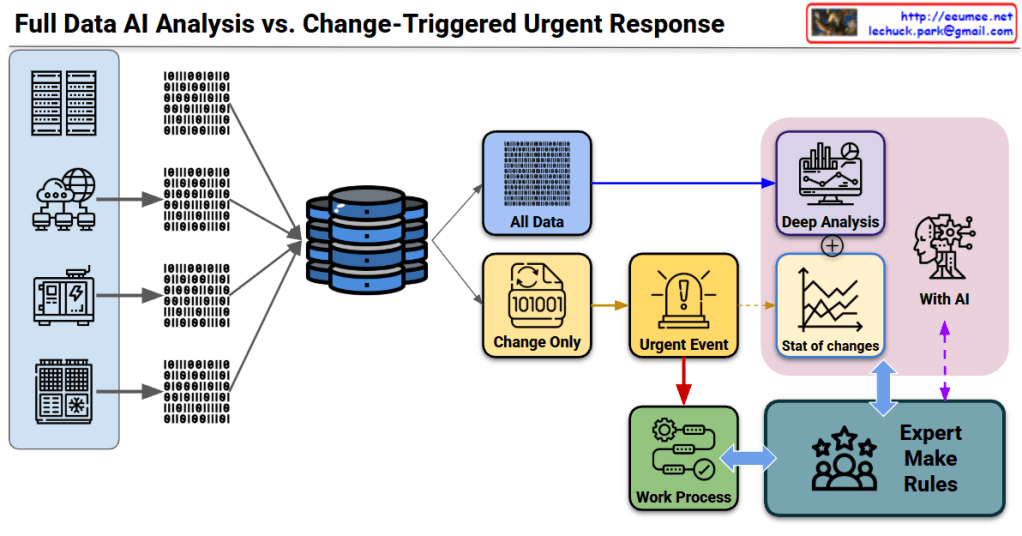
This diagram illustrates a system architecture comparing two core strategies for data processing.

🎯 Core 1: Two Data Processing Approaches

Approach A: Full Data Processing (Analysis)

  • All Data path (blue)
  • Collects and comprehensively analyzes all data
  • Performs in-depth analysis through Deep Analysis
  • AI-powered statistical change (Stat of changes) analysis
  • Characteristics: Identifies overall patterns, trends, and correlations

Approach B: Separate Change Detection Processing

  • Change Only path (yellow)
  • Selectively detects only changes
  • Extracts and processes only deltas (differences)
  • Characteristics: Fast response time, efficient resource utilization

πŸ”₯ Core 2: Analysisβ†’Urgent Responseβ†’Expert Processing Flow

Stage 1: Analysis

  • Full Data Analysis: AI-based Deep Analysis
  • Change Detection: Change Only monitoring

Stage 2: Urgent Response (Urgent Event)

  • Immediate alert generation when changes detected (⚠️ Urgent Event)
  • Automated primary response process execution
  • Direct linkage to Work Process

Stage 3: Expert Processing (Expert Make Rules)

  • Human expert intervention
  • Integrated review of AI analysis results + urgent event information
  • Creation and modification of situation-appropriate rules
  • Work Process optimization

πŸ”„ Integrated Process Flow

[Data Collection] 
    ↓
[Path Bifurcation]
    β”œβ”€β†’ [All Data] β†’ [Deep Analysis] ─┐
    β”‚                                  β”œβ†’ [AI Statistical Analysis]
    └─→ [Change Only] β†’ [Urgent Event]β”€β”˜
                            ↓
                    [Work Process] ↔ [Expert Make Rules]
                            ↑_____________↓
                         (Feedback loop with AI)

πŸ’‘ Core System Value

  1. Dual Processing Strategy: Stability (full analysis) + Agility (change detection)
  2. 3-Stage Response System: Automated analysis β†’ Urgent process β†’ Expert judgment
  3. AI + Human Collaboration: Combines AI analytical power with human expert judgment
  4. Continuous Improvement: Virtuous cycle where expert rules feed back into AI learning

This system is an architecture optimized for environments where real-time response is essential while expert judgment remains critical (manufacturing, infrastructure operations, security monitoring, etc.).


Summary

  1. Dual-path system: Comprehensive full data analysis (stability) + selective change detection (speed) working in parallel
  2. Three-tier response: AI automated analysis triggers urgent events, followed by work processes and expert rule refinement
  3. Human-AI synergy: Continuous improvement loop where expert knowledge enhances AI capabilities while AI insights inform expert decisions

#DataArchitecture #AIAnalysis #EventDrivenArchitecture #RealTimeMonitoring #HybridProcessing #ExpertSystems #ChangeDetection #UrgentResponse #IndustrialAI #SmartMonitoring #DataProcessing #AIHumanCollaboration #PredictiveMaintenance #IoTArchitecture #EnterpriseAI

Operations by Metrics

1. Big Data Collection & 2. Quality Verification

  • Big Data Collection: Represented by the binary data (top-left) and the “All Data (Metrics)” block (bottom-left).
  • Data Quality Verification: The collected data then passes through the checklist icon (top flow) and the “Verification (with Resolution)” step (bottom flow). This aligns with the quality verification step, including ‘resolution/performance’.

3. Change Data Capture (CDC)

  • Verified data moves to the “Change Only” stage (central pink box).
  • If there are “No Changes,” it results in “No Actions,” illustrating the CDC (Change Data Capture) concept of processing only altered data.
  • The magnifying glass icon in the top flow also visualizes this ‘change detection’ role.

4. State/Numeric Processing & 5. Analysis, Severity Definition

  • State/Numeric Processing: Once changes are detected (after the magnifying glass), the data is split into two types:
    • State Changes (ON/OFF icon): Represents changes in ‘state values’.
    • Numeric Changes (graph icon): Represents changes in ‘numeric values’.
  • Statistical Analysis & Severity Definition:
    • These changes are fed into the “Analysis” step.
    • This stage calculates the “Count of Changes” (statistics on the number of changes) and “Numeric change Diff” (amount of numeric change).
    • The analysis result leads to “Severity Tagging” to define the ‘Severity’ level (e.g., “Critical? Major? Minor?”).

6. Notification & 7. Analysis (Retrieve)

  • Notification: Once the severity is defined, the “Notification” step (bell/email icon) is triggered to alert personnel.
  • Analysis (Retrieve):
    • The notified user then performs the “Retrieve” action.
    • This final step involves querying both the changed data (CDD results) and the original data (source, indicated by the URL in the top-right) to analyze the cause.

Summary

This workflow begins with collecting and verifying all data, then uses CDC to isolate only the changes. These changes (state or numeric) are analyzed for count and difference to assign a severity level. The process concludes with notification and a retrieval step for root cause analysis.

#DataProcessing #DataMonitoring #ChangeDataCapture #CDC #DataAnalysis #SystemMonitoring #Alerting #ITOperations #SeverityAnalysis

With Gemini