Numbers about Cooling

Numbers about Cooling – System Analysis

This diagram illustrates the thermodynamic principles and calculation methods for cooling systems, particularly relevant for data center and server room thermal management.

System Components

Left Side (Heat Generation)

  • Power consumption device (Power kW)
  • Time element (Time kWh)
  • Heat-generating source (appears to be server/computer systems)

Right Side (Cooling)

  • Cooling system (Cooling kW – Remove ‘Heat’)
  • Cooling control system
  • Coolant circulation system

Core Formula: Q = m×Cp×ΔT

Heat Generation Side (Red Box)

  • Q: Heat flow rate (J/s) = Power (kW)
  • V: Volumetric flow rate (m³/s)
  • ρ: Air density (approximately 1.2 kg/m³)
  • Cp: Specific heat capacity of air at constant pressure (approximately 1005 J/(kg·K))
  • ΔT: Temperature change

Cooling Side (Blue Box)

  • Q: Cooling capacity (kW)
  • m: Coolant circulation rate (kg/s)
  • Cp: Specific heat capacity of coolant (for water, approximately 4.2 kJ/kg·K)
  • ΔT: Temperature change

System Operation Principle

  1. Heat generated by electronic equipment heats the air
  2. Heated air moves to the cooling system
  3. Circulating coolant absorbs the heat
  4. Cooling control system regulates flow rate or temperature
  5. Processed cool air recirculates back to the system

Key Design Considerations

The cooling control system monitors critical parameters such as:

  • High flow rate vs. High temperature differential
  • Optimal balance between energy efficiency and cooling effectiveness
  • Heat load matching between generation and removal capacity

Summary

This diagram demonstrates the fundamental thermodynamic principles for cooling system design, where electrical power consumption directly translates to heat generation that must be removed by the cooling system. The key relationship Q = m×Cp×ΔT applies to both heat generation (air side) and heat removal (coolant side), enabling engineers to calculate required coolant flow rates and temperature differentials. Understanding these heat balance calculations is essential for efficient thermal management in data centers and server environments, ensuring optimal performance while minimizing energy consumption.

Components for AI Work

This diagram visualizes the core concept that all components must be organically connected and work together to successfully operate AI workloads.

Importance of Organic Interconnections

Continuity of Data Flow

  • The data pipeline from Big Data → AI Model → AI Workload must operate seamlessly
  • Bottlenecks at any stage directly impact overall system performance

Cooperative Computing Resource Operations

  • GPU/CPU computational power must be balanced with HBM memory bandwidth
  • SSD I/O performance must harmonize with memory-processor data transfer speeds
  • Performance degradation in one component limits the efficiency of the entire system

Integrated Software Control Management

  • Load balancing, integration, and synchronization coordinate optimal hardware resource utilization
  • Real-time optimization of workload distribution and resource allocation

Infrastructure-based Stability Assurance

  • Stable power supply ensures continuous operation of all computing resources
  • Cooling systems prevent performance degradation through thermal management of high-performance hardware
  • Facility control maintains consistency of the overall operating environment

Key Insight

In AI systems, the weakest link determines overall performance. For example, no matter how powerful the GPU, if memory bandwidth is insufficient or cooling is inadequate, the entire system cannot achieve its full potential. Therefore, balanced design and integrated management of all components is crucial for AI workload success.

The diagram emphasizes that AI infrastructure is not just about having powerful individual components, but about creating a holistically optimized ecosystem where every element supports and enhances the others.

With Claude

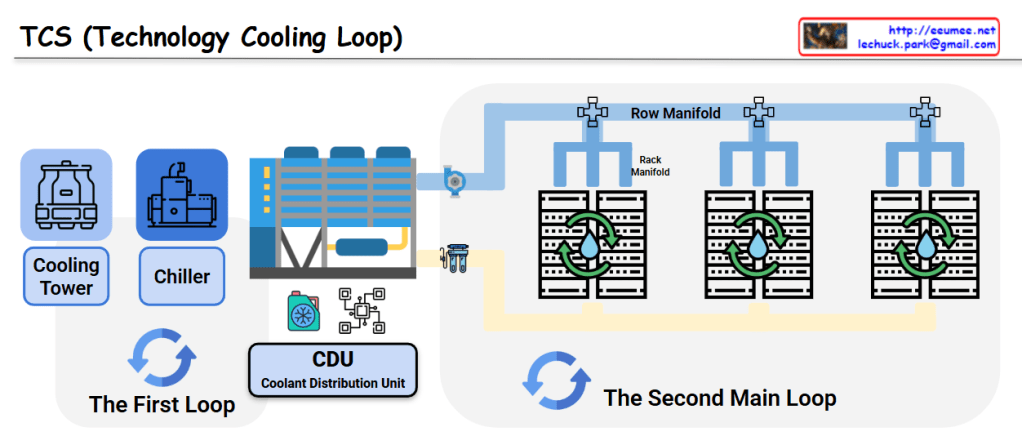
TCS (Technology Cooling Loop)

This image shows a diagram of the TCS (Technology Cooling Loop) system structure.

System Components

The First Loop:

  • Cooling Tower: Dissipates heat to the atmosphere
  • Chiller: Generates chilled water
  • CDU (Coolant Distribution Unit): Distributes coolant throughout the system

The Second Main Loop:

  • Row Manifold: Distributes cooling water to each server rack row
  • Rack Manifold: Individual rack-level cooling water distribution system
  • Server Racks: IT equipment racks that require cooling

System Operation

  1. Primary Loop: The cooling tower releases heat to the outside air, while the chiller produces chilled water that is supplied to the CDU
  2. Secondary Loop: Coolant distributed from the CDU flows through the Row Manifold to each server rack’s Rack Manifold, cooling the servers
  3. Circulation System: The heated coolant returns to the CDU where it is re-cooled through the primary loop

This is an efficient cooling system used in data centers and large-scale IT facilities. It systematically removes heat generated by server equipment to ensure stable operations through a two-loop architecture that separates the heat rejection process from the precision cooling delivery to IT equipment.

With Claude

Server Room Workload

This diagram illustrates a server room thermal management system workflow.

System Architecture

Server Internal Components:

  • AI Workload, GPU Workload, and Power Workload are connected to the CPU, generating heat

Temperature Monitoring Points:

  • Supply Temp: Cold air supplied from the cooling system
  • CoolZone Temp: Temperature in the cooling zone
  • Inlet Temp: Server inlet temperature
  • Outlet Temp: Server outlet temperature
  • Hot Zone Temp: Temperature in the heat exhaust zone
  • Return Temp : Hot air return to the cooling system

Cooling System:

  • The Cooling Workload on the left manages overall cooling
  • Closed-loop cooling system that circulates back via Return Temp

Temperature Delta Monitoring

The bottom flowchart shows how each workload affects temperature changes (ΔT):

  • Delta temperature sensors (Δ1, Δ2, Δ3) measure temperature differences across each section
  • This data enables analysis of each workload’s thermal impact and optimization of cooling efficiency

This system appears to be a data center thermal management solution designed to effectively handle high heat loads from AI and GPU-intensive workloads. The comprehensive temperature monitoring allows for precise control and optimization of the cooling infrastructure based on real-time workload demands.

With Claude

GPU Server Room : Changes

Image Overview

This dashboard displays the cascading resource changes that occur when GPU workload increases in an AI data center server room monitoring system.

Key Change Sequence (Estimated Values)

  1. GPU Load Increase: 30% → 90% (AI computation tasks initiated)
  2. Power Consumption Rise: 0.42kW → 1.26kW (3x increase)
  3. Temperature Delta Rise: 7°C → 17°C (increased heat generation)
  4. Cooling System Response:
    • Water flow rate: 200 LPM → 600 LPM (3x increase)
    • Fan speed: 600 RPM → 1200 RPM (2x increase)

Operational Prediction Implications

  • Operating Costs: Approximately 3x increase from baseline expected
  • Spare Capacity: 40% cooling system capacity remaining
  • Expansion Capability: Current setup can accommodate additional 67% GPU load

This AI data center monitoring dashboard illustrates the cascading resource changes when GPU workload increases from 30% to 90%, triggering proportional increases in power consumption (3x), cooling flow rate (3x), and fan speed (2x). The system demonstrates predictable operational scaling patterns, with current cooling capacity showing 40% remaining headroom for additional GPU load expansion. Note: All values are estimated figures for demonstration purposes.

Note: All numerical values are estimated figures for demonstration purposes and do not represent actual measured data.

With Claude

Data in AI DC

This image illustrates a data monitoring system for an AI data center server room. Titled “Data in AI DC Server Room,” it depicts the relationships between key elements being monitored in the data center.

The system consists of four main components, each with detailed metrics:

  1. GPU Workload – Right center
    • Computing Load: GPU utilization rate (%) and type of computational tasks (training vs. inference)
    • Power Consumption: Real-time power consumption of each GPU (W) – Example: NVIDIA H100 GPU consumes up to 700W
    • Workload Pattern: Periodicity of workload (peak/off-peak times) and predictability
    • Memory Usage: GPU memory usage patterns (e.g., HBM3 memory bandwidth usage)
  2. Power Infrastructure – Left
    • Power Usage: Real-time power output and efficiency of UPS, PDU, and transformers
    • Power Quality: Voltage, frequency stability, and power loss rate
    • Power Capacity: Types and proportions of supplied energy, ensuring sufficient power availability for current workload operations
  3. Cooling System – Right
    • Cooling Device Status: Air-cooling fan speed (RPM), liquid cooling pump flow rate (LPM), and coolant temperature (°C)
    • Environmental Conditions: Data center internal temperature, humidity, air pressure, and hot/cold zone temperatures – critical for server operations
    • Cooling Efficiency: Power Usage Effectiveness (PUE) and proportion of power consumed by the cooling system
  4. Server/Rack – Top center
    • Rack Power Density: Power consumption per rack (kW) – Example: GPU server racks range from 30 to 120 kW
    • Temperature Profile: Temperature (°C) of GPUs, CPUs, memory modules, and heat distribution
    • Server Status: Operational state of servers (active/standby) and workload distribution status

The workflow sequence indicated at the bottom of the diagram represents:

  1. ① GPU WORK: Initial execution of AI workloads – GPU computational tasks begin, generating system load
  2. ② with POWER USE: Increased power supply for GPU operations – Power demand increases with GPU workload, and power infrastructure responds accordingly
  3. ③ COOLING WORK: Cooling processes activated in response to heat generation
    • Sensing: Temperature sensors detect server and rack thermal conditions, monitoring hot/cold zone temperature differentials
    • Analysis: Analysis of collected temperature data, determining cooling requirements
    • Action: Adjustment of cooling equipment (fan speed, coolant flow rate, etc. automatically regulated)
  4. ④ SERVER OK: Maintenance of normal server operation through proper power supply and cooling – Temperature and power remain stable, allowing GPU workloads to continue running under optimal conditions

The arrows indicate data flow and interrelationships between systems, showing connections from power infrastructure to servers and from cooling systems to servers. This integrated system enables efficient and stable data center operation by detecting increased power demand and heat generation from GPU workloads, and adjusting cooling systems in real-time accordingly.

With Claude

Key Factors in DC

This image is a diagram showing the key components of a Data Center (DC).

The diagram visually represents the core elements that make up a data center:

  1. Building – Shown on the left with a building icon, representing the physical structure of the data center.
  2. Core infrastructure elements (in the central blue area):
    • Network – Data communication infrastructure
    • Computing – Servers and processing equipment
    • Power – Energy supply systems
    • Cooling – Temperature regulation systems
  3. The central orange circle represents server racks, which is connected to power supply units (transformers), cooling equipment, and network devices.
  4. Digital Service – Displayed on the right, representing the end services that all this infrastructure ultimately delivers.

This diagram illustrates how a data center flows from a physical building through core elements like network, computing, power, and cooling to ultimately provide digital services.

With Claude