3 Computing in AI

AI Computing Architecture

3 Processing Types

1. Sequential Processing

  • Hardware: General CPU (Intel/ARM)
  • Function: Control flow, I/O, scheduling, Data preparation
  • Workload Share: Training 5%, Inference 5%

2. Parallel Stream Processing

  • Hardware: CUDA core (Stream process)
  • Function: FP32/FP16 Vector/Scalar, memory management
  • Workload Share: Training 10%, Inference 30%

3. Matrix Processing

  • Hardware: Tensor core (Matrix core)
  • Function: Mixed-precision (FP8/FP16) MMA, Sparse matrix operations
  • Workload Share: Training 85%+, Inference 65%+

Key Insight

The majority of AI workloads are concentrated in matrix processing because matrix multiplication is the core operation in deep learning. Tensor cores are the key component for AI performance improvement.

With Claude

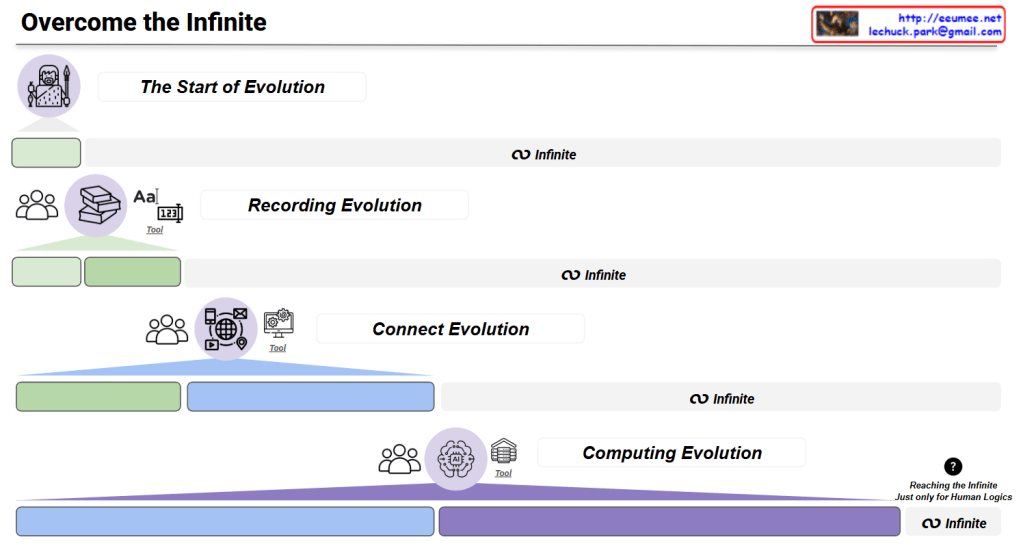
Overcome the Infinite

Overcome the Infinite – Game Interface Analysis

Overview

This image presents a philosophical game interface titled “Overcome the Infinite” that chronicles the evolutionary journey of human civilization through four revolutionary stages of innovation.

Game Structure

Stage 1: The Start of Evolution

  • Icon: Primitive human figure
  • Description: The beginning of human civilization and consciousness

Stage 2: Recording Evolution

  • Icon: Books and writing materials
  • Innovation: The revolution of knowledge storage through numbers, letters, and books
  • Significance: Transition from oral tradition to written documentation, enabling permanent knowledge preservation

Stage 3: Connect Evolution

  • Icon: Network/internet symbols with people
  • Innovation: The revolution of global connectivity through computers and the internet
  • Significance: Worldwide information sharing and communication breakthrough

Stage 4: Computing Evolution

  • Icon: AI/computing symbols with data centers
  • Innovation: The revolution of computational processing through data centers and artificial intelligence
  • Significance: The dawn of the AI era and advanced computational capabilities

Progress Indicators

  • Green and blue progress bars show advancement through each evolutionary stage
  • Each stage maintains the “∞ Infinite” symbol, suggesting unlimited potential at every level

Philosophical Message

“Reaching the Infinite Just only for Human Logics” (Bottom right)

This critical message embodies the game’s central philosophical question:

  • Can humanity truly overcome or reach the infinite through these innovations?
  • Even if we approach the infinite, it remains constrained within the boundaries of human perception and logic
  • Represents both technological optimism and humble acknowledgment of human limitations

Theme

The interface presents a contemplative journey through human technological evolution, questioning whether our innovations truly bring us closer to transcending infinite boundaries, or merely expand the scope of our human-limited understanding.

With Claude

Key Factors in DC

This image is a diagram showing the key components of a Data Center (DC).

The diagram visually represents the core elements that make up a data center:

  1. Building – Shown on the left with a building icon, representing the physical structure of the data center.
  2. Core infrastructure elements (in the central blue area):
    • Network – Data communication infrastructure
    • Computing – Servers and processing equipment
    • Power – Energy supply systems
    • Cooling – Temperature regulation systems
  3. The central orange circle represents server racks, which is connected to power supply units (transformers), cooling equipment, and network devices.
  4. Digital Service – Displayed on the right, representing the end services that all this infrastructure ultimately delivers.

This diagram illustrates how a data center flows from a physical building through core elements like network, computing, power, and cooling to ultimately provide digital services.

With Claude

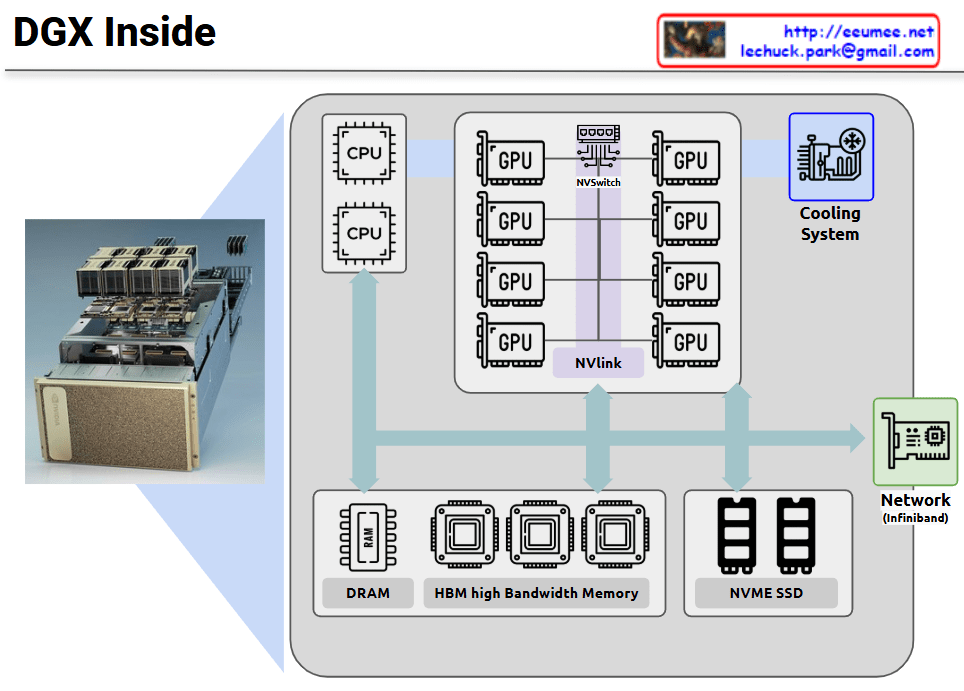
DGX Inside

NVIDIA DGX is a specialized server system optimized for GPU-centric high-performance computing. This diagram illustrates the internal architecture of DGX, which maintains a server-like structure but is specifically designed for massive parallel processing.

The core of the DGX system consists of multiple high-performance GPUs interconnected not through conventional PCIe, but via NVIDIA’s proprietary NVLink and NVSwitch technologies. This configuration dramatically increases GPU-to-GPU communication bandwidth, maximizing parallel processing efficiency.

Key features:

  • Integration of multiple CPUs and eight GPUs through high-performance interconnects
  • Mesh network configuration between all GPUs via NVSwitch, minimizing bottlenecks
  • Hierarchical memory architecture combining High Bandwidth Memory (HBM) and DRAM
  • NVMe SSDs for high-speed storage
  • High-efficiency cooling system supporting dense computing environments
  • InfiniBand networking for high-speed connections between multiple DGX systems

This configuration is optimized for workloads requiring parallel processing such as deep learning, AI model training, and large-scale data analysis, enabling much more efficient GPU utilization compared to conventional servers.

With Claude

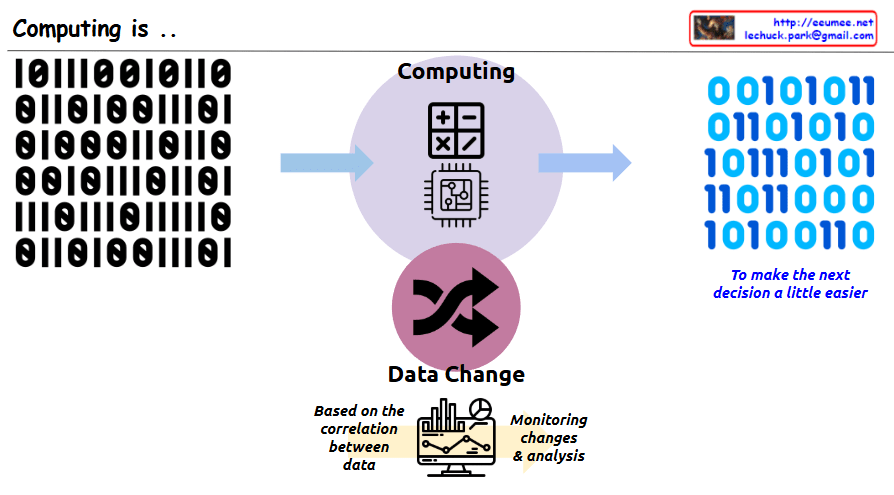
Computing is ..

This image illustrates the core concept of “Computing.” The key message is that computing is a process of transforming data to make people’s next decisions easier.

In the center, there is a circle with the title “Computing” along with calculator and computer chip icons. On the left side, there is binary input data (0s and 1s), which is shown being transformed through the central computing process into different binary output on the right side. Next to the binary output on the right is blue italic text saying “To make the next decision a little easier,” emphasizing that the purpose of this data transformation is to aid human decision-making.

At the bottom of the image, there is a section titled “Data Change” with cycling arrows representing data transformation. Below that, there’s a monitor displaying charts and graphs with descriptions “Based on the correlation between data” and “Monitoring changes & analysis,” showing that analyzing relationships between data is important for supporting decision-making.

With Claude

Data Center NOW

This image shows a data center architecture diagram titled “Data Center Now” at the top. It illustrates the key components and flow of a modern data center infrastructure.

The diagram depicts:

  1. On the left side: An “Explosion of data” icon with data storage symbols, pointing to computing components with the note “More Computing is required”
  2. In the center: Server racks connected to various systems with colored lines indicating different connections (red, blue, green)
  3. On the right side: Several technology components illustrated with circular icons and labels:
    • “Software Defined” with a computer/gear icon
    • “AI & GPU” with neural network and GPU icons and note “Big power is required”
    • “Renewable Energy & Grid Power” with solar panel and wind turbine icons
    • “Optimized Cooling /w Using Water” with cooling system icon
    • “Enhanced Op System & AI Agent” with a robotic/AI system icon

The diagram shows how data flows through processing units and connects to different infrastructure elements, emphasizing modern data center requirements like increased computing power, AI capabilities, power management, and cooling solutions.

With Claude

Add with power

Add with Power: 8-Bit Binary Addition and Energy Transformation

Core Mechanism:

  1. Input: Two 8-energy binary states (both rows ending with 1)
  2. Computation Process: 1+1 = 2 (binary overflow occurs)
  3. Result:
    • Output row’s last bit changed to 0
    • Part of energy converted to heat

Key Components:

  • Two input rows with 8 binary “energies”
  • Computing symbol (+) representing addition
  • A heat generation (?) box marked x8
  • Resulting output row with modified energy state

Fundamental Principle: “All energies must be maintained with continuous energies for no error (no changes without Computing)”

This diagram illustrates:

  • Binary addition process
  • Energy conservation and transformation
  • Information loss during computation
  • Relationship between computation, energy, and heat generation

The visual representation shows how a simple 8-bit addition triggers energy transfer, with overflow resulting in heat production and a modified binary state.

WIth Claude