One Point

From Claude with some prompting
This image presents a concept diagram titled “One Point”. It illustrates the process from the smallest unit in the universe to human data collection.

Key elements include:

  1. “The Point”: Representing the smallest unit.
  2. “From the universe”:
    • Quantum: Symbolized by an atom icon
    • Energy: Depicted with a lightning bolt icon
  3. “Sensing”: Shown as a yellow arrow process
  4. “By Humans”:
    • “0 and 1”: Representing digital data
    • “Diff”: Likely indicating data processing
    • “Data”: The final output
  5. “gathering”: The process from 0 and 1 to Data

At the bottom, there’s an infinity symbol with the phrase “not much different (infinite by the view of micro & macro)”. This suggests little difference between microscopic and macroscopic perspectives.

UNIX 1969

From Claude with some prompting
The image comprehensively illustrates the structure and major developments of the UNIX operating system, first developed in 1969. The key components and features are as follows:

  • Hardware: The foundation of the system
  • Kernel: The core of the operating system, including process management functions
  • Shell: The interface for users to manage the system
  • Utilities: Tools such as compilers included
  • Daemon: Processes that run in the background
  • C Language and Assembly: Introduced in 1972, the C language was used for system development
  • POSIX (1988): An interface for standardizing UNIX systems, including pipes and filters
  • Multitasking and Time-sharing: Key features of UNIX
  • “All is File” Philosophy: A core design principle of UNIX
  • Networking Advancements:
    • UUCP (1978): An early communication protocol between UNIX systems
    • TCP/IP with Socket API (1983): The foundation of modern networking

This diagram shows the evolution of UNIX from its basic structure to significant technological advancements over time, providing a comprehensive overview of UNIX’s core concepts and features. It displays the historical development of UNIX by combining early design elements with later added functionalities, allowing for a clear understanding of UNIX’s progression.
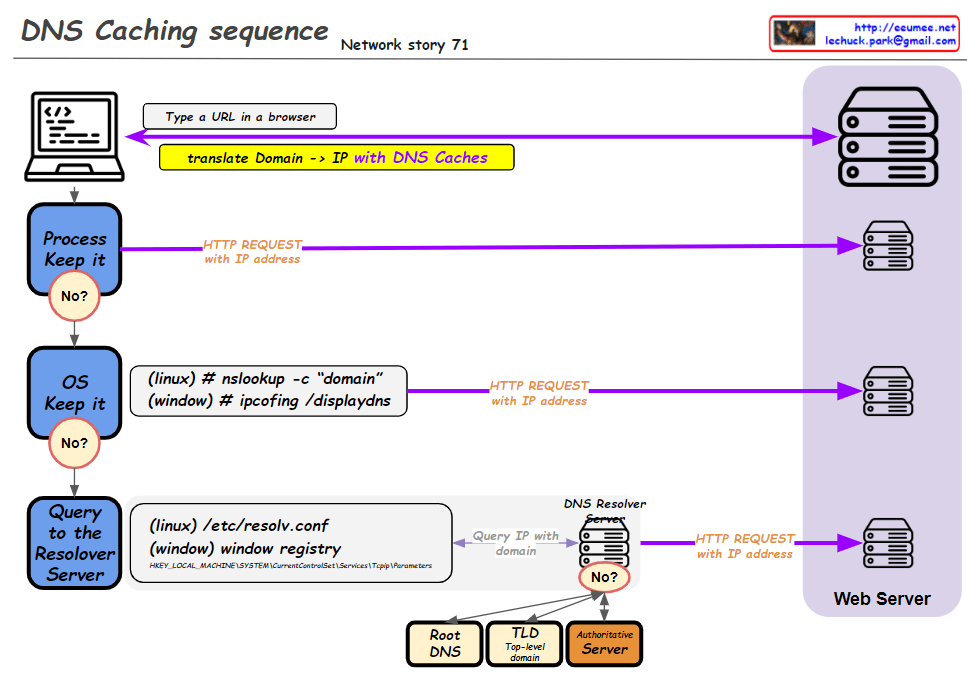
DNS Caching SEQ

From Claude with some prompting
This improved diagram illustrates the DNS caching sequence more comprehensively. Here’s a breakdown of the process:

  1. A user types a URL in a browser.
  2. The system attempts to translate the domain to an IP address using DNS caches.
  3. Process Keep it: Checks the process-level DNS cache. If the information isn’t found here (“No”), it moves to the next step.
  4. OS Keep it: Checks the operating system-level DNS cache. For Linux, it uses the “nslookup -c domain” command, while for Windows, it uses “ipconfig /displaydns”. If the information isn’t found here (“No”), it proceeds to the next step.
  5. Query to the Resolver Server: The system queries the DNS resolver server. The resolver’s information is found in “/etc/resolv.conf” for Linux or the Windows Registry for Windows systems.
  6. If the resolver doesn’t have the information cached (“No”), it initiates a recursive query through the DNS hierarchy:
    • Root DNS
    • TLD (Top-Level Domain) server
    • Authoritative server
  7. Once the IP address is obtained, an HTTP request is sent to the web server.

This diagram effectively shows the hierarchical nature of DNS resolution and the fallback mechanisms at each level. It demonstrates how the system progressively moves from local caches to broader, more authoritative sources when resolving domain names to IP addresses. The addition of the DNS hierarchy (Root, TLD, Authoritative) provides a more complete picture of the entire resolution process when local caches and the initial resolver query don’t yield results.

New OS

From Claude with some prompting
This image illustrates a more comprehensive structure of a new operating system integrated with AI. Here’s a summary of the key changes and features:

  1. Cloud Connectivity: A “Cloud Connected” element has been added, linked to AI Applications. This represents the integration between local AI and cloud-based AI services.
  2. User Data Protection: The “User Data (Private)” section now includes various icons, visualizing the management of different types of user data and emphasizing privacy protection.
  3. New Interface: The Q&A-style “New Interface” is more prominently displayed, highlighting direct interaction between AI and users.
  4. AI Application Integration: AI Applications are closely connected to User Applications, the Inference Model, and User Data.
  5. Hardware Utilization: The GPU (inference) is clearly marked as specialized hardware for AI tasks.
  6. Localized Learning Data: “Learned Data (Localized)” is included as part of the system, indicating the capability to provide personalized AI experiences.

This structure offers several advantages:

  • Enhanced User Experience: Intuitive interaction through AI-based interfaces
  • Privacy Protection: Secure management of user data
  • Hybrid Cloud-Local AI: Balanced use of local processing and cloud resources
  • Performance Optimization: Efficient AI task processing through GPU
  • Personalization: Customized AI services using localized learning data

This new OS architecture integrates AI as a core component, seamlessly combining traditional OS functions with advanced AI capabilities to present a next-generation computing environment.

AI DC Key

From Claude with some prompting
This image titled “AI DC Key” illustrates the key components of an AI data center. Here’s an interpretation of the diagram:

  1. On the left, there’s an icon representing “Massive Data”.
  2. The center showcases four core elements of AI:
    • “Super Power”
    • “Super Computing” (utilizing GPU)
    • “Super Cooling”
    • “Optimizing Operation”
  3. Below each core element, key considerations are listed:
    • Super Power: “Nature & Consistent”
    • Super Computing: “Super Parallel”
    • Super Cooling: “Liquid Cooling”
    • Optimizing Operation: “Data driven Auto & AI”
  4. On the right, an icon represents “Analyzed Data”.
  5. The overall flow illustrates the process of massive data being input, processed through the AI core elements, and resulting in analyzed data.

This diagram visualizes the essential components of a modern AI data center and their key considerations. It demonstrates how high-performance computing, efficient power management, advanced cooling technology, and optimized operations effectively process and analyze large-scale data, emphasizing the critical technologies or approaches for each element.