AI together!!

This diagram titled “AI together!!” illustrates a comprehensive architecture for AI-powered question-answering systems, focusing on the integration of user data, tools, and AI models through standardized protocols.

Key Components:

  1. Left Area (Blue) – User Side:
    • Prompt: The entry point for user queries, represented by a UI interface with chat elements
    • RAG (Retrieval Augmented Generation): A system that enhances AI responses by retrieving relevant information from user data sources
    • My Data: User’s personal data repositories shown as spreadsheets and databases
    • My Tool: Custom tools that can be integrated into the workflow
  2. Right Area (Purple) – AI Model Side:
    • AI Model (foundation): The core AI foundation model represented by a robot icon
    • MOE (Mixture Of Experts): A system that combines multiple specialized AI models for improved performance
    • Domain Specific AI Model: Specialized AI models trained for particular domains or tasks
    • External or Internet: Connection to external knowledge sources and internet resources
  3. Center Area (Green) – Connection Standard:
    • MCP (Model Context Protocol): A standardized protocol that facilitates communication between user-side components and AI models, labeled as “Standard of Connecting”

Information Flow:

  • Questions flow from the prompt interface on the left to the AI models on the right
  • Answers are generated by the AI models and returned to the user interface
  • The RAG system augments queries with relevant information from the user’s data
  • Semantic Search provides additional connections between components
  • All interactions are standardized through the MCP framework

This architecture demonstrates how personal data and custom tools can be seamlessly integrated with foundation and specialized AI models to create a more personalized, context-aware AI system that delivers more accurate and relevant responses to user queries.

With Claude

Nice Action

This “Nice Action” diagram illustrates how decision-making processes work similarly for both humans and AI:

  1. Dual Structure of All Choices: Every decision inherently consists of elements of certainty and uncertainty.
  2. Certainty Expansion Strategy: The first step “① Expansion ‘Certain’ First” demonstrates the strategy of maximizing the use of already certain information. This establishes a foundation for decision-making based on known facts.
  3. Uncertainty Upgrade: The second step “② Upgrade Possibility to near 100%” represents the process of increasing the probability of uncertain elements to bring them as close as possible to certainty. While complete certainty cannot be achieved for all elements, obtaining sufficiently high probability enhances the reliability of decisions.
  4. Similarity to Machine Learning and AI: This decision-making model is remarkably similar to how modern machine learning and AI function. AI systems also operate based on certain data (learned patterns) and use probabilistic approaches for uncertain elements to derive optimal decisions.
  5. Transition to Action: Once sufficient certainty is established, the final “ACTION” step can be taken to implement the decision.

This diagram provides insight into how human intuitive decision-making and AI’s algorithmic approach fundamentally follow the same principle—maximizing certainty while managing uncertainty to an acceptable level. The “AI, too” notation explicitly emphasizes this similarity.

With Claude

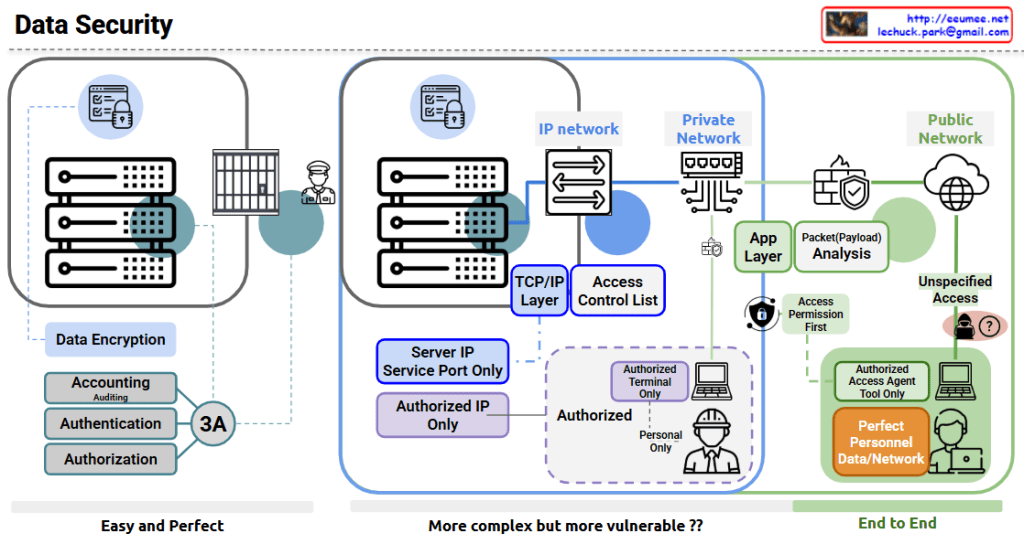
Data Security

The image shows a comprehensive data security diagram with three main approaches to securing data systems. Let me explain each section:

  1. Left Section – “Easy and Perfect”:
    • Features data encryption for secure storage
    • Implements the “3A” security principles: Accounting (with Auditing), Authentication, and Authorization
    • Shows server hardware protected by physical security (guard)
    • Represents a straightforward but effective security approach
  2. Middle Section – “More complex but more vulnerable??”:
    • Shows an IP network architecture with:
      • Server IP and service port restrictions
      • TCP/IP layer security
      • Access Control Lists
      • Authorized IP only policy
      • Authorized terminal restrictions
      • Personnel authorization controls
  3. Right Section – “End to End”:
    • Divides security between Private Network and Public Network
    • Includes:
      • Application layer security
      • Packet/Payload analysis
      • Access Permission First principle
      • Authorized Access Agent Tool restrictions
      • “Perfect Personnel Data/Network” security approach
      • Unspecified Access concerns (shown with question mark)

The diagram illustrates the evolution of data security approaches from simpler encryption and authentication methods to more complex network security architectures, and finally to comprehensive end-to-end security solutions. The diagram questions whether more complex systems might actually introduce more vulnerabilities, suggesting that complexity doesn’t always equal better security.

With Claude

Key Factors in DC

This image is a diagram showing the key components of a Data Center (DC).

The diagram visually represents the core elements that make up a data center:

  1. Building – Shown on the left with a building icon, representing the physical structure of the data center.
  2. Core infrastructure elements (in the central blue area):
    • Network – Data communication infrastructure
    • Computing – Servers and processing equipment
    • Power – Energy supply systems
    • Cooling – Temperature regulation systems
  3. The central orange circle represents server racks, which is connected to power supply units (transformers), cooling equipment, and network devices.
  4. Digital Service – Displayed on the right, representing the end services that all this infrastructure ultimately delivers.

This diagram illustrates how a data center flows from a physical building through core elements like network, computing, power, and cooling to ultimately provide digital services.

With Claude

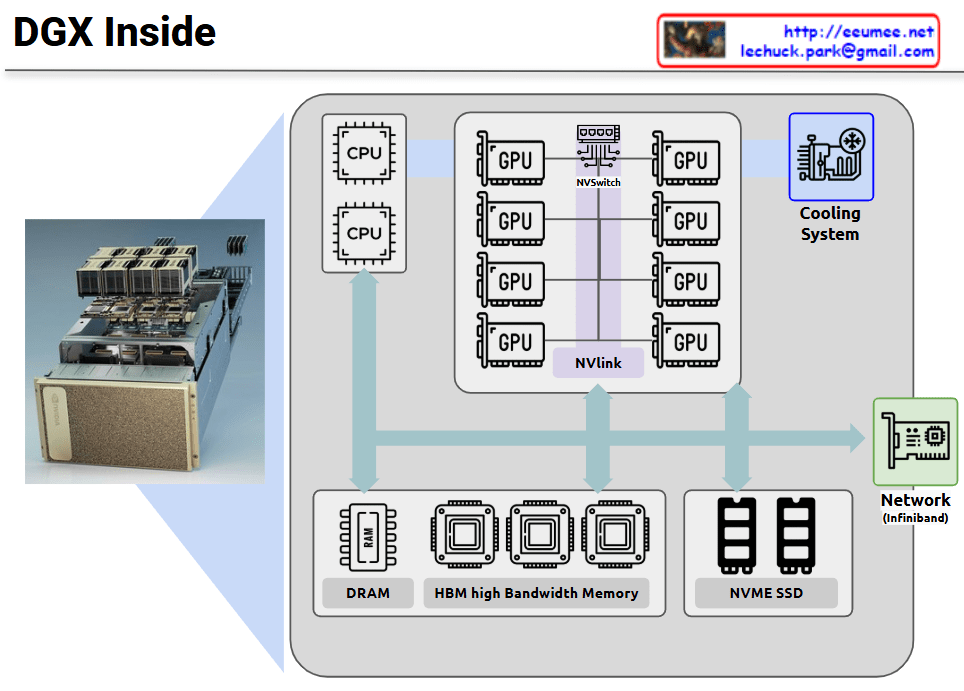
DGX Inside

NVIDIA DGX is a specialized server system optimized for GPU-centric high-performance computing. This diagram illustrates the internal architecture of DGX, which maintains a server-like structure but is specifically designed for massive parallel processing.

The core of the DGX system consists of multiple high-performance GPUs interconnected not through conventional PCIe, but via NVIDIA’s proprietary NVLink and NVSwitch technologies. This configuration dramatically increases GPU-to-GPU communication bandwidth, maximizing parallel processing efficiency.

Key features:

  • Integration of multiple CPUs and eight GPUs through high-performance interconnects
  • Mesh network configuration between all GPUs via NVSwitch, minimizing bottlenecks
  • Hierarchical memory architecture combining High Bandwidth Memory (HBM) and DRAM
  • NVMe SSDs for high-speed storage
  • High-efficiency cooling system supporting dense computing environments
  • InfiniBand networking for high-speed connections between multiple DGX systems

This configuration is optimized for workloads requiring parallel processing such as deep learning, AI model training, and large-scale data analysis, enabling much more efficient GPU utilization compared to conventional servers.

With Claude