Data Explosion in Data Center

This image titled “Data Explosion in Data Center” illustrates three key challenges faced by modern data centers:

  1. Data/Computing:
    • Shows the explosive growth of data from computing servers to internet/cloud infrastructure and AI technologies.
    • Visualizes the exponential increase in data volume from 1X to 100X, 10,000X, and ultimately to 1,000,000,000X (one billion times).
    • Depicts how servers, computers, mobile devices, and global networks connect to massive data nodes, generating and processing enormous amounts of information.
  2. Power:
    • Addresses the increasing power supply requirements needed to support the data explosion in data centers.
    • Shows various energy sources including traditional power plants, wind turbines, solar panels, and battery storage systems to meet the growing energy demands.
    • Represents energy efficiency and sustainable power supply through a cyclical system indicated by green arrows.
  3. Cooling:
    • Illustrates the heat management challenges resulting from increased data processing and their solutions.
    • Explains the shift from traditional air cooling methods to more efficient server liquid cooling technologies.
    • Visualizes modern cooling solutions with blue circular arrows representing the cooling cycle.

This diagram comprehensively explains how the exponential growth of data impacts data center design and operations, particularly highlighting the challenges and innovations in power consumption and thermal management.

With Claude

AI Data Center : Power Req.

This image illustrates a diagram of power requirements and management for AI data centers:

Top Section – “More Power & Control”:

  • Diverse power sources: SMR (Small Modular Reactor), Reusable Energy (wind, solar), and ESS (Energy Storage System)
  • Power control system directing electricity from these various sources to the data center through “Power Control with Grid”
  • Integrated system for reliable and sustainable power supply

Bottom Section – “Optimization”:

  • Power distribution system through transformers and power supply units
  • Central control system for power routing
  • Load Balancing and Dynamic Power Management capabilities
  • Efficient power distribution to server racks based on GPU workload
  • “More Stable” indication emphasizing system reliability

This diagram highlights the importance of diversifying reliable power sources, efficient power control, and optimized power management according to GPU workload in AI data centers.

With Claude

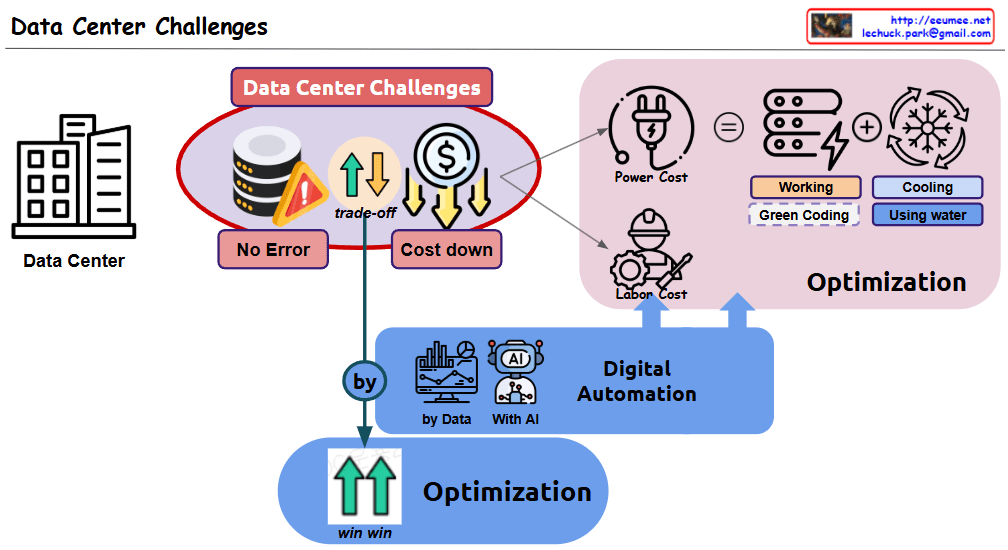
Data Center Challenges

This diagram illustrates “Data Center Challenges” by visually explaining the key challenges faced by data centers and their potential solutions.

The central red circle highlights the main challenges:

  • “No Error” – representing reliable operations
  • “Cost down” – representing economic efficiency
  • Between these two goals, there typically exists a “trade-off” relationship

The “Optimization” section on the right breaks down the cost structure:

  1. “Power Cost”:
    • “Working” – representing IT power that can be optimized through “Green Coding”
    • “Cooling” – can be significantly optimized with “Using water” (liquid cooling) technologies
  2. “Labor Cost”:
    • Personnel costs that can be reduced through automation

The middle “Digital Automation” section shows:

  • “by Data” decision-making approaches
  • “With AI” methodologies

At the bottom, the final outcome shows:

  • “win win” – upward arrows and “Optimization” indicating that both goals can be achieved simultaneously

This diagram demonstrates how digital automation leveraging data and AI can help data centers achieve the seemingly conflicting goals of reliable operations and cost reduction simultaneously.

With Claude

Data Center NOW

This image shows a data center architecture diagram titled “Data Center Now” at the top. It illustrates the key components and flow of a modern data center infrastructure.

The diagram depicts:

  1. On the left side: An “Explosion of data” icon with data storage symbols, pointing to computing components with the note “More Computing is required”
  2. In the center: Server racks connected to various systems with colored lines indicating different connections (red, blue, green)
  3. On the right side: Several technology components illustrated with circular icons and labels:
    • “Software Defined” with a computer/gear icon
    • “AI & GPU” with neural network and GPU icons and note “Big power is required”
    • “Renewable Energy & Grid Power” with solar panel and wind turbine icons
    • “Optimized Cooling /w Using Water” with cooling system icon
    • “Enhanced Op System & AI Agent” with a robotic/AI system icon

The diagram shows how data flows through processing units and connects to different infrastructure elements, emphasizing modern data center requirements like increased computing power, AI capabilities, power management, and cooling solutions.

With Claude

Power Usage of Cooling

Data Center Cooling System Power Usage Analysis

This diagram illustrates the cooling system configuration of a data center and the power consumption proportions of each component.

Cooling Facility Stages:

  1. Cooling Tower: The first stage, generating Cooling Water through contact between outside air and water.
  2. Chiller: Receives cooling water and converts it to Chilled Water at a lower temperature through the compressor.
  3. CRAH (Computer Room Air Handler): Uses chilled water to produce Cooling Air for the server room.
  4. Server Rack Cooling: Finally, cooling air reaches the server racks and absorbs heat.

Several auxiliary devices operate in this process:

  • Pump: Regulates the pressure and speed of cooling water and chilled water.
  • Header: Efficiently distributes and collects water.
  • Heat Exchanger: Optimizes the heat transfer process.
  • Fan: Circulates cooling air.

Cooling Facility Power Usage Proportions:

  • Chiller/Compressor: The largest power consumer, accounting for 60-80% of total cooling power.
  • Pump: Consumes 10-15% of power.
  • Cooling Tower: Uses approximately 10% of power.
  • CRAH/Fan: Uses approximately 10% of power.
  • Other components: Account for the remaining 10%.

Purpose of Energy Usage (Efficiency):

  • As indicated in the blue box on the lower right, “Most of the power is to lower the temperature and transfer it.”
  • The system operates through Supply and Return loops to remove heat from the “Sources of heat.”
  • The note “100% Free Cooling = Chiller Not working” indicates that when using natural cooling methods, the most power-intensive component (the chiller) doesn’t need to operate, potentially resulting in significant energy efficiency improvements.

This data center cooling system diagram illustrates how cooling moves from Cooling Tower to Chiller to CRAH to server racks, with compressors consuming the majority (60-80%) of power usage, followed by pumps (10-15%) and other components (10% each). The system primarily functions to lower temperatures and transfer heat, with the important insight that 100% free cooling eliminates the need for chillers, potentially saving significant energy.

With Claude

Power Flow

Power Flow Diagram Analysis

This image illustrates a power flow diagram for a data center or server room, showing the sequential path of electricity from external power sources to the final server equipment.

Main Components:

  1. Intake: External power supply at 154 kV / 22.9 kV with 100MW(MVA) capacity
  2. Transformer: Performs voltage conversion (step down) to make power easier to handle
  3. Generator: Provides backup power during outages, connected to a fuel tank
  4. Transformer #2: Second voltage conversion, bringing power closer to usable voltage (220/380V)
  5. UPS/Battery: Uninterruptible Power Supply with battery backup for blackout protection, showing capacity (KVA) and backup time
  6. PDU/TOB: Power Distribution Unit for connecting to servers
  7. Server: Final power consumption equipment

Key Features:

  • Red circles indicate power switching/distribution points
  • Dotted lines show backup power connections
  • The bottom section details the characteristics of each component:
    • Intake power specifications
    • Voltage conversion information
    • Blackout readiness status
    • Server connection details
    • Power usage status

Summary:

This diagram represents the complete power infrastructure of a data center, illustrating how electricity flows from the grid through multiple transformation and backup systems before reaching the servers. It demonstrates the redundancy measures implemented to ensure continuous operation during power outages, including generators and UPS systems. The power path includes necessary voltage step-down transformations to convert high-voltage grid power to server-appropriate voltages, with switching and distribution points throughout the system. This comprehensive power flow design ensures reliable, uninterrupted power delivery critical for data center operations.

With Claude

AI in the data center

AI in the Data Center

This diagram titled “AI in the Data Center” illustrates two key transformational elements that occur when AI technology is integrated into data centers:

1. Computing Infrastructure Changes

  • AI workloads powered by GPUs become central to operations
  • Transition from traditional server infrastructure to GPU-centric computing architecture
  • Fundamental changes in data center hardware configuration and network connectivity

2. Management Infrastructure Changes

  • Increased requirements for power (“More Power!!”) and cooling (“More Cooling!!”) to support GPU infrastructure
  • Implementation of data-driven management systems utilizing AI technology
  • AI-based analytics and management for maintaining stability and improving efficiency

These two changes are interconnected, visually demonstrating how AI technology not only revolutionizes the computing capabilities of data centers but also necessitates innovation in management approaches to effectively operate these advanced systems.

with Claude