Time Constant(Delay of the sensor)

Image Interpretation: System Problems Due to Sensor Delay

This diagram explains system performance issues caused by the Time Constant (delay) of temperature sensors.

Top Section: Two Workload Scenarios

LLM Workload (AI Tasks)

  • Runs at 100% workload
  • Almost no delay (No Delay almost)
  • Result: Performance Down and Workload Cost waste

GPU Workload

  • Operating at 80°C
  • Thermal Throttling occurs
  • Transport Delay exists
  • Performance degradation starts at 60°C → Step down

Bottom Section: Core of the Sensor Delay Problem

Timeline:

  1. Sensor UP start (Temperature Sensor activation)
    • Big Delay due to Time Constant
  2. TC63 (After 10-20 seconds)
    • Sensor detects 63% temperature rise
    • Actual temperature is already higher
  3. After 30-40 seconds
    • Sensor detects 86% rise
    • Temperature Divergence, Late Cooling problem occurs

Key Issues

Due to the sensor’s Time Constant delay:

  • Takes too long to detect actual temperature rise
  • Cooling system activates too late
  • GPU already overheated, causing thermal throttling
  • Results in workload cost waste and performance degradation

Summary

Sensor delays create a critical gap between actual temperature and detected temperature, causing cooling systems to react too late. This results in GPU thermal throttling, performance degradation, and wasted computational resources. Real-time monitoring with fast-response sensors is essential for optimal system performance.


#ThermalManagement #SensorDelay #TimeConstant #GPUThrottling #DataCenter #PerformanceOptimization #CoolingSystem #AIWorkload #SystemMonitoring #HardwareEngineering #ThermalThrottling #LatencyChallenges #ComputeEfficiency #ITInfrastructure #TemperatureSensing

With Claude
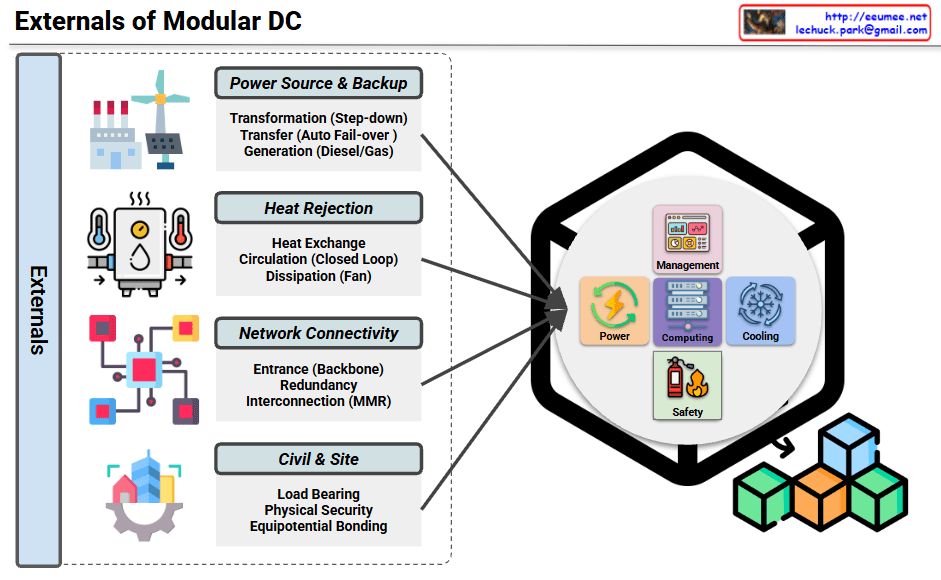
Externals of Modular DC

Externals of Modular DC Infrastructure

This diagram illustrates the external infrastructure systems that support a Modular Data Center (Modular DC).

Main Components

1. Power Source & Backup

  • Transformation (Step-down transformer)
  • Transfer switch (Auto Fail-over)
  • Generation (Diesel/Gas generators)

Ensures stable power supply and emergency backup capabilities.

2. Heat Rejection

  • Heat Exchange equipment
  • Circulation system (Closed Loop)
  • Dissipation system (Fan-based)

Cooling infrastructure that removes heat generated from the data center to the outside environment.

3. Network Connectivity

  • Entrance (Backbone connection)
  • Redundancy configuration
  • Interconnection (MMR – Meet Me Room)

Provides connectivity and telecommunication infrastructure with external networks.

4. Civil & Site

  • Load Bearing structures
  • Physical Security facilities
  • Equipotential Bonding

Handles building foundation and physical security requirements.

Internal Management Systems

The module integrates the following management elements:

  • Management: Integrated control system
  • Power: Power management
  • Computing: Computing resource management
  • Cooling: Cooling system control
  • Safety: Safety management

Summary

Modular data centers require four critical external infrastructure systems: power supply with backup generation, heat rejection for thermal management, network connectivity for communications, and civil/site infrastructure for physical foundation and security. These external systems work together to support the internal management components (power, computing, cooling, and safety) within the modular unit. This architecture enables rapid deployment while maintaining enterprise-grade reliability and scalability.

#ModularDataCenter #DataCenterInfrastructure #DCInfrastructure #EdgeComputing #HybridIT #DataCenterDesign #CriticalInfrastructure #PowerBackup #CoolingSystem #NetworkRedundancy #PhysicalSecurity #ModularDC #DataCenterSolutions #ITInfrastructure #EnterpriseIT

With Claude

Power/Cooling impacts to AI Work

Power/Cooling Impacts on AI Work – Analysis

This slide summarizes research findings on how AI workloads impact power grids and cooling systems.

Key Findings:

📊 Reliability & Failure Studies

  • Large-Scale ML Cluster Reliability (Meta, 2024/25)
    • 1024-GPU job MTTF (Mean Time To Failure): 7.9 hours
    • 8-GPU job: 47.7 days
    • 16,384-GPU job: 1.8 hours
    • → Larger jobs = higher failure risk due to cooling/power faults amplifying errors

🔌 Silent Data Corruption (SDC)

  • SDC in LLM Training (2025)
    • Meta report: 6 SDC failures in 54-day pretraining run
    • Power droop, thermal stress → hardware faults → silent errors → training divergence

Inference Energy Efficiency

  • LLM Inference Energy Consumption (2025)
    • GPT-4o query benchmarks:
      • Short: 0.43 Wh
      • Medium: ~3.71 Wh
    • Batch 4→8: ~43% savings
    • Batch 8→16: ~43% savings per prompt
    • → PUE & infrastructure efficiency significantly impact inference cost, delay, and carbon footprint

🏭 Grid-Level Instability

  • AI-Induced Power Grid Disruptions (2024)
    • Model training causes power transients
    • Dropouts → hardware resets
    • Grid-level instability → node-level errors (SDC, restarts) → LLM job failures

🎯 Summary:

  1. Large-scale AI workloads face exponentially higher failure rates – bigger jobs are increasingly vulnerable to power/cooling system issues, with 16K-GPU jobs failing every 1.8 hours.
  2. Silent data corruption from thermal/power stress causes undetected training failures, while inference efficiency can be dramatically improved through batch optimization (43% energy reduction).
  3. AI training creates a vicious cycle of grid instability – power transients trigger hardware faults that cascade into training failures, requiring robust infrastructure design for power stability and fault tolerance.

#AIInfrastructure #MLOps #DataCenterEfficiency #PowerManagement #AIReliability #LLMTraining #SilentDataCorruption #EnergyEfficiency #GridStability #AIatScale #HPC #CoolingSystem #AIFailures #SustainableAI #InferenceOptimization

With Claude