Leetcode 974.Subarray Sums Divisible by K

From Claude with some prompting
Find Subarrays with Same Remainder First, we calculate the prefix sum, which is the cumulative sum up to each element in the array. For example, the prefix sum for [4, 5, 0, -2, -3, 1] is [4, 9, 9, 7, 4, 5]. Then, we find the remainder when each prefix sum is divided by k. In this case, with k=5, the remainders are [4, 4, 4, 2, 4, 0].

Count Subarrays with Same Remainder We count the number of subarrays that have the same remainder. For instance, if the remainder 4 appears 3 times, it means there are 3 subarrays ending with a sum divisible by 5 and leaving a remainder of 4. We store these counts in a remainder_count array.

Calculate Answer For the remainder 0, we assume there is always at least one subarray (the empty subarray), so we initialize remainder_count[0] = 1. Then, we calculate the combinations of subarrays with the same remainder. If there are remainder_count[r] subarrays with the same remainder r, the number of combinations is (remainder_count[r] * (remainder_count[r] – 1)) / 2. We sum up these values for all remainders to get the final answer.

In summary, this algorithm utilizes the remainders of prefix sums to count the number of subarrays with the same remainder, and then combines these counts to find the total number of subarrays whose sum is divisible by k.

Who First

From ChatGPT with some prompting
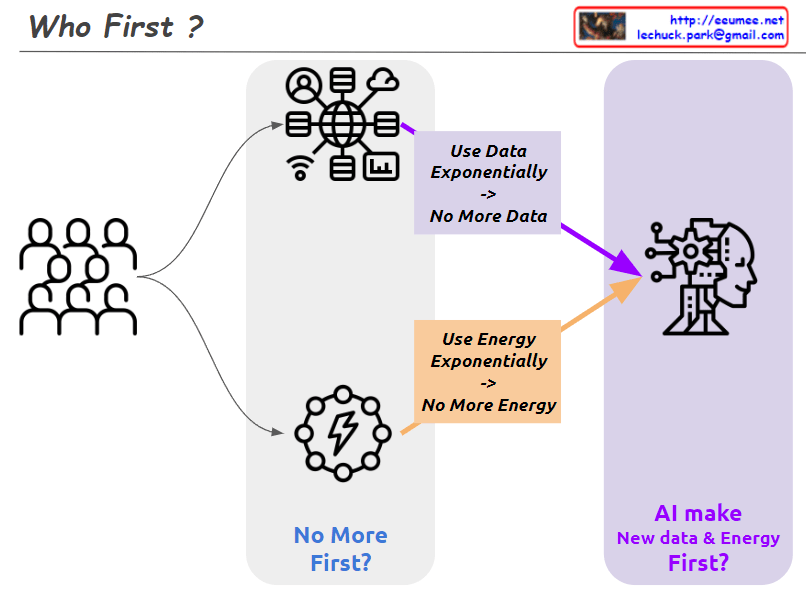
This image explores two potential scenarios related to the advancement of AI (Artificial Intelligence). It raises two main questions:

  1. Exponential Use of Data and Energy: The left side illustrates a scenario where data and energy created by humans are used exponentially by AI. This leads to the concern that data and energy might be depleted. It questions whether we will run out of data and energy first due to this exponential use.
  2. AI’s Self-Sufficiency: The right side presents the possibility that AI might be able to create new data and energy on its own. If AI can generate its own data and energy resources, it could overcome the problem of depletion.

Therefore, the image highlights a dilemma: on one hand, the rapid use of data and energy by AI might lead to their depletion, while on the other hand, AI might potentially find ways to create new data and energy to sustain itself. It questions which of these scenarios will happen first.

Trend & Prediction

From Claude with some prompting
The image presents a “Trend & Predictions” process, illustrating a data-driven prediction system. The key aspect is the transition from manual validation to automation.

  1. Data Collection & Storage: Digital data is gathered from various sources and stored in a database.
  2. Manual Selection & Validation: a. User manually selects which metric (data) to use b. User manually chooses which AI model to apply c. Analysis & Confirmation using selected data and model
  3. Transition to Automation:
    • Once optimal metrics and models are confirmed in the manual validation phase, the system learns and switches to automation mode. a. Automatically collects and processes data based on selected metrics b. Automatically applies validated models c. Applies pre-set thresholds to prediction results d. Automatically detects and alerts on significant predictive patterns or anomalies based on thresholds

The core of this process is combining user expertise with system efficiency. Initially, users directly select metrics and models, validating results to “educate” the system. This phase determines which data is meaningful and which models are accurate.

Once this “learning” stage is complete, the system transitions to automation mode. It now automatically collects, processes data, and generates predictions using user-validated metrics and models. Furthermore, it applies preset thresholds to automatically detect significant trend changes or anomalies.

This enables the system to continuously monitor trends, providing alerts to users whenever important changes are detected. This allows users to respond quickly, enhancing both the accuracy of predictions and the efficiency of the system.

How to share access to files

From Claude with some prompting
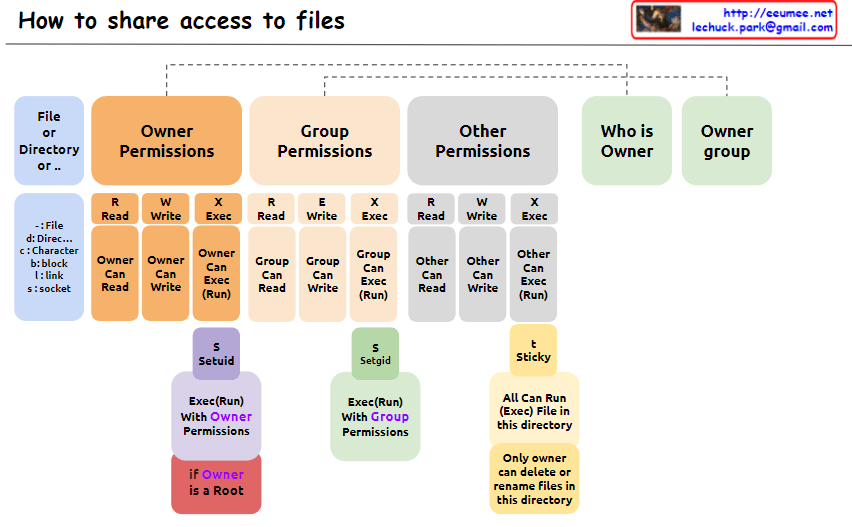
The image explains “How to share access to files” in Unix/Linux systems, illustrating the structure of file permissions. The diagram breaks down permissions into owner, group, and other categories, along with special permissions and metadata.

  1. File Permissions Structure: The image depicts how access rights to files or directories are shared in Unix/Linux systems. Permissions are divided into owner, group, and other users.
  2. Owner Permissions:
    • Read (R): Owner can read the file.
    • Write (W): Owner can modify the file.
    • Execute (X): Owner can execute the file.
  3. Group Permissions:
    • Read (R): Group members can read the file.
    • Write (W): Group members can modify the file.
    • Execute (X): Group members can execute the file.
  4. Other Permissions:
    • Read (R): Other users can read the file.
    • Write (W): Other users can modify the file.
    • Execute (X): Other users can execute the file.
  5. Metadata:
    • Who is Owner: Indicates who owns the file or directory.
    • Owner group: Shows which group the file or directory belongs to.
  6. Special Permissions: a. SetUID (S):
    • Executes with the file owner’s permissions.
    • Useful when a regular user runs the passwd command owned by root.
    b. SetGID (S):
    • Executes with the file group’s permissions.
    • Beneficial for group collaboration; new files can inherit the parent directory’s group.
    c. Sticky (T) – Corrected Part:
    • “Only owner can delete or rename files in this directory”
    • When set on a directory, files within it can only be deleted or renamed by the file’s owner, directory owner, or root.
    • Commonly used in shared directories like /tmp to prevent users from unauthorized deletion or renaming of each other’s files.
  7. Additional Information:
    • “if Owner is a Root”: When the owner is the root user, special privileges are granted. Root has all permissions on every file and directory, enabling any system administration task.

This image provides a clear and visual explanation of the file permission system in Unix/Linux. Notably, the description of the Sticky bit has been corrected to accurately reflect its function: “Only owner can delete or rename files in this directory”. This correction properly conveys that while execution and modification of files in a Sticky directory are governed by individual file permissions, the ability to delete or rename files is restricted to the file owner, directory owner, or root.

This permission system effectively manages security and accessibility in multi-user environments. It allows fine-grained control over who can read, write, or execute files, and in the case of the Sticky bit, who can delete or rename files in shared spaces. Such granular control is crucial for maintaining data integrity, privacy, and orderly collaboration among users on a Unix/Linux system.

CPU & GPU Works

From Claude with some prompting
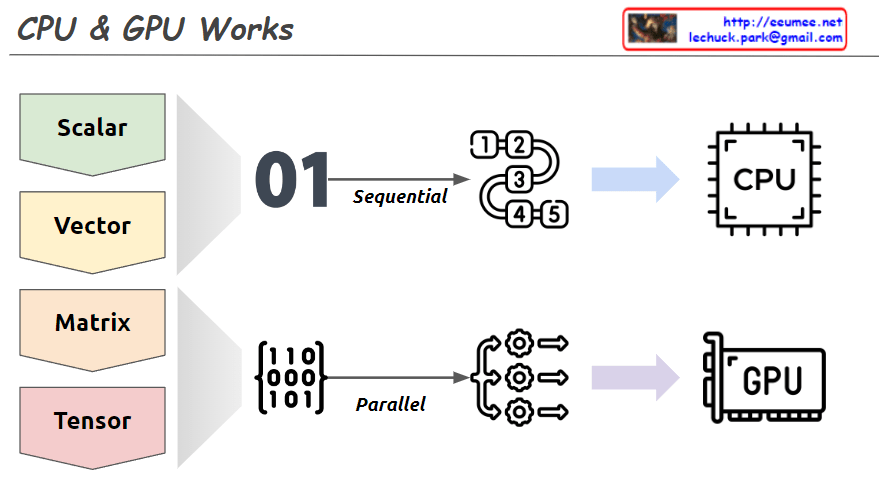
This image explains the working principles of CPU (Central Processing Unit) and GPU (Graphics Processing Unit) in a visual manner.

  1. Data Types:
    • Scalar: A single value
    • Vector: One-dimensional array
    • Matrix: Two-dimensional array
    • Tensor: Multi-dimensional array
  2. CPU Work Method:
    • Sequential processing, denoted by ’01’
    • Tasks are processed in order, as shown by 1, 2, 3, 4, 5
    • Primarily handles scalar data, processing complex tasks sequentially
  3. GPU Work Method:
    • Parallel processing, represented by a matrix
    • Icons show multiple tasks being processed simultaneously
    • Mainly deals with multi-dimensional data like matrices or tensors, processing many tasks in parallel

The image demonstrates that while CPUs process tasks sequentially, GPUs can handle many tasks simultaneously in parallel. This helps explain which processing unit is more efficient based on the complexity and volume of data. Complex and large-scale data (matrices, tensors) are better suited for GPUs, while simple, sequential tasks are more appropriate for CPUs.

Tahoe & Reno

From Claude with some prompting
This image is a diagram explaining the TCP Congestion Control mechanisms, particularly comparing the congestion control algorithms of two TCP versions: Tahoe and Reno.

Key points:

  1. Both algorithms use a Slow Start Threshold (ssthresh) to determine the initial congestion window size.
  2. The congestion window grows exponentially (2^n) at first, then switches to linear growth (+1) once it reaches ssthresh.
  3. Both algorithms reduce the congestion window to 1 and adjust ssthresh to half of the current size upon a timeout.
  4. When receiving 3 duplicate ACKs (3 DUP ACK), both algorithms halve their ssthresh.

Difference:

  • On 3 DUP ACK:
    • Tahoe: Reduces congestion window to 1
    • Reno: Multiplicatively decreases congestion window

There doesn’t appear to be any incorrect information in this image. It accurately shows the key difference between Tahoe and Reno in their response to 3 DUP ACK situations, and correctly explains other aspects of congestion control as well.