Load balancing

From DALL-E with some prompting

Direct Analysis and Distribution:

Traffic flows directly from a group of users to a group of servers.
This traffic can be distributed based on static information such as TCP/IP headers, user IP/Port, etc., through a “Static hash map.”
Alternatively, “Dynamic Analysis Traffic” can be used to distribute the load based on throughput or service load.
These processes require guidelines on “How to Control” and “How to Analysis.”
Pre-connection Routing Change:

The CDN Load Balance (GLBS) operates differently based on User IP and Request URL.
It controls responses through “nice destination IP return” or “BGP advertisement Routing Control,”
Or distributes traffic through “Response redirect URL.”
All these processes are executed through a Control phase.

Anomaly IP Packet header

From Gemini with some prompting
Title: Anomaly Detection (IP Packet Header)

Overview:

The image illustrates the structure of an IP packet header and how to detect anomalous activities based on TCP/IP header information.

Key Elements:

  • IP Address: Identifies the server.
  • TCP/UDP Port: Used to send and receive packets.
  • Service Port Number: Port number used to connect to a specific service.
  • Service Area: IP address range where a specific service is provided.

Indicators of Anomalous Activity:

  • Unknown IP: Packets coming from unknown IP addresses.
  • Foreign IP: Packets coming from overseas IP addresses.
  • Unused Port: Packets sent to unused ports.
  • TCP/UDP Port == 0: Packets with TCP/UDP port number 0.
  • IP/TCP Checksum == 0: Packets with IP/TCP checksum 0.
  • Unused IP Protocol: Packets using unused protocols.
  • Too Large (IP.ttl): Packets with excessively large TTL values.
  • Too Many (TCP Syn): Excessive number of SYN packets.
  • Too Many (IP. fragmented): Excessive number of fragmented packets.

Leetcode 234.Palindrome Linked List

From DALL-E with some prompting
Scenario:

  • Linked-List: You can only read one element at the same time.
  • Memory Map: Allows direct access to all data.
  • Optimization: There are 2 key points to optimize:
    • Point 1: Find out the center of the list.
    • Point 2: Reverse the ordering of the second half of the list and compare it with the first half.
    The diagram illustrates two examples with nodes that show how you would first read all data (in the Linked-List), then direct access allows you to compare elements starting from the ends towards the center (in the Memory Map). For optimization, the steps include finding the center of the list, reversing the order of the second half of the list, and then comparing the two halves to determine if the list is a palindrome.

My own AI agent

From DALL-E with some prompting
This image appears to be a conceptual diagram of an individual’s AI agent, divided into several parts:

  1. Personal Area: There’s a user icon with arrows labeled ‘Control’ and ‘Sensing All’. This suggests the user can direct the AI agent and the AI is capable of gathering comprehensive information from its environment.
  2. Micro & Macro Infinite World: This part features illustrations that seem to represent microorganisms, plants, butterflies, etc., indicating that the AI collects data from both microscopic and macroscopic environments.
  3. Personalized Resource: The icon resembling a human brain could represent personalized services or data tailored to the user.
  4. Cloud Infra: The cloud infrastructure is presumably responsible for data processing and storage.
  5. Cloud Service: Depicted as a server providing various services, connected to the cloud infrastructure.
  6. Internet Connected: A globe icon with various network points suggests that the AI agent is connected to global information and knowledge via the internet.

Overall, the diagram illustrates a personalized AI agent that collects information under the user’s control, processes it through cloud infrastructure and services, and ultimately contributes to collective intelligence through an internet connection.

How to see the back

From DALL-E with some prompting
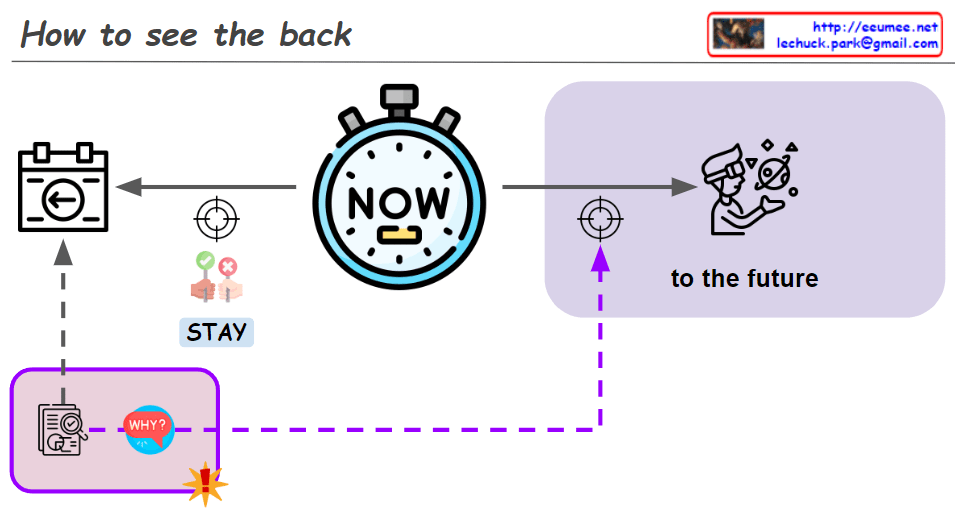
The modified image displays a diagram titled “How to see the back” which seems to represent a conceptual understanding of time. At the center, there is a stopwatch labeled “NOW,” indicating the present moment. A line extends from the stopwatch to the left toward a camera icon, representing the past. From the camera, another line descends to a house icon with the word “STAY,” suggesting that focusing solely on the past may result in staying in the present without progress.

To the right of the stopwatch, the diagram states “to the future” and includes an icon of a person in a spacesuit boarding a spacecraft, symbolizing the journey into the future.

The key element here is a dotted line descending from the camera icon, accompanied by the question “WHY?” This signifies a sense of inquiry or exploration into the events of the past. The implication is that by analyzing and understanding the past from the perspective of “why” things happened, one can begin to move toward the future.

Thus, the diagram seems to convey that a deep, analytical understanding of past events—asking “why”—is necessary to effectively design and move towards the future. It expresses the idea that we must analyze the past with depth to pave the way forward.


The parallel world

From DALL-E with some prompting
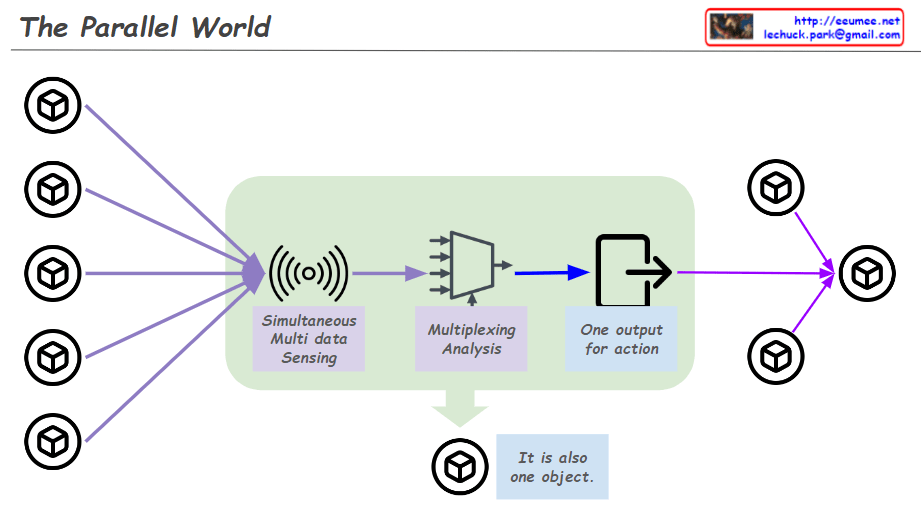
The Parallel World diagram showcases a robust system architecture where multiple hexagon-shaped data sources represent a concurrent data collection network. Each source simultaneously sends information to a central processing unit, highlighted by a symbol of radio waves, indicating simultaneous multi-data sensing. This information undergoes parallel processing within the green-shaded area, where a ‘Multiplexing Analysis’ mechanism filters and combines the various data streams. Although the visible outcome is a single decisive output for action, this representation underscores the substantial parallel processing that occurs behind the scenes. This parallelism ensures that the system maximizes efficiency and response times, embodying the concept that, in the grand scheme, the majority of operations are processed in parallel, even if they converge into a singular action.

New Platform

From DALL-E with some prompting
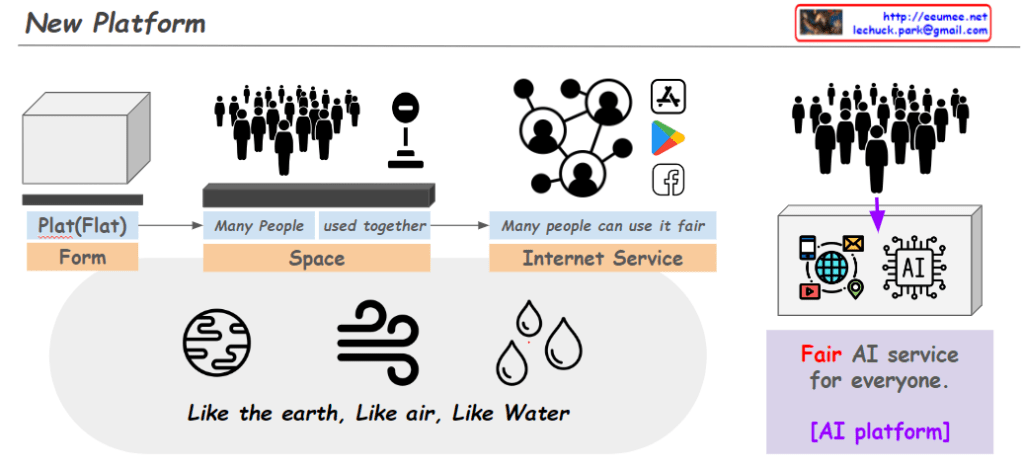
This image appears to depict a conceptual framework for a new platform designed to advance AI in a way that ensures it is a fair and equitable system accessible to everyone. It illustrates the following key components:

Plat(Flat) Form: Represents the fundamental structure of the platform, which is depicted as flat and formative, suggesting a foundation or base layer.
Space: Symbolizes a communal space where many people come together, indicating collaborative use and a shared environment.
Internet Service: Portrayed by interconnected nodes, suggesting a service that integrates with the modern internet ecosystem, designed to be used fairly by many.
AI Platform: Signified by various AI-related icons, highlighting the emphasis on artificial intelligence. Accompanied by the phrase “Fair AI service for everyone,” it conveys the platform’s commitment to equitable access to AI technology.
Overall, the image conveys a message that internet services, much like the earth, air, and water, are essential and should be naturally accessible. The main goal highlighted is to foster the development of AI as a platform—a system that is just and available to all, akin to universal resources.