Data standardization : Collection info list

From ChatGPT with some prompting
Certainly, the image represents the process of collecting data from facilities, demonstrating how different technical components interact.

  • Facility: This indicates the physical equipment or site generating data, likely composed of various sensors and devices.
  • Data Relay Device: It serves as an intermediary, relaying data collected from the facility to the network. It is depicted as being connected to the network via an IP address and port number.
  • TCP/IP Network: The path through which data is transmitted, utilizing the TCP/IP protocol to transfer data. This network manages the flow of data to the data point.
  • Data Point: The location where collected data is processed, where important metrics such as software protocol and data collection rate are set.
  • Network Topology: This represents the physical or logical layout of the network, including performance-related metrics such as the specifications of switches.
  • TCP/IP Layer: Although not explicitly illustrated in the image, the TCP/IP network is intended to be managed as a distinct logical layer. This emphasizes the advantages of managing and optimizing the data transmission process.

The image visually communicates these technical details, providing an overview of how each component is interconnected for the purpose of data collection and transmission.

GPU works for

From ChatGPT with some prompting
The image is a schematic representation of GPU applications across three domains, emphasizing the GPU’s strength in parallel processing:

Image Processing: GPUs are employed to perform parallel updates on image data, which is often in matrix form, according to graphical instructions, enabling rapid rendering and display of images.

Blockchain Processing: For blockchain, GPUs accelerate the calculation of new transaction hashes and the summing of existing block hashes. This is crucial in the race of mining, where the goal is to compute new block hashes as efficiently as possible.

Deep Learning Processing: In deep learning, GPUs are used for their ability to process multidimensional data, like tensors, in parallel. This speeds up the complex computations required for neural network training and inference.

A common thread across these applications is the GPU’s ability to handle multidimensional data structures—matrices and tensors—in parallel, significantly speeding up computations compared to sequential processing. This parallelism is what makes GPUs highly effective for a wide range of computationally intensive tasks.

AI Prerequisite

From ChatGPT with some prompting
The image illustrates the complexity of AI processing and underscores the importance of the process. It begins with data collected from various sources like people, industry, nature, and at a microcosmic level, space or atoms, which is fed into an AI system. This data is processed through what is labeled as ‘Super Parallel Computing’, indicating a level of complexity that is described as ‘unexplainable’—suggesting the intricate and potentially incomprehensible nature of AI computations. However, a red ‘X’ button marked with ‘IF wrong Data/translate’ indicates the necessity to correct the data if it is incorrect or improperly translated, emphasizing that even advanced computing can lead to negative outcomes, as represented by the vague small character marked as ‘bad result’, if the input data is flawed. The term ‘WOW’ signifies the astonishing results AI can produce when functioning correctly, yet this is contingent on the quality and accuracy of the input data.

Overall, this diagram serves as a visual warning that the power of AI technology is reliant on the integrity of its data. Inaccurate data can lead to adverse outcomes, even with the use of sophisticated AI, as highlighted by the image’s contrast between the potential for amazement and the risk of poor results.


Hub/Switch/Router

From ChatGPT with some prompting
The image appears to be an educational diagram explaining the basic functions and differences between three types of network devices: hubs, switches, and routers. Here’s what the image indicates about each device:

  • Hub: A hub is a simple networking device that broadcasts all incoming data packets to every connected device, regardless of the destination MAC address. It’s depicted as sending the same data to devices A, B, C, and D.
  • Switch: Unlike a hub, a switch is intelligent enough to filter and forward data packets based on their destination MAC addresses. This means it only sends the data to the specific device it is intended for, improving network efficiency and reducing collisions.
  • Router: A router operates at a higher level than switches and hubs. It routes data packets not just based on MAC addresses but also using IP addresses. It can connect multiple networks and manage the data traffic between them using protocols like BGP (Border Gateway Protocol).

The note at the bottom of the image states that the functions of these devices are not completely separated, and higher-level equipment includes the functions of the lower-level equipment. This means routers can perform the functions of switches, which in turn can perform the functions of hubs.

From Gemini with some prompting
The image is a diagram of a network consisting of hubs, switches, and routers. The functions of each device are as follows:

Hub: A hub is a central device that connects network devices. All devices connected to a hub can communicate with each other. When a hub receives a data frame, it transmits it to all ports.

Switch: A switch is similar to a hub, but it only transmits data to the device connected to each port. A switch uses MAC addresses to determine which port to transmit a data frame to.

Router: A router is a device that connects two or more networks. A router uses IP addresses to determine which network to transmit a data packet to.

In the image, each device is connected as follows:

  • Computers A, B, C, D: Each computer is connected to a hub or switch.
  • Hub: The hub is connected to a switch.
  • Switch: The switch is connected to a router.

The image also includes a description of the type of data that each device handles:

  • Hub: The hub transmits all data frames to all ports.
  • Switch: The switch uses MAC addresses to determine which port to transmit a data frame to.
  • Router: The router uses IP addresses to determine which network to transmit a data packet to.

Data Relay Type

From ChatGPT with some prompting
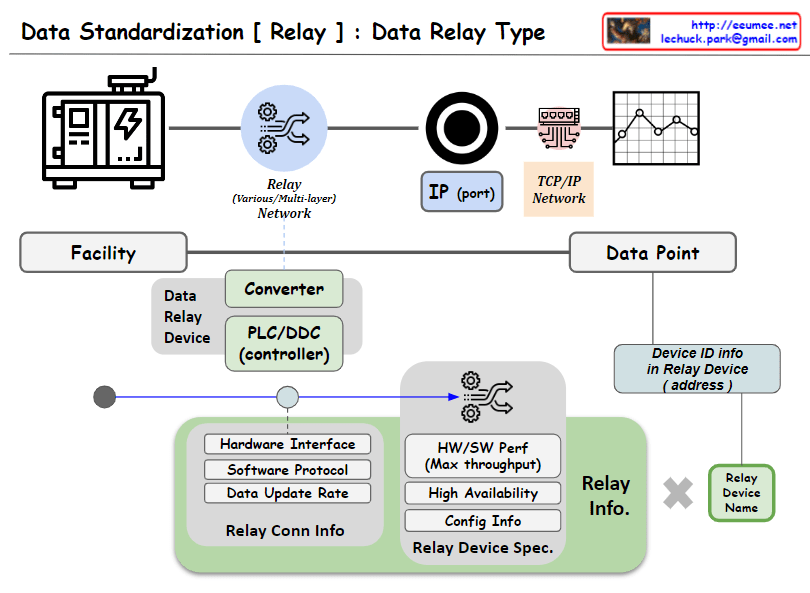
The image appears to illustrate the process and key elements involved in data collection from a facility, with a focus on the intermediary step of converting or relaying data through devices such as PLCs (Programmable Logic Controllers) or DDCs (Direct Digital Controllers). These conversion devices play a pivotal role, and their functions are visualized as follows:

Data Conversion (Converter): This converts raw data from the facility into a format that is communicable across a network, ensuring compatibility with other devices through protocol or data format alignment.

Communication Gateway (PLC/DDC controller): The data relay device also serves as a gateway, managing the flow of data between the facility and the TCP/IP network, transmitting data in a form that is understandable to other devices on the network, and sometimes processing complex data.

Relay Information (Relay Info): As depicted, it defines the functional and technical details of the converter, including hardware interfaces, software protocols, data update rates, and relay connection information. This encompasses the device’s performance capabilities (maximum throughput), availability, configuration information, and relay device specifications.

Device Identification Information (Device ID info): Each relay device possesses unique identification information (address), which is a critical parameter for distinguishing and addressing devices within the network.

Relay Device Naming (Relay Device Name): Each device is assigned a discernible name for easy identification and reference within the system.

These components are crucial for standardized communication and processing of data, ensuring efficient collection and prompt handling of data. The diagram is designed to elucidate how these technical elements interact and fulfill their roles in the data relay process.

Load balancing with traffic flow

From ChatGPT with some prompting

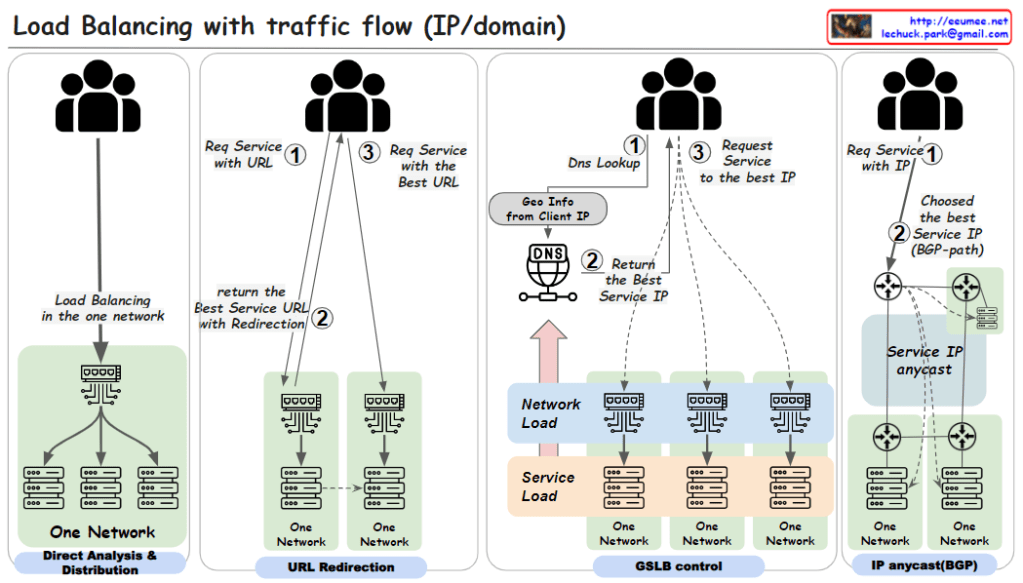
  1. Direct Analysis & Distribution within One Network:
    • This method involves load balancing within a single network using a load balancing switch. The user requests a service via a URL (step 1). The load balancing is handled internally by the switch, which directly analyzes traffic and distributes the load to various servers within the network.
  2. URL Redirection:
    • Here, a user requests a service using a URL (step 1). The network then uses URL redirection to guide the user to the best service URL (step 2), which may involve multiple redirections within one network until the most optimal service endpoint is selected for the user (step 3).
  3. GSLB (Global Server Load Balancing) Control:
    • In this approach, the user starts with a DNS lookup when requesting a service (step 1). The DNS uses the geographic information from the client’s IP to return the best service IP (step 2). The user then requests the service at the given IP address (step 3). This method uses global considerations such as network and service load to balance traffic across multiple networks.
  4. IP Anycast with BGP (Border Gateway Protocol):
    • Users request a service directly using an IP address (step 1). The best service IP is determined via the BGP, which routes traffic based on the shortest available path (step 2). With IP anycast, the user is automatically directed to the nearest or most appropriate service location based on network routing protocols.

Each of these methods is designed to distribute network traffic efficiently. The goal is to ensure service reliability and performance, optimize server use, and improve the overall user experience by reducing latency.