What is The Next?

With Claude
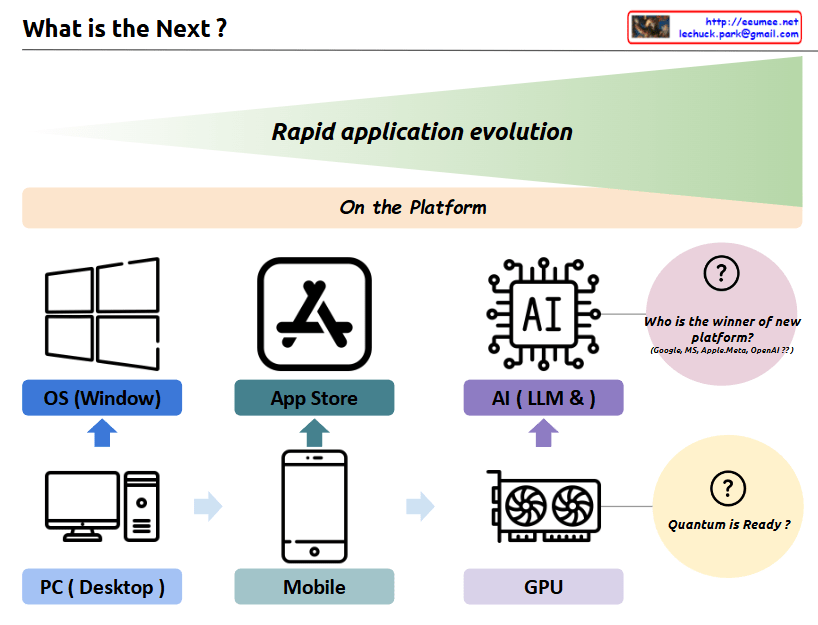
a comprehensive interpretation of the image and its concept of “Rapid application evolution”:

The diagram illustrates the parallel evolution of both hardware infrastructure and software platforms, which has driven rapid application development and user experiences:

  1. Hardware Infrastructure Evolution:
  • PC/Desktop → Mobile Devices → GPU
  • Represents the progression of core computing power platforms
  • Each transition brought fundamental changes in how users interact with technology
  1. Software Platform Evolution:
  • Windows OS → App Store → AI/LLM
  • Shows the evolution of application ecosystems
  • Each platform created new possibilities for user applications

The symbiotic relationship between these two axes:

  • PC Era: Integration of PC hardware with Windows OS
  • Mobile Era: Combination of mobile devices with app store ecosystems
  • AI Era: Marriage of GPU infrastructure with LLM/AI platforms

Each transition has led to exponential growth in application capabilities and user experiences, with hardware and software platforms developing in parallel and reinforcing each other.

Future Outlook:

  1. “Who is the winner of new platform?”
  • Current competition between Google, MS, Apple/Meta, OpenAI
  • Platform leadership in the AI era remains undecided
  • Possibility for new players to emerge
  1. “Quantum is Ready?”
  • Suggests quantum computing as the next potential hardware revolution
  • Implies the possibility of new software platforms emerging to leverage quantum capabilities
  • Continues the pattern of hardware-software co-evolution

This cyclical pattern of hardware-software evolution suggests that we’ll continue to see new infrastructure innovations driving platform development, and vice versa. Each cycle has dramatically expanded the possibilities for applications and user experiences, and this trend is likely to continue with future technological breakthroughs.

The key insight is that major technological leaps happen when both hardware infrastructure and software platforms evolve together, creating new opportunities for application development and user experiences that weren’t previously possible.

My own AI agent

From DALL-E with some prompting
This image appears to be a conceptual diagram of an individual’s AI agent, divided into several parts:

  1. Personal Area: There’s a user icon with arrows labeled ‘Control’ and ‘Sensing All’. This suggests the user can direct the AI agent and the AI is capable of gathering comprehensive information from its environment.
  2. Micro & Macro Infinite World: This part features illustrations that seem to represent microorganisms, plants, butterflies, etc., indicating that the AI collects data from both microscopic and macroscopic environments.
  3. Personalized Resource: The icon resembling a human brain could represent personalized services or data tailored to the user.
  4. Cloud Infra: The cloud infrastructure is presumably responsible for data processing and storage.
  5. Cloud Service: Depicted as a server providing various services, connected to the cloud infrastructure.
  6. Internet Connected: A globe icon with various network points suggests that the AI agent is connected to global information and knowledge via the internet.

Overall, the diagram illustrates a personalized AI agent that collects information under the user’s control, processes it through cloud infrastructure and services, and ultimately contributes to collective intelligence through an internet connection.

On-device AI

From DALL-E with some prompting
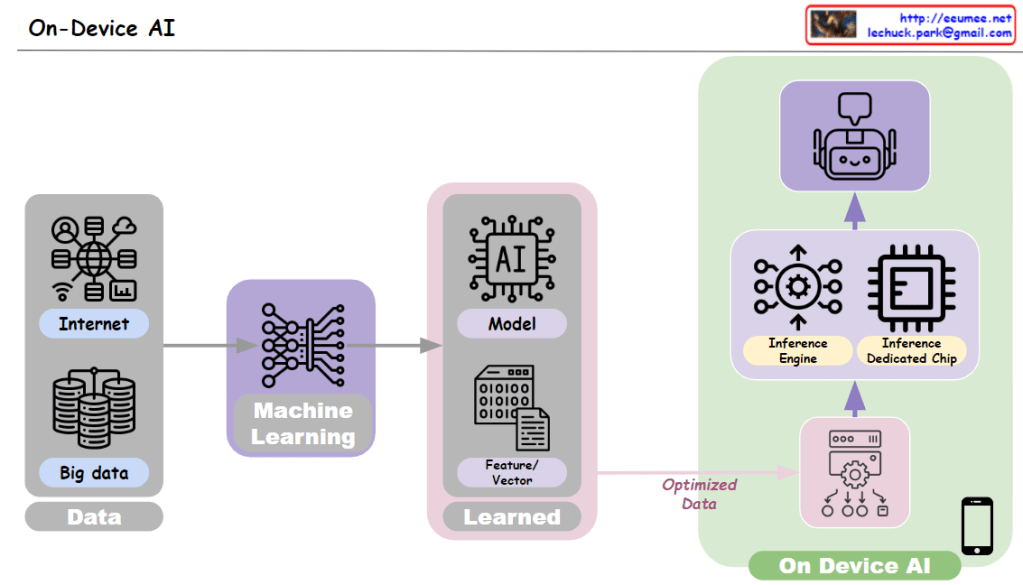
The image is a diagram explaining the concept of “On-Device AI,” which describes the process of operating artificial intelligence within a device. The stages are as follows:

Data: It begins with the collection of data from large databases and the internet, represented by a “Big data” icon and various icons representing different internet services.

Machine Learning: The collected data is used to train models through the machine learning process, depicted by a neural network icon.

Model: The trained model is represented by an AI model icon, including learned features or vectors, indicated by the term “Learned.”

Optimized Data: The trained model is transformed into optimized data for use in on-device AI.

On Device AI: The on-device AI operates using an inference engine and a dedicated inference chip, supporting AI functionalities on the end-user’s device, such as a smartphone, as illustrated by a device icon.

The image represents the flow from data collection, through model training and optimization, to the execution of AI within a device. This process allows AI to function independently within a personal device rather than on cloud servers, providing benefits such as reduced response times and enhanced privacy protection