Computing Power 4-Optimizations

From Claude with some prompting
The image “Computing Power 4-Optimizations” highlights four key areas for optimizing computing power, emphasizing a comprehensive approach that goes beyond infrastructure to include both hardware and software perspectives:

  1. Processing Optimizing: Focuses on hardware-level optimization, utilizing advanced manufacturing process technology to develop low-power GPUs and CPUs. It incorporates techniques like dynamic voltage and frequency scaling, and clock/power gating to maximize chip efficiency.
  2. Power Supply Optimizing: Addresses infrastructure-level optimization, improving power management and distribution across the entire system. This involves efficient power supply units and intelligent power management systems.
  3. Cooling Supply Optimizing: Another infrastructure-level optimization, enhancing thermal management of the system. Efficient cooling is crucial for maintaining computing performance while reducing power consumption.
  4. Code Optimizing: Emphasizes software-level optimization, including programming optimization, workload optimization at the OS level, and ‘green coding’ practices. This underscores the importance of considering energy efficiency in the software development process.

The diagram effectively illustrates that computing power optimization is not limited to hardware or infrastructure improvements alone. It stresses the need for a holistic approach, from chip design to code writing, to achieve effective optimization. By considering both hardware (chip) and software (code) level optimizations together, the overall system efficiency can be maximized. This comprehensive view is essential for addressing the complex challenges of power management in modern computing systems.

Parallel Processing ( Process – Data works)

From Claude with some prompting
This image illustrates different architectures of Parallel Processing:

  1. Single Core CPU: A single CPU connected to memory via one memory channel. The memory is divided into Instruction (Computing) and Data sections.
  2. Multi Core CPU: A CPU with multiple cores connected to memory through multiple memory channels. The memory structure is similar to the single core setup.
  3. NUMA (Non-Uniform Memory Access): Multiple multi-core CPUs, each with local memory. CPUs can access memory attached to other CPUs, but with “More Hop Memory Access”.
  4. GPU (Graphics Processing Unit): Described as “Completely Independent Processing-Memory Units”. It uses High Bandwidth Memory and has a large number of processing units directly mapped to data.

The GPU architecture shows many small processing units connected to a shared high-bandwidth memory, illustrating its capacity for massive parallel processing.

This diagram effectively contrasts CPU and GPU architectures, highlighting how CPUs are optimized for sequential processing while GPUs are designed for highly parallel tasks.

CPU + GPU

From Claude with some prompting
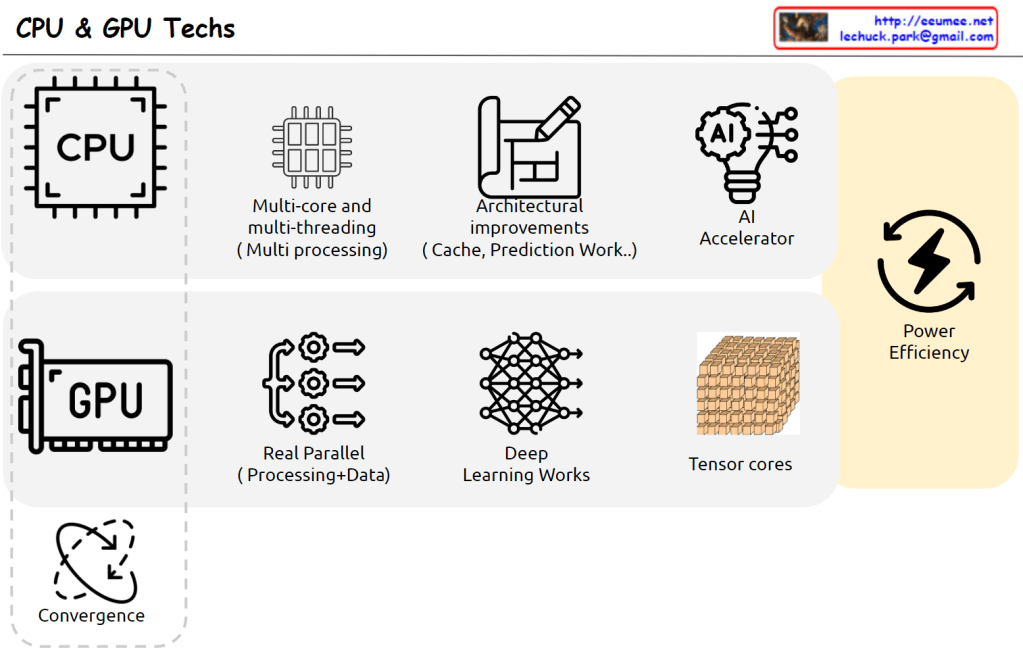
This image outlines the latest trends and developments in CPU and GPU technologies. The key points are:

  1. CPU: It shows advancements in multi-core and multi-threading (multi-processing) capabilities, as well as architectural improvements (cache, prediction work).
  2. GPU: It highlights the improvements in real-time parallel processing and data-centric processing capabilities.
  3. AI Accelerator: Hardware technologies that accelerate AI algorithms are evolving.
  4. Power Efficiency: Improving power efficiency is emerging as an important challenge.
  5. Convergence: The image suggests a trend of convergence and integration between CPUs and GPUs.

Overall, the image presents the evolving directions where CPU and GPU technologies are complementing each other and converging. This is expected to drive improvements in performance and power efficiency.

CPU & GPU Works

From Claude with some prompting
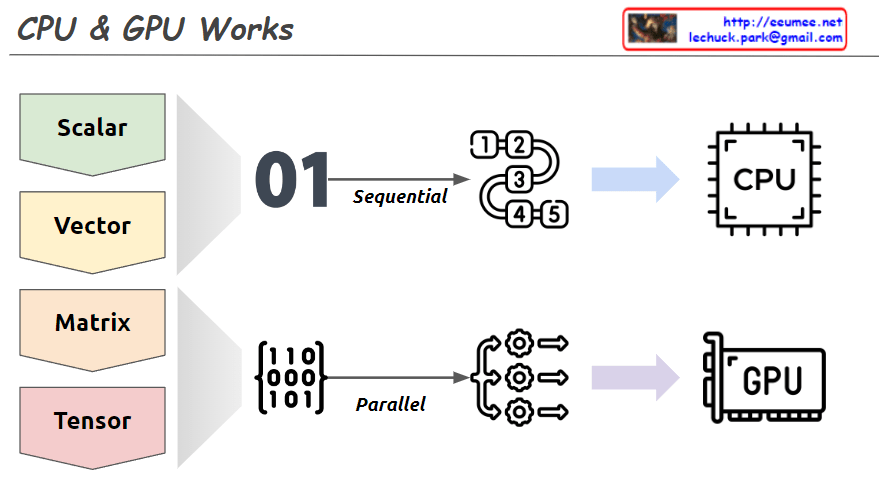
This image explains the working principles of CPU (Central Processing Unit) and GPU (Graphics Processing Unit) in a visual manner.

  1. Data Types:
    • Scalar: A single value
    • Vector: One-dimensional array
    • Matrix: Two-dimensional array
    • Tensor: Multi-dimensional array
  2. CPU Work Method:
    • Sequential processing, denoted by ’01’
    • Tasks are processed in order, as shown by 1, 2, 3, 4, 5
    • Primarily handles scalar data, processing complex tasks sequentially
  3. GPU Work Method:
    • Parallel processing, represented by a matrix
    • Icons show multiple tasks being processed simultaneously
    • Mainly deals with multi-dimensional data like matrices or tensors, processing many tasks in parallel

The image demonstrates that while CPUs process tasks sequentially, GPUs can handle many tasks simultaneously in parallel. This helps explain which processing unit is more efficient based on the complexity and volume of data. Complex and large-scale data (matrices, tensors) are better suited for GPUs, while simple, sequential tasks are more appropriate for CPUs.

Not Real-Simultaneous Works

From Claude with some prompting
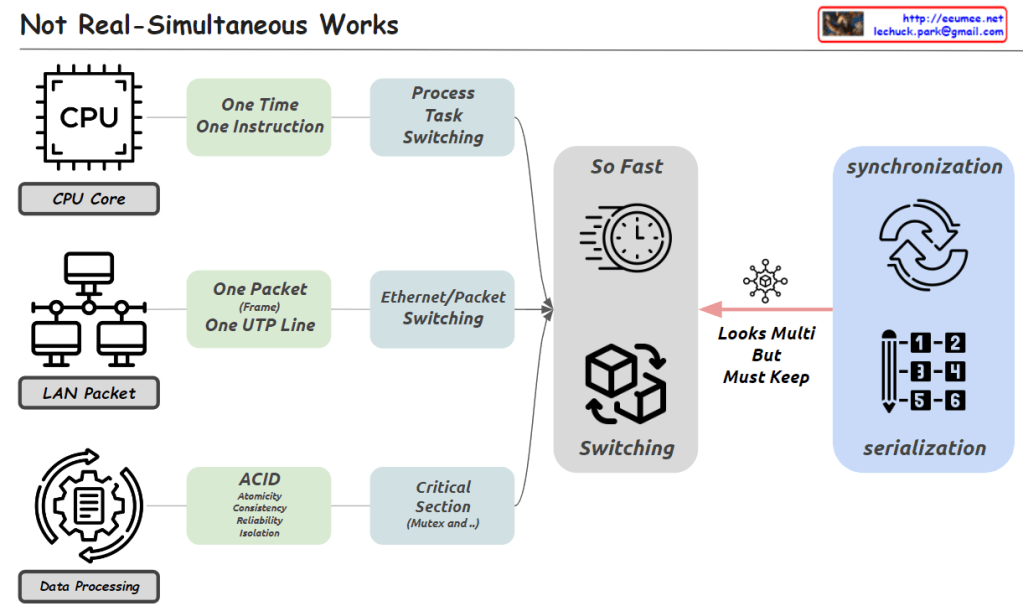
The image emphasizes that while it may appear to be simultaneous processing, it is actually very fast serial processing.

From the perspectives of the CPU, LAN, and data processing, each can only handle one unit of work at a time. The CPU can execute one instruction, the network can transmit one packet line, and in data processing, critical sections require mutual exclusion and serialization.

However, due to very fast switching techniques like process/task switching and Ethernet/packet switching, multiple tasks appear to be happening concurrently. But in reality, it is processing single units of work in rapid serial fashion.

So concurrency is achieved through fast serial processing, not parallel processing. Even so, in critical areas, synchronization and serialization are required to maintain data integrity.

In essence, the image highlights that while it looks like simultaneous processing, concurrency is actually implemented through extremely fast serial processing of single work units at a time.

Industrial Automation

From Claude with some prompting
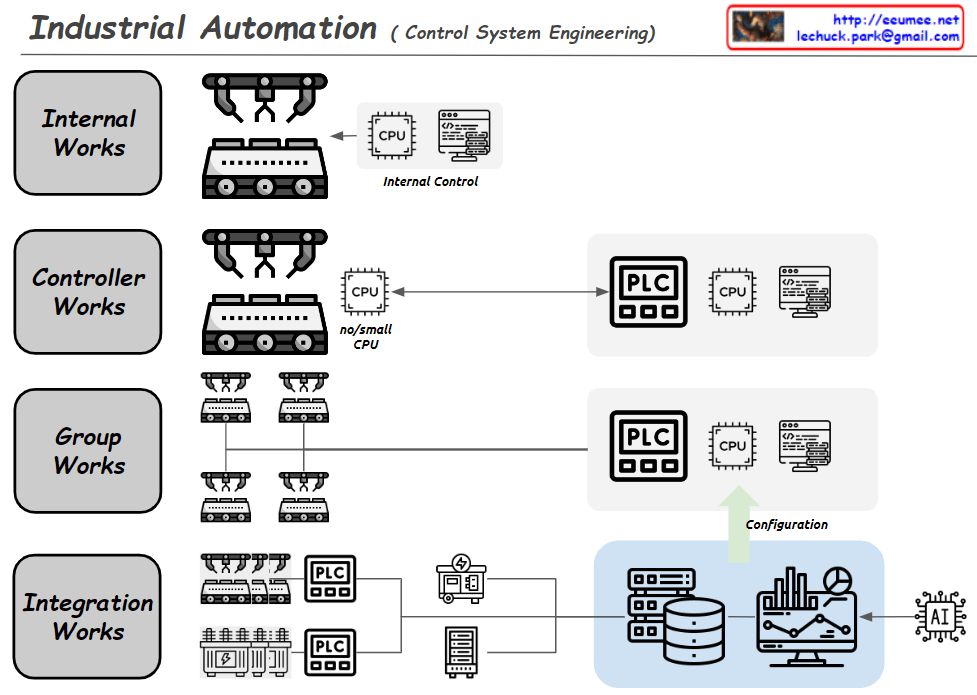
This image depicts the hierarchical structure of an industrial automation system.

At the lowest level, the Internal Works handle the internal control of individual devices.

At the Controller Works level, separate PLCs (Programmable Logic Controllers) are used for control because the computing power of the equipment itself is insufficient for complex program control.

The Group Works level integrates and manages groups of similar or identical equipment.

The Integration Works level integrates all the equipment through PLCs.

At the highest level, there is a database, HMI (Human-Machine Interface), monitoring/analytics systems, etc. This integrated analytics system does not directly control the equipment but rather manages the configuration information for control. AI technologies can also be applied at this level.

Through this hierarchical structure, the entire industrial automation system can be operated and managed efficiently and in an integrated manner.

Register in a CPU

From Claude with some prompting
This image explains the registers within the CPU and their purposes. Registers are small, high-speed memory locations inside the CPU that serve various roles.

GPR (General Purpose Registers) are used for calculations, logical operations, etc. (like variables). SP (Stack Pointer Register) remembers the memory location of the stack for calling functions, passing parameters, and managing local variables. BP (Base Pointer Register) refers to the current/next data location within a data structure. PC (Program Counter Register) is the command currently executing, used by the CPU to decide which instruction to execute next. Status Register detects abnormalities resulting from operation performance and handles them.

It also mentions that there are more registers such as indexes, counters, timers, flags, and more.