Power Control

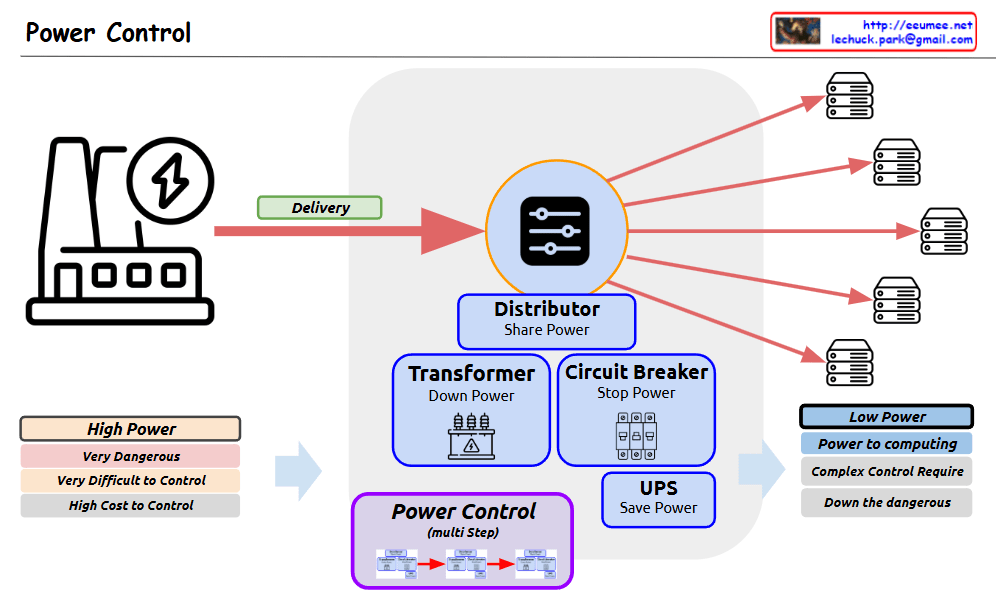
Power Control system diagram

  1. Power Source (Left Side)
  • High Power characteristics:
    • Very Dangerous
    • Very Difficult to Control
    • High Cost to Control
  1. Central Control/Distribution System (Center)
  • Distributor: Shares/distributes power
  • Transformer: Steps down power
  • Circuit Breaker: Stops power
  • UPS (Uninterruptible Power Supply): Saves power
  • Power Control (multi-step)
  1. Final Distribution (Right Side)
  • Low Power characteristics:
    • Power for computing
    • Complex Control Required
    • Reduced dangers

The diagram shows the complete process of how high-power electricity is safely and efficiently controlled and converted into low-power suitable for computing systems. The power flow is illustrated through a “Delivery” phase, passing through various protective and control devices before being distributed to multiple servers or computing equipment.

The system emphasizes safety and control through multiple stages:

  • Initial high-power input is marked as dangerous and difficult to control
  • Multiple control mechanisms (transformer, circuit breaker, UPS) manage the power
  • The distributor splits the controlled power to multiple endpoints
  • Final output is appropriate for computing equipment

This setup ensures safe and reliable power distribution while reducing the risks associated with high-power electrical systems.

With Claude

Fast Copy over network

With a Claude
This image illustrates a system architecture diagram for “Fast Copy over network”. Here’s a detailed breakdown:

  1. Main Sections:
  • Fast Copy over network
  • Minimize Copy stacks
  • Minimize Computing
  • API optimization for read/write
  1. System Components:
  • Basic computing layer including OS (Operating System) and CPU
  • RAM (memory) layer
  • Hardware device layer
  1. Key Features:
  • The purple area on the left focuses on minimizing Count & Copy with API
  • The blue center area represents minimized computing works (Program Code)
  • The orange area on the right shows programmable API implementation
  1. Data Flow:
  • Arrows indicating bi-directional communication between systems
  • Vertical data flow from OS to RAM to hardware
  • Horizontal data exchange between systems

The architecture demonstrates a design aimed at optimizing data copying operations over networks while efficiently utilizing system resources.

Processing with Data

From Claude with some prompting
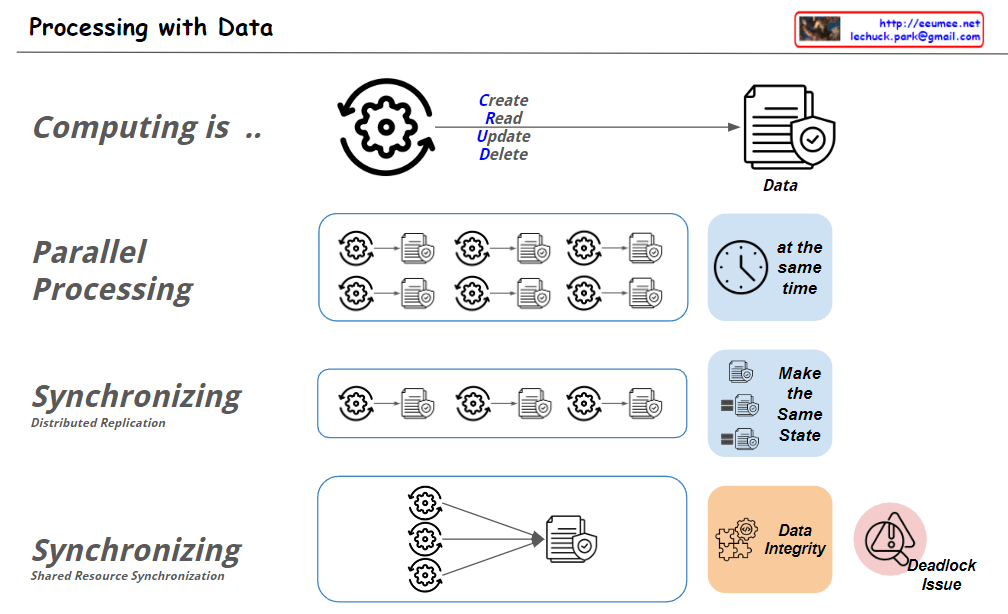
This image illustrates “Processing with Data” concepts. Here’s an interpretation of the key elements:

  1. Computing:
    • Shown as a cycle of Create, Read, Update, Delete (CRUD) operations on data.
  2. Parallel Processing:
    • Depicts multiple processes running simultaneously, labeled “at the same time”.
  3. Synchronizing – Distributed Replication:
    • Illustrates multiple processes being synchronized to “Make the Same State”.
  4. Synchronizing – Shared Resource Synchronization:
    • Shows multiple processes accessing a single shared resource.
    • Highlights “Data Integrity” and “Deadlock Issue” as important considerations.

The image uses simple icons and diagrams to visually explain various aspects of data processing, making complex concepts more accessible.

New Infra Age

From Claude with some prompting
This diagram illustrates the cyclical evolution of computing infrastructure, emphasizing the re-entry into a new computing infrastructure era driven by AI technology:

  1. Development cycle:
    • Traditional infrastructure era (Infra age) → Software era (SW Age) → New infrastructure era (New Infra age)
  2. Core elements of the new infrastructure era:
    • AI/ML (highlighted with red circles): Processing humanity’s accumulated experiences and data
    • GPU: Key computing infrastructure for AI
  3. Driving forces of development:
    • More Users
    • More Data
    • These are visualized by the icons at the bottom
  4. Key connection points (highlighted with red circles):
    • PC: Increased user base due to personal computer proliferation
    • Internet: Enhanced global connectivity
    • Web: Improved information accessibility
    • Mobile: Anytime, anywhere access environment
    • AI/ML: Processing and utilization of accumulated data
  5. Cyclical development:
    • User increase → Data increase → Infrastructure development to process this data → Attraction of more users, creating a cyclical structure

This diagram emphasizes that as AI technology begins to comprehensively process and utilize humanity’s accumulated experiences and data, it necessitates the expansion of new GPU-centric computing infrastructure to support this. It demonstrates a cyclical structure where processing more users and data leads to further infrastructure development, which in turn enables handling even more users and data.

Automatic Control System

From Claude with some prompting
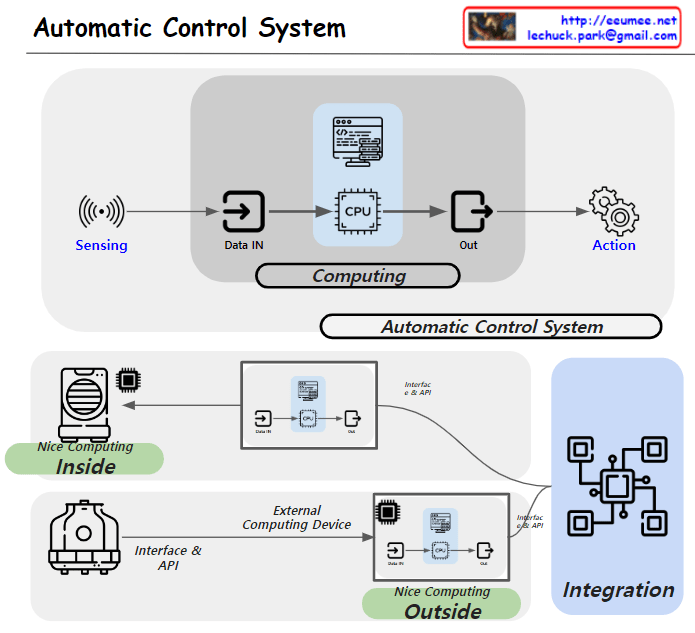
focusing on the importance of computing in automatic control systems and the distinction between devices with sufficient computing power and those without:

  1. Basic Structure of Automatic Control System:
    • The system operates in the sequence of Sensing -> Data IN -> CPU -> Out -> Action.
    • This entire process occurs within the ‘Computing’ phase, which is crucial for automatic control.
  2. Device Classification Based on Computing Capability:
    • ‘Nice Computing Inside’: Represents devices with sufficient computing power. These devices can process complex control logic independently.
    • ‘Nice Computing Outside’: Indicates devices with limited computing capabilities. These devices rely on external computing resources for automatic control.
  3. Utilization of External Computing Resources:
    • The ‘External Computing Device’ allows devices with limited computing power to perform advanced automatic control functions.
    • This is implemented through external computing devices such as PLCs (Programmable Logic Controllers) or DDCs (Direct Digital Controls).
  4. System Integration:
    • ‘Interface & API’ facilitates the connection and communication between various devices and external computing resources.
    • The ‘Integration’ section demonstrates how these diverse elements function as a unified automatic control system.
  5. Importance of Computing:
    • In automatic control systems, computing plays a crucial role in data processing, decision-making, and generating control commands.
    • By appropriately utilizing internal or external computing resources, various types of equipment can function as part of an efficient automatic control system.

This diagram effectively illustrates the flexibility and scalability of automatic control systems, explaining different approaches based on computing capabilities. The forthcoming explanation about PLC/DDC and other external computing devices will likely provide more concrete insights into the practical implementation of these systems.

Computing Power 4-Optimizations

From Claude with some prompting
The image “Computing Power 4-Optimizations” highlights four key areas for optimizing computing power, emphasizing a comprehensive approach that goes beyond infrastructure to include both hardware and software perspectives:

  1. Processing Optimizing: Focuses on hardware-level optimization, utilizing advanced manufacturing process technology to develop low-power GPUs and CPUs. It incorporates techniques like dynamic voltage and frequency scaling, and clock/power gating to maximize chip efficiency.
  2. Power Supply Optimizing: Addresses infrastructure-level optimization, improving power management and distribution across the entire system. This involves efficient power supply units and intelligent power management systems.
  3. Cooling Supply Optimizing: Another infrastructure-level optimization, enhancing thermal management of the system. Efficient cooling is crucial for maintaining computing performance while reducing power consumption.
  4. Code Optimizing: Emphasizes software-level optimization, including programming optimization, workload optimization at the OS level, and ‘green coding’ practices. This underscores the importance of considering energy efficiency in the software development process.

The diagram effectively illustrates that computing power optimization is not limited to hardware or infrastructure improvements alone. It stresses the need for a holistic approach, from chip design to code writing, to achieve effective optimization. By considering both hardware (chip) and software (code) level optimizations together, the overall system efficiency can be maximized. This comprehensive view is essential for addressing the complex challenges of power management in modern computing systems.

Parallel Processing ( Process – Data works)

From Claude with some prompting
This image illustrates different architectures of Parallel Processing:

  1. Single Core CPU: A single CPU connected to memory via one memory channel. The memory is divided into Instruction (Computing) and Data sections.
  2. Multi Core CPU: A CPU with multiple cores connected to memory through multiple memory channels. The memory structure is similar to the single core setup.
  3. NUMA (Non-Uniform Memory Access): Multiple multi-core CPUs, each with local memory. CPUs can access memory attached to other CPUs, but with “More Hop Memory Access”.
  4. GPU (Graphics Processing Unit): Described as “Completely Independent Processing-Memory Units”. It uses High Bandwidth Memory and has a large number of processing units directly mapped to data.

The GPU architecture shows many small processing units connected to a shared high-bandwidth memory, illustrating its capacity for massive parallel processing.

This diagram effectively contrasts CPU and GPU architectures, highlighting how CPUs are optimized for sequential processing while GPUs are designed for highly parallel tasks.