Operations : Changes Detection and then

Process Analysis from “Change Drives Operations” Perspective

Core Philosophy

“No Change, No Operation” – This diagram illustrates the fundamental IT operations principle that operations are driven by change detection.

Change-Centric Operations Framework

1. Change Detection as the Starting Point of All Operations

  • Top-tier monitoring systems continuously detect changes
  • No Changes = No Operations (left gray boxes)
  • Change Detected = Operations Initiated (blue boxes)

2. Operational Strategy Based on Change Characteristics

Change Detection → Operational Need Assessment → Appropriate Response
  • Normal Changes → Standard operational activities
  • Anomalies → Immediate response operations
  • Real-time Events → Emergency operational procedures

3. Cyclical Structure Based on Operational Outcomes

  • Maintenance: Stable operations maintained through proper change management
  • Fault/Big Cost: Increased costs due to inadequate response to changes

Key Insights

“Change Determines Operations”

  1. System without change = No intervention required
  2. System with change = Operational activity mandatory
  3. Early change detection = Efficient operations
  4. Proper change classification = Optimized resource allocation

Operational Paradigm

This diagram demonstrates the evolution from Reactive Operations to Proactive Operations, where:

  • Traditional Approach: Wait for problems → React
  • Modern Approach: Detect changes → Predict → Respond proactively

The framework recognizes change as the trigger for all operational activities, embodying the contemporary IT operations paradigm where:

  • Operations are event-driven rather than schedule-driven
  • Intelligence (AI/Analytics) transforms raw change data into actionable insights
  • Automation ensures appropriate responses to different types of changes

This represents a shift toward Change-Driven Operations Management, where the operational workload directly correlates with the rate and nature of system changes, enabling more efficient resource utilization and better service reliability.

With Claude

Together is not easy

This infographic titled “Together” emphasizes the critical importance of parallel processing = working together across all domains – computing, AI, and human society.

Core Concept:

The Common Thread Across All 5 Domains – ‘Parallel Processing’:

  1. Parallel Processing – Simultaneous task execution in computer systems
  2. Deep Learning – AI’s multi-layered neural networks learning in parallel
  3. Multi Processing – Collaborative work across multiple processors
  4. Co-work – Human collaboration and teamwork
  5. Social – Collective cooperation among community members

Essential Elements of Parallel Processing:

  • Sync (Synchronization) – Coordinating all components to work harmoniously
  • Share (Sharing) – Efficient distribution of resources and information
  • Optimize (Optimization) – Maximizing performance while minimizing energy consumption
  • Energy (Energy) – The inevitable cost required when working together

Reinterpreted Message: “togetherness is always difficult, but it’s something we have to do.”

This isn’t merely about the challenges of cooperation. Rather, it conveys that parallel processing (working together) in all systems requires high energy costs, but only through optimization via synchronization and sharing can we achieve true efficiency and performance.

Whether in computing systems, AI, or human society – all complex systems cannot advance without parallel cooperation among individual components. This is an unavoidable and essential process for any sophisticated system to function and evolve. The insight reveals a fundamental truth: the energy investment in “togetherness” is not just worthwhile, but absolutely necessary for progress.

With Claude

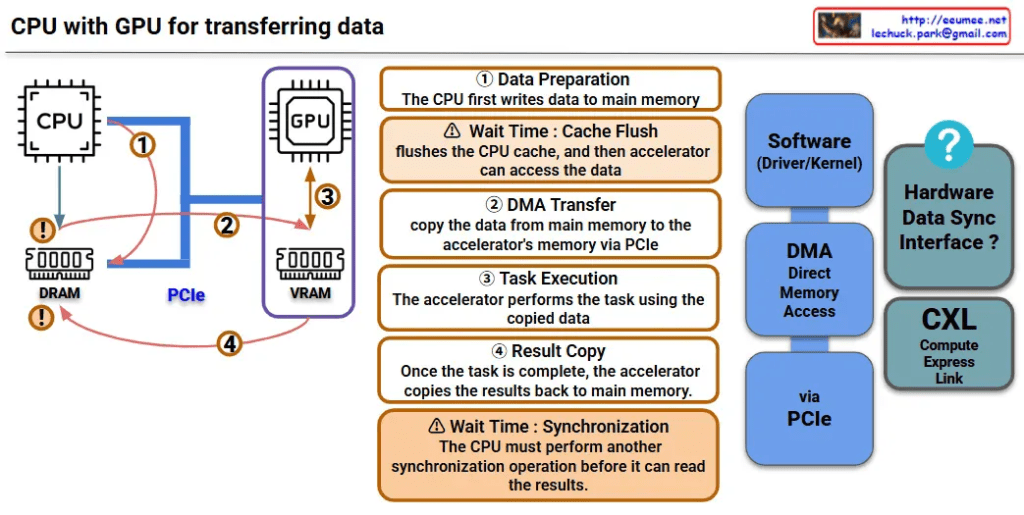
CPU with GPU (legacy)

This image is a diagram explaining the data transfer process between CPU and GPU. Let me interpret the main components and processes.

Key Components

Hardware:

  • CPU: Main processor
  • GPU: Graphics processing unit (acting as accelerator)
  • DRAM: Main memory on CPU side
  • VRAM: Dedicated memory on GPU side
  • PCIe: High-speed interface connecting CPU and GPU

Software/Interfaces:

  • Software (Driver/Kernel): Driver/kernel controlling hardware
  • DMA (Direct Memory Access): Direct memory access

Data Transfer Process (4 Steps)

Step 1 – Data Preparation

  • CPU first writes data to main memory (DRAM)

Step 2 – DMA Transfer

  • Copy data from main memory to GPU’s VRAM via PCIe
  • ⚠️ Wait Time: Cache Flush – CPU cache is flushed before accelerator can access the data

Step 3 – Task Execution

  • GPU performs tasks using the copied data

Step 4 – Result Copy

  • After task completion, GPU copies results back to main memory
  • ⚠️ Wait Time: Synchronization – CPU must perform another synchronization operation before it can read the results

Performance Considerations

This diagram shows the major bottlenecks in CPU-GPU data transfer:

  • Memory copy overhead: Data must be copied twice (CPU→GPU, GPU→CPU)
  • Synchronization wait times: Synchronization required at each step
  • PCIe bandwidth limitations: Physical constraints on data transfer speed

CXL-based Improvement Approach

CXL (Compute Express Link) shown on the right side of the diagram represents next-generation technology for improving this data transfer process, offering an alternative approach to solve the complex 4-step process and related performance bottlenecks.


Summary

This diagram demonstrates how CPU-GPU data transfer involves a complex 4-step process with performance bottlenecks caused by memory copying overhead, synchronization wait times, and PCIe bandwidth limitations. CXL is presented as a next-generation technology solution that can overcome the limitations of traditional data transfer methods.

With Claude

Human Extends

This image is a conceptual diagram titled “Human Extend” that illustrates the cognitive extension of human capabilities and the role of AI tools.

Core Concept

“Human See” at the center represents the core of human observation and understanding abilities.

Bidirectional Extension Structure

Left: Macro Perspective

  • Represented by an orange circle
  • “A deeper understanding of the micro leads to better macro predictions”

Right: Micro Perspective

  • Represented by a blue circle
  • “A deeper understanding of the macro leads to better micro predictions”

Role of AI and Data

The upper portion shows two supporting tools:

  1. AI (by Tool): Represented by an atomic structure-like icon
  2. Data (by Data): Represented by network and database icons

Overall Meaning

This diagram visually represents the concept that human cognitive abilities can be extended through AI tools and data analysis, enabling deeper mutual understanding between microscopic details and macroscopic patterns. It illustrates the complementary relationship where understanding small details leads to better prediction of the big picture, and understanding the big picture leads to more accurate prediction of details.

The diagram suggests that AI and data serve as amplifying tools that enhance human perception, allowing for more sophisticated analysis across different scales of observation and prediction.

with Claude

LMM Operation

LLM Operations System Analysis

This diagram illustrates the architecture of an LLM Operations (LLMOps) system, demonstrating how Large Language Models are deployed and operated in industrial settings.

Key Components and Data Flow

1. Data Input Sources (3 Categories)

  • Facility: Digitized sensor data that gets detected and generates alert/event logs
  • Manual: Equipment manuals and technical documentation
  • Experience: Operational manuals including SOP/MOP/EOP (Standard/Maintenance/Emergency Operating Procedures)

2. Central Processing System

  • RAG (Retrieval-Augmented Generation): A central hub that integrates and processes all incoming data
  • Facility data is visualized through metrics and charts for monitoring purposes

3. LLM Operations

  • The central LLM synthesizes all information to provide intelligent operational support
  • Interactive interface enables user communication and queries

4. Final Output and Control

  • Dashboard for data visualization and monitoring
  • AI chatbot for real-time operational assistance
  • Operator Control: The bottom section shows checkmark (✓) and X-mark (✗) buttons along with an operator icon, indicating that final decision-making authority remains with human operators

System Characteristics

This system represents a smart factory solution that integrates AI into traditional industrial operations, providing comprehensive management from real-time data monitoring to operational manual utilization.

The key principle is that while AI provides comprehensive analysis and recommendations, the final operational decisions and approvals still rest with human operators. This is clearly represented through the operator icon and approval/rejection buttons at the bottom of the diagram.

This demonstrates a realistic and desirable AI operational model that emphasizes safety, accountability, and the importance of human judgment in unpredictable situations.

With Claude