Service Development Env.

From Claude with some prompting
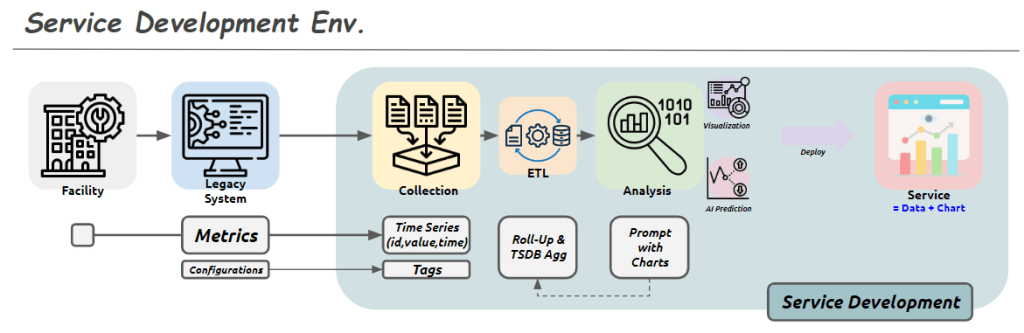
This image shows a diagram titled “Service Development Env.” (Service Development Environment). It illustrates the stages of a service development process:

  1. Facility: Represented by a building icon, serving as the starting point.
  2. Legacy System: Depicted by a computer screen icon.
  3. Collection: Shown as multiple document icons.
  4. ETL (Extract, Transform, Load): Represented by gear and database icons.
  5. Analysis: Indicated by a magnifying glass icon, including visualization and AI prediction capabilities.
  6. Deploy: Represented by a screen icon with charts, described as “Service = Data + Chart”.

The lower part of the diagram shows additional process steps:

  • Metrics: Includes Configurations.
  • Time Series: Stores data in (id, value, time) format.
  • Tags
  • Roll-Up & TSDB Agg (Time Series Database Aggregation)
  • Prompt with Charts

Overall, this diagram illustrates the entire service development process from data collection to analysis, visualization, and final service deployment. Each stage represents the steps of processing, storing, analyzing data, and ultimately delivering it to end-users.

The flow suggests a progression from legacy systems and facilities, through data collection and processing, to advanced analysis and deployment of data-driven services

Standardization & Platform Why?

From Claude with some prompting
This diagram illustrates the importance of standardization and platform development, highlighting two key objectives:

  1. Standardization:
    • Encompasses the stages from real work (machine and processing) through digitization, collecting, and verification.
    • Purpose: “Move on with data trust”
    • Meaning: By establishing standardized processes for data collection and verification, it ensures data reliability. This allows subsequent stages to proceed without concerns about data quality.
  2. Software Development Platform:
    • Includes analysis, improvement, and new development stages.
    • Purpose: “Make easy to improve & go to new”
    • Meaning: Building on standardized data and processes, the platform facilitates easier service improvements and new service development and expansion.

This structure offers several advantages:

  1. Data Reliability: Standardized processes for collection and verification ensure trustworthy data, eliminating concerns about data quality in later stages.
  2. Efficient Improvement and Innovation: With reliable data and a standardized platform, improving existing services or developing new ones becomes more straightforward.
  3. Scalability: The structure provides a foundation for easily adding new services or features.

In conclusion, this diagram visually represents two core strategies: establishing data reliability through standardization and enabling efficient service improvement and expansion through a dedicated platform. It emphasizes how standardization allows teams to trust and focus on using the data, while the platform makes it easier to improve existing services and develop new ones.
Changes -> Process

From Claude with some prompting
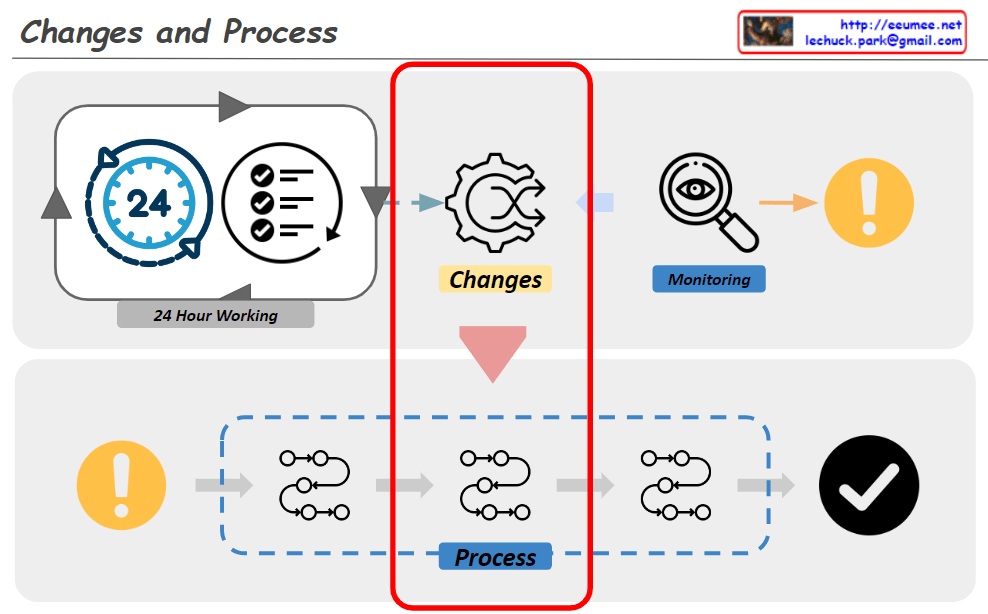
The diagram titled “Changes and Process” illustrates an organization’s system for detecting and responding to changes. The key components and flow are as follows:

  1. 24-Hour Working System:
    • Represented by a 24-hour clock icon and a checklist icon.
    • This indicates continuous monitoring and operation.
  2. Change Detection:
    • Depicted by a gear icon positioned centrally.
    • Captures changes occurring within the 24-hour working system.
  3. Monitoring:
    • Shown as a magnifying glass icon.
    • Closely observes and analyzes detected changes.
  4. Alert System:
    • Represented by an exclamation mark icon.
    • Signals important changes or issues that require attention.
  5. Response Process:
    • Illustrated as a flowchart with multiple stages.
    • Initiates when an alert is triggered and follows systematic steps to address the issue.
  6. Completion Verification:
    • Indicated by a checkmark icon.
    • Confirms the successful completion of the response process.

This system operates cyclically, continuously monitoring to detect changes and activating an immediate response process when necessary. This approach maintains the organization’s efficiency and stability. It demonstrates the organization’s ability to respond quickly and systematically to changing environments.

The diagram emphasizes the interconnectedness of continuous operation, change management, monitoring, and the execution of structured processes, all working together to ensure effective adaptation to changes.

Computing Power 4-Optimizations

From Claude with some prompting
The image “Computing Power 4-Optimizations” highlights four key areas for optimizing computing power, emphasizing a comprehensive approach that goes beyond infrastructure to include both hardware and software perspectives:

  1. Processing Optimizing: Focuses on hardware-level optimization, utilizing advanced manufacturing process technology to develop low-power GPUs and CPUs. It incorporates techniques like dynamic voltage and frequency scaling, and clock/power gating to maximize chip efficiency.
  2. Power Supply Optimizing: Addresses infrastructure-level optimization, improving power management and distribution across the entire system. This involves efficient power supply units and intelligent power management systems.
  3. Cooling Supply Optimizing: Another infrastructure-level optimization, enhancing thermal management of the system. Efficient cooling is crucial for maintaining computing performance while reducing power consumption.
  4. Code Optimizing: Emphasizes software-level optimization, including programming optimization, workload optimization at the OS level, and ‘green coding’ practices. This underscores the importance of considering energy efficiency in the software development process.

The diagram effectively illustrates that computing power optimization is not limited to hardware or infrastructure improvements alone. It stresses the need for a holistic approach, from chip design to code writing, to achieve effective optimization. By considering both hardware (chip) and software (code) level optimizations together, the overall system efficiency can be maximized. This comprehensive view is essential for addressing the complex challenges of power management in modern computing systems.
Energy Usage

From Claude with some prompting
Here’s an interpretation of the image in English:

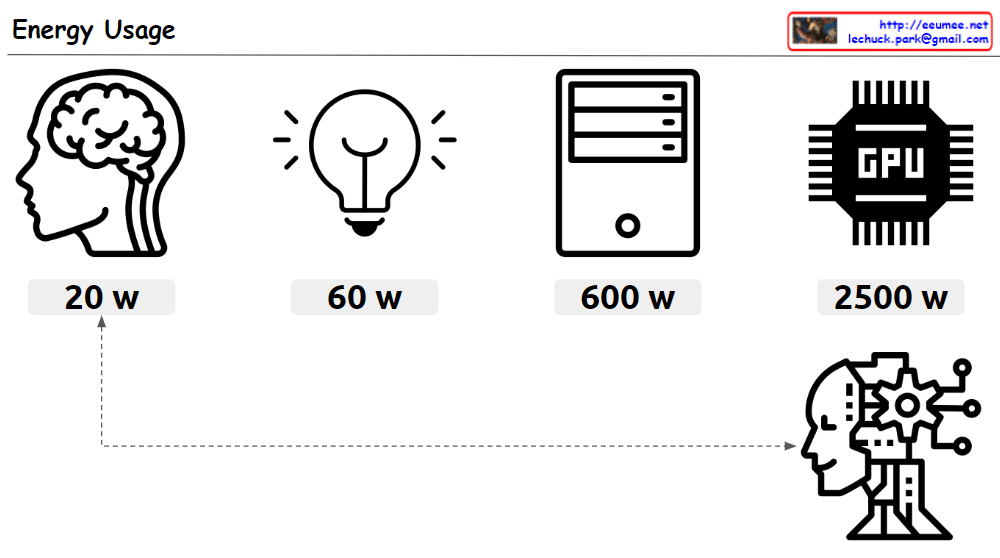
This image compares the energy usage of various devices and systems. Under the title “Energy Usage”, the following items are listed:

  1. An icon representing a human brain: 20 W (watts)
  2. A light bulb icon: 60 W
  3. An icon representing a computer tower: 600 W
  4. An icon representing a GPU (Graphics Processing Unit): 2500 W

At the bottom of the image, there’s an icon suggestive of artificial intelligence or a robot. This icon is connected by a dotted line to the human brain icon, implying a comparison of energy usage between the human brain and AI systems.

The image emphasizes the energy efficiency of the human brain. While the brain operates on just 20W, a high-performance computing device like a GPU consumes 2500W. This suggests that artificial intelligence systems consume significantly more energy compared to the human brain.

In the top right corner of the image, an email address (lechuck.park@gmail.com) is displayed.

Overall, this image provides a striking visual comparison of energy consumption across different systems, highlighting the remarkable efficiency of the human brain in contrast to artificial computing systems.