Computing Changes with Power/Cooling

This chart compares power consumption and cooling requirements for server-grade computing hardware.

CPU Servers (Intel Xeon, AMD EPYC)

  • 1U-4U Rack: 0.2-1.2kW power consumption
  • 208V power supply
  • Standard air cooling (CRAC, server fans) sufficient
  • PUE: 1.4-1.6 (Power Usage Effectiveness)

GPU Servers (DGX Series)

Power consumption and cooling complexity increase dramatically:

Low-Power Models (DGX-1, DGX-2)

  • 3.5-10kW power consumption
  • Tesla V100 GPUs
  • High-performance air cooling required

Medium-Power Models (DGX A100, H100)

  • 6.5-10.2kW power consumption
  • 400V high voltage required
  • Liquid cooling recommended or essential

Highest-Performance Models (DGX B200, GB200)

  • 14.3-120kW extreme power consumption
  • Blackwell architecture GPUs
  • Full liquid cooling essential
  • PUE 1.1-1.2 with improved cooling efficiency

Key Trends Summary

The evolution from CPU to GPU computing represents a fundamental shift in data center infrastructure requirements. Power consumption scales dramatically from kilowatts to tens of kilowatts, driving the transition from traditional air cooling to sophisticated liquid cooling systems. Higher-performance systems paradoxically achieve better power efficiency through advanced cooling technologies, while requiring substantial infrastructure upgrades including high-voltage power delivery and comprehensive thermal management solutions.

※ Disclaimer: All figures presented in this chart are approximate reference values and may vary significantly depending on actual environmental conditions, workloads, configurations, ambient temperature, and other operational factors.

WIth Claude

Data in AI DC

This image illustrates a data monitoring system for an AI data center server room. Titled “Data in AI DC Server Room,” it depicts the relationships between key elements being monitored in the data center.

The system consists of four main components, each with detailed metrics:

  1. GPU Workload – Right center
    • Computing Load: GPU utilization rate (%) and type of computational tasks (training vs. inference)
    • Power Consumption: Real-time power consumption of each GPU (W) – Example: NVIDIA H100 GPU consumes up to 700W
    • Workload Pattern: Periodicity of workload (peak/off-peak times) and predictability
    • Memory Usage: GPU memory usage patterns (e.g., HBM3 memory bandwidth usage)
  2. Power Infrastructure – Left
    • Power Usage: Real-time power output and efficiency of UPS, PDU, and transformers
    • Power Quality: Voltage, frequency stability, and power loss rate
    • Power Capacity: Types and proportions of supplied energy, ensuring sufficient power availability for current workload operations
  3. Cooling System – Right
    • Cooling Device Status: Air-cooling fan speed (RPM), liquid cooling pump flow rate (LPM), and coolant temperature (°C)
    • Environmental Conditions: Data center internal temperature, humidity, air pressure, and hot/cold zone temperatures – critical for server operations
    • Cooling Efficiency: Power Usage Effectiveness (PUE) and proportion of power consumed by the cooling system
  4. Server/Rack – Top center
    • Rack Power Density: Power consumption per rack (kW) – Example: GPU server racks range from 30 to 120 kW
    • Temperature Profile: Temperature (°C) of GPUs, CPUs, memory modules, and heat distribution
    • Server Status: Operational state of servers (active/standby) and workload distribution status

The workflow sequence indicated at the bottom of the diagram represents:

  1. ① GPU WORK: Initial execution of AI workloads – GPU computational tasks begin, generating system load
  2. ② with POWER USE: Increased power supply for GPU operations – Power demand increases with GPU workload, and power infrastructure responds accordingly
  3. ③ COOLING WORK: Cooling processes activated in response to heat generation
    • Sensing: Temperature sensors detect server and rack thermal conditions, monitoring hot/cold zone temperature differentials
    • Analysis: Analysis of collected temperature data, determining cooling requirements
    • Action: Adjustment of cooling equipment (fan speed, coolant flow rate, etc. automatically regulated)
  4. ④ SERVER OK: Maintenance of normal server operation through proper power supply and cooling – Temperature and power remain stable, allowing GPU workloads to continue running under optimal conditions

The arrows indicate data flow and interrelationships between systems, showing connections from power infrastructure to servers and from cooling systems to servers. This integrated system enables efficient and stable data center operation by detecting increased power demand and heat generation from GPU workloads, and adjusting cooling systems in real-time accordingly.

With Claude

Power Flow

Power Flow Diagram Analysis

This image illustrates a power flow diagram for a data center or server room, showing the sequential path of electricity from external power sources to the final server equipment.

Main Components:

  1. Intake: External power supply at 154 kV / 22.9 kV with 100MW(MVA) capacity
  2. Transformer: Performs voltage conversion (step down) to make power easier to handle
  3. Generator: Provides backup power during outages, connected to a fuel tank
  4. Transformer #2: Second voltage conversion, bringing power closer to usable voltage (220/380V)
  5. UPS/Battery: Uninterruptible Power Supply with battery backup for blackout protection, showing capacity (KVA) and backup time
  6. PDU/TOB: Power Distribution Unit for connecting to servers
  7. Server: Final power consumption equipment

Key Features:

  • Red circles indicate power switching/distribution points
  • Dotted lines show backup power connections
  • The bottom section details the characteristics of each component:
    • Intake power specifications
    • Voltage conversion information
    • Blackout readiness status
    • Server connection details
    • Power usage status

Summary:

This diagram represents the complete power infrastructure of a data center, illustrating how electricity flows from the grid through multiple transformation and backup systems before reaching the servers. It demonstrates the redundancy measures implemented to ensure continuous operation during power outages, including generators and UPS systems. The power path includes necessary voltage step-down transformations to convert high-voltage grid power to server-appropriate voltages, with switching and distribution points throughout the system. This comprehensive power flow design ensures reliable, uninterrupted power delivery critical for data center operations.

With Claude

Server Room Flow

With Claude
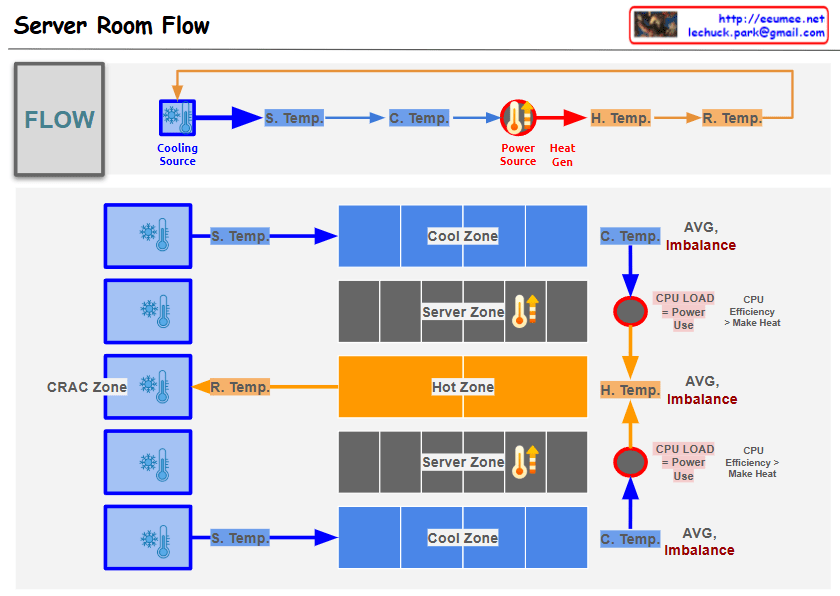
Comprehensive Analysis of Server Room HVAC System Configuration and Operation

  1. Physical Configuration
  • Multiple cooling units arranged in CRAC (Computer Room Air Conditioning) Zone
  • Three-tier structure: Cool Zone, Server Zone, Hot Zone
  • Upper and lower distribution structure for air circulation
  1. Temperature Monitoring System
  • Supply Temperature (S. Temp): Cooling unit output temperature
  • Cooling Zone Temperature (C. Temp): Pre-server intake temperature
  • Hot Zone Temperature (H. Temp): Server exhaust temperature
  • Return Temperature (R. Temp): CRAC intake temperature
  1. Efficiency Management Indicators
  • AVG. Imbalance monitoring for each section
  • CPU load and power consumption correlation analysis
  • CPU efficiency and heat generation relationship tracking
  1. Analysis Points
  • Delta T analysis between sections
  • Temperature variation patterns by time/season
  • Power efficiency and cooling efficiency correlation
  • System stability prediction indicators
  1. Operational Goals
  • Operating cost optimization
  • Provide stable server operating environment
  • Energy-efficient cooling system operation
  • Proactive problem detection and response

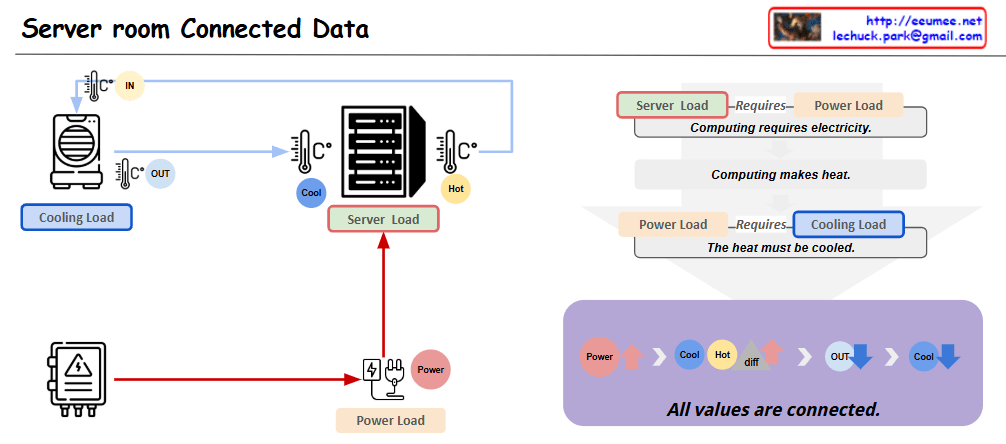
Server room Connected Data

with a claude’s help
This diagram represents the key interconnected elements within a server room in a data center. It is composed of three main components:

  1. Server Load: This represents the computing processing demand on the server hardware.
  2. Cooling Load: This represents the cooling system’s load required to remove the heat generated by the server equipment.
  3. Power Load: This represents the electrical power demand needed to operate the server equipment.

These three elements are closely related. As the Server Load increases, the Power Load increases, which then leads to greater heat generation and an increase in Cooling Load.

Applying this to an actual data center environment, important considerations would include:

  1. Server rack placement: Efficient rack arrangement to optimize cooling performance and power distribution.
  2. Hot air exhaust channels: Dedicated pathways to effectively expel the hot air from the server racks, reducing Cooling Load.
  3. Cooling system capacity: Sufficient CRAC (Computer Room Air Conditioning) units to handle the Cooling Load.
  4. Power supply: Appropriate PDU (Power Distribution Unit) to provide the necessary Power Load for stable server operation.

By accounting for these real-world data center infrastructure elements, the diagram can be further enhanced to provide more practical and applicable insights.

Overall, this diagram effectively illustrates the core interdependent components within a server room and how they relate to the actual data center operational environment.Copy

Getting server data

From Claude with some prompting
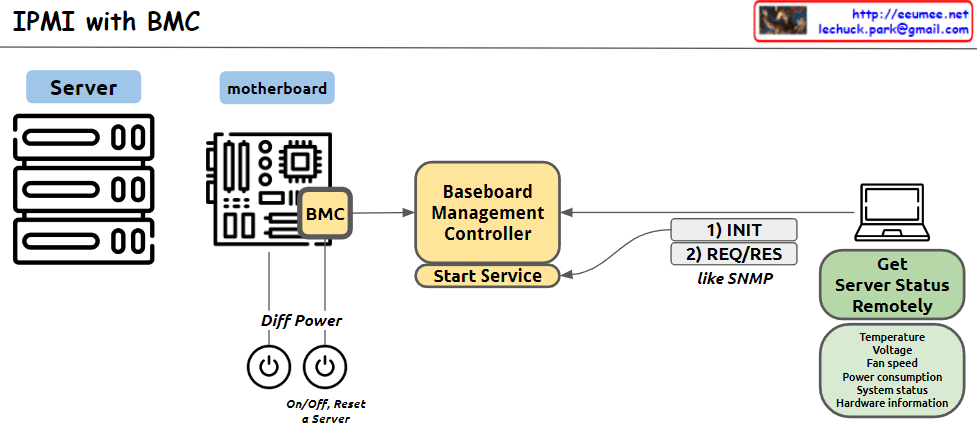
This image illustrates the structure of an IPMI (Intelligent Platform Management Interface) system using BMC (Baseboard Management Controller). The main components and functions are as follows:

  1. Server: Represents the managed server.
  2. Motherboard: Depicts the server’s mainboard, where the BMC chip is located.
  3. BMC (Baseboard Management Controller): The core component for monitoring and managing server hardware.
  4. Baseboard Management Controller: Performs the main functions of the BMC, with a “Start Service” function indicated.
  5. Diff Power: Represents the server’s power management functions, including On/Off and Reset capabilities.
  6. Remote management computer: Used to remotely monitor and manage the server status.
  7. Get Server Status Remotely: Server status information that can be checked remotely, including temperature, voltage, fan speed, power consumption, system status, and hardware information.
  8. Communication process: The interaction between the remote computer and BMC is shown to involve 1) INIT (initialization) and 2) REQ/RES (request/response) stages, described as functioning similar to SNMP.

This system allows administrators to remotely monitor and control the physical state of the server.