Fundamental Principle: “All energies must be maintained with continuous energies for no error (no changes without Computing)”
This diagram illustrates:
Binary addition process
Energy conservation and transformation
Information loss during computation
Relationship between computation, energy, and heat generation
The visual representation shows how a simple 8-bit addition triggers energy transfer, with overflow resulting in heat production and a modified binary state.
This dashboard is designed to monitor the comprehensive performance of server room cooling systems by displaying temperature changes alongside server power consumption data, while also tracking water flow rate (Water LPM) and fan speed. The main utilities and applications of this approach include:
Integrated Data Visualization:
Enables simultaneous monitoring of temperature, power consumption, and cooling system parameters (flow rate, fan speed) in a single dashboard, facilitating the identification of correlations between systems.
Allows operators to immediately observe how increases in power consumption lead to temperature rises and the subsequent response of cooling systems.
Benefits of Heat Map Implementation:
Represents data from multiple temperature sensors categorized as MAX/MIN/AVG with color differentiation, providing intuitive understanding of spatial temperature distribution.
Creates clear visual contrast between yellow (HOTZONE) and blue (COOLZONE) areas, making temperature gradients easily recognizable.
Enables quick identification of temperature anomalies for early detection of potential issues.
Cooling Efficiency Monitoring:
Facilitates analysis of the relationship between Water LPM (water flow rate) and temperature changes to evaluate cooling water usage efficiency.
Allows assessment of air circulation system effectiveness by examining correlations between fan speed and COOLZONE/HOTZONE temperature changes.
Enables real-time monitoring of heat exchange efficiency through the difference between RETURN TEMP and SUPPLY TEMP.
Event Detection and Analysis:
Features an “EVENT(Big Change?)” indicator that helps quickly identify significant changes or anomalies.
Displays data from the past 30 minutes in 5-minute intervals, enabling analysis of short-term trends and patterns.
Operational Decision Support:
Provides immediate feedback on the effects of cooling system adjustments (changes in flow rate or fan speed) on temperature, enabling optimization of operational parameters.
Helps evaluate the response capability of cooling systems during increased server loads, supporting capacity planning.
Offers necessary data to balance energy efficiency with server stability.
This dashboard goes beyond a simple monitoring tool to serve as a comprehensive decision support system for optimizing thermal management in server rooms, improving energy efficiency, and ensuring equipment stability. The heat map visualization approach, in particular, makes complex temperature data intuitively interpretable, allowing operators to quickly assess situations and respond appropriately.
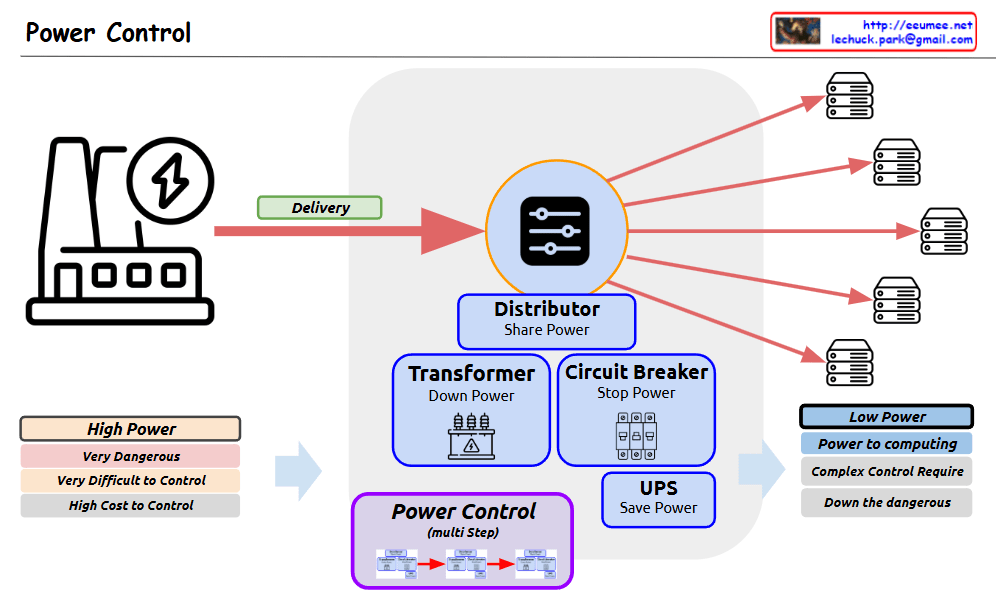
The diagram shows the complete process of how high-power electricity is safely and efficiently controlled and converted into low-power suitable for computing systems. The power flow is illustrated through a “Delivery” phase, passing through various protective and control devices before being distributed to multiple servers or computing equipment.
The system emphasizes safety and control through multiple stages:
Initial high-power input is marked as dangerous and difficult to control
Multiple control mechanisms (transformer, circuit breaker, UPS) manage the power
The distributor splits the controlled power to multiple endpoints
Final output is appropriate for computing equipment
This setup ensures safe and reliable power distribution while reducing the risks associated with high-power electrical systems.
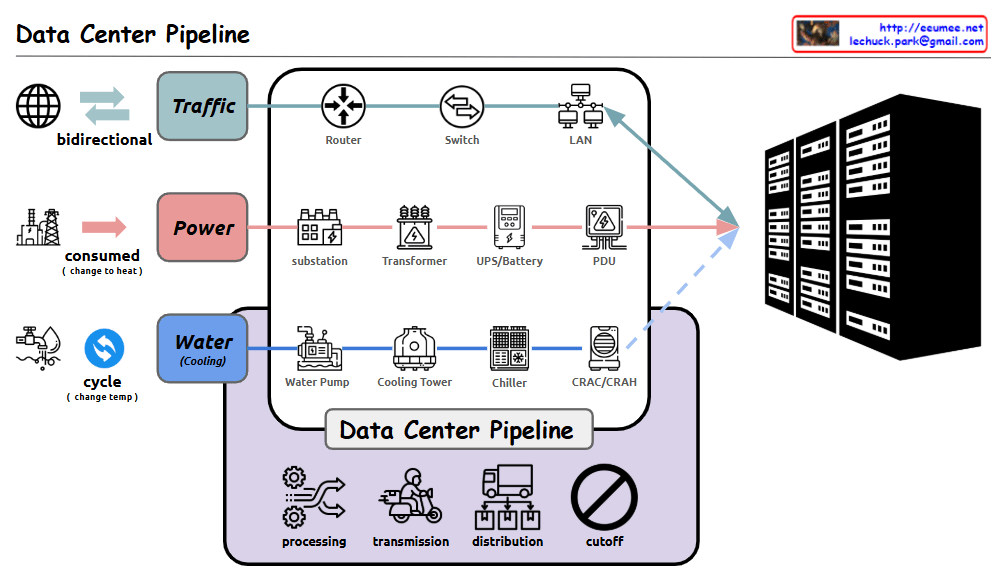
With Claude The supply system in data centers follows a unified control flow pattern of “Change → Distribute → Block”. This pattern is consistently applied across all core infrastructure elements (Traffic, Power, and Cooling). Let’s examine each stage and its applications:
1. Change Stage
Transforms incoming resources into forms suitable for the system
Traffic: Protocol/bandwidth conversion through routers
Power: Voltage/current conversion through transformers/UPS
Cooling: Temperature conversion through chillers/heat exchangers
2. Distribute Stage
Efficiently distributes converted resources where needed
Traffic: Network load distribution through switches and load balancers
Power: Power distribution through distribution boards and bus ducts
Cooling: Cooling air/water distribution through ducts/piping/dampers
3. Block Stage
Ensures system protection and security
Traffic: Security threat prevention through firewalls/IPS/IDS
Power: Overload protection through circuit breakers and fuses
Cooling: Backflow prevention through shutoff valves and dampers
This structure enables systematic and efficient operation of complex data center infrastructure by managing the three critical supply elements (Traffic, Power, Cooling) within the same framework. Each component plays a specific role in ensuring the reliable and secure operation of the data center, while maintaining consistency across different systems.
Circulation cooling system through temperature change
Flow: Water Pump → Cooling Tower → Chiller → CRAC/CRAH (Computer Room Air Conditioning/Handler)
Efficiently controls server heat generation
Data Center Management Functions
Processing: Data and system processing
Transmission: Data transfer
Distribution: Resource allocation
Cutoff: System protection during emergencies
Comprehensive Summary: This diagram illustrates the core infrastructure of a modern data center. It shows the seamless integration of three critical pipelines: network traffic for data processing, power supply for system operation, and cooling systems for equipment protection. Each pipeline undergoes multiple processing stages, working harmoniously to ensure stable data center operations. The four core management functions – processing, transmission, distribution, and cutoff – guarantee the efficiency and stability of the entire system. This integrated infrastructure design enables reliable operation of data centers, which form the foundation of modern digital services. The careful balance between these systems is crucial for maintaining optimal performance, ensuring business continuity, and protecting valuable computing resources. The design demonstrates how modern data centers handle the complex requirements of digital infrastructure while maintaining reliability and efficiency.
With a Claude the Software Defined Power Distribution (SDPD) system, including the added standards and protocols shown in the image:
SDN Similarity
Like Software-Defined Networking controls network traffic, SDPD applies similar software-defined principles to power distribution
Key Components
Real-time Monitoring: Power consumption and system status analysis using IoT sensors and AI
Centralized Control: Power distribution optimization through an integrated platform
Flexibility/Scalability: Software-based upgrades and expansion
Energy Efficiency: Data center power optimization and rapid fault response
Standards and Protocols
IEC 61850: Substation automation communication standard
IEEE 2030.5: Smart energy profile standard
Modbus/DNP3: Industrial communication protocols
OpenADR: Automated demand response standard
Final Summary: Why Software Defined X (SDx) is necessary for power distribution
Modern power systems face increasing complexity and require real-time response capabilities
Data-driven decision making and automated control are essential
Software Defined approach (SDPD) provides:
Real-time data collection/analysis for optimized power flow
Rapid response and efficient management through centralized control
Flexible system expansion and upgrades through software-based architecture
Achievement of improved energy efficiency and reduced operational costs
The software-defined approach has become essential in the power sector, just as it has in networking, because it enables:
Intelligent resource allocation
Improved system visibility
Enhanced operational efficiency
Better fault tolerance and recovery
Cost-effective scaling and updates
This demonstrates why a data-centric, software-defined approach is crucial for modern power systems to achieve efficiency, reliability, and scalability.
With Claude Server Room Metric Correlation Analysis & Operations Guide
1. Diagram Structure Analysis
Key Component Areas
Server Zone (Left)
Server racks and equipment
Workload-driven CPU/GPU operations
Load metrics indicating rising system demands
Resource utilization monitoring
Power Supply Zone (Center Bottom)
Power metering system
Power consumption monitoring
Load status tracking with increasing indicators
Hot Zone (Center)
Heat generation and thermal management area
Exhaust temperature monitoring
Return temperature tracking
Overall temperature management
Cool Zone (Right)
Cooling system operations
Inlet temperature control
Cooling supply temperature management
Cooling system load monitoring
2. Core Metric Correlations
Basic Metric Flow
Load Generation
Server workload increases
CPU/GPU utilization rises
System load elevation
Power Consumption
Load-driven power usage increase
Power efficiency monitoring
Overall system load tracking
Thermal Management
Heat generation in Hot Zone
Exhaust/Return temperature differential
Cooling system response
Cooling Efficiency
Cool Zone temperature regulation
Cooling system load adjustment
System stability maintenance
3. Key Operational Indicators
Primary Metrics
Performance Metrics
Server workload levels
CPU/GPU utilization
System response metrics
Environmental Metrics
Zone temperatures
Air flow patterns
Cooling efficiency
Power Metrics
Power consumption rates
Load distribution
Efficiency indicators
4. Monitoring Focus Points
Critical Correlations
Load-Power-Temperature Relationship
Workload impact on power consumption
Heat generation patterns
Cooling system response efficiency
System Stability Indicators
Temperature zone balance
Power distribution effectiveness
Cooling system performance
This comprehensive analysis of server room metrics and their correlations enables effective monitoring and management of the entire system, ensuring optimal performance and stability through understanding the interconnected nature of all components and their respective metrics.
The diagram effectively illustrates how different metrics interact and influence each other, providing a clear framework for monitoring and maintaining server room operations efficiently.





 Lechuck Park