A series of decisions

From Claude with some prompting
The image depicts a diagram titled “A series of decisions,” illustrating a data processing and analysis workflow. The main stages are as follows:

  1. Big Data: The starting point for data collection.
  2. Gathering Domains by Searching: This stage involves searching for and collecting relevant data.
  3. Verification: A step to validate the collected data.
  4. Database: Where data is stored and managed. This stage includes “Select Betters” for data refinement.
  5. ETL (Extract, Transform, Load): This process involves extracting, transforming, and loading data, with a focus on “Select Combinations.”
  6. AI Model: The stage where artificial intelligence models are applied, aiming to find a “More Fit AI Model.”

Each stage is accompanied by a “Visualization” icon, indicating that data visualization plays a crucial role throughout the entire process.

At the bottom, there’s a final step labeled “Select Results with Visualization,” suggesting that the outcomes of the entire process are selected and presented through visualization techniques.

Arrows connect these stages, showing the flow from Big Data to the AI Model, with “Select Results” arrows feeding back to earlier stages, implying an iterative process.

This diagram effectively illustrates the journey from raw big data to refined AI models, emphasizing the importance of decision-making and selection at each stage of the data processing and analysis workflow.

More abstracted Data & Bigger Error possibility

From Claude with some prompting
This image illustrates the data processing, analysis, and machine learning application process, emphasizing how errors can be amplified at each stage:

  1. Data Flow:
    • Starts with RAW data.
    • Goes through multiple ETL (Extract, Transform, Load) processes, transforming into new forms of data (“NEW”) at each stage.
    • Time information is incorporated, developing into statistical data.
    • Finally, it’s processed through machine learning techniques, evolving into more sophisticated new data.
  2. Error Propagation and Amplification:
    • Each ETL stage is marked with a “WHAT {IF.}” and a red X, indicating the possibility of errors.
    • Errors occurring in early stages propagate through subsequent stages, with their impact growing progressively larger, as shown by the red arrows.
    • The large red X at the end emphasizes how small initial errors can have a significant impact on the final result.
  3. Key Implications:
    • As the data processing becomes more complex, the quality and accuracy of initial data become increasingly crucial.
    • Thorough validation and preparation for potential errors at each stage are necessary.
    • Particularly for data used in machine learning models, initial errors can be amplified, severely affecting model performance, thus requiring extra caution.

This image effectively conveys the importance of data quality management in data science and AI fields, and the need for systematic preparation against error propagation. It highlights that as data becomes more abstracted and processed, the potential impact of early errors grows, necessitating robust error mitigation strategies throughout the data pipeline.

Standardization

From Claude + ChatGPT with some prompting
The image you provided shows a standardization process aimed at delivering high-quality data and consistent services. Here’s a breakdown of the structure based on the image:

Key Areas:

  1. [Data]
    • Facility: Represents physical systems or infrastructure.
    • Auto Control: Automatic controls used to manage the system.
  2. [Service]
    • Mgt. System: Management system that controls and monitors operations.
    • Process: Processes to maintain efficiency and quality.

Optimization Paths:

  1. Legacy Optimization:
    • a) Configure List-Up: Listing and organizing the configurations for the existing system.
    • b) Configure Optimization (Standardization): Optimizing and standardizing the existing system to improve performance.
    • Outcome: Enhances the existing system by improving its efficiency and consistency.
  2. New Setup:
    • a) Configure List-Up: Listing and organizing configurations for the new system.
    • b) Configure Optimization (Standardization): Optimizing and standardizing the configuration for the new system.
    • c) Configuration Requirement: Defining the specific requirements for setting up the new system.
    • d) Verification (on Installation): Verifying that the system operates correctly after installation.
    • Outcome: Builds a completely new system that provides high-quality data and consistent services.

Outcome:

The aim for both paths is to provide high-quality data and consistent service by standardizing either through optimizing legacy systems or creating entirely new setups.

This structured approach helps improve efficiency, consistency, and system performance.

Service

From Claude with some prompting
The image is a diagram titled “Service” that illustrates two main processes:

  1. Top left: “Op. Process” (Operational Process)
    • Shown as a circular structure containing:
      • “Event!!”: Represented by an exclamation mark icon
      • “Operator”: Indicated by a person icon
      • “Processing”: Depicted by an icon of connected circles
    • This process is marked with “xN”, suggesting it can be repeated multiple times.
  2. Bottom left: “D/T Service” (presumably Data/Technology Service)
    • Also presented in a circular structure, including:
      • “Data”: Shown as a graph icon
      • “Analysis(Visual)”: Represented by a monitor icon with charts
      • “Program”: Depicted by a code or document icon
    • This process is also marked with “xN”, indicating repeatability.
  3. Right side: Integrated “Op. Process” and “D/T Service”
    • A larger circle contains the “Op. Process”, which in turn encompasses the “D/T Service”
    • Within the “D/T Service” circle, “Data Result” and “Operation” are connected by a bidirectional arrow.

This diagram appears to illustrate how operational processes and data/technology services interact and integrate, likely representing a data-driven operational and decision-making process.

“if then” by AI

From Claude with some prompting
This image titled “IF THEN” by AI illustrates the evolution from traditional programming to modern AI approaches:

  1. Upper section – “Programming”: This represents the traditional method. Here, programmers collect data, analyze it, and explicitly write “if-then” rules. This process is labeled “Making Rules”.
    • Data collection → Analysis → Setting conditions (IF) → Defining actions (THEN)
  2. Lower section – “AI”: This shows the modern AI approach. It uses “Huge Data” to automatically learn patterns through machine learning algorithms.
    • Large-scale data → Machine Learning → AI model generation

Key differences:

  • Traditional method: Programmers explicitly define rules
  • AI method: Automatically learns patterns from data to create AI models that include basic “if-then” logic

The image effectively diagrams the shift in programming paradigms. It demonstrates how AI can process and learn from massive datasets to automatically generate logic that was previously manually defined by programmers.

This visualization succinctly captures how AI has transformed the approach to problem-solving in computer science, moving from explicit rule-based programming to data-driven, pattern-recognizing models.

Parallel Processing ( Process – Data works)

From Claude with some prompting
This image illustrates different architectures of Parallel Processing:

  1. Single Core CPU: A single CPU connected to memory via one memory channel. The memory is divided into Instruction (Computing) and Data sections.
  2. Multi Core CPU: A CPU with multiple cores connected to memory through multiple memory channels. The memory structure is similar to the single core setup.
  3. NUMA (Non-Uniform Memory Access): Multiple multi-core CPUs, each with local memory. CPUs can access memory attached to other CPUs, but with “More Hop Memory Access”.
  4. GPU (Graphics Processing Unit): Described as “Completely Independent Processing-Memory Units”. It uses High Bandwidth Memory and has a large number of processing units directly mapped to data.

The GPU architecture shows many small processing units connected to a shared high-bandwidth memory, illustrating its capacity for massive parallel processing.

This diagram effectively contrasts CPU and GPU architectures, highlighting how CPUs are optimized for sequential processing while GPUs are designed for highly parallel tasks.

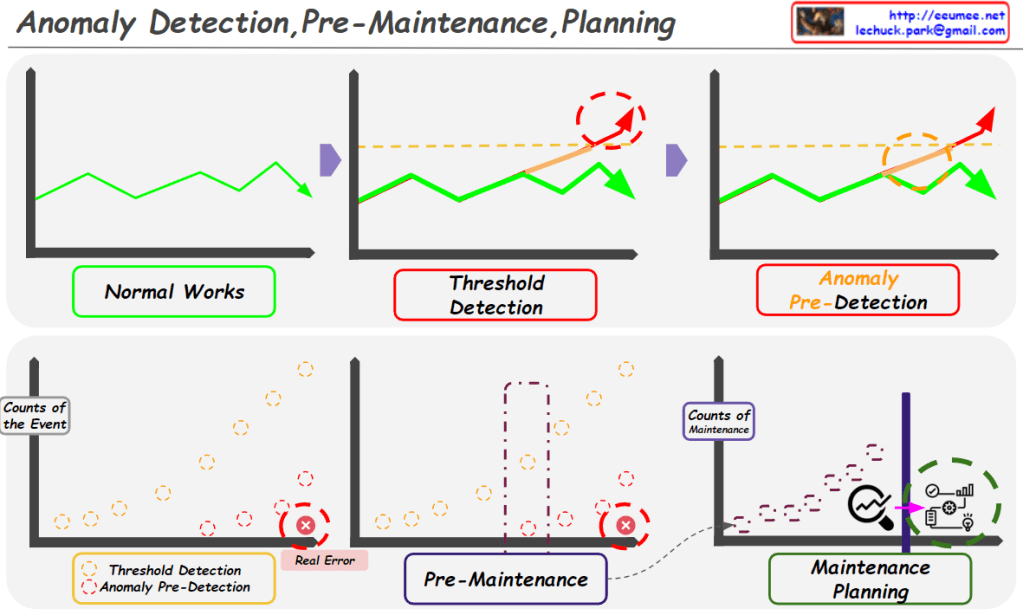
Anomaly Detection,Pre-Maintenance,Planning

From Claude with some prompting
This image illustrates the concepts of Anomaly Detection, Pre-Maintenance, and Planning in system or equipment management.

Top section:

  1. “Normal Works”: Shows a graph representing normal operational state.
  2. “Threshold Detection”: Depicts the stage where anomalies exceeding a threshold are detected.
  3. “Anomaly Pre-Detection”: Illustrates the stage of detecting anomalies before they reach the threshold.

Bottom section:

  1. “Threshold Detection Anomaly Pre-Detection”: A graph showing both threshold detection and pre-detection of anomalies. It captures anomalies before a real error occurs.
  2. “Pre-Maintenance”: Represents the pre-maintenance stage, where maintenance work is performed after anomalies are detected.
  3. “Maintenance Planning”: Shows the maintenance planning stage, indicating continuous monitoring and scheduled maintenance activities.

The image demonstrates the process of:

  • Detecting anomalies early in normal system operations
  • Implementing pre-maintenance to prevent actual errors
  • Developing systematic maintenance plans

This visual explanation emphasizes the importance of proactive monitoring and maintenance to prevent failures and optimize system performance.