Bitnet

BitNet Architecture Analysis

Overview

BitNet is an innovative neural network architecture that achieves extreme efficiency through ultra-low precision quantization while maintaining model performance through strategic design choices.

Key Features

1. Ultra-Low Precision (1.58-bit)

  • Uses only 3 values: {-1, 0, +1} for weights
  • Entropy calculation: log₂(3) ≈ 1.58 bits
  • More efficient than standard 2-bit (4 values) representation

2. Weight Quantization

  • Ternary weight system with correlation-based interpretation:
    • +1: Positive correlation
    • -1: Negative correlation
    • 0: No relation

3. Multi-Layer Structure

  • Leverages combinatorial power of multi-layer architecture
  • Enables non-linear function approximation despite extreme quantization

4. Precision-Targeted Operations

  • Minimizes high-precision operations
  • Combines 8-bit activation (input data) with 1.58-bit weights
  • Precise activation functions where needed

5. Hardware & Kernel Optimization

  • CPU (ARM) kernel-level optimization
  • Leverages bitwise operations (especially multiply → bit operations)
  • Memory management through SIMD instructions
  • Supports non-standard nature of 1.58-bit data

6. Token Relationship Computing

  • Single token uses N weights of {1, -1, 0} to calculate relationships with all other tokens

Summary

BitNet represents a breakthrough in neural network efficiency by using extreme weight quantization (1.58-bit) that dramatically reduces memory usage and computational complexity while preserving model performance through hardware-optimized bitwise operations and multi-layer combinatorial representation power.

With Claude

CXL ( Compute express link )

Traditional CPU-GPU vs CXL Key Comparison

🔴 PCIe System Inefficiencies

Separated Memory Architecture

  • Isolated Memory: CPU(DDR4) ↔ GPU(VRAM) completely separated
  • Mandatory Data Copying: CPU Memory → PCIe → GPU Memory → Computation → Result Copy
  • PCIe Bandwidth Bottleneck: Limited to 64GB/s maximum

Major Overheads

  • Memory Copy Latency: Tens of ms to seconds for large data transfers
  • Synchronization Wait: CPU cache flush + GPU synchronization
  • Memory Duplication: Same data stored in both CPU and GPU memory

🟢 CXL Core Improvements

1. Unified Memory Architecture

Before: CPU [Memory] ←PCIe→ [Memory] GPU (Separated)
After: CPU ←CXL→ GPU → Shared Memory Pool (Unified)

2. Zero-Copy & Hardware Cache Coherency

  • Eliminates Memory Copying: Data access through pointer sharing only
  • Automatic Synchronization: CXL controller ensures cache coherency at HW level
  • Real-time Sharing: GPU can immediately access CPU-modified data

3. Performance Improvements

MetricPCIe 4.0CXL 2.0Improvement
Bandwidth64 GB/s128 GB/s2x
Latency1-2μs200-400ns5-10x
Memory CopyRequiredEliminatedComplete Removal

🚀 Practical Benefits

AI/ML: 90% reduction in training data loading time, larger model processing capability
HPC: Real-time large dataset exchange, memory constraint elimination
Cloud: Maximized server resource efficiency through memory pooling


💡 CXL Core Innovations

  1. Zero-Copy Sharing – Eliminates physical data movement
  2. HW-based Coherency – Complete removal of software synchronization overhead
  3. Memory Virtualization – Scalable memory pool beyond physical constraints
  4. Heterogeneous Optimization – Seamless integration of CPU, GPU, FPGA, etc.

The key technical improvements of CXL – Zero-Copy sharing and hardware-based cache coherency – are emphasized as the most revolutionary aspects that fundamentally solve the traditional PCIe bottlenecks.

With Claude

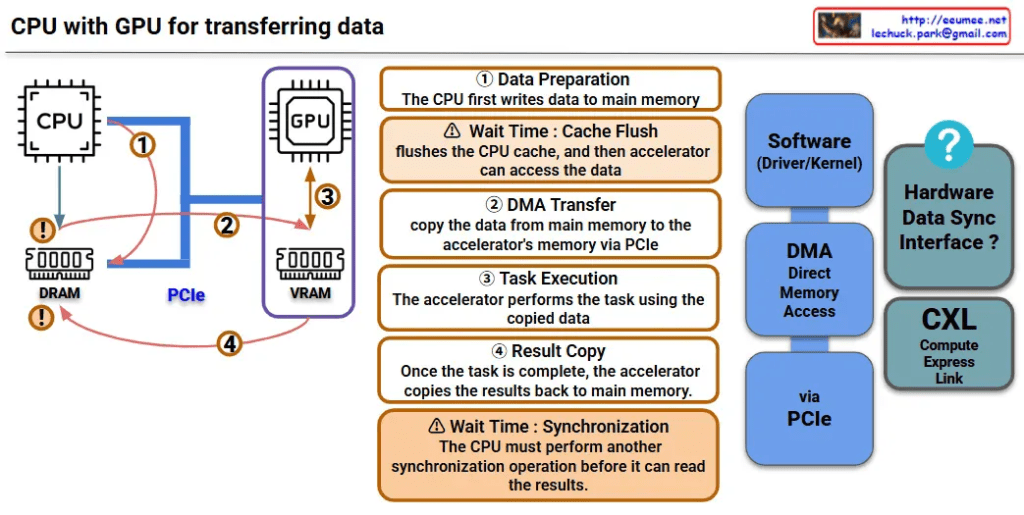
CPU with GPU (legacy)

This image is a diagram explaining the data transfer process between CPU and GPU. Let me interpret the main components and processes.

Key Components

Hardware:

  • CPU: Main processor
  • GPU: Graphics processing unit (acting as accelerator)
  • DRAM: Main memory on CPU side
  • VRAM: Dedicated memory on GPU side
  • PCIe: High-speed interface connecting CPU and GPU

Software/Interfaces:

  • Software (Driver/Kernel): Driver/kernel controlling hardware
  • DMA (Direct Memory Access): Direct memory access

Data Transfer Process (4 Steps)

Step 1 – Data Preparation

  • CPU first writes data to main memory (DRAM)

Step 2 – DMA Transfer

  • Copy data from main memory to GPU’s VRAM via PCIe
  • ⚠️ Wait Time: Cache Flush – CPU cache is flushed before accelerator can access the data

Step 3 – Task Execution

  • GPU performs tasks using the copied data

Step 4 – Result Copy

  • After task completion, GPU copies results back to main memory
  • ⚠️ Wait Time: Synchronization – CPU must perform another synchronization operation before it can read the results

Performance Considerations

This diagram shows the major bottlenecks in CPU-GPU data transfer:

  • Memory copy overhead: Data must be copied twice (CPU→GPU, GPU→CPU)
  • Synchronization wait times: Synchronization required at each step
  • PCIe bandwidth limitations: Physical constraints on data transfer speed

CXL-based Improvement Approach

CXL (Compute Express Link) shown on the right side of the diagram represents next-generation technology for improving this data transfer process, offering an alternative approach to solve the complex 4-step process and related performance bottlenecks.


Summary

This diagram demonstrates how CPU-GPU data transfer involves a complex 4-step process with performance bottlenecks caused by memory copying overhead, synchronization wait times, and PCIe bandwidth limitations. CXL is presented as a next-generation technology solution that can overcome the limitations of traditional data transfer methods.

With Claude

PIM processing-in-memory

This image illustrates the evolution of computing architectures, comparing three major computing paradigms:

1. General Computing (Von Neumann Architecture)

  • Traditional CPU-memory structure
  • CPU and memory are separated, processing complex instructions
  • Data and instructions move between memory and CPU

2. GPU Computing

  • Collaborative structure between CPU and GPU
  • GPU performs simple mathematical operations with massive parallelism
  • Provides high throughput
  • Uses new types of memory specialized for AI computing

3. PIM (Processing-in-Memory)

The core focus of the image, PIM features the following characteristics:

Core Concept:

  • “Simple Computing” approach that performs operations directly within new types of memory
  • Integrated structure of memory and processor

Key Advantages:

  • Data Movement Minimization: Reduces in-memory copy/reordering operations
  • Parallel Data Processing: Parallel processing of matrix/vector operations
  • Repetitive Simple Operations: Optimized for add/multiply/compare operations
  • “Simple Computing”: Efficient operations without complex control logic

PIM is gaining attention as a next-generation computing paradigm that can significantly improve energy efficiency and performance compared to existing architectures, particularly for tasks involving massive repetitive simple operations such as AI/machine learning and big data analytics.

With Claude

3 Computing in AI

AI Computing Architecture

3 Processing Types

1. Sequential Processing

  • Hardware: General CPU (Intel/ARM)
  • Function: Control flow, I/O, scheduling, Data preparation
  • Workload Share: Training 5%, Inference 5%

2. Parallel Stream Processing

  • Hardware: CUDA core (Stream process)
  • Function: FP32/FP16 Vector/Scalar, memory management
  • Workload Share: Training 10%, Inference 30%

3. Matrix Processing

  • Hardware: Tensor core (Matrix core)
  • Function: Mixed-precision (FP8/FP16) MMA, Sparse matrix operations
  • Workload Share: Training 85%+, Inference 65%+

Key Insight

The majority of AI workloads are concentrated in matrix processing because matrix multiplication is the core operation in deep learning. Tensor cores are the key component for AI performance improvement.

With Claude

Analytical vs Empirical

Analytical vs Empirical Approaches

Analytical Approach

  1. Theory Driven: Based on mathematical theories and logical reasoning
  2. Programmable with Design: Implemented through explicit rules and algorithms
  3. Sequential by CPU: Tasks are processed one at a time in sequence
  4. Precise & Explainable: Results are accurate and decision-making processes are transparent

Empirical Approach

  1. Data Driven: Based on real data and observations
  2. Deep Learning with Learn: Neural networks automatically learn from data
  3. Parallel by GPU: Multiple tasks are processed simultaneously for improved efficiency
  4. Approximate & Unexplainable: Results are approximations and internal workings are difficult to explain

Summary

This diagram illustrates the key differences between traditional programming methods and modern machine learning approaches. The analytical approach follows clearly defined rules designed by humans and can precisely explain results, while the empirical approach learns patterns from data and improves efficiency through parallel processing but leaves decision-making processes as a black box.

with claude

CPU Isolation & Affinity

With a Claude’s Help
CPU Isolation & Affinity is a concept that focuses on pinning and isolating CPU cores for real-time tasks. The diagram breaks down into several key components:

  1. CPU Isolation
  • Restricts specific processes or threads to run only on specific CPU cores
  • Isolates other processes from using that core to ensure predictable performance and minimize interference
  1. CPU Affinity
  • Refers to preferring a process or thread to run on a specific CPU core
  • Doesn’t necessarily mean it will only run on that core, but increases the probability that it will run on that core as much as possible
  1. Application Areas:

a) Real-time Systems

  • Critical for predictable response times
  • CPU isolation minimizes latency by ensuring specific tasks run without interference on the cores assigned to them

b) High Performance Computing

  • Effective utilization of CPU cache is critical
  • CPU affinity allows processes that reference data frequently to run on the same core to increase cache hit rates and improve performance

c) Multi-core Systems

  • If certain cores have hardware acceleration capabilities
  • Can increase efficiency by assigning cores based on the task

This system of CPU management is particularly important for:

  • Ensuring predictable performance in time-sensitive applications
  • Optimizing cache usage and system performance
  • Making efficient use of specialized hardware capabilities in different cores

These features are essential tools for optimizing system performance and ensuring reliability in real-time operations.