Server Room Metric Correlation

With Claude
Server Room Metric Correlation Analysis & Operations Guide

1. Diagram Structure Analysis

Key Component Areas

  1. Server Zone (Left)
  • Server racks and equipment
  • Workload-driven CPU/GPU operations
  • Load metrics indicating rising system demands
  • Resource utilization monitoring
  1. Power Supply Zone (Center Bottom)
  • Power metering system
  • Power consumption monitoring
  • Load status tracking with increasing indicators
  1. Hot Zone (Center)
  • Heat generation and thermal management area
  • Exhaust temperature monitoring
  • Return temperature tracking
  • Overall temperature management
  1. Cool Zone (Right)
  • Cooling system operations
  • Inlet temperature control
  • Cooling supply temperature management
  • Cooling system load monitoring

2. Core Metric Correlations

Basic Metric Flow

  1. Load Generation
  • Server workload increases
  • CPU/GPU utilization rises
  • System load elevation
  1. Power Consumption
  • Load-driven power usage increase
  • Power efficiency monitoring
  • Overall system load tracking
  1. Thermal Management
  • Heat generation in Hot Zone
  • Exhaust/Return temperature differential
  • Cooling system response
  1. Cooling Efficiency
  • Cool Zone temperature regulation
  • Cooling system load adjustment
  • System stability maintenance

3. Key Operational Indicators

Primary Metrics

  1. Performance Metrics
  • Server workload levels
  • CPU/GPU utilization
  • System response metrics
  1. Environmental Metrics
  • Zone temperatures
  • Air flow patterns
  • Cooling efficiency
  1. Power Metrics
  • Power consumption rates
  • Load distribution
  • Efficiency indicators

4. Monitoring Focus Points

Critical Correlations

  1. Load-Power-Temperature Relationship
  • Workload impact on power consumption
  • Heat generation patterns
  • Cooling system response efficiency
  1. System Stability Indicators
  • Temperature zone balance
  • Power distribution effectiveness
  • Cooling system performance

This comprehensive analysis of server room metrics and their correlations enables effective monitoring and management of the entire system, ensuring optimal performance and stability through understanding the interconnected nature of all components and their respective metrics.

The diagram effectively illustrates how different metrics interact and influence each other, providing a clear framework for monitoring and maintaining server room operations efficiently.
High Computing Room Requires

With a Claude’s Help
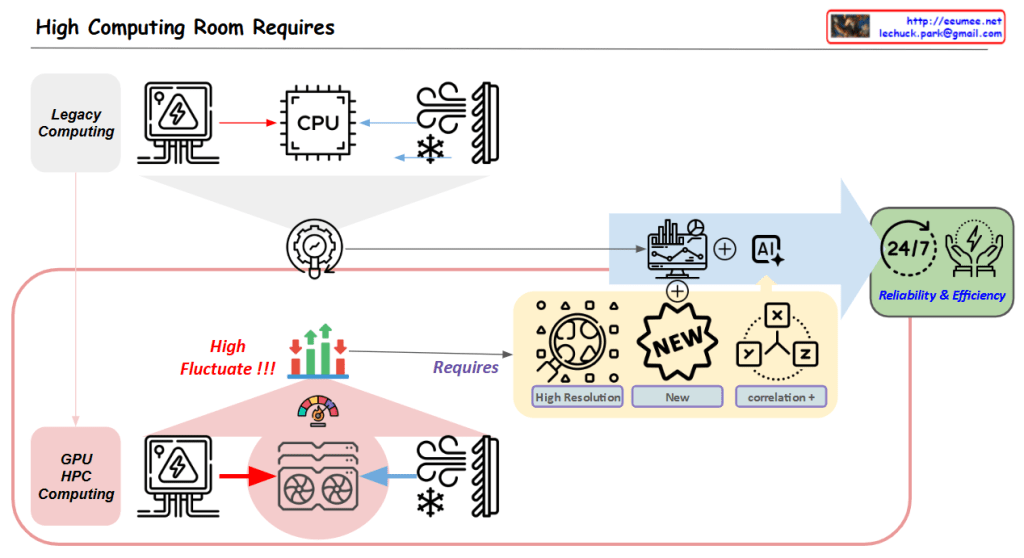
Core Challenge:

  1. High Variability in GPU/HPC Computing Room
  • Dramatic fluctuations in computing loads
  • Significant variations in power consumption
  • Changing cooling requirements

Solution Approach:

  1. Establishing New Data Collection Systems
  • High Resolution Data: More granular, time-based data collection
  • New Types of Data Acquisition
  • Identification of previously overlooked data points
  1. New Correlation Analysis
  • Understanding interactions between computing/power/cooling
  • Discovering hidden patterns among variables
  • Deriving predictable correlations

Objectives:

  • Managing variability through AI-based analysis
  • Enhancing system stability
  • Improving overall facility operational efficiency

In essence, the diagram emphasizes that to address the high variability challenges in GPU/HPC environments, the key strategy is to collect more precise and new types of data, which enables the discovery of new correlations, ultimately leading to improved stability and efficiency.

This approach specifically targets the inherent variability of GPU/HPC computing rooms by focusing on data collection and analysis as the primary means to achieve better operational outcomes.

Server room Connected Data

with a claude’s help
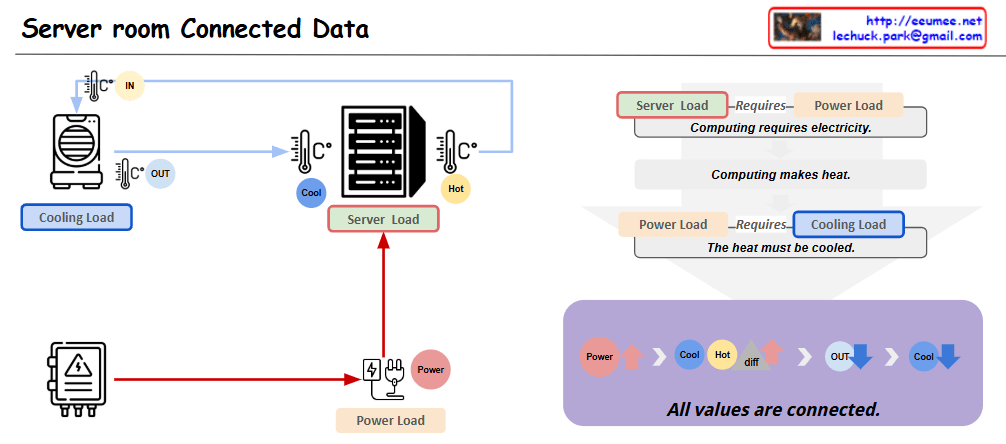
This diagram represents the key interconnected elements within a server room in a data center. It is composed of three main components:

  1. Server Load: This represents the computing processing demand on the server hardware.
  2. Cooling Load: This represents the cooling system’s load required to remove the heat generated by the server equipment.
  3. Power Load: This represents the electrical power demand needed to operate the server equipment.

These three elements are closely related. As the Server Load increases, the Power Load increases, which then leads to greater heat generation and an increase in Cooling Load.

Applying this to an actual data center environment, important considerations would include:

  1. Server rack placement: Efficient rack arrangement to optimize cooling performance and power distribution.
  2. Hot air exhaust channels: Dedicated pathways to effectively expel the hot air from the server racks, reducing Cooling Load.
  3. Cooling system capacity: Sufficient CRAC (Computer Room Air Conditioning) units to handle the Cooling Load.
  4. Power supply: Appropriate PDU (Power Distribution Unit) to provide the necessary Power Load for stable server operation.

By accounting for these real-world data center infrastructure elements, the diagram can be further enhanced to provide more practical and applicable insights.

Overall, this diagram effectively illustrates the core interdependent components within a server room and how they relate to the actual data center operational environment.Copy

DC Cooling (delta)T

From Claude with some prompting
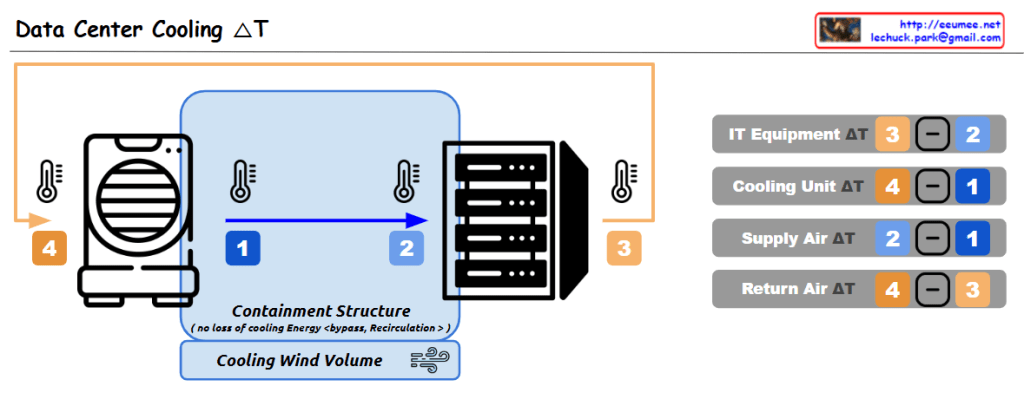
This data center cooling system utilizes a containment structure to control the airflow around the IT equipment, which helps improve cooling efficiency. The cooled air is supplied to the equipment, and the warmer exhaust air is expelled outside.

The key aspect of this system is the monitoring of temperature differences (ΔT) between the various components, which enables the following analyses and improvements:

  1. IT Equipment ΔT (3 – 2): This represents the temperature rise across the IT equipment itself, indicating the amount of heat generated by the IT hardware. Analyzing this can help identify opportunities to improve the efficiency of the IT equipment, such as through layout optimization or hardware upgrades.
  2. Cooling Unit ΔT (4 – 1): This is the temperature difference across the cooling unit, where the air is cooled. A smaller ΔT indicates higher efficiency of the cooling unit. Monitoring this metric allows for continuous evaluation and optimization of the cooling unit’s performance.
  3. Supply Air ΔT (2 – 1): This is the temperature change of the cooled air as it is supplied into the data center. A smaller ΔT here suggests the cooled air is being effectively distributed.
  4. Return Air ΔT (4 – 3): This is the temperature rise of the air as it is returned from the data center. A larger ΔT indicates the cooling system is effectively removing more heat from the data center.

These temperature difference data points are crucial baseline information for evaluating and improving the overall efficiency of the data center cooling system. By continuously monitoring and analyzing these metrics, the facility can optimize energy usage, cooling costs, and system reliability.

DC Key metrics for operating

From Claude with some prompting
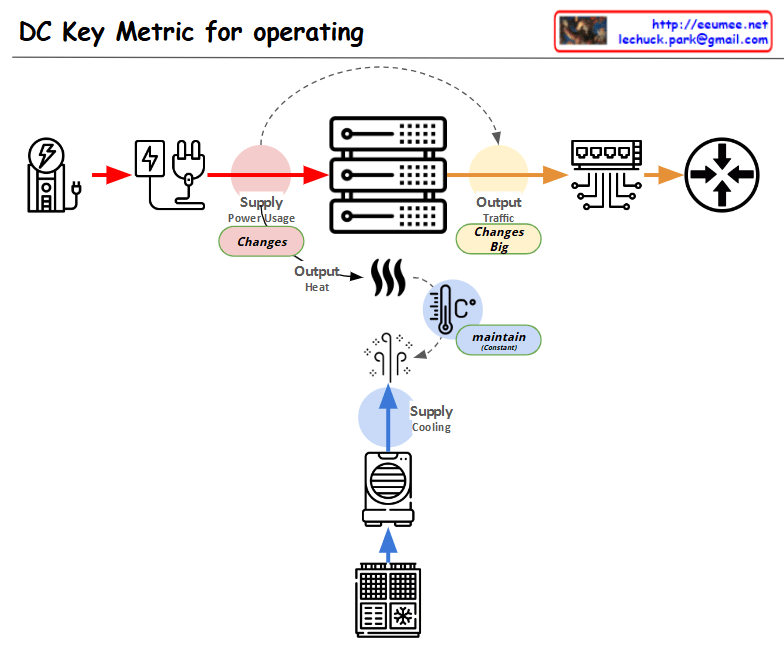
This diagram showing the key metrics for Data Center (DC) operations:

  1. Power Supply Chain:
  • Power input → Power conversion/distribution → Server equipment
  • Marked as “Supply Power Usage” with a note indicating “Changes” in variability
  1. Server Operations:
  • Server racks shown in the center
  • Two main outputs:
    • Top: “Output Traffic” with a note “Changes Big” indicating high variability
    • Bottom: “Output Heat” generation
  1. Cooling System:
  • Cooling equipment shown at the bottom
  • Marked as “Supply Cooling”
  • Temperature icon with “maintain” indicator showing the need to maintain consistent temperature
  1. Overall Flow:
  • Power input → Server operations → Network output
  • Separate cooling circulation system for heat management

The diagram illustrates the interconnection between three critical elements of data center operations:

  • Power supply management
  • Server operations
  • Cooling system

Each component shows potential variability points (marked as “Changes”) and management requirements, with special attention to:

  • Power usage monitoring
  • Traffic output management
  • Heat dissipation and temperature control

This visualization effectively demonstrates how these systems work together in a data center environment, highlighting the key areas that require monitoring and management for optimal operation.

Computing Power 4-Optimizations

From Claude with some prompting
The image “Computing Power 4-Optimizations” highlights four key areas for optimizing computing power, emphasizing a comprehensive approach that goes beyond infrastructure to include both hardware and software perspectives:

  1. Processing Optimizing: Focuses on hardware-level optimization, utilizing advanced manufacturing process technology to develop low-power GPUs and CPUs. It incorporates techniques like dynamic voltage and frequency scaling, and clock/power gating to maximize chip efficiency.
  2. Power Supply Optimizing: Addresses infrastructure-level optimization, improving power management and distribution across the entire system. This involves efficient power supply units and intelligent power management systems.
  3. Cooling Supply Optimizing: Another infrastructure-level optimization, enhancing thermal management of the system. Efficient cooling is crucial for maintaining computing performance while reducing power consumption.
  4. Code Optimizing: Emphasizes software-level optimization, including programming optimization, workload optimization at the OS level, and ‘green coding’ practices. This underscores the importance of considering energy efficiency in the software development process.

The diagram effectively illustrates that computing power optimization is not limited to hardware or infrastructure improvements alone. It stresses the need for a holistic approach, from chip design to code writing, to achieve effective optimization. By considering both hardware (chip) and software (code) level optimizations together, the overall system efficiency can be maximized. This comprehensive view is essential for addressing the complex challenges of power management in modern computing systems.

Server Room Stability & Optimization

From Claude with some prompting
Server Room Stability & Optimization

  1. Cooling Supply: Ensuring sufficient cooling capacity to effectively dissipate the heat generated by the servers
  2. Power Usage: Monitoring and managing the power consumption of the servers
  3. Power Supply: Maintaining a stable and reliable power supply to the server room
  4. Resource Check:
    • Power Resource: Verifying the ability to provide the necessary power supply for the server usage
    • Cooling Resource: Checking the cooling capacity to effectively handle the heat generated by the servers
  5. Anomaly Detection: Identifying any anomalies or unusual patterns in the server room’s behavior
  6. Stability: Maintaining the power and cooling resource supply to meet or exceed the server usage requirements
  7. Optimizing: Based on the stability analysis, optimizing the power and cooling resource supply to match the server usage

The key focus is on the appropriate management and provisioning of both power and cooling resources to ensure the overall stability and optimization of the server room operations.