The minority

From DALL-E with some prompting
The image appears to illustrate a concept related to network dynamics, specifically how a minority within a network can gain influence or power. It shows a progression of three stages:

  1. A central node with uniform connections around it, representing an initial state of a network.
  2. The same network, but with the central node now having a dashed outline, possibly indicating the beginning of a decentralization process or the distribution of control.
  3. In the final stage, two nodes labeled “Min” are highlighted, suggesting that these minority nodes have gained significant influence within the network. The question “Bad Minority??” implies a potential concern about the intentions or impact of this empowered minority.

The overarching message could be about the changing nature of influence in increasingly shared, Internet-enabled, and distributed networks, and the potential for smaller or previously less influential actors to become powerful, with an open question about whether this influence is positive or negative.

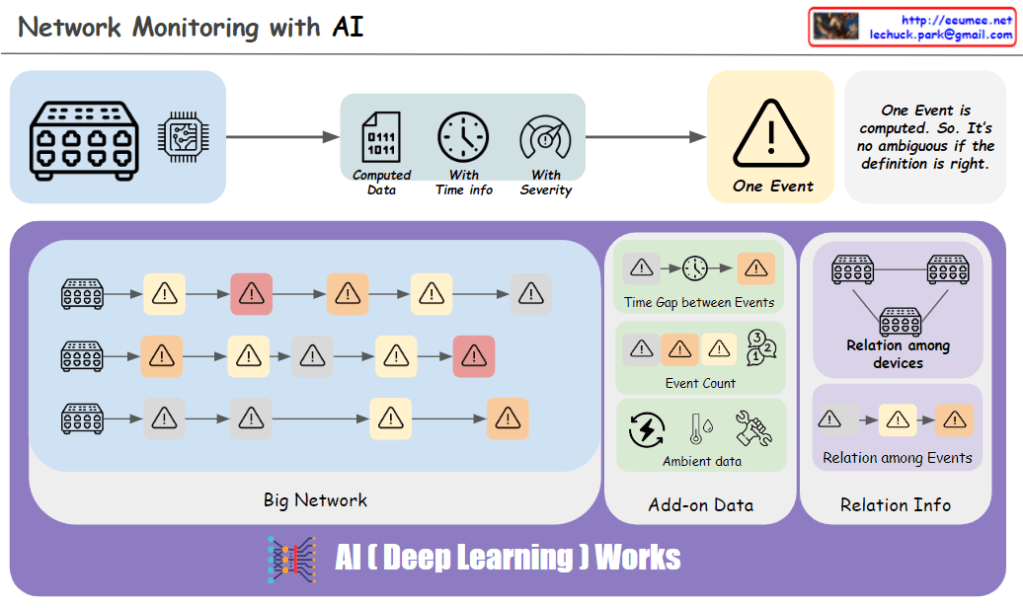
Network Monitoring with AI

from DALL-E with some prompting
The image portrays a network monitoring system enhanced by AI, specifically utilizing deep learning. It shows a flow from the network infrastructure to the identification of an event, characterized by computed data with time information and severity. The “One Event” is clearly defined to avoid ambiguity. The system identifies patterns such as the time gap between events, event count, and relationships among devices and events, which are crucial for a comprehensive network analysis. AI deep learning algorithms work to process additional data (add-on data) and ambient data to detect anomalies and support predictive maintenance within the network.

Switching & Routing (Origin)

From DALL-E with some prompting
The image delineates the foundational aspects of network switching and routing based on their origins. Switching, historically in LANs, involved the broadcasting of packets, which modern switches now intelligently direct or block based on MAC addresses and VLAN information. Routing originally functioned to determine packet pathways over networks using IP address information. While these were once discrete tasks performed by separate devices, contemporary network technology often integrates both functions within the same hardware, allowing switches to perform some routing tasks and vice versa, reflecting the evolution and convergence of networking equipment.

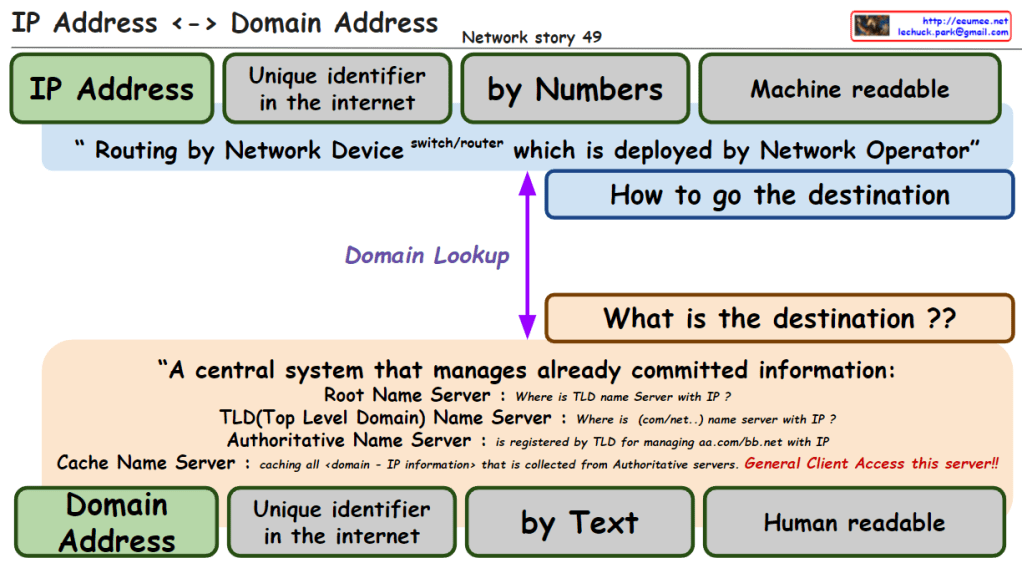
IP & Domain address

From DALL-E with some prompting
The image explains the relationship between IP addresses and domain addresses within the context of the internet and network infrastructure. Here’s a breakdown of the components:

  1. IP Address: Identified as a unique identifier in the internet by numbers, which is machine-readable. It is used for routing by network devices like switches and routers, deployed by network operators.
  2. Domain Lookup: The process that determines how to get the destination, asking “what is the destination?”
  3. Domain Address: Also a unique identifier on the internet, represented by text, which is human-readable.
  4. Central System of Name Servers:
    • Root Name Server: Answers queries about the location of the Top-Level Domain (TLD) name server associated with an IP.
    • TLD Name Server: Provides information about the domain’s name server associated with certain domain extensions like .com or .net.
    • Authoritative Name Server: Holds the definitive records for domains within its TLD.
    • Cache Name Server: Caches all domain-to-IP information collected from authoritative servers, accessible to general clients.

The overall message emphasizes the conversion between IP addresses (numeric form) and domain addresses (text form), which is crucial for navigating the internet and finding the correct destination for data packets. It also highlights the significance of the Domain Name System (DNS) in translating between human-readable domain names and machine-readable IP addresses.

Overall IP Network

From DALL-E with some prompting
The image is a diagram explaining the overall structure and data flow of an IP network.

Overall IP network: The entire structure of an IP network
Ethernet In the LAN: Ethernet used within the Local Area Network (LAN)
Identification in the internet: Identifying devices on the internet
OSPF short path with IP addresses: Open Shortest Path First (OSPF) routing protocol finds the shortest path using IP addresses
Addressing/Routing to the peer: Assigning addresses and routing to peer devices
BGP to get/share IP (other & me): Border Gateway Protocol (BGP) is used for obtaining and sharing IP addresses between others and oneself
Service Connection: Establishing a service connection
IP address ↔ Domain address: The relationship between IP addresses and domain addresses
DNS Easy to keep an internet address by Domain name: Domain Name System (DNS) makes it easy to maintain an internet address by using domain names
On TCP/UDP: Operating on TCP (Transmission Control Protocol) and UDP (User Datagram Protocol)
The diagram illustrates how data moves within a network. For instance, when a user accesses web services using the HTTP protocol, the DNS translates domain names into IP addresses, and then a service connection is established using the IP address over TCP/UDP protocols. Routing protocols such as OSPF and BGP are used to find the optimal path for data transmission through internal networks and the wider internet, respectively.


ARP/RARP

From DALL-E with some prompting
The image focuses on the primary uses and applications of ARP and RARP protocols in a network. ARP (Address Resolution Protocol) is utilized to translate IP addresses into MAC addresses to ensure packets are delivered to the correct destination. This information is stored in the ARP table, facilitating packet forwarding across the Ethernet network. On the other hand, RARP (Reverse Address Resolution Protocol) has largely been superseded by DHCP (Dynamic Host Configuration Protocol). DHCP is commonly used to dynamically assign IP addresses to devices on a network and to automatically configure network setting information.

Traceroute works 2

From DALL-E with some prompting
The image provides a detailed explanation of the ‘traceroute’ network diagnostic tool and how it functions, along with potential error messages and their meanings. The ‘traceroute’ command can work with not only ICMP but also TCP/UDP protocols, allowing it to trace the path data packets take through a network to reach the destination. Specifically, the command ‘traceroute -T -p 80 [destination]’ is used to trace the route to the destination over TCP port 80.

The diagram displays several routers (labeled 1, 2, 3, 4) that the traceroute may encounter on its path. Accompanying these are four cases, each illustrating a different error scenario that might occur during the trace:

  • Case1: A TCP block might occur, potentially due to a firewall or Access Control List (ACL), indicated by ICMP Type 3, Code 2 (Protocol Unreachable) or Code 10 (Communication with Destination Host is Administratively Prohibited).
  • Case2: A block on TCP Port 80 might be encountered, also possibly because of a firewall or ACL.
  • Case3: A general TCP block, which might be caused by iptables or similar tools, indicated by ICMP Type 3, Code 2 (Protocol Unreachable) or Code 13 (Communication Administratively Prohibited).
  • Case4: A block on TCP Port 80 or a service not being open on the destination, which can result in messages such as “Port Unreachable” or “Connection Refused”.

Each case provides the relevant ICMP message type and code that might be returned if such a situation occurs, which is crucial for network administrators or IT professionals in diagnosing and resolving network connectivity issues.