
Rest
The Computing for the Fair Human Life.

From Claude with some prompting
Sure, here’s an explanation of the image in English, with a detailed description of the graph’s contents:
This image contrasts the capabilities of rule-based human logic and data-driven AI. The graph shows two curves:
The key points made are:
So the image suggests that while human logic is perfect within its constraints, the future lies with data-driven AI systems that can harness massive data and computing resources to deliver extremely high accuracy, potentially exceeding human capabilities.


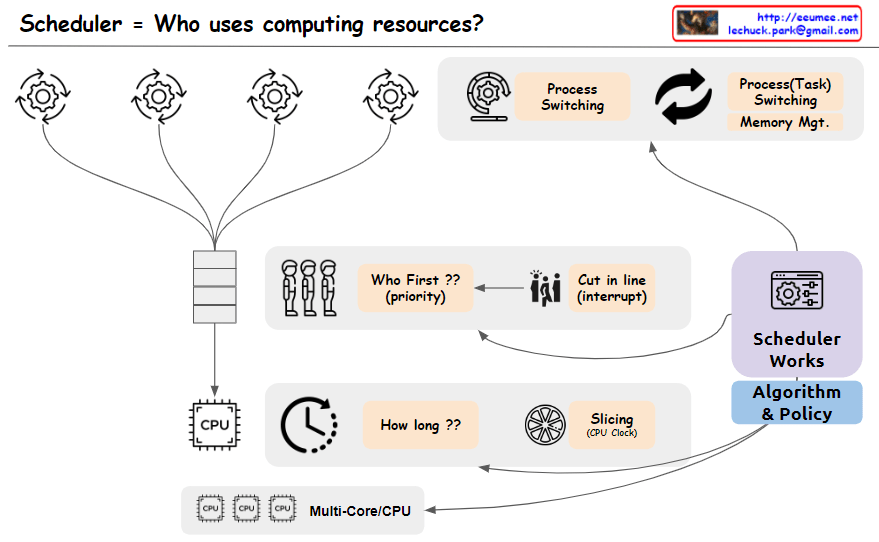
From Claude with some prompting
The image depicts a scheduler system that manages the allocation of computing resources, addressing the key question “Who uses computing resources?”. The main components shown are:
The image effectively covers the key concepts and components involved in scheduling computing resources, including task prioritization, interrupts, CPU time allocation, time slicing, process/task switching, scheduling algorithms and policies, and support for multi-core/multi-CPU systems. Memory management is assumed to be part of the task-switching process and is not explicitly depicted.

From Claude with some prompting
The image illustrates the role of a Data Processing Unit (DPU) in facilitating seamless and delay-free data exchange between different hardware components such as the GPU, NVME (likely referring to an NVMe solid-state drive), and other devices.
The key highlight is that the DPU enables “Data Exchange Parallely without a Delay” and provides “Seamless” connectivity between these components. This means the DPU acts as a high-speed interconnect, allowing parallel data transfers to occur without any bottlenecks or latency.
The image emphasizes the DPU’s ability to provide a low-latency, high-bandwidth data processing channel, enabling efficient data movement and processing across various hardware components within a system. This seamless connectivity and delay-free data exchange are crucial for applications that require intensive data processing, such as data analytics, machine learning, or high-performance computing, where minimizing latency and maximizing throughput are critical.
==================
The key features of the DPU highlighted in the image are:
The DPU aims to provide a high-speed, low-latency data processing channel, enabling efficient data movement and computation between various hardware components in a system. This can be particularly useful in applications that require intensive data processing, such as data analytics, machine learning, or high-performance computing.Cop


From Claude with some prompting
The CPU is described as a central processing unit for general-purpose computing, handling diverse tasks with high performance but at a low cost/price ratio.
This image provides an overview of different types of processors and their key characteristics. It compares CPUs, ASICs (Application-Specific Integrated Circuits), FPGAs (Field-Programmable Gate Arrays), and GPUs (Graphics Processing Units).
The ASIC is an application-specific integrated circuit designed for specific tasks like cryptography and AI. It has low performance per price but is highly optimized for its intended use cases.
The FPGA is a reconfigurable processor that allows design changes and prototyping. It has medium performance per price and is suitable for data processing sequences.
The GPU is designed for graphic processing and parallel data processing. It excels at high-performance computing for graphics-intensive applications, but has a medium to high cost/price ratio.
The image highlights the key differences in terms of processing capability, specialization, reconfigurability, performance, and cost among these processor types.

