Web Service [Server Inside]

From Claude with some prompting
focusing on the key technical aspects and operational considerations for designing a web service application.

Web Service [Server Inside] – Design and Operational Considerations

  1. Service Architecture Design: a. Multi-tier structure:
    • Gateway → Load Balancer → API Gateway → DB Proxy → Database
    • Each layer focuses on specific functions, improving maintainability and scalability b. Microservice Architecture:
    • Implemented through “Programmatic Control” at the API Gateway
    • Ensures service independence, increases development and deployment flexibility
  2. Scalability Design: a. Auto Scaling:
    • Applied at each layer (Load Balancer, API Gateway, DB Proxy)
    • Automatic resource adjustment based on traffic fluctuations for improved stability b. Resource Pooling:
    • “Protecting SVC” functionality for efficient resource management c. Load Balancing:
    • Gateway provides “Route with Load Balancing (2 More Resources)” functionality
  3. Performance Optimization: a. Static/Dynamic Data Separation:
    • Static Data Control: HTML/CSS/JS/IMAGES
    • Utilization of CDN services or On-Premise storage b. Database Optimization:
    • SQL, NoSQL, Hybrid options available
    • Connection management through DB Proxy for database load distribution
  4. Security Design: a. Multi-layered Security:
    • Authentication (OAuth2, etc.)
    • Encryption (SSL/TLS)
    • Firewall/WAF/IPS/IDS b. Request Limiting:
    • “Limiting Requests (Protect Domain Service)” at Gateway for DDoS protection
  5. Monitoring and Analysis: a. Comprehensive Monitoring:
    • Collection of Network, Server, and Application Metrics b. Analysis and Planning:
    • Maintenance & Scaling
    • Service Design Upgrade
    • Resource & Cost Optimization
  6. Error Handling:
    • Specification of 400, 500 series errors (Network Error, Service Unavailable, Server Internal, etc.)
    • Emphasis on Gateway-related errors (502 Bad Gateway, 504 Gateway Timeout)
  7. Network and Protocol:
    • “Protocol Converting” functionality provided at the Gateway
    • Separate management of Network Domain Control
  8. Operational Efficiency:
    • Automation: Minimized manual intervention through Auto Scaling, resource pooling, etc.
    • Flexibility: Possible combination of On-Premise and CDN services
    • Cost Optimization: Efficient resource usage, continuous analysis and improvement

Key Advantages of This Configuration:

  1. High Availability and Stability: Stable service provision through multiple layers and auto-scaling
  2. Excellent Scalability: Flexible response to traffic fluctuations
  3. Strong Security: Multi-layered security structure to address various threats
  4. Efficient Resource Management: Cost efficiency through automation and optimization
  5. Flexible Service Development and Deployment: Utilization of microservice architecture
  6. Comprehensive Monitoring and Analysis: Enables continuous service improvement

This design incorporates almost all essential elements required for modern, large-scale web services, enabling stable and scalable service operations. It reflects a thorough consideration of both technical and operational aspects, providing a robust foundation for complex web applications.
Domain to IP

From Claude with some prompting
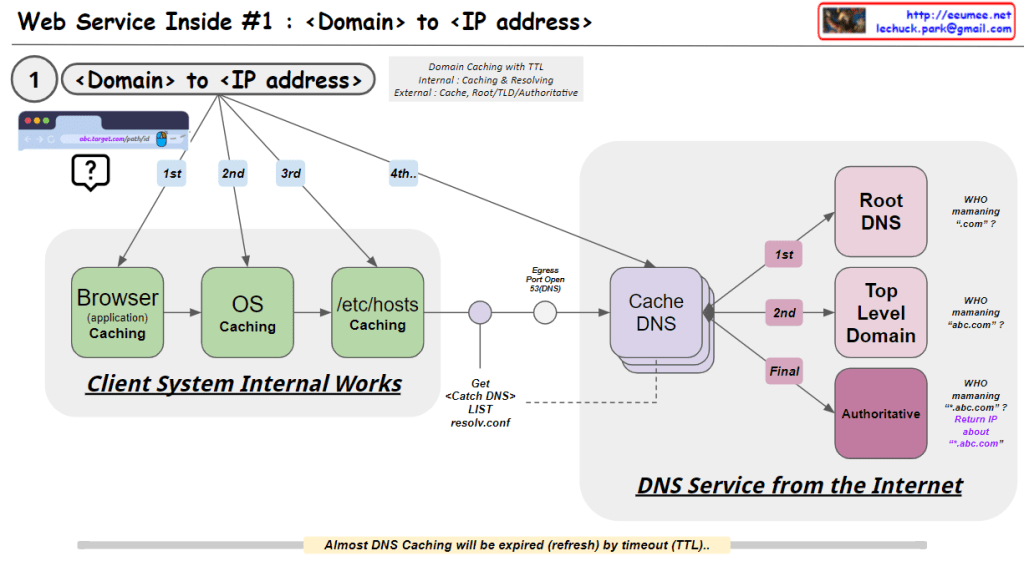
This image illustrates the process of converting a domain name to an IP address, which is the first step in web service operations. Here’s a breakdown of the image:

  1. Client System Internal Works:
    • Browser (application) Caching: The first level of caching occurs in the web browser.
    • OS Caching: The second level of caching is at the operating system level.
    • /etc/hosts Caching: The third level involves checking the local hosts file.
  2. DNS Service from the Internet:
    • Cache DNS: This is the first point of contact with external DNS services.
    • Root DNS: Manages top-level domains like “.com”.
    • Top Level Domain: Manages specific top-level domains (e.g., “.com”, “.org”).
    • Authoritative DNS: Provides the final, authoritative IP address for the specific domain.

The process follows a hierarchical order:

  1. Check Browser cache
  2. Check OS cache
  3. Check /etc/hosts file
  4. Query Cache DNS server
  5. If not found, Cache DNS queries Root DNS
  6. Then queries Top Level Domain
  7. Finally queries Authoritative DNS to get the IP address

The image also notes:

  • DNS caching uses TTL (Time To Live) for expiration.
  • The system uses a resolve.conf file to get the Cache DNS list.
  • It questions who is managing various levels of DNS (“.com”, “abc.com”, etc.)

This process ensures efficient and hierarchical resolution of domain names to IP addresses, utilizing various caching mechanisms to improve speed and reduce network load.

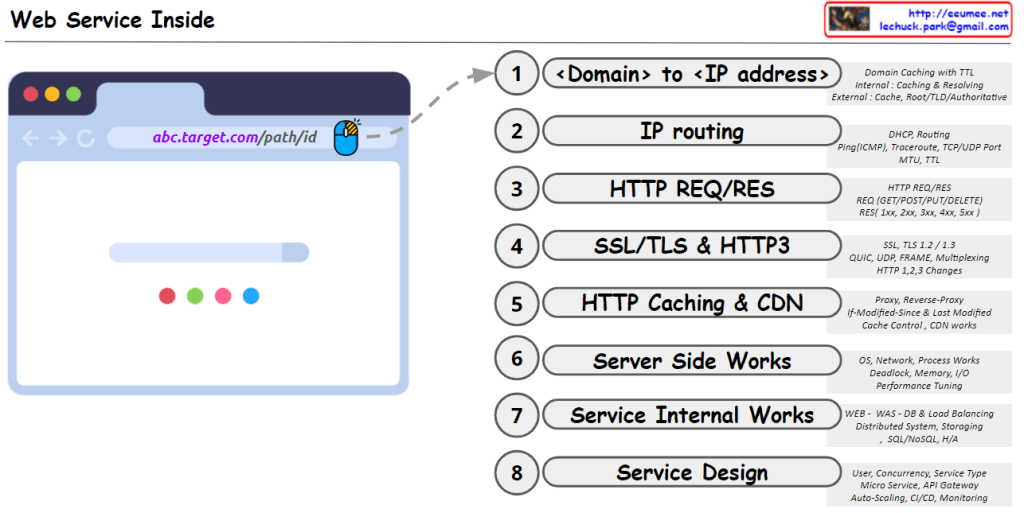
Web(HTTP) Service Inside

From Claude with some prompting
This image titled “Web Service Inside” illustrates the internal workings of a web service in 8 steps, from the browser to service design:

  1. <Domain> to <IP address>: Converts user-friendly domain names into computer-readable IP addresses. This process utilizes multi-level caching for efficiency and ultimately locates the desired web server.
  2. IP routing: Guides data packets to their destination via optimal paths based on the converted IP address. This ensures accurate and efficient information delivery across the complex network of the internet.
  3. HTTP REQ/RES: Defines the communication rules between clients and servers. It structures how clients make requests and how servers respond, providing a standardized method for exchanging information on the web.
  4. SSL/TLS & HTTP3: Enhances data transmission security and improves performance. It protects information through encryption and enables faster, more efficient communication using the latest protocols.
  5. HTTP Caching & CDN: Increases efficiency for repetitive data requests and delivers content to users faster. This plays a crucial role in reducing server load and improving user experience.
  6. Server Side Works: Involves the actual processing of requests and generation of responses on the server. It covers operating systems, network protocols, and resource management to provide an efficient and stable service foundation.
  7. Service Internal Works: Addresses the internal structure and data processing methods of web services. It covers database management, load balancing, and maintaining high availability to provide reliable service to large-scale user bases.
  8. Service Design: Encompasses the overall architecture and operational strategy of the web service. It involves creating optimal service structures considering user requirements, scalability, and maintainability, as well as establishing continuous improvement and monitoring plans.

Each of these stages is essential in creating a web service that efficiently and securely handles user requests, while building a system that is scalable and easy to maintain at a large scale.

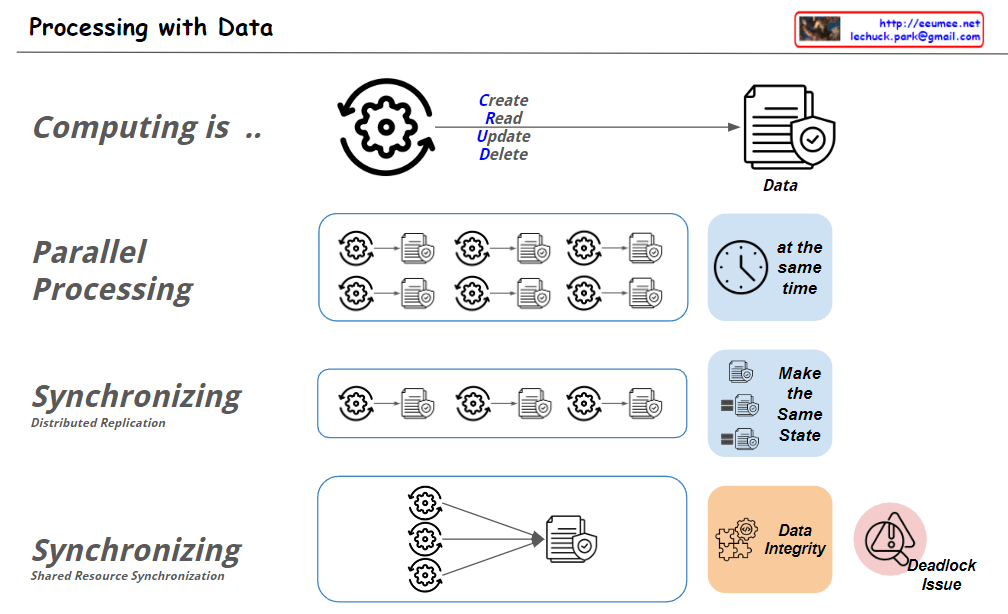
Processing with Data

From Claude with some prompting
This image illustrates “Processing with Data” concepts. Here’s an interpretation of the key elements:

  1. Computing:
    • Shown as a cycle of Create, Read, Update, Delete (CRUD) operations on data.
  2. Parallel Processing:
    • Depicts multiple processes running simultaneously, labeled “at the same time”.
  3. Synchronizing – Distributed Replication:
    • Illustrates multiple processes being synchronized to “Make the Same State”.
  4. Synchronizing – Shared Resource Synchronization:
    • Shows multiple processes accessing a single shared resource.
    • Highlights “Data Integrity” and “Deadlock Issue” as important considerations.

The image uses simple icons and diagrams to visually explain various aspects of data processing, making complex concepts more accessible.

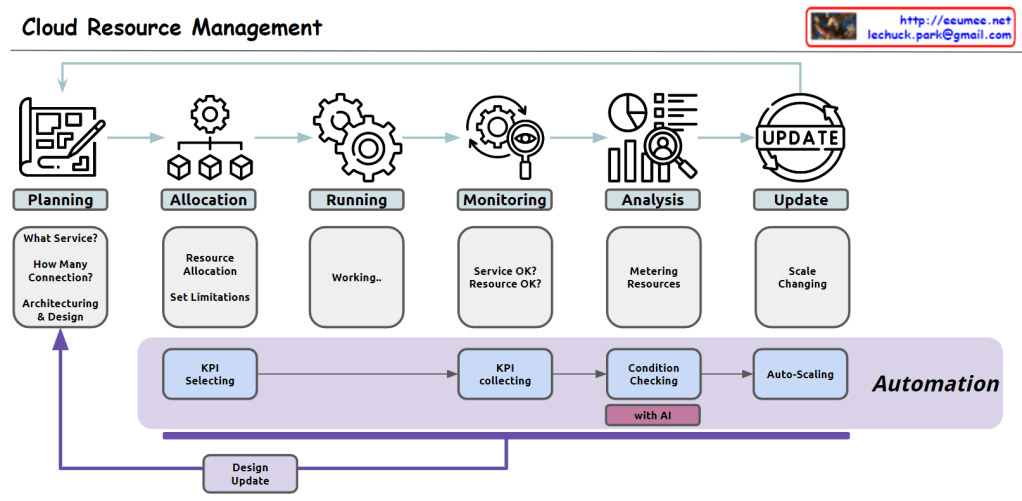
Cloud Resource Management

From Claude with some prompting
Here’s the comprehensive overview of cloud resource management in English:

  1. Planning:
    • Service selection: Determining appropriate cloud computing service types (e.g., virtual machines, containers, serverless)
    • Capacity forecasting: Estimating required resource scale based on expected traffic and workload
    • Architecture design: Designing system structure considering scalability, availability, and security
    • Infrastructure definition tool selection: Choosing tools for defining and managing infrastructure as code
  2. Allocation:
    • Resource provisioning: Creating and configuring necessary cloud resources using defined infrastructure code
    • Resource limitation setup: Configuring usage limits for CPU, memory, storage, network bandwidth, etc.
    • Access control configuration: Building a granular permission management system based on users, groups, and roles
  3. Running:
    • Application deployment management: Deploying and managing services through container orchestration tools
    • Automated deployment pipeline operation: Automating the process from code changes to production environment reflection
  4. Monitoring:
    • Real-time performance monitoring: Continuous collection and visualization of system and application performance metrics
    • Log management: Operating a centralized log collection, storage, and analysis system
    • Alert system setup: Configuring a system to send immediate notifications when performance metrics exceed thresholds
  5. Analysis:
    • Resource usage tracking: Analyzing cloud resource usage patterns and efficiency
    • Cost optimization analysis: Evaluating cost-effectiveness relative to resource usage and identifying areas for improvement
    • Performance bottleneck analysis: Identifying causes of application performance degradation and optimization points
  6. Update:
    • Dynamic resource adjustment: Implementing automatic scaling mechanisms based on demand changes
    • Zero-downtime update strategy: Applying methodologies for deploying new versions without service interruption
    • Security and patch management: Building automated processes for regularly checking and patching system vulnerabilities

Automation process:

  1. Key Performance Indicator (KPI) definition: Selecting key metrics reflecting system performance and business goals
  2. Data collection: Establishing a real-time data collection system for selected KPIs
  3. Intelligent analysis: Detecting anomalies and predicting future demand based on collected data
  4. Automatic optimization: Implementing a system to automatically adjust resource allocation based on analysis results

This approach enables efficient management of cloud resources, cost optimization, and continuous improvement of service stability and scalability.

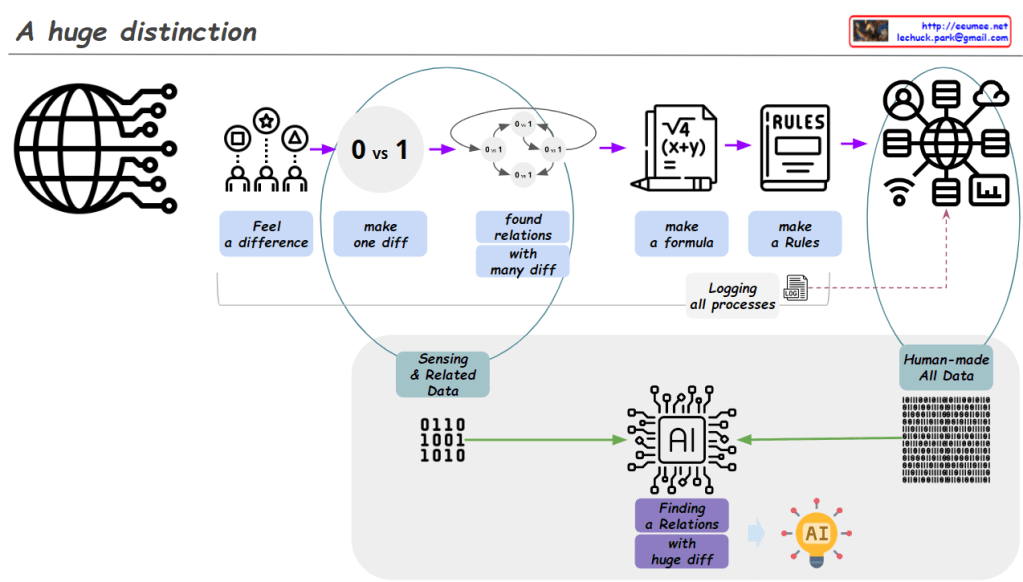
A huge distinction

From Claude with some prompting
Image Analysis: “A huge distinction”

  1. Human Data Processing:
    • “Feel a difference”: Humans start by recognizing basic differences.
    • “Make one diff (0 vs 1)”: Creating the most fundamental distinction.
    • “Found relations with many diff”: Discovering relationships among various differences.
    • “Make a formula”: Developing formulas based on discovered relationships.
    • “Make a Rules”: Establishing rules based on these formulas.
    • “Human-made All Data”: Accumulation of data created through this entire process.
  2. Process Recording:
    • “Logging all processes”: The data creation process itself is recorded as data.
  3. AI Data Processing:
    • “Sensing & Related Data”: AI receives basic sensory data and related information.
    • “Human-made All Data”: All human-created data serves as input for AI.
    • “Finding a Relations with huge diff”: AI analyzes relationships and differences within this vast dataset.
  4. Result:
    • AI icon: Represents the final derivation of insights through AI.

Evaluation:

  1. Insightfulness: The diagram effectively illustrates the fundamental difference between human data processing methods and AI’s data processing capabilities. It highlights how humans follow a step-by-step logical process, while AI can process large-scale data simultaneously.
  2. Process Continuity: The diagram well expresses how human data processing forms the foundation for AI learning. This conveys the important concept that AI develops based on human knowledge and experience.
  3. Importance of Data: By emphasizing the importance of digitalizing all processes, the diagram effectively represents the core of our modern data-centric society.
  4. Visualization Effectiveness: Complex concepts are represented using simple icons and arrows, making them easy to understand.
  5. Future Expectation: We look forward to seeing additional explanations about AI’s output results or its potential applications. This would enhance the comprehensiveness of the diagram, providing a fuller picture of the AI process from input to output and its real-world impact.

Overall, this image effectively contrasts human data processing with AI’s data analysis capabilities, showcasing how these two domains operate complementarily. It provides a clear visual representation of the journey from basic human distinctions to complex AI-driven insights, highlighting the ‘huge distinction’ in scale and capability between human and artificial intelligence processing.