What is The Next?

With Claude
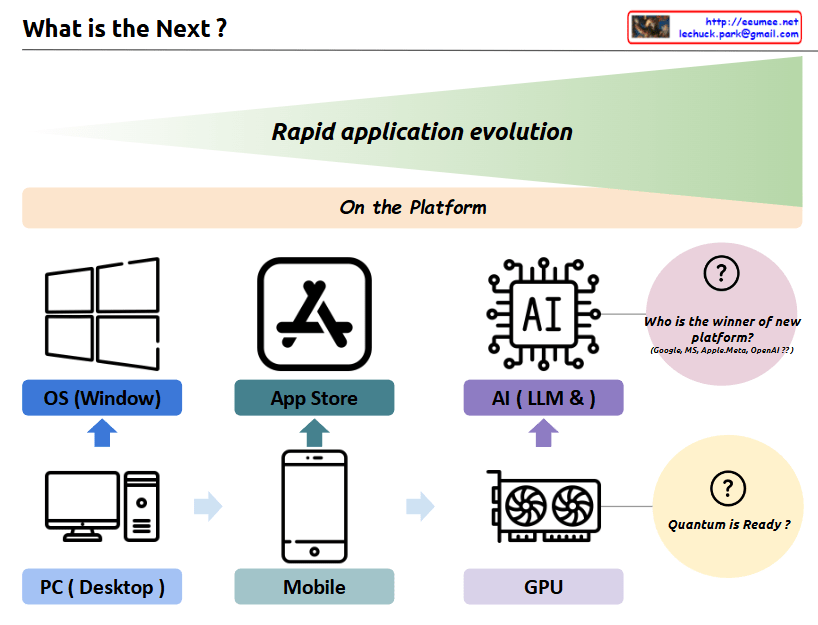
a comprehensive interpretation of the image and its concept of “Rapid application evolution”:

The diagram illustrates the parallel evolution of both hardware infrastructure and software platforms, which has driven rapid application development and user experiences:

  1. Hardware Infrastructure Evolution:
  • PC/Desktop → Mobile Devices → GPU
  • Represents the progression of core computing power platforms
  • Each transition brought fundamental changes in how users interact with technology
  1. Software Platform Evolution:
  • Windows OS → App Store → AI/LLM
  • Shows the evolution of application ecosystems
  • Each platform created new possibilities for user applications

The symbiotic relationship between these two axes:

  • PC Era: Integration of PC hardware with Windows OS
  • Mobile Era: Combination of mobile devices with app store ecosystems
  • AI Era: Marriage of GPU infrastructure with LLM/AI platforms

Each transition has led to exponential growth in application capabilities and user experiences, with hardware and software platforms developing in parallel and reinforcing each other.

Future Outlook:

  1. “Who is the winner of new platform?”
  • Current competition between Google, MS, Apple/Meta, OpenAI
  • Platform leadership in the AI era remains undecided
  • Possibility for new players to emerge
  1. “Quantum is Ready?”
  • Suggests quantum computing as the next potential hardware revolution
  • Implies the possibility of new software platforms emerging to leverage quantum capabilities
  • Continues the pattern of hardware-software co-evolution

This cyclical pattern of hardware-software evolution suggests that we’ll continue to see new infrastructure innovations driving platform development, and vice versa. Each cycle has dramatically expanded the possibilities for applications and user experiences, and this trend is likely to continue with future technological breakthroughs.

The key insight is that major technological leaps happen when both hardware infrastructure and software platforms evolve together, creating new opportunities for application development and user experiences that weren’t previously possible.

HTTP Service components

From Claude with some prompting
This image illustrates the network structure of an HTTP service. The main components are:

Client Side:

  • Browser: Handles URL requests, HTML parsing, and JavaScript execution
  • OS: Runs the browser, translates URL (domain) to IP

Internet:

  • DNS: Converts domain names to IP addresses
  • IP: Transfers data using IP addresses

Server Side:

  • OS (Operating System): Runs applications, manages IP network
  • TLS: Handles encryption
  • WEB:
    • Manages HTML embedding
    • Handles JSP (JavaServer Pages)
    • Typically deals with static content and some dynamic content generation
  • WAS (Web Application Server):
    • Handles server-side programming and application logic
    • Manages complex dynamic content generation
    • Interacts with the database
    • Handles business logic of the application
  • DB: Database for storing and retrieving data for web services

The diagram shows the entire process of how an HTTP request is handled, from the web browser to the server’s database. It briefly explains the technologies and protocols involved at each step, providing a helpful overview of the basic structure of web services.

New OS

From Claude with some prompting
This image illustrates a more comprehensive structure of a new operating system integrated with AI. Here’s a summary of the key changes and features:

  1. Cloud Connectivity: A “Cloud Connected” element has been added, linked to AI Applications. This represents the integration between local AI and cloud-based AI services.
  2. User Data Protection: The “User Data (Private)” section now includes various icons, visualizing the management of different types of user data and emphasizing privacy protection.
  3. New Interface: The Q&A-style “New Interface” is more prominently displayed, highlighting direct interaction between AI and users.
  4. AI Application Integration: AI Applications are closely connected to User Applications, the Inference Model, and User Data.
  5. Hardware Utilization: The GPU (inference) is clearly marked as specialized hardware for AI tasks.
  6. Localized Learning Data: “Learned Data (Localized)” is included as part of the system, indicating the capability to provide personalized AI experiences.

This structure offers several advantages:

  • Enhanced User Experience: Intuitive interaction through AI-based interfaces
  • Privacy Protection: Secure management of user data
  • Hybrid Cloud-Local AI: Balanced use of local processing and cloud resources
  • Performance Optimization: Efficient AI task processing through GPU
  • Personalization: Customized AI services using localized learning data

This new OS architecture integrates AI as a core component, seamlessly combining traditional OS functions with advanced AI capabilities to present a next-generation computing environment.

Memory Control Unit

From Claude with some prompting
The image explains the memory management and access approaches in computing systems. Fundamentally, for any memory management approach, whether hardware or software, there needs to be a defined unit of operation.

At the hardware level, the physical Memory Access Unit is determined by the CPU’s bit width (32-bit or 64-bit).

At the software/operating system level, the Paging Unit, typically 4KB, is used for virtual memory management through the paging mechanism.

Building upon these foundational units, additional memory management techniques are employed to handle memory regions of varying sizes:

  • Smaller units: Byte-addressable memory, bit operations, etc.
  • Larger units: SLAB allocation, Buddy System, etc.

Essentially, the existence of well-defined units at the hardware and logical/software layers is a prerequisite that enables comprehensive and scalable memory management. These units serve as the basis for memory control mechanisms across different levels of abstraction and size requirements in computing systems.

Non-Uniform Memory Access

From DALL-E with some prompting
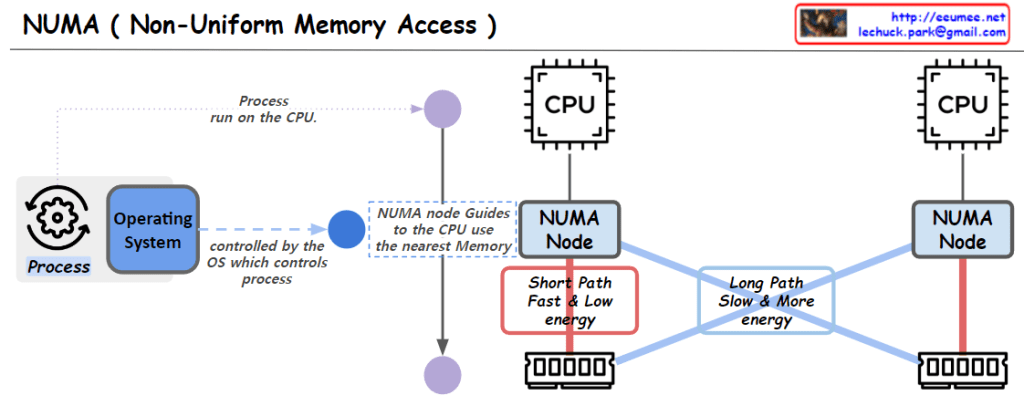
The image depicts the NUMA (Non-Uniform Memory Access) architecture in computer systems. Key elements include:

  1. Operating System: Manages and controls processes running on the CPU.
  2. CPU: Central Processing Units where computing tasks are executed.
  3. NUMA Nodes: Guide CPUs to use the nearest memory, with each NUMA node having memory areas closer to specific CPUs.
  4. Memory Access Paths: “Short Path” indicates a fast and low-energy memory access that is closer, while “Long Path” represents a slower and more energy-consuming memory access that is farther away.

The structure illustrates that memory access times in a NUMA system are not uniform across all memory, suggesting that memory access optimization can enhance overall system performance.


Process scheduler

From DALL-E with some prompting
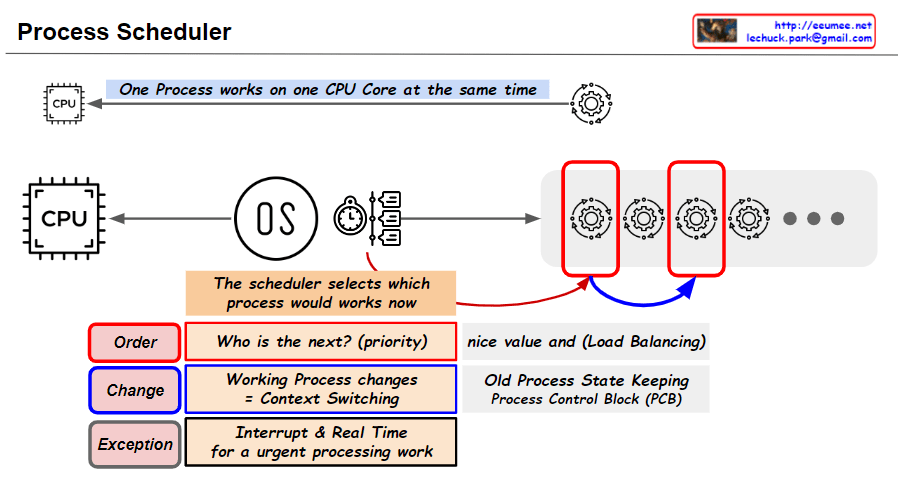
The image highlights the essential mechanisms of process scheduling to share a single CPU core resource among multiple processes. The scheduler determines the order of processes to be executed based on priority and changes the current running process through context switching. Additionally, it promptly addresses exceptions requiring urgent processing through interrupts and real-time handling. This scheduling approach ensures efficient allocation of CPU resources and stable operation of the system.