AI Model Optimization

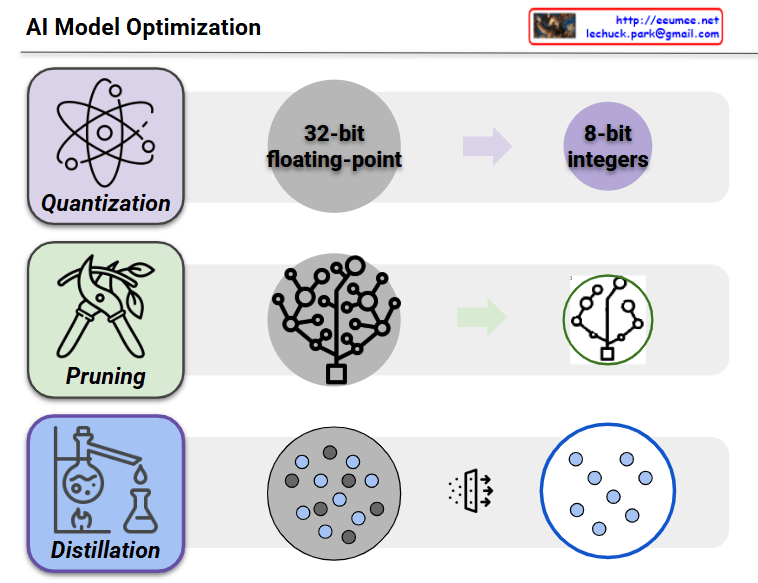
This image shows a diagram illustrating three major AI model optimization techniques.

1. Quantization

  • The process of converting 32-bit floating-point numbers to 8-bit integers
  • A technique that dramatically reduces model size while maintaining performance
  • Significantly decreases memory usage and computational complexity

2. Pruning

  • The process of removing less important connections or neurons from neural networks
  • Transforms complex network structures into simpler, more efficient forms
  • Reduces model size and computation while preserving core functionality

3. Distillation

  • A technique that transfers knowledge from a large model (teacher model) to a smaller model (student model)
  • Reproduces the performance of complex models in lighter, more efficient models
  • Greatly improves efficiency during deployment and execution

All three techniques are essential methods for optimizing AI models to be more efficiently used in real-world environments. They are particularly crucial technologies when deploying AI models in mobile devices or edge computing environments.

With Claude

AI DC Energy Optimization

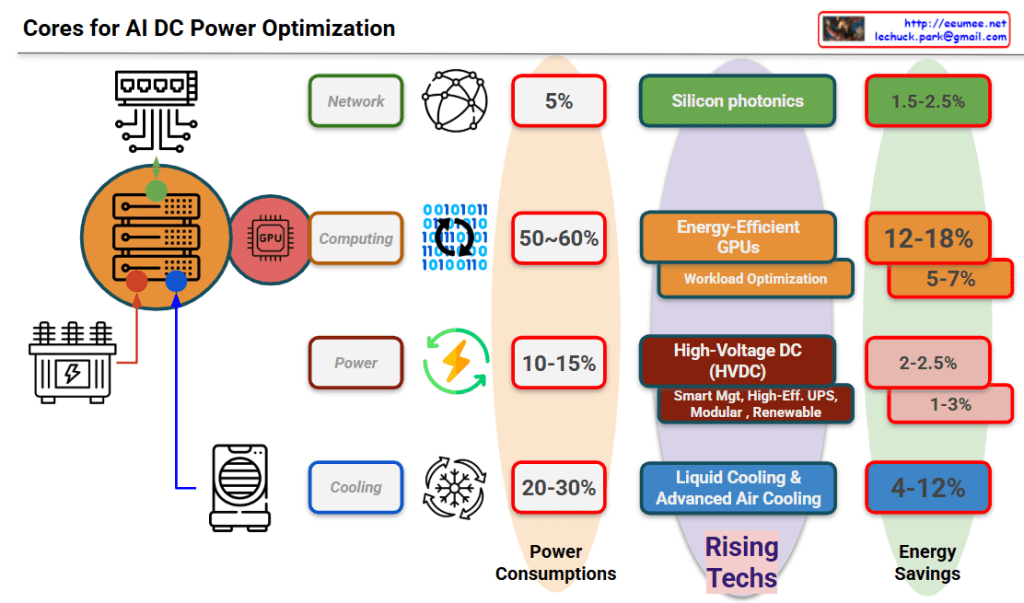
Core Technologies for AI DC Power Optimization

This diagram systematically illustrates the core technologies for AI datacenter power optimization, showing power consumption breakdown by category and energy savings potential of emerging technologies.

Power Consumption Distribution:

  • Network: 5% – Data transmission and communication infrastructure
  • Computing: 50-60% – GPUs and server processing units (highest consumption sector)
  • Power: 10-15% – UPS, power conversion and distribution systems
  • Cooling: 20-30% – Server and equipment temperature management systems

Energy Savings by Rising Technologies:

  1. Silicon Photonics: 1.5-2.5% – Optical communication technology improving network power efficiency
  2. Energy-Efficient GPUs & Workload Optimization: 12-18% (5-7%) – AI computation optimization
  3. High-Voltage DC (HVDC): 2-2.5% (1-3%) – Smart management, high-efficiency UPS, modular, renewable energy integration
  4. Liquid Cooling & Advanced Air Cooling: 4-12% – Cooling system efficiency improvements

This framework presents an integrated approach to maximizing power efficiency in AI datacenters, addressing all major power consumption areas through targeted technological solutions.

With Claude

Basic Optimization

With a Claude
This Basic Optimization diagram demonstrates the principle of optimizing the most frequent tasks first:

  1. Current System Load Analysis:
  • Total Load: 54 X N (where N can extend to infinity)
  • Task Frequency Breakdown:
    • Red tasks: 23N (most frequent)
    • Yellow tasks: 13N
    • Blue tasks: 11N
    • Green tasks: 7N
  1. Optimization Strategy and Significance:
  • Priority: Optimize the most frequent task first (red tasks, 23N)
  • 0.4 efficiency improvement achieved on the highest frequency task
  • As N approaches infinity, the optimization effect grows exponentially
  • Calculation: 23 x 0.4 = 9.2 reduction in load per N
  1. Optimization Results:
  • Final Load: 40.2 X N (reduced from 54 X N)
  • Detailed calculation: (9.2 + 31) X N
    • 9.2: Load reduction from optimization
    • 31: Remaining task loads
  • Scale Effect Examples:
    • At N=100: 1,380 units reduced (5,400 → 4,020)
    • At N=1000: 13,800 units reduced (54,000 → 40,200)
    • At N=10000: 138,000 units reduced

The key insight here is that in a system where N can scale infinitely, optimizing the most frequent task (red) yields exponential benefits. This demonstrates the power of the “optimize the highest frequency first” principle – where focusing optimization efforts on the most common operations produces the greatest system-wide improvements. The larger N becomes, the more dramatic the optimization benefits become, making this a highly efficient approach to system optimization.

This strategy perfectly embodies the principle of “maximum impact with minimal effort” in system optimization, especially in scalable systems where N can grow indefinitely. 

Optimization in the Real

From Claude with some prompting
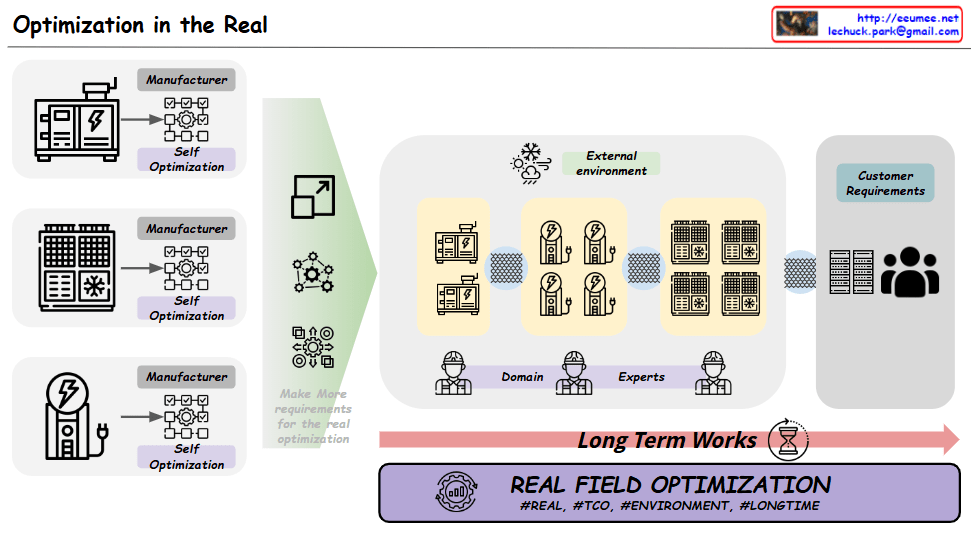
The Real Field Optimization diagram and its extended implications:

  1. Extended Scope of Optimization:
  • Begins with equipment Self-Optimization but extends far beyond
  • Increasing complexity in real operating environments:
    • Equipment/system interactions
    • Operational scale expansion
    • Service quality requirements
    • Various stakeholder requirements
  1. Real Operating Environment Considerations:
  • Domain Experts’ practical experience and knowledge
  • Customer requirements and feedback
  • External Environment impacts
  • Variables emerging from Long Term operations
  1. TCO (Total Cost of Ownership) Perspective:
  • Beyond initial installation/deployment costs
  • Operation/maintenance costs
  • Energy efficiency
  • Lifecycle cost optimization
  1. Data-Driven Optimization Necessity:
  • Collection and analysis of actual operational data
  • Understanding operational patterns
  • Predictive maintenance
  • Performance/efficiency monitoring
  • Data-driven decision making for continuous improvement
  1. Long-Term Perspective Importance:
  • Performance change management over time
  • Scalability considerations
  • Sustainable operation model establishment
  • Adaptability to changing requirements
  1. Real Field Integration:
  • Interaction between manufacturers, operators, and customers
  • Environmental factor considerations
  • Complex system interdependencies
  • Real-world constraint management

This comprehensive optimization approach goes beyond individual equipment efficiency, aiming for sustainable operation and value creation of the entire system. This can be achieved through continuous improvement activities based on real operational environment data. This represents the true meaning of “Real Field Optimization” with its hashtags #REAL, #TCO, #ENVIRONMENT, #LONGTIME.

The diagram effectively illustrates that while equipment-level optimization is fundamental, the real challenge and opportunity lie in optimizing the entire operational ecosystem over time, considering all stakeholders, environmental factors, and long-term sustainability. The implicit need for data-driven optimization in real operating environments becomes crucial for achieving these comprehensive optimization goals.

Stability + Efficiency = Optimization

From Claude with some prompting
This image illustrates the concept of optimization, which is achieved through a balance between stability and efficiency.

  1. Stability:
    • Represented by the 24-hour clock icon, this refers to the consistency and reliability of a system over time.
  2. Efficiency:
    • Depicted by the gear/dollar sign icon, this represents the ability to maximize output or performance with minimal resources.
  3. Trade-off:
    • The central element shows the conflicting relationship between stability and efficiency.
    • Humans struggle to achieve both stability and efficiency simultaneously.
  4. Programmatic Automation:
    • The system icon suggests that automation or programmatic control can enable a “win-win” scenario, where both stability and efficiency can be optimized.
    • Systems have the capability to overcome the “trade-off” tendency that humans often exhibit.
  5. Optimization:
    • Represented by the gear and chart icon, this is the final, optimized state achieved through the balance of stability and efficiency.
    • By combining the human “trade-off” tendency and the system’s “win-win” capability, a more integrated optimization can be attained.

In summary, this image contrasts the differences between human and system approaches in the pursuit of optimization. By leveraging the strengths of both, the optimal balance between stability and efficiency can be achieved.

optimization

From Claude with some prompting

  1. “Just look (the average of usage)”:
    • This stage shows a simplistic view of usage based on rough averages.
    • The supply (green arrow) is generously provided based on this average usage.
    • Actual fluctuations in usage are not considered at this point.
  2. “More Details of Usages”:
    • Upon closer inspection, continuous variations in actual usage are discovered.
    • The red dotted circle highlights these subtle fluctuations.
    • At this stage, variability is recognized but not yet addressed.
  3. “Optimization”:
    • After recognizing the variability, optimization is attempted based on peak usage.
    • The dashed green arrow indicates the supply level set to meet maximum usage.
    • Light green arrows show excess supply when actual usage is lower.
  4. “Changes of usage”:
    • Over time, usage variability increases significantly.
    • The red dotted circle emphasizes this increased volatility.
  5. “Unefficient”:
    • This demonstrates how maintaining a constant supply based on peak usage becomes inefficient when faced with high variability.
    • The orange shaded area visualizes the large gap between actual usage and supply, indicating the degree of inefficiency.
  6. “Optimization”:
    • Finally, optimization is achieved through flexible supply that adapts to actual usage patterns.
    • The green line closely matching the orange line (usage) shows supply being adjusted in real-time to match usage.
    • This approach minimizes oversupply and efficiently responds to fluctuating demand.

This series illustrates the progression from a simplistic average-based view, through recognition of detailed usage patterns, to peak-based optimization, and finally to flexible supply optimization that matches real-time demand. It demonstrates the evolution towards a more efficient and responsive resource management approach.

Before & Optimization

From Claude with some prompting
This image illustrates the process of “Before & Optimization” in a system, divided into three main stages:

  1. Initial State:
    • Shows “Supply” and “Usage” components.
    • Demonstrates a stable supply flowing to usage.
    • The graph indicates supply maintaining slightly above usage.
  2. Intermediate Stage:
    • Introduces “Redundancy (High Availability)”.
    • An additional supply unit labeled “One More Ready” is added.
    • The “Stability” graph shows supply consistently higher than usage, with the note “Maintain Supply > Usage”.
  3. Final Optimization Stage:
    • The “Optimization” graph shows supply and usage being closely aligned.
    • Purple arrows indicate adjustments to match supply with usage.
    • Labeled “Goto Supply = Usage”, showing the goal of matching supply to usage.

Overall, this image depicts the progression from ensuring stable supply, through adding redundancy for increased stability, to finally optimizing the system by matching supply closely with usage. It demonstrates the process of maintaining system stability while improving efficiency.