Memoy Leak

From Claude with some prompting
This image illustrates the process of “Memory Leak Checking”. The main components and steps are as follows:

  1. Process Is Started:
    • When a process starts, it connects through an API to a “Like Virtual Machine” environment.
    • In this environment, “Hooking” techniques are employed.
  2. Process Is Running:
    • The running process generates a “Software Interrupt” through the API.
    • There’s “Tracking syscall with Ptrace()” occurring at this stage.
  3. Memory :
    • Functions related to memory allocation, modification, and deallocation (such as malloc(), calloc(), free()) are called.
  4. Memory Leakage Management:
    • This component tracks memory Changes and Status.
  5. OS kernel:
    • OS kernel parameters about memory are involved in the process.

The diagram shows the overall process of detecting and managing memory leaks. It demonstrates how memory leaks are systematically monitored and managed from the start of a process, through its execution, memory management, and interaction with the operating system.
This diagram effectively visualizes the complex process of memory leak checking, showing how different components interact to monitor and manage memory usage in a running process.

Kernel Samepage Merging

From Claude with some prompting
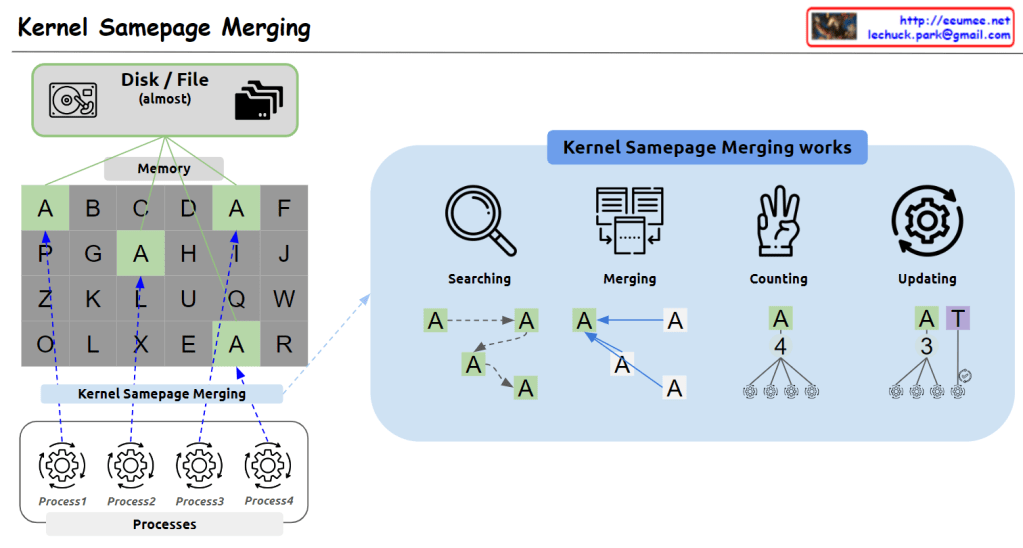
This image illustrates Kernel Samepage Merging (KSM), a memory management technique used to optimize memory usage in computing systems.

Key components of the image:

  1. Top left: Icons representing disk/file systems (“almost”) and a memory grid.
  2. Memory grid: Shows memory pages filled with various letters (A-Z). Note the repeated occurrences of ‘A’ pages.
  3. Bottom: Multiple processes (Process1, Process2, Process3, Process4) sharing this memory.
  4. Right side: Explains how KSM works in four stages:
    • Searching: Locating pages with identical content.
    • Merging: Combining identical pages into one.
    • Counting: Tallying references to the merged page.
    • Updating: Refreshing page references.

KSM works by identifying and merging memory pages with identical content, thus reducing memory usage. This is particularly useful in virtualized environments where multiple virtual machines might be running similar operating systems.

The image effectively demonstrates how KSM can identify duplicate ‘A’ pages across different memory locations and processes, merging them to save memory space while maintaining proper references for each process.

Recent Memory Control

From Perplexity with some prompting
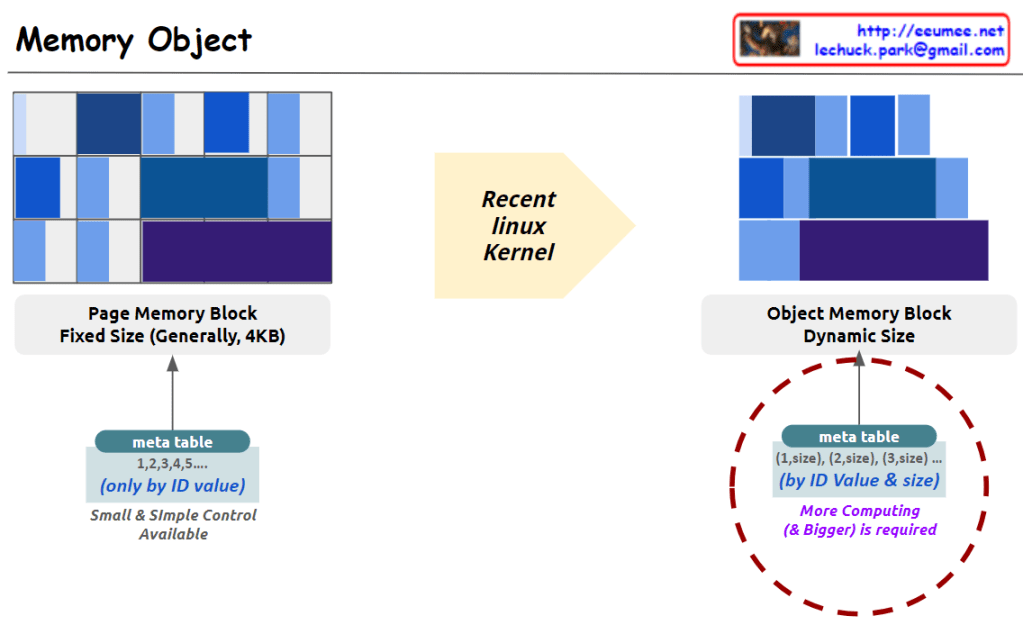
The image illustrates a change in memory object management in recent Linux kernels, focusing on the transition from fixed-size page memory blocks to dynamic-size object memory blocks.

Left: Fixed-Size Page Memory Block

  • Page Memory Block: Typically uses fixed-size blocks, generally 4KB in size.
  • Meta Table: Managed by simple ID values (e.g., 1, 2, 3, 4, 5), allowing for straightforward and efficient control.

Right: Dynamic-Size Object Memory Block

Meta Table: Requires both ID values and sizes (e.g., (1, size), (2, size)), necessitating more complex computation and larger metadata tables.

Object Memory Block: Utilizes blocks of varying sizes to accommodate different memory object sizes.

This transition reflects a shift towards more flexible memory management, allowing for better utilization of memory resources by accommodating objects of different sizes. However, it also introduces increased complexity in managing these memory allocations.

Parallel Processing ( Process – Data works)

From Claude with some prompting
This image illustrates different architectures of Parallel Processing:

  1. Single Core CPU: A single CPU connected to memory via one memory channel. The memory is divided into Instruction (Computing) and Data sections.
  2. Multi Core CPU: A CPU with multiple cores connected to memory through multiple memory channels. The memory structure is similar to the single core setup.
  3. NUMA (Non-Uniform Memory Access): Multiple multi-core CPUs, each with local memory. CPUs can access memory attached to other CPUs, but with “More Hop Memory Access”.
  4. GPU (Graphics Processing Unit): Described as “Completely Independent Processing-Memory Units”. It uses High Bandwidth Memory and has a large number of processing units directly mapped to data.

The GPU architecture shows many small processing units connected to a shared high-bandwidth memory, illustrating its capacity for massive parallel processing.

This diagram effectively contrasts CPU and GPU architectures, highlighting how CPUs are optimized for sequential processing while GPUs are designed for highly parallel tasks.

RDMA : Remote Direct Memory Access

From Claude with some prompting
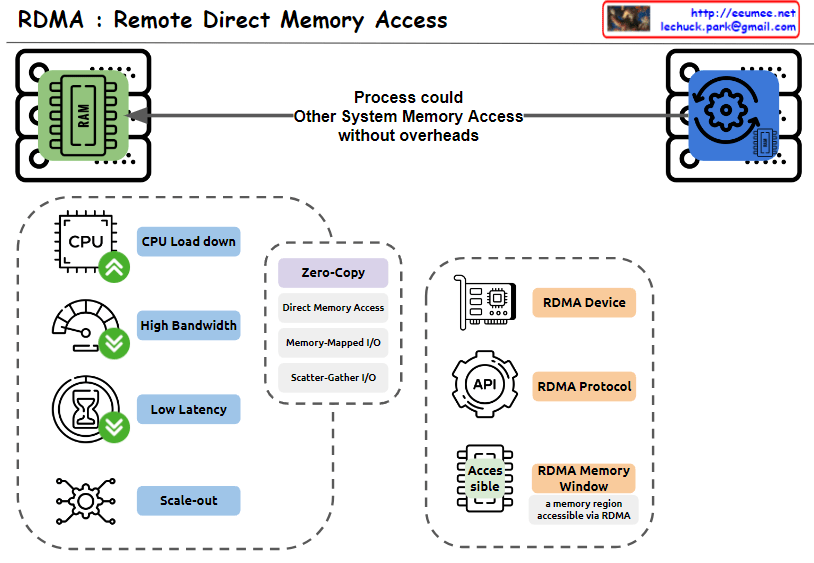
This image explains RDMA (Remote Direct Memory Access). Here’s an interpretation in English:

  1. The top of the image shows that RDMA allows one system to access the memory of another system without overheads.
  2. The bottom left box lists the main advantages of RDMA:
    • CPU Load down
    • High Bandwidth
    • Low Latency
    • Scale-out
  3. The central box describes key features of RDMA:
    • Zero-Copy
    • Direct Memory Access
    • Memory-Mapped I/O
    • Scatter-Gather I/O
  4. The bottom right box lists RDMA-related components:
    • RDMA Device
    • RDMA Protocol
    • RDMA Memory Window (defined as “a memory region accessible via RDMA”)

The image provides a concise overview of RDMA technology, highlighting its main features and benefits. It illustrates how RDMA enables efficient, direct memory access between systems, reducing CPU load and improving performance in terms of bandwidth and latency.

Memory Control Unit

From Claude with some prompting
The image explains the memory management and access approaches in computing systems. Fundamentally, for any memory management approach, whether hardware or software, there needs to be a defined unit of operation.

At the hardware level, the physical Memory Access Unit is determined by the CPU’s bit width (32-bit or 64-bit).

At the software/operating system level, the Paging Unit, typically 4KB, is used for virtual memory management through the paging mechanism.

Building upon these foundational units, additional memory management techniques are employed to handle memory regions of varying sizes:

  • Smaller units: Byte-addressable memory, bit operations, etc.
  • Larger units: SLAB allocation, Buddy System, etc.

Essentially, the existence of well-defined units at the hardware and logical/software layers is a prerequisite that enables comprehensive and scalable memory management. These units serve as the basis for memory control mechanisms across different levels of abstraction and size requirements in computing systems.

KASAN @ linux kernel

From Gemini with some prompting
The image you provided depicts a diagram illustrating the operation of Kernel Address Sanitizer (KASAN) in the Linux kernel. KASAN is a memory sanitizer tool that aims to detect memory corruption errors, particularly those related to out-of-bounds reads/writes and use-after-free vulnerabilities.

Key Elements of the Diagram:

  1. Memory Accessing: This section represents the various ways in which memory is accessed within the kernel. It includes both valid and invalid access patterns.
  2. For All Memory: This indicates that KASAN monitors memory accesses for all allocated memory regions, regardless of their purpose or usage.
  3. Shadow Memory: This represents a dedicated memory space, typically 1/8th of the total physical memory, allocated by KASAN to store information about memory accesses.
  4. Violation Detection: This section highlights the core function of KASAN, which is to detect and report invalid memory access attempts.
  5. Use-after-free Detection: This specifically refers to KASAN’s ability to identify attempts to access memory regions that have already been freed, preventing potential memory corruption issues.
  6. Out-of-Bounds Read/Write: This emphasizes KASAN’s capability to detect memory accesses that exceed the boundaries of the allocated memory regions, safeguarding against buffer overflows and other memory-related vulnerabilities.

Overall Interpretation:

The diagram effectively illustrates the fundamental concept of KASAN: monitoring memory accesses, maintaining a shadow memory space for access information, and detecting invalid access patterns to prevent memory corruption errors.