KASLR(Kernel Address Space Layout Randomization)

With a Claude
this image of KASLR (Kernel Address Space Layout Randomization):

  1. Top Section:
  • Shows the traditional approach where the OS uses a Fixed kernel base memory address
  • Memory addresses are consistently located in the same position
  1. Bottom Section:
  • Demonstrates the KASLR-applied approach
  • The OS uses Randomized kernel base memory addresses
  1. Right Section (Components of Kernel Base Address):
  • “Kernel Region Code”: Area for kernel code
  • “Kernel Stack”: Area for kernel stack
  • “Virtual Memory mapping Area (vmalloc)”: Area for virtual memory mapping
  • “Module Area”: Where kernel modules are loaded
  • “Specific Memory Region”: Other specific memory regions
  1. Booting Time:
  • This is when the base addresses for kernel code, data, heap, stack, etc. are determined

The main purpose of KASLR is to enhance security. By randomizing the kernel’s memory addresses, it makes it more difficult for attackers to predict specific memory locations, thus preventing buffer overflow attacks and other memory-based exploits.

The diagram effectively shows the contrast between:

  • The traditional fixed-address approach (using a wrench symbol)
  • The KASLR approach (using dice to represent randomization)

Both approaches connect to RAM, but KASLR adds an important security layer through address randomization.

DAS / NAS / SAN

With a Claude
This image is a diagram comparing three major storage systems – DAS (Direct Access Storage), NAS (Network Access Storage), and SAN (Storage Network Array).

Let’s examine each system in detail:

  1. DAS (Direct Access Storage):
  • Direct storage system connected to the CPU
  • Shows direct connections between RAM and disk drives
  • Most basic storage architecture
  • Connected directly to the computer system
  1. NAS (Network Access Storage):
  • Storage accessible through the network
  • Marked with “Over The Network” indicating network connectivity
  • Consists of standalone storage units
  • Provides shared storage access through network
  1. SAN (Storage Network Array):
  • Most sophisticated and complex storage system
  • Features shown include:
    • High Speed Dedicated Network
    • Centralization Control
    • Block Storage
    • HA with RAID (High Availability with RAID)
    • Scale-out capabilities

The diagram effectively illustrates the evolution and increasing complexity of storage systems. It shows the progression from the simple direct-attached storage (DAS) through network-attached storage (NAS) to the more complex storage area network (SAN), with each iteration adding more sophisticated features and capabilities.

The layout of the diagram moves from left to right, demonstrating how each storage solution becomes more complex but also more capable, with SAN offering the most advanced features for enterprise-level storage needs.

Fast Copy over network

With a Claude
This image illustrates a system architecture diagram for “Fast Copy over network”. Here’s a detailed breakdown:

  1. Main Sections:
  • Fast Copy over network
  • Minimize Copy stacks
  • Minimize Computing
  • API optimization for read/write
  1. System Components:
  • Basic computing layer including OS (Operating System) and CPU
  • RAM (memory) layer
  • Hardware device layer
  1. Key Features:
  • The purple area on the left focuses on minimizing Count & Copy with API
  • The blue center area represents minimized computing works (Program Code)
  • The orange area on the right shows programmable API implementation
  1. Data Flow:
  • Arrows indicating bi-directional communication between systems
  • Vertical data flow from OS to RAM to hardware
  • Horizontal data exchange between systems

The architecture demonstrates a design aimed at optimizing data copying operations over networks while efficiently utilizing system resources.

Basic Optimization

With a Claude
This Basic Optimization diagram demonstrates the principle of optimizing the most frequent tasks first:

  1. Current System Load Analysis:
  • Total Load: 54 X N (where N can extend to infinity)
  • Task Frequency Breakdown:
    • Red tasks: 23N (most frequent)
    • Yellow tasks: 13N
    • Blue tasks: 11N
    • Green tasks: 7N
  1. Optimization Strategy and Significance:
  • Priority: Optimize the most frequent task first (red tasks, 23N)
  • 0.4 efficiency improvement achieved on the highest frequency task
  • As N approaches infinity, the optimization effect grows exponentially
  • Calculation: 23 x 0.4 = 9.2 reduction in load per N
  1. Optimization Results:
  • Final Load: 40.2 X N (reduced from 54 X N)
  • Detailed calculation: (9.2 + 31) X N
    • 9.2: Load reduction from optimization
    • 31: Remaining task loads
  • Scale Effect Examples:
    • At N=100: 1,380 units reduced (5,400 → 4,020)
    • At N=1000: 13,800 units reduced (54,000 → 40,200)
    • At N=10000: 138,000 units reduced

The key insight here is that in a system where N can scale infinitely, optimizing the most frequent task (red) yields exponential benefits. This demonstrates the power of the “optimize the highest frequency first” principle – where focusing optimization efforts on the most common operations produces the greatest system-wide improvements. The larger N becomes, the more dramatic the optimization benefits become, making this a highly efficient approach to system optimization.

This strategy perfectly embodies the principle of “maximum impact with minimal effort” in system optimization, especially in scalable systems where N can grow indefinitely. 

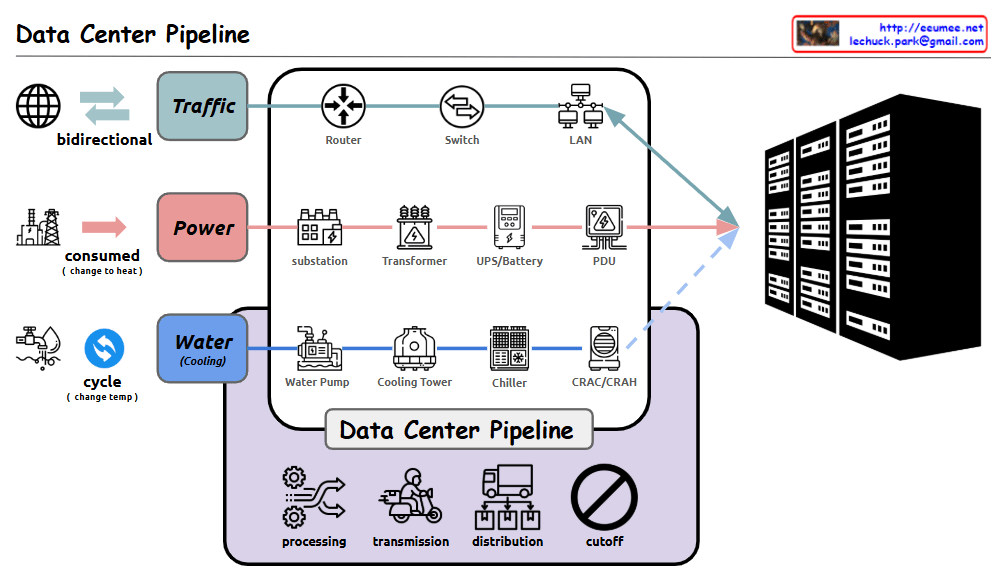
Data Center Pipeline

With a Claude
Detailed analysis of the Data Center Pipeline diagram:

  1. Traffic Pipeline
  • Bidirectional network traffic handling
  • Infrastructure flow: Router → Switch → LAN
  • Responsible for stable data transmission and reception
  1. Power Pipeline
  • Power consumption converted to heat
  • Flow: Substation → Transformer → UPS/Battery → PDU (Power Distribution Unit)
  • Ensures stable power supply and backup systems
  1. Water (Cooling) Pipeline
  • Circulation cooling system through temperature change
  • Flow: Water Pump → Cooling Tower → Chiller → CRAC/CRAH (Computer Room Air Conditioning/Handler)
  • Efficiently controls server heat generation
  1. Data Center Management Functions
  • Processing: Data and system processing
  • Transmission: Data transfer
  • Distribution: Resource allocation
  • Cutoff: System protection during emergencies

Comprehensive Summary: This diagram illustrates the core infrastructure of a modern data center. It shows the seamless integration of three critical pipelines: network traffic for data processing, power supply for system operation, and cooling systems for equipment protection. Each pipeline undergoes multiple processing stages, working harmoniously to ensure stable data center operations. The four core management functions – processing, transmission, distribution, and cutoff – guarantee the efficiency and stability of the entire system. This integrated infrastructure design enables reliable operation of data centers, which form the foundation of modern digital services. The careful balance between these systems is crucial for maintaining optimal performance, ensuring business continuity, and protecting valuable computing resources. The design demonstrates how modern data centers handle the complex requirements of digital infrastructure while maintaining reliability and efficiency.