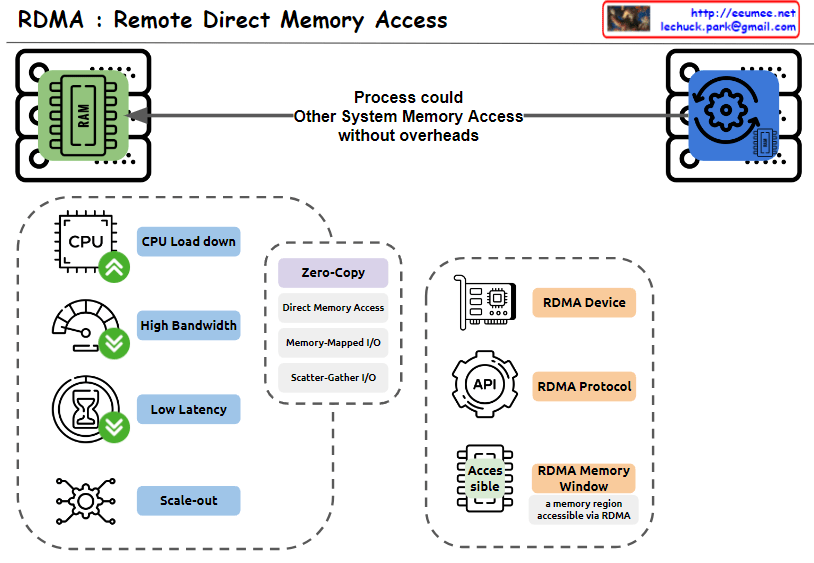
RDMA : Remote Direct Memory Access

From Claude with some prompting
This image explains RDMA (Remote Direct Memory Access). Here’s an interpretation in English:

  1. The top of the image shows that RDMA allows one system to access the memory of another system without overheads.
  2. The bottom left box lists the main advantages of RDMA:
    • CPU Load down
    • High Bandwidth
    • Low Latency
    • Scale-out
  3. The central box describes key features of RDMA:
    • Zero-Copy
    • Direct Memory Access
    • Memory-Mapped I/O
    • Scatter-Gather I/O
  4. The bottom right box lists RDMA-related components:
    • RDMA Device
    • RDMA Protocol
    • RDMA Memory Window (defined as “a memory region accessible via RDMA”)

The image provides a concise overview of RDMA technology, highlighting its main features and benefits. It illustrates how RDMA enables efficient, direct memory access between systems, reducing CPU load and improving performance in terms of bandwidth and latency.

nagle for TCP

From Claude with some prompting
This image illustrates the TCP (Transmission Control Protocol) packet structure and the Nagle algorithm.

  1. Top section:
    • Shows data transfer between two computers.
    • Demonstrates how data (payload) is divided into multiple packets for transmission.
  2. Middle section – Packet structure:
    • Data Payload: The actual data being transmitted
    • TCP/IP header: Contains control information for communication
    • Ethernet header: 14 Bytes
    • IPv4 header: 20 Bytes
    • TCP header: 20 Bytes
    • Data + Padding: Actual data and padding added if necessary
    • MTU Limit: Maximum Transmission Unit limit
  3. Bottom section – Nagle’s Algorithm:
    • Normal TCP/IP transmission: Small data packets are sent individually
    • With Nagle’s Algorithm: Small data packets are combined into larger packets before transmission
    • Packet sending conditions:
      1. When an ACK is received
      2. On timeout
      3. When the TCP sending window overflows

The image effectively demonstrates the packet structure in TCP communications and explains how the Nagle algorithm improves network efficiency. The main purpose of Nagle’s algorithm is to reduce network overhead by bundling small packets together before transmission.

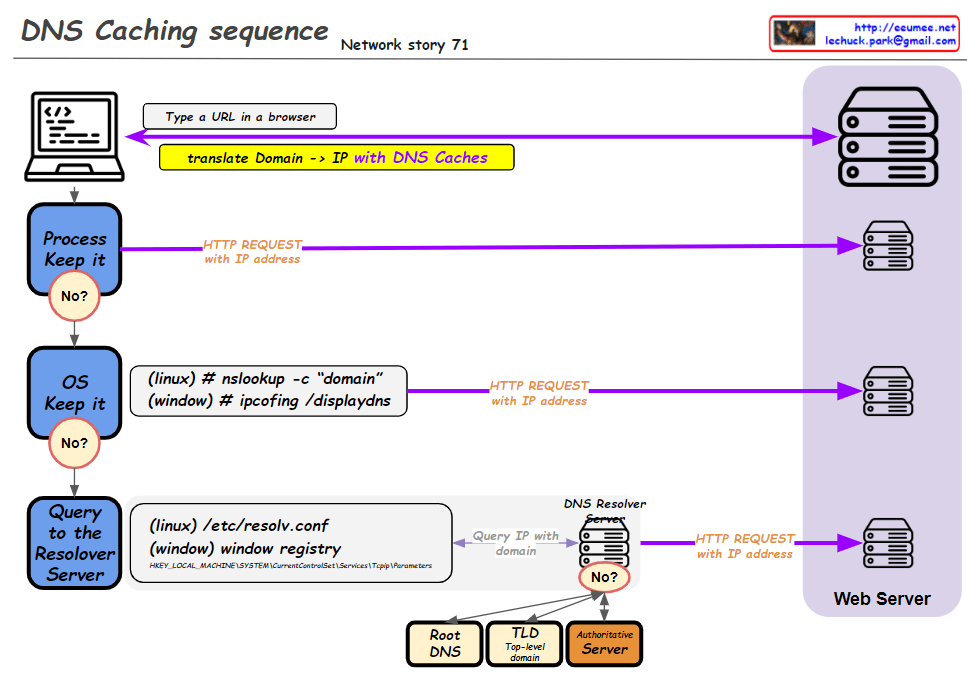
DNS Caching SEQ

From Claude with some prompting
This improved diagram illustrates the DNS caching sequence more comprehensively. Here’s a breakdown of the process:

  1. A user types a URL in a browser.
  2. The system attempts to translate the domain to an IP address using DNS caches.
  3. Process Keep it: Checks the process-level DNS cache. If the information isn’t found here (“No”), it moves to the next step.
  4. OS Keep it: Checks the operating system-level DNS cache. For Linux, it uses the “nslookup -c domain” command, while for Windows, it uses “ipconfig /displaydns”. If the information isn’t found here (“No”), it proceeds to the next step.
  5. Query to the Resolver Server: The system queries the DNS resolver server. The resolver’s information is found in “/etc/resolv.conf” for Linux or the Windows Registry for Windows systems.
  6. If the resolver doesn’t have the information cached (“No”), it initiates a recursive query through the DNS hierarchy:
    • Root DNS
    • TLD (Top-Level Domain) server
    • Authoritative server
  7. Once the IP address is obtained, an HTTP request is sent to the web server.

This diagram effectively shows the hierarchical nature of DNS resolution and the fallback mechanisms at each level. It demonstrates how the system progressively moves from local caches to broader, more authoritative sources when resolving domain names to IP addresses. The addition of the DNS hierarchy (Root, TLD, Authoritative) provides a more complete picture of the entire resolution process when local caches and the initial resolver query don’t yield results.

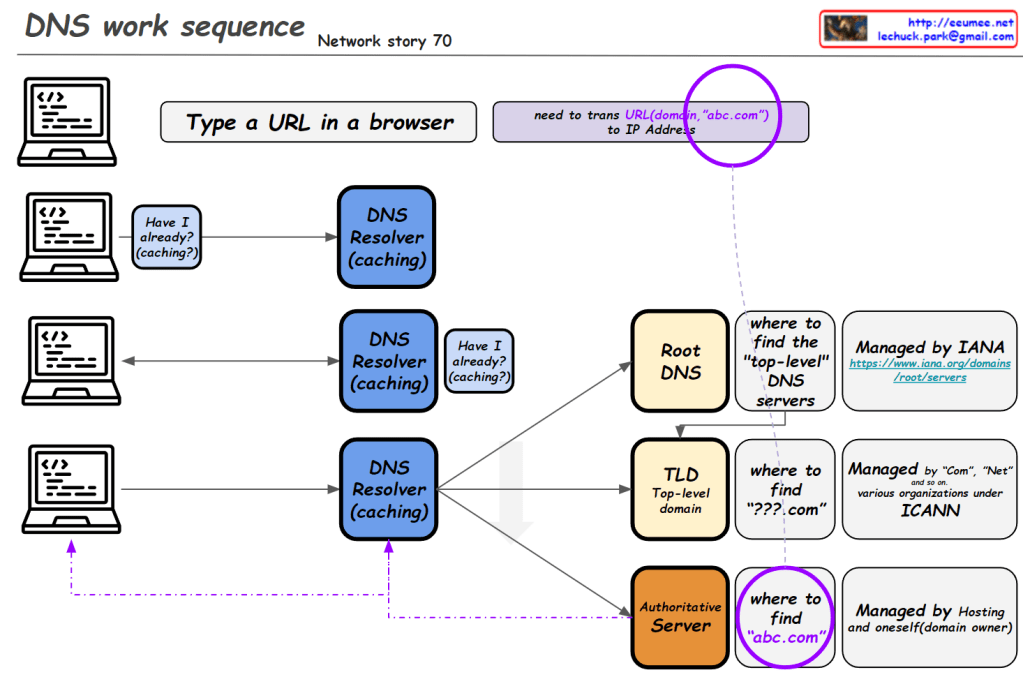
DNS work sequence

From Claude with some prompting
This image illustrates the DNS (Domain Name System) work sequence. Here’s a breakdown:

  1. It starts with typing a URL in a browser. For example, entering “abc.com” requires translation to an IP address.
  2. The DNS resolution process begins, involving multiple levels of DNS resolvers with caching capabilities.
  3. At each level, there’s a “Have I already? (caching?)” check. If the information is cached, it’s used immediately.
  4. If not found, it proceeds to the next level:
    • Root DNS: Provides information on top-level DNS servers (Managed by IANA)
    • TLD (Top-Level Domain): Gives information on domains like “.com” (Managed by various organizations under ICANN)
    • Authoritative Server: Provides actual domain information (e.g., abc.com, managed by hosting providers or domain owners)
  5. Through these stages, the system finds the necessary information to ultimately obtain the IP address of the entered domain.

This diagram effectively demonstrates the hierarchical structure of DNS lookup process and the caching mechanism at each stage.

DNS Why?

From Claude with some prompting
This image is a network diagram explaining the function and importance of DNS (Domain Name System). The main points are:

  1. WWW service works with DNS on TCP/IP.
  2. DNS is responsible for mapping domains to IP addresses.
  3. All network devices on the Internet can only route to IP addresses.
  4. It’s difficult to include actual service characteristics in IP addresses (only by number).
  5. Domain addresses are easy to use and must be mapped to IP addresses.
  6. On the client side, there’s a DNS Resolver (caching).
  7. On the server side, there’s a DNS server, which includes Authoritative Server, Root Server, and TLD Server. These are managed by IANA.
  8. At the center of the diagram is the key question: “So, how does DNS-IP Mapping work?”

This diagram visually explains the working principle of DNS and its importance in the Internet. It emphasizes the crucial role DNS plays in translating user-friendly domain names into IP addresses that computers can understand.

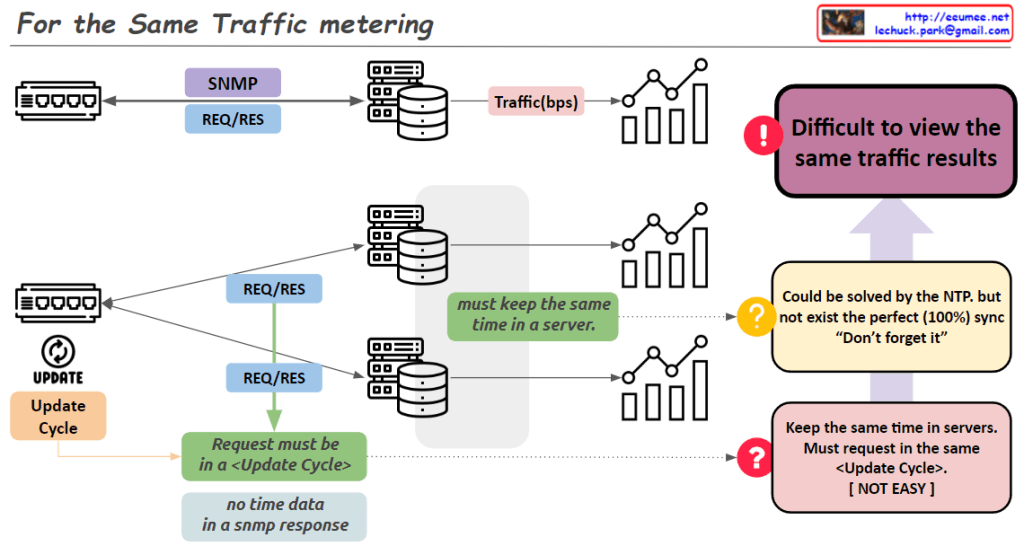
For the Same Traffic metering

From Claude with some prompting
“For the Same Traffic Metering” – Key Points:

  1. Problem: Different collection servers using SNMP may not yield the same results for identical traffic.
  2. Main causes of discrepancy:
    • Network equipment updates traffic information periodically.
    • To get consistent values, SNMP requests must align with the equipment’s update cycle.
    • Difficult to synchronize requests precisely across multiple servers.
  3. Challenges for resolution:
    • Servers need accurate time synchronization.
    • All requests should occur within the same ‘Update Cycle’ of the equipment.
  4. Time synchronization:
    • NTP can partially solve the issue.
    • Perfect (100%) synchronization is not achievable in practice.
  5. Consequence: SNMP data collected from multiple servers may show different results for the same traffic.
  6. Key insight: The image emphasizes the difficulties in accurate data collection using SNMP in network monitoring systems.
  7. Implications: Network administrators and system designers must be aware of these limitations and consider them when collecting and interpreting data.

This summary highlights the complexities involved in ensuring consistent traffic metering across multiple collection points in a network environment.

TCP BBR

From ChatGPT with some prompting
Overview of TCP BBR:

  • TCP BBR optimizes network performance using Bottleneck Bandwidth and Round-trip time (RTT).
  • Speed is determined by RTT.
  • Bandwidth is determined by Bottleneck Bandwidth.

Learning Process:

  • Every ACK:
    • Updates the bottleneck bandwidth.
    • Tracks the minimum observed RTT value.
  • Every RTT:
    • Adjusts the sending size (n * MSS) and the pacing rate (the rate at which data is sent).

Sending Size Update:

  • BBR continuously updates the sending size (how many MSS to send) based on the current network conditions.

In summary, TCP BBR learns the network conditions by monitoring the bottleneck bandwidth and RTT, and accordingly adjusts the sending size and pacing rate to optimize data transmission, reducing congestion and improving performance.