All are by packets

From Claude with some prompting
Let me explain this network diagram which illustrates packet processing and various network devices:

  1. Network Components:
  • Internet: Shows L3-L7 packet flowing
  • Router: Handles L3 routing and packet control
  • Firewall/IPS/IDS: Manages L3/L4 base packet control and L7 packet analysis/control
  • Switching: Performs Ethernet(L2/L3) switching and L2/L3 packet control
  • Server/Client: Handles packet send & receive (L1-L7), packet making and analysis
  1. Key Issues:
  • COST Concerns:
    • ALL operations are packet-based
    • Performs L1-L7 packet collecting/analysis/switching/routing
    • Multiple devices perform many duplicates of the same functions (L2, L3-L4 packet collecting/analysis/switching/routing)
  1. Suggested Improvement:
  • Mentioned in “IF Possible” section:
    • Consider aggregating all packets and manipulating them from central controls
    • This could potentially reduce redundancy and improve efficiency
  1. Key Message:
  • There are many types of packet processing devices on the network
  • Redundancy occurs as each device performs similar functions
  • Need to explore possibility of centralized packet management system

The diagram effectively highlights the complexity and redundancy in modern network architecture while suggesting a potential path toward more efficient packet processing through centralization.

This visualization emphasizes how current network infrastructure might benefit from consolidation of packet processing functions to reduce duplicated efforts and potentially lower costs.
RPKI : Resource Public Key Infrastructure

From Claude with some prompting
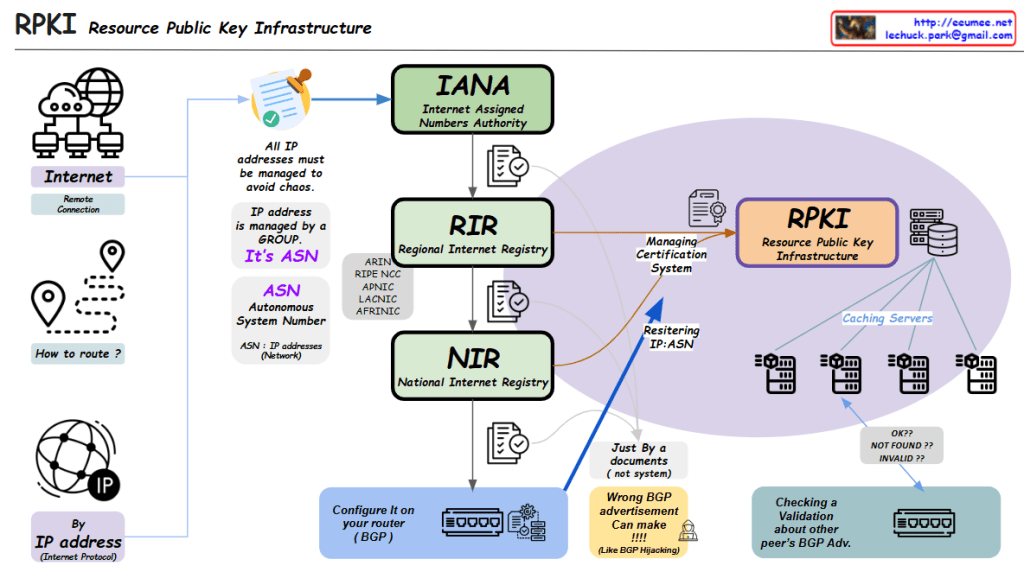
RPKI (Resource Public Key Infrastructure) Overview

  1. Background of RPKI Need

1.1. Internet requires reliable IP management

1.2. Traditional IP address and routing system vulnerabilities

1.3. Need for secure and verifiable routing infrastructure

  1. Core Components of RPKI Structure

2.1. IANA (Internet Assigned Numbers Authority)

  • Top-level authority for IP resource management
  • Oversees global IP address allocation
  • Delegates authority to regional registries

2.2. RIR (Regional Internet Registry)

  • Manages continental-level resources
  • Key organizations: ARIN, RIPE NCC, APNIC, LACNIC, AFRINIC
  • Handles certification management

2.3. NIR (National Internet Registry)

  • National-level IP resource management
  • Works under RIR guidance
  • Manages local resource allocation
  1. RPKI Operational Process

3.1. Resource Management

  • IP addresses grouped by ASN (Autonomous System Number)
  • Systematic management to prevent chaos
  • Certificate-based validation system

3.2. Technical Implementation

  • Caching servers for RPKI data
  • Router configuration using BGP
  • Real-time validation of routing information
  1. Security Features

4.1. BGP Route Protection

  • Prevents BGP hijacking attempts
  • Validates peer BGP advertisements
  • Ensures routing path integrity

4.2. Validation States

  • OK: Valid route
  • NOT FOUND: No RPKI record
  • INVALID: Failed validation
  1. Benefits of RPKI

5.1. Enhanced routing security

5.2. Prevents unauthorized IP address use

5.3. Provides verifiable trust chain

5.4. Maintains internet routing stability

Summary

This RPKI-centric structure transforms traditional IP management into a robust, secure, and verifiable system for global internet routing infrastructure.

The system essentially creates a chain of trust from IANA through RIRs and NIRs down to individual network operators, ensuring the legitimacy of IP address usage and routing announcements.

Web(HTTP) Service Inside

From Claude with some prompting
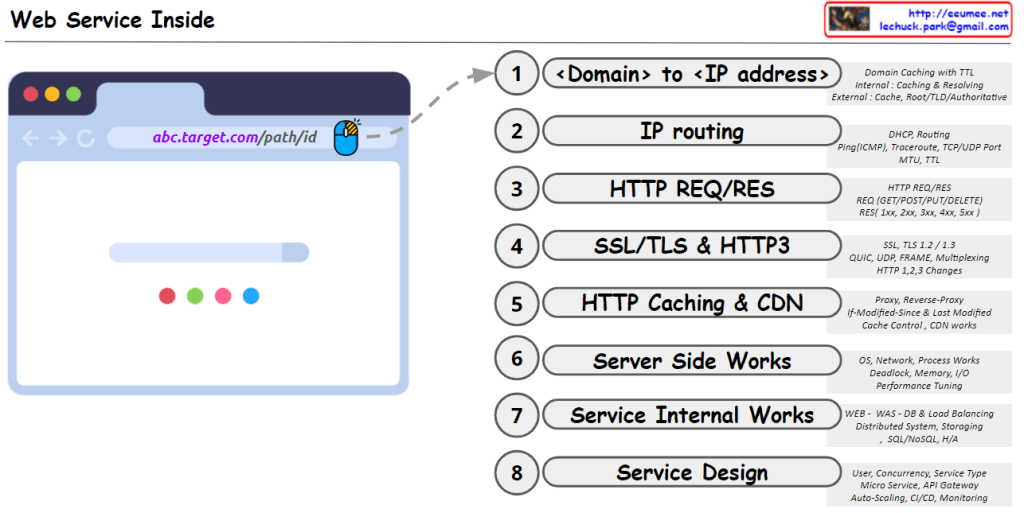
This image titled “Web Service Inside” illustrates the internal workings of a web service in 8 steps, from the browser to service design:

  1. <Domain> to <IP address>: Converts user-friendly domain names into computer-readable IP addresses. This process utilizes multi-level caching for efficiency and ultimately locates the desired web server.
  2. IP routing: Guides data packets to their destination via optimal paths based on the converted IP address. This ensures accurate and efficient information delivery across the complex network of the internet.
  3. HTTP REQ/RES: Defines the communication rules between clients and servers. It structures how clients make requests and how servers respond, providing a standardized method for exchanging information on the web.
  4. SSL/TLS & HTTP3: Enhances data transmission security and improves performance. It protects information through encryption and enables faster, more efficient communication using the latest protocols.
  5. HTTP Caching & CDN: Increases efficiency for repetitive data requests and delivers content to users faster. This plays a crucial role in reducing server load and improving user experience.
  6. Server Side Works: Involves the actual processing of requests and generation of responses on the server. It covers operating systems, network protocols, and resource management to provide an efficient and stable service foundation.
  7. Service Internal Works: Addresses the internal structure and data processing methods of web services. It covers database management, load balancing, and maintaining high availability to provide reliable service to large-scale user bases.
  8. Service Design: Encompasses the overall architecture and operational strategy of the web service. It involves creating optimal service structures considering user requirements, scalability, and maintainability, as well as establishing continuous improvement and monitoring plans.

Each of these stages is essential in creating a web service that efficiently and securely handles user requests, while building a system that is scalable and easy to maintain at a large scale.

Changes of the network traffic

From Claude with some prompting
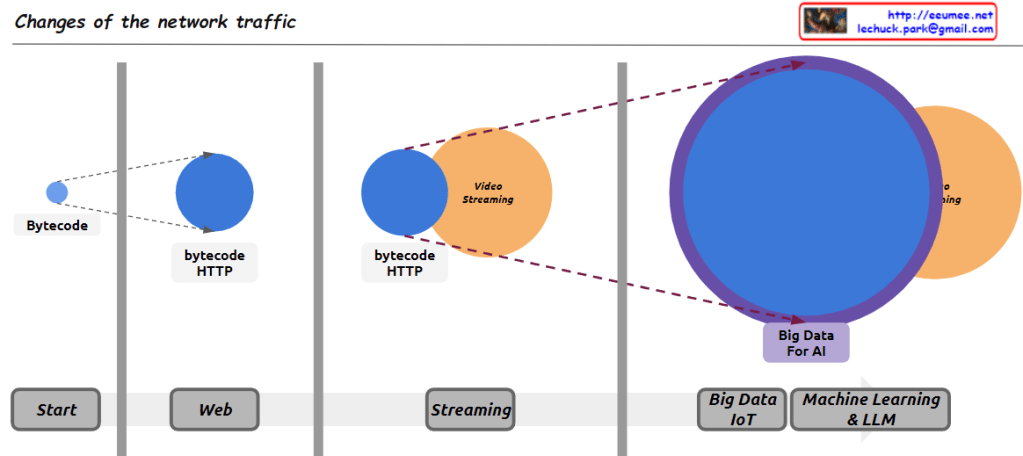
Here’s an interpretation of the diagram in English, focusing on the major changes in internet traffic types:

  1. Early Internet (Start): The small “Bytecode” circle represents the limited data exchange of the early internet. This period was primarily characterized by simple, text-based information exchange.
  2. Web Era (Web): The larger “bytecode HTTP” circle illustrates the surge in HTTP traffic with the advent of the World Wide Web. This represents increased traffic from web browsing, email, and early online services.
  3. Streaming Age (Streaming): The addition of the “Video Streaming” circle signifies the explosive growth in video streaming traffic, driven by platforms like YouTube and Netflix. This marks a paradigm shift in internet bandwidth usage.
  4. Big Data and AI Era (Big Data IoT / Machine Learning & LLM): The largest circle, “Big Data For AI,” represents the enormous traffic increase due to IoT device proliferation, cloud computing ubiquity, and large-scale data processing for AI and machine learning. This suggests it now constitutes the largest portion of internet traffic.

This diagram effectively shows the evolution of internet traffic from simple data exchange to web-based services, media streaming, and the current data-centric, AI-driven era.

Comments (points to be cautious about):

  1. Accuracy: It’s unclear if the circle sizes accurately reflect actual traffic volumes. This should be understood as a conceptual representation.
  2. Time scale: The time intervals between stages may not be uniform, which is not indicated in the diagram.
  3. Overlap: In reality, these traffic types coexist and are not as distinctly separated as the diagram suggests.
  4. Recent trends: The diagram doesn’t reflect traffic changes due to latest technological trends like 5G or edge computing.
  5. Regional differences: These changes may not have occurred uniformly worldwide, which is not reflected in the diagram.

It’s important to consider these points when interpreting the diagram. Overall, this image effectively conveys the macroscopic trends in the evolution of internet traffic in a concise and impactful manner.

Network 1

From Claude with some prompting
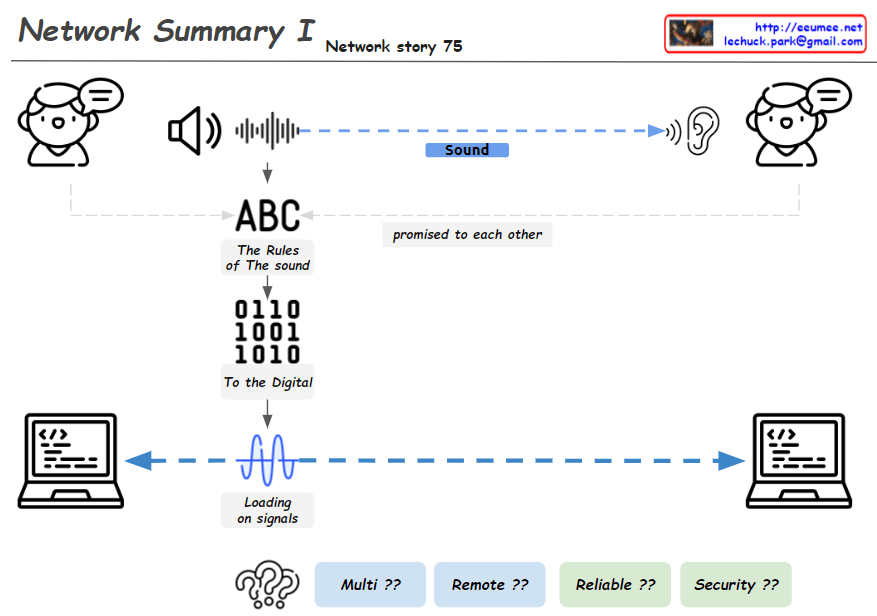
This image, titled “Network Summary I”, illustrates the basic process of network communication in several steps:

  1. Sound Transmission: It shows sound being transmitted between two people.
  2. Communication Rules: The phrase “ABC – The Rules of The sound” indicates that there are agreed-upon rules for sound transmission.
  3. Digital Conversion: It demonstrates how sound is converted into digital signals, represented as “0110 1001 1010”.
  4. Signal Transmission: The phrase “Loading on signals” along with a waveform shows how signals are transmitted between two computers.
  5. Network Challenges: At the bottom, the questions “Multi ??”, “Remote ??”, “Reliable ??”, and “Security ??” present key issues to be addressed after establishing a network connection.

This diagram provides a basic overview of how voice communication is converted to digital data and transmitted over computer networks. It then poses questions about how to handle multiplexity, remote connections, reliability, and security in actual network implementations.

By presenting these challenges, the image implies the necessity for more complex networking protocols like TCP/IP and various networking equipment. It effectively summarizes the journey from basic principles of network communication to the complex issues faced in real-world network implementation, serving as an educational tool to introduce networking concepts.

HTTP Changes

From Claude with some prompting
HTTP: HTTP uses text-based HTML with a head and body structure. HTTP/1.1 introduced Keep-Alive for maintaining TCP connections, but suffers from header overhead and Head-of-Line Blocking issues. Servers cannot push data without a client request.

HTTP/2: HTTP/2 introduced binary framing to improve performance. It enhances efficiency through header compression and multiplexing, and added server push functionality. It also strengthened authentication and encryption using TLS/SSL.

HTTP/3: HTTP/3 operates over the QUIC protocol using UDP instead of TCP. It includes TLS 1.3 by default and provides lower latency and improved multiplexing. HTTP/3 significantly enhances performance through 0-RTT connection establishment, elimination of TCP handshakes, and solving Head-of-Line Blocking issues. It also offers reliable data streams over UDP and ensures data ordering on each stream.

HTTP Service components

From Claude with some prompting
This image illustrates the network structure of an HTTP service. The main components are:

Client Side:

  • Browser: Handles URL requests, HTML parsing, and JavaScript execution
  • OS: Runs the browser, translates URL (domain) to IP

Internet:

  • DNS: Converts domain names to IP addresses
  • IP: Transfers data using IP addresses

Server Side:

  • OS (Operating System): Runs applications, manages IP network
  • TLS: Handles encryption
  • WEB:
    • Manages HTML embedding
    • Handles JSP (JavaServer Pages)
    • Typically deals with static content and some dynamic content generation
  • WAS (Web Application Server):
    • Handles server-side programming and application logic
    • Manages complex dynamic content generation
    • Interacts with the database
    • Handles business logic of the application
  • DB: Database for storing and retrieving data for web services

The diagram shows the entire process of how an HTTP request is handled, from the web browser to the server’s database. It briefly explains the technologies and protocols involved at each step, providing a helpful overview of the basic structure of web services.