The Age of Utilization

This image is an infographic depicting “The Age of Utilization.”

On the left side, a gray oval contains “All knowledge of mankind” represented by various icons including letter and number blocks, books with writing tools, and a globe symbolizing the internet, illustrating the diverse forms of knowledge humanity has accumulated over time.

In the center, there’s a section labeled “Massive parallel processing” showing multiple eye icons with arrows pointing toward a GPU icon. This illustrates how vast amounts of human knowledge are efficiently processed through GPUs.

On the right side, a purple arrow-shaped area labeled “Easy to utilize” demonstrates how processed information can be used. At the top is an “EASY TO USE” icon, with “Inference” and “Learning” stages below it. This section includes Q&A icons, a vector database, and neural network structures.

The infographic comprehensively shows how humanity has entered a new era where accumulated knowledge can be processed using modern technology and easily accessed through question-and-answer formats, making all human knowledge readily available for utilization.

With Claude

100% is the direction, not Now

This image illustrates a key concept about leadership and decision-making.

The main message, titled “100% is the direction, not Now,” conveys that while perfection (100%) should be our aspiration and direction, it’s not a realistic immediate goal under real-world constraints.

Key elements in the diagram:

  • On the left, a silhouette of a person running toward the 100% goal
  • In the upper right, a circle marked “100%” with text below stating “100% is only with All the conditions of the world”
  • In the center, a thinking figure asking “Is it possible to consider all conditions?” alongside the constraints “with Limited Resource & Limited Time”
  • Below, the text “to make the most efficient decision based on current Conditions” next to “90%?”
  • At the bottom, “Leadership skills” is highlighted

The core message is that it’s nearly impossible to achieve 100% of our goals when considering all real-world limitations of time and resources. An important leadership skill is finding the balance and determining what a realistic “90%” achievement looks like in the present circumstances – making efficient decisions based on current conditions rather than pursuing an unattainable perfect outcome. Leaders must direct their teams toward the 100% ideal while making balanced decisions about what can actually be accomplished now.
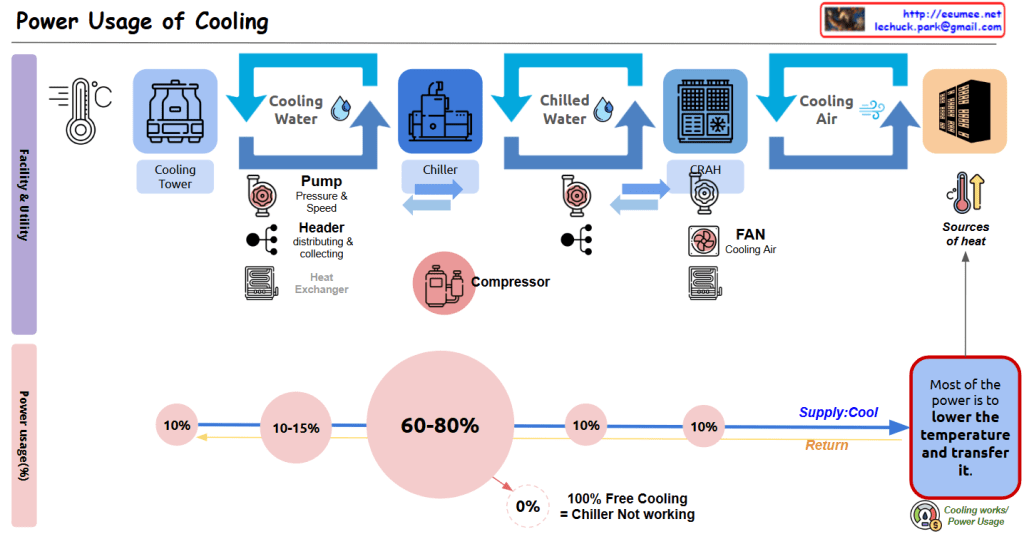
Power Usage of Cooling

Data Center Cooling System Power Usage Analysis

This diagram illustrates the cooling system configuration of a data center and the power consumption proportions of each component.

Cooling Facility Stages:

  1. Cooling Tower: The first stage, generating Cooling Water through contact between outside air and water.
  2. Chiller: Receives cooling water and converts it to Chilled Water at a lower temperature through the compressor.
  3. CRAH (Computer Room Air Handler): Uses chilled water to produce Cooling Air for the server room.
  4. Server Rack Cooling: Finally, cooling air reaches the server racks and absorbs heat.

Several auxiliary devices operate in this process:

  • Pump: Regulates the pressure and speed of cooling water and chilled water.
  • Header: Efficiently distributes and collects water.
  • Heat Exchanger: Optimizes the heat transfer process.
  • Fan: Circulates cooling air.

Cooling Facility Power Usage Proportions:

  • Chiller/Compressor: The largest power consumer, accounting for 60-80% of total cooling power.
  • Pump: Consumes 10-15% of power.
  • Cooling Tower: Uses approximately 10% of power.
  • CRAH/Fan: Uses approximately 10% of power.
  • Other components: Account for the remaining 10%.

Purpose of Energy Usage (Efficiency):

  • As indicated in the blue box on the lower right, “Most of the power is to lower the temperature and transfer it.”
  • The system operates through Supply and Return loops to remove heat from the “Sources of heat.”
  • The note “100% Free Cooling = Chiller Not working” indicates that when using natural cooling methods, the most power-intensive component (the chiller) doesn’t need to operate, potentially resulting in significant energy efficiency improvements.

This data center cooling system diagram illustrates how cooling moves from Cooling Tower to Chiller to CRAH to server racks, with compressors consuming the majority (60-80%) of power usage, followed by pumps (10-15%) and other components (10% each). The system primarily functions to lower temperatures and transfer heat, with the important insight that 100% free cooling eliminates the need for chillers, potentially saving significant energy.

With Claude

EEUMEE (AI-Block share)

The diagram illustrates a blockchain-based AI service system where:

  • At the center is a blockchain network (represented by an interconnected cube structure in a blue square) labeled “All transaction in a Block-chain”
  • Connected to this central blockchain are several components:
    • On the left: A personal AI agent connected to a person with a shopping cart
    • On the top right: A personal AI agent connected to what appears to be a chef or cook
    • On the bottom right: A personal AI agent connected to what looks like a farmer or gardener
    • At the bottom: A money/payment symbol (showing a coin with a dollar sign)

The arrows indicate connections or transactions between these components through the blockchain.

This appears to be illustrating a system where personal AI agents serve different user types (shoppers, cooks, farmers) with their transactions recorded on a blockchain.

With Claude

MCP #1 _ flow

MCP Overview

MCP (Model Context Protocol) is a conversion interface designed to enable LLMs (Large Language Models) to effectively interact with external resources. This protocol transforms text-format queries into API calls to access specific resources, allowing LLMs to provide more accurate and useful responses.

Key Components

  1. MCP Client: Interface that receives user questions, processes them, and returns final answers
  2. MCP Server: Server that converts text to API calls and communicates with specific resources
  3. LLM: Language model that analyzes questions and generates answers utilizing resource information

Operational Flow

  1. User submits a question to the MCP Client
  2. MCP Client forwards external resource requests to the MCP Server
  3. MCP Server transforms text-format requests into API call format
  4. MCP Server executes API calls to specific resources
  5. Resources return results to the MCP Server
  6. MCP Server provides resource information to the MCP Client
  7. LLM analyzes the question and generates an answer using all provided resources
  8. MCP Client returns the final answer to the user

Core Features

  • Provides an interface for converting text-based requests to API calls
  • Enables access to specific resource solutions
  • Integrates seamlessly with LLMs
  • Generates enhanced responses by leveraging external data sources

With Claude